
Yescom 23LED015-WF36-06
Yescom LED Aquarium Light User Manual
Model: 23LED015-WF36-06
Brand: Yescom
1. Introduction
This manual provides detailed instructions for the installation, operation, and maintenance of your Yescom LED Aquarium Light. This full-spectrum LED light is designed for freshwater plant aquariums, featuring APP and WiFi control, extendable brackets, and a built-in timer function.
Package Contents
- Yescom LED Aquarium Light Fixture
- Extendable Mounting Brackets (2)
- Power Adapter
- Control Panel (integrated or separate, depending on model variant)
- User Manual (this document)
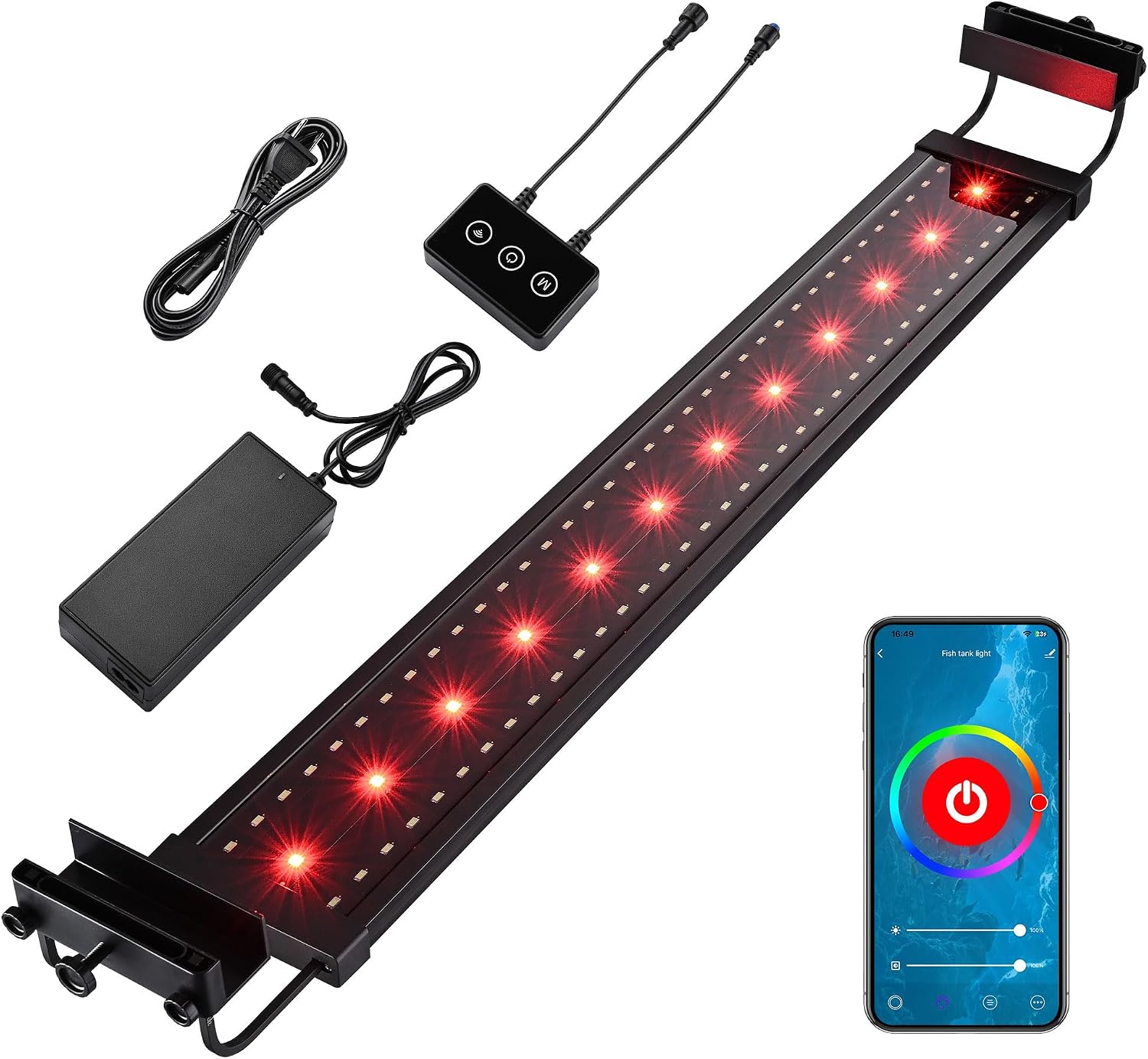
Image 1.1: Overview of the Yescom LED Aquarium Light and its included components, including the light bar, power adapter, control panel, and power cord.
2. Safety Instructions
Please read all safety instructions carefully before using the product. Failure to follow these instructions may result in electric shock, fire, or serious injury.
- Electrical Safety: Ensure the power supply voltage matches the product's requirements. Do not operate with a damaged cord or plug. Keep the power adapter and connections dry.
- Water Contact: This product is rated IP65 water-resistant, meaning it is protected against low-pressure water jets. However, it is not submersible. Do not immerse the light fixture or power adapter in water.
- Installation: Securely mount the light to prevent it from falling into the aquarium. Ensure all connections are firm.
- Maintenance: Disconnect power before performing any maintenance or cleaning.
- Children and Pets: Keep out of reach of children and pets to prevent accidental damage or injury.
- Operating Environment: Do not operate in excessively hot or humid environments beyond specified limits.
3. Setup and Installation
Follow these steps to properly set up your aquarium light.
3.1 Attaching Extendable Brackets
- Carefully remove the light fixture and brackets from the packaging.
- Slide one extendable bracket onto each end of the light fixture. Ensure the bracket's mounting feet face downwards.
- Adjust the length of the brackets by loosening the screws on the bracket arms, extending them to fit your aquarium's width, and then tightening the screws to secure the desired length. The light is designed for aquariums from 30 5/16" to 38 9/16" (77 to 98 cm).

Image 3.1: The extendable brackets allow adjustment to fit various aquarium sizes, from 30 5/16 inches to 38 9/16 inches.

Image 3.2: Detail of the bracket adjustment mechanism, showing the screws used to secure the extended length.
3.2 Mounting on Aquarium
- Carefully place the light fixture with extended brackets onto the edges of your aquarium. Ensure it is stable and centered.
- Tighten the bracket clamps onto the aquarium glass to secure the light in place. Do not overtighten.

Image 3.3: Close-up view of the bracket securely attached to the rim of an aquarium.
3.3 Power Connection
- Connect the power adapter to the light fixture's input port.
- Plug the power adapter into a suitable electrical outlet. The light should power on or enter standby mode.
3.4 APP Installation and WiFi Connection
The light can be controlled via a smartphone application. Ensure your smartphone is connected to a 2.4GHz WiFi network for initial setup, as 5GHz networks are not supported.
- Scan the QR code provided in the product packaging or search for the designated APP in your smartphone's app store (compatible with iOS/Android).
- Install and open the APP. Follow the in-app instructions to register an account if required.
- Add your device by selecting the aquarium light from the device list. The APP will guide you through connecting the light to your home WiFi network. This typically involves putting the light into pairing mode (refer to APP instructions or light's control panel for specific steps).
- Once connected, you can control the light remotely via the APP.

Image 3.4: A smartphone displaying the control application, demonstrating remote control capabilities over the aquarium light via WiFi.

Image 3.5: A user remotely controlling the aquarium light settings from a smartphone, highlighting the convenience of APP control.
4. Operating Instructions
The Yescom LED Aquarium Light offers various control options and lighting modes to suit your aquarium's needs.
4.1 APP Control Features
Once connected to the APP, you can access the following functions:
- Stepless Dimming: Adjust brightness from 0% to 100%.
- Stepless Color Temperature Adjustment: Modify color temperature from 0-10,000K.
- RGB Color Selection: Access 160 million colors to create custom lighting effects. Red light promotes fish and plant growth, while blue light enhances fluorescent colors.
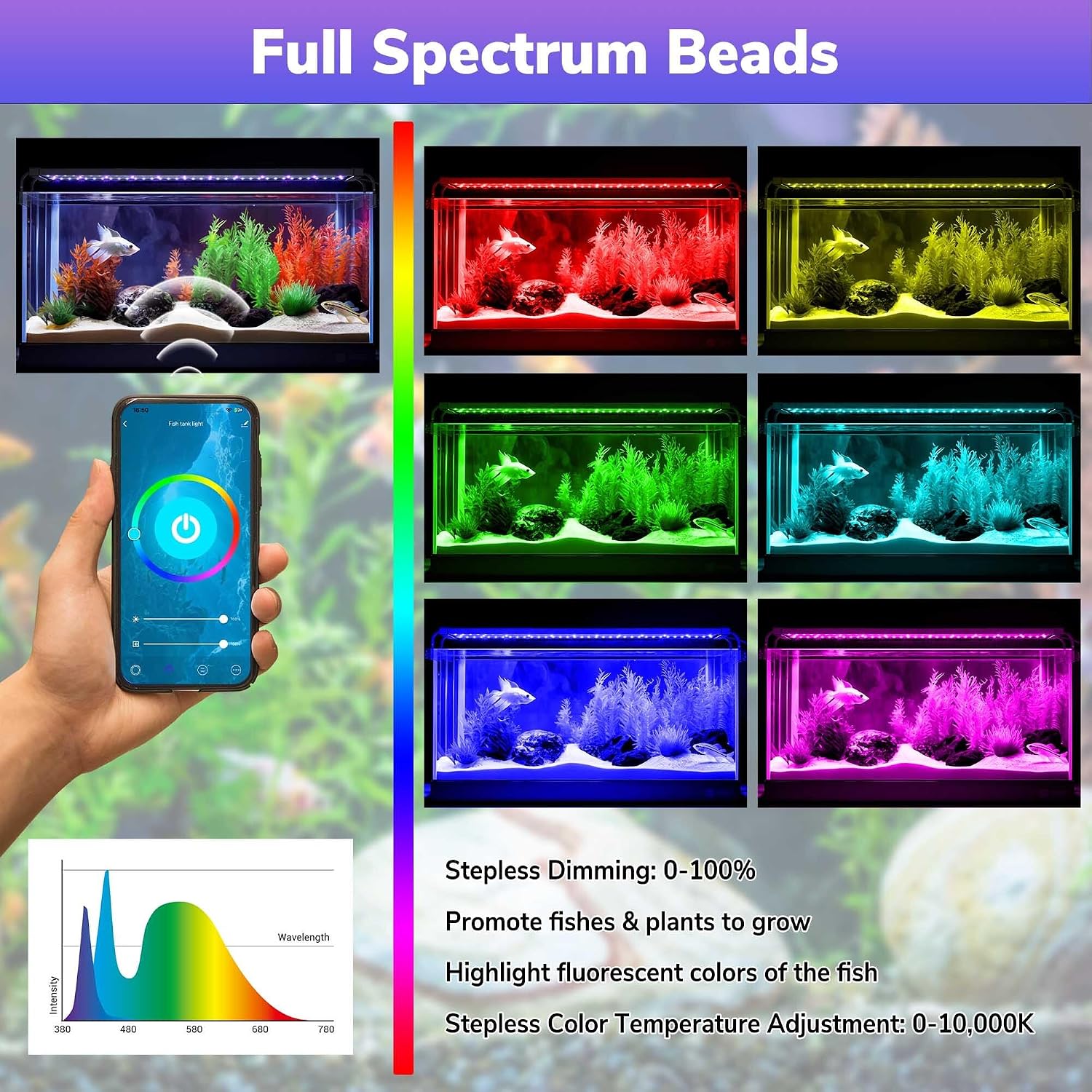
Image 4.1: The full spectrum LED light offers a wide range of colors and dimming options, beneficial for plant growth and enhancing fish coloration.
4.2 Light Modes
The APP provides 8 pre-programmed light modes:
- Day Light: Mimics natural daylight.
- Sunrise: Gradually brightens to simulate a sunrise.
- Lightning: Creates a dynamic lightning effect.
- 3 Color Fade: Smooth transition between three colors.
- 3 Color Change: Abrupt change between three colors.
- 7 Color Fade: Smooth transition between seven colors.
- 7 Color Change: Abrupt change between seven colors.

Image 4.2: The smartphone application interface showing the selection of 8 distinct light modes for various aquarium effects.
4.3 24-Hour Timer Function
Set a 24-hour timer to automate the light cycle, maintaining a natural rhythm for your fish and plants.
- Access the timer settings within the APP.
- Configure desired on/off times and light intensity for different periods of the day.
- Save your settings. The light will operate automatically according to the programmed schedule.

Image 4.3: Visual representation of the 24-hour timer mode, showing different light intensities and colors throughout a day-night cycle.
5. Maintenance
Regular maintenance ensures optimal performance and longevity of your aquarium light.
5.1 Cleaning
- Disconnect Power: Always unplug the light from the power outlet before cleaning.
- Light Fixture: Wipe the light fixture with a soft, damp cloth. Do not use abrasive cleaners or solvents. Ensure no water enters the electrical components.
- Brackets: Clean the extendable brackets as needed to prevent mineral buildup.
5.2 General Care
- Periodically check the power cord and adapter for any signs of damage.
- Ensure the light's heat sink (grooved aluminum shell) remains clear of obstructions to allow for proper heat dissipation.

Image 5.1: The light's durable aluminum alloy shell with heat sink grooves for efficient heat dissipation, contributing to its longevity.

Image 5.2: Detail of the aluminum heat sink fins, designed to enhance heat dissipation and ensure stable operation.
6. Troubleshooting
If you encounter issues with your Yescom LED Aquarium Light, refer to the following common problems and solutions.
| Problem | Possible Cause | Solution |
|---|---|---|
| Light does not turn on. | No power supply; loose connection; faulty adapter. | Check power outlet; ensure all cables are securely connected; test with another outlet; contact support if adapter is suspected faulty. |
| APP cannot connect to the light. | Incorrect WiFi band (5GHz); light not in pairing mode; incorrect password. | Ensure your phone is connected to a 2.4GHz WiFi network. Put the light into pairing mode (refer to APP instructions). Re-enter WiFi password carefully. |
| Light modes or colors are not changing. | APP synchronization issue; temporary software glitch. | Close and reopen the APP. Disconnect and reconnect the light's power. Ensure APP is updated to the latest version. |
| Brackets are not holding securely. | Screws not tightened; incorrect bracket placement. | Ensure all adjustment screws are tightened firmly. Verify brackets are correctly seated on the aquarium rim. |
7. Specifications
| Feature | Detail |
|---|---|
| Model Name | 23LED015-WF36-06 |
| Power | 65 Watts |
| Light Source Type | LED (Full Spectrum RGB) |
| Control Method | APP (WiFi 2.4GHz), Touch Control |
| Extendable Length | 30 5/16" to 38 9/16" (77 to 98 cm) |
| Product Dimensions | 4.1"D x 38.6"W x 3"H |
| Item Weight | 5 Pounds |
| Base Material | Aluminum |
| Water Resistance | IP65 |
| Certifications | UL Certified |
| Voltage | 100-240V AC |

Image 7.1: Detailed dimensions of the Yescom LED Aquarium Light, including the main body length and bracket extension range.

Image 7.2: Close-up view of the energy-efficient and long-lasting LED beads on the light fixture.
8. Warranty and Support
8.1 Warranty Information
This product comes with a standard manufacturer's warranty. Please refer to the warranty card included in your product packaging for specific terms, conditions, and duration. Keep your purchase receipt as proof of purchase for warranty claims.
8.2 Customer Support
For technical assistance, troubleshooting not covered in this manual, or warranty inquiries, please contact Yescom customer support through their official website or the contact information provided in your product documentation.
You can visit the Yescom Store on Amazon for more product information and support resources.
Ask a question about this manual
Ask about setup, troubleshooting, compatibility, parts, safety, or missing instructions. Manuals+ will review the question and use this page’s manual context to help answer it.