
1. Introduction
This manual provides essential information for the installation, operation, and maintenance of your Irnyso Replacement Photocell Flame Sensor Eye Piece. This component is designed to detect the presence of a flame in oil burners, ensuring safe and efficient operation. It is compatible with Riello 40 Series Oil Burners and Riello Cad Cell Eyes, replacing part numbers RBS21, 3002280, 20132573, ZE3002280, and 87161092610.
2. Safety Information
- Always disconnect power to the oil burner before attempting any installation, maintenance, or inspection.
- Working with oil burners and electrical components can be hazardous. If you are not experienced or comfortable with such tasks, it is recommended to consult a qualified technician.
- Ensure all connections are secure and properly insulated to prevent electrical shorts or malfunctions.
- Do not operate the burner if any components appear damaged or improperly installed.
3. Product Overview
The photocell flame sensor is a critical safety component in an oil burner system. Its primary function is to detect the presence of a flame during burner operation. If a flame is not detected when it should be, or if it extinguishes unexpectedly, the sensor signals the control system to shut down the burner, preventing the accumulation of unburnt fuel.

Figure 1: Irnyso Replacement Photocell Flame Sensor Eye Piece.
This replacement part is specifically designed for compatibility with Riello 40 Series Oil Burners, including models F3, F5, F10, F15, F20, BF3, and BF5. It is also known as a 'Cad Cell Eye' due to its cadmium sulfide (CdS) cell, which changes electrical resistance in the presence of light from the flame.

Figure 2: Close-up of the photocell flame sensor, showing the light-sensitive element.
4. Setup and Installation
Follow these general steps for replacing the photocell flame sensor. Always refer to your specific oil burner's service manual for detailed instructions and safety precautions.
- Power Disconnection: Ensure the main power supply to the oil burner is completely disconnected before beginning any work.
- Locate the Existing Sensor: Identify the current photocell flame sensor in your Riello 40 Series oil burner. It is typically located in a position where it can directly view the flame.
- Remove Old Sensor: Carefully disconnect the wiring from the old sensor and unmount it from its housing. Note the orientation and connection points for the new sensor.
- Install New Sensor: Insert the new Irnyso photocell flame sensor into the housing. Ensure it is securely seated and oriented correctly to face the flame.
- Connect Wiring: Reconnect the wiring to the new sensor. Verify that the connections are firm and match the original configuration.
- Secure Components: Reassemble any covers or panels that were removed during the process.
- Restore Power and Test: Restore power to the oil burner and initiate a test firing sequence to ensure the new sensor is functioning correctly and detecting the flame.
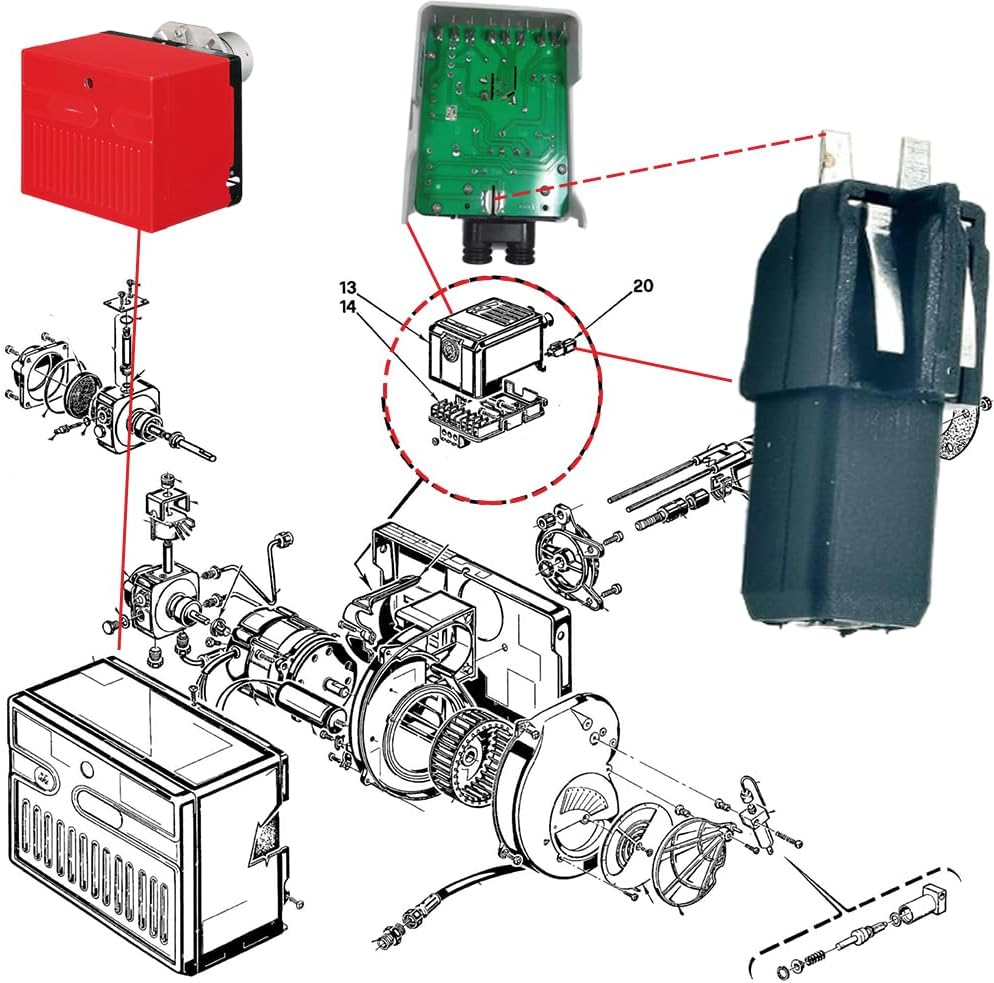
Figure 3: Diagram illustrating typical placement of the flame sensor within an oil burner assembly.
Video 1: Demonstration of installing a 20132573 Cad Cell Flame Sensor. This video shows the process of replacing the flame sensor, highlighting its placement and connection points within the burner system.
Video 2: Overview of replacing oil burner flame sensors 3002280 and 20132573. This video provides a visual guide to the replacement procedure for these specific models, emphasizing key steps for a successful installation.
5. Operating Principles
The photocell flame sensor operates by detecting the light emitted by the oil burner's flame. When the burner ignites, the flame produces light, which causes the cadmium sulfide (CdS) cell within the sensor to decrease its electrical resistance. This change in resistance is detected by the burner's control unit, confirming the presence of a stable flame. If the flame is not established within a set time, or if it becomes unstable or extinguishes, the sensor's resistance will increase, signaling the control unit to shut down the burner to prevent unsafe conditions.
6. Maintenance
Regular inspection and maintenance of the photocell flame sensor are crucial for reliable burner operation.
- Visual Inspection: Periodically inspect the sensor for any signs of physical damage, such as cracks or discoloration.
- Cleanliness: Ensure the sensor's lens or viewing area is clean and free from soot, dust, or oil residue. A dirty sensor can lead to intermittent flame detection or nuisance shutdowns. Use a soft, dry cloth to gently clean the surface.
- Wiring Check: Verify that all wiring connections to the sensor are tight and free from corrosion or damage.
- Replacement: If the sensor appears tan, smoky colored, or brown, or if it is no longer crystal-clear like glass, it indicates degradation and should be replaced immediately to ensure accurate flame detection.
7. Troubleshooting
If your oil burner is experiencing issues related to flame detection, the photocell flame sensor may be a contributing factor. Common symptoms of a faulty or dirty sensor include:
- Burner cycles on and off frequently (short cycling).
- Burner fails to ignite or locks out shortly after ignition.
- Burner shuts down randomly during operation.
Troubleshooting Steps:
- Check for Obstructions: Ensure there are no physical obstructions blocking the sensor's view of the flame.
- Clean the Sensor: As described in the Maintenance section, gently clean the sensor's viewing area.
- Inspect Wiring: Check for loose, corroded, or damaged wiring connections.
- Test Sensor Resistance (Advanced): A qualified technician can use a multimeter to measure the sensor's resistance in both dark and light conditions to determine if it is operating within specifications.
- Replace Sensor: If cleaning and wiring checks do not resolve the issue, and the sensor shows signs of degradation (discoloration) or fails resistance tests, replace it with a new Irnyso replacement part.
8. Specifications
| Item Model Number | 20132573 & 3002280 |
| Compatible Burners | Riello 40 Series Oil Burners (F3, F5, F10, F15, F20, BF3, BF5) |
| Replacement Part Numbers | RBS21, 3002280, 20132573, ZE3002280, 87161092610 |
| Item Weight | 5 ounces |
| Package Dimensions | 5.67 x 2.83 x 1.57 inches |
| Batteries Required | No |
9. Warranty and Support
Specific warranty details for this product are not provided in the available information. For warranty inquiries, technical support, or further assistance, please contact Irnyso customer service through their official channels or the retailer from whom the product was purchased.