
Introduction
This user manual provides essential information for the assembly, operation, and maintenance of your new Giantex Computer Desk with Hutch. Please read through this manual carefully before beginning assembly or use to ensure safe and proper functionality of your product.

Image: The Giantex Computer Desk with Hutch, showcasing its overall design and integrated hutch, suitable for various home office setups.
Safety Information
Your safety is paramount. Please adhere to the following safety guidelines:
- Always ensure the desk is properly assembled and anchored to the wall using the provided anti-tipping kits to prevent tipping hazards.
- Do not overload the desk; the maximum weight capacity is 210 lbs.
- Keep small parts away from children during assembly to prevent choking hazards.
- Use the desk on a flat, stable surface.

Image: Visual representation of the anti-tipping device installation, along with close-ups of the magnetic door catch, two cable holes, and non-slip foot pads, highlighting the desk's thoughtful design for stability and convenience.
Product Features
- Ample Storage Space: Features a tabletop hutch and storage cabinet for organized essentials.
- Multifunctional Adjustable Shelf: A 3-position adjustable shelf offers versatile organization and can be removed to accommodate a computer tower.
- Sturdy Construction: Crafted from high-quality MDF with 2 anti-tipping kits for enhanced stability and safety.
- Handy Cable Management: Integrated system with tabletop grommet and cable hole for tidy device plug-in.
- Sleek Design & Versatile Use: Modern design suitable for home or office, also functions as a craft table or vanity.

Image: A detailed view of the desk emphasizing its storage capabilities, including the tabletop shelf, spacious main desktop, and the integrated storage cabinet.

Image: A close-up demonstrating the adjustable shelf's three positions, illustrating its flexibility for various items or for creating space for a computer tower.
Setup and Assembly
The Giantex Computer Desk with Hutch requires assembly. Please refer to the included instruction manual for detailed, step-by-step assembly instructions, including a list of all parts and hardware. It is recommended that two people assemble this desk for ease and safety.
Ensure all components are present and undamaged before beginning assembly. Follow the numerical sequence provided in the separate assembly guide for optimal results.
Operating Instructions
This desk is designed for versatile use in various settings, including home offices, bedrooms, and study rooms. Its spacious desktop and integrated storage solutions allow for efficient organization of your workspace.
- Workspace Utilization: Place your computer, laptop, or other work essentials on the main desktop.
- Hutch Storage: Utilize the hutch shelf for displaying books, decorative items, or frequently accessed supplies.
- Cabinet & Lower Shelf: Store larger items, documents, or a computer tower in the side cabinet or on the adjustable lower shelves.
- Cable Management: Route power cords and cables through the integrated grommet and cable hole to maintain a tidy and safe workspace.
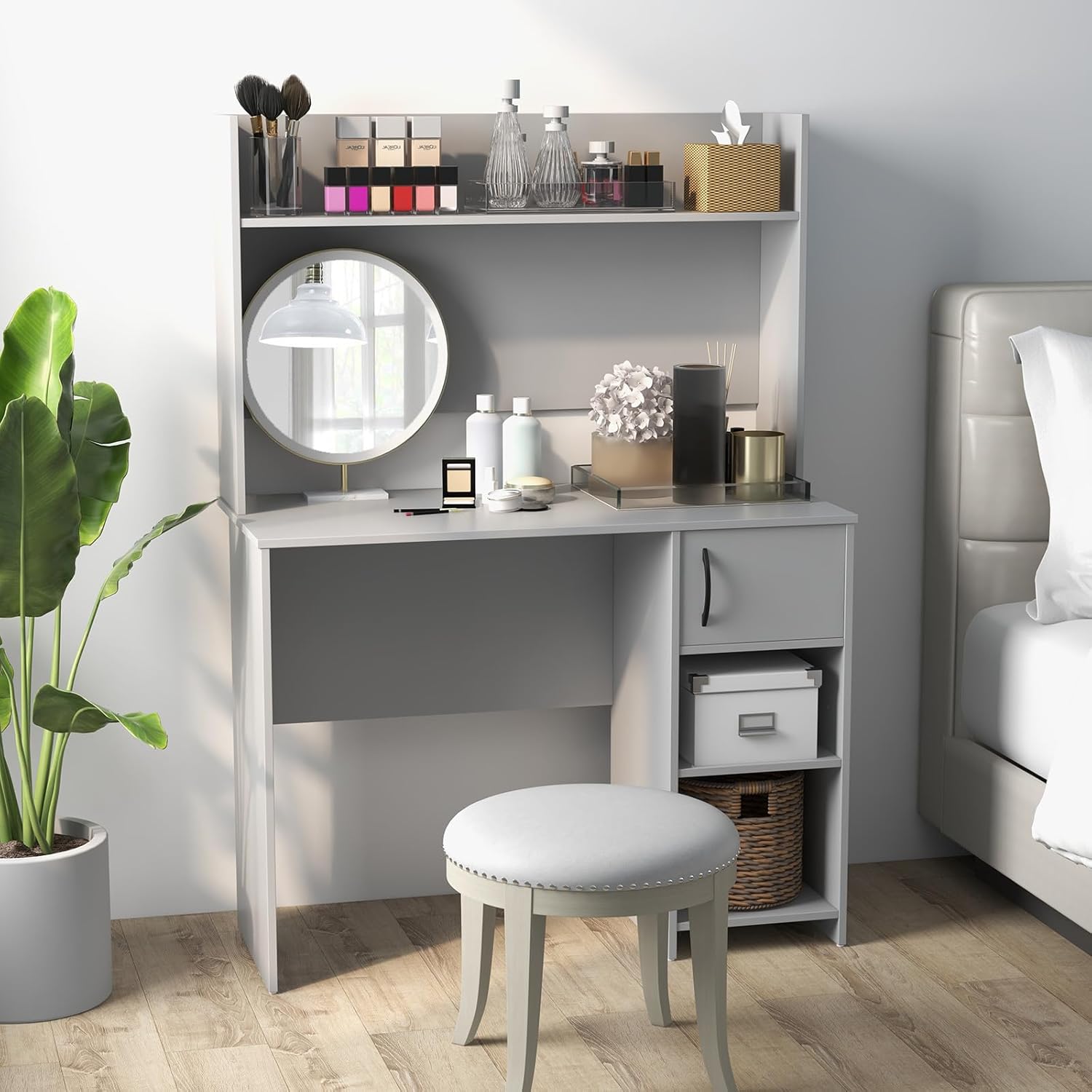
Image: The desk creatively set up as a vanity table, demonstrating its adaptability beyond a traditional computer workstation, complete with a mirror and various personal items.
Maintenance and Care
- Cleaning: Wipe surfaces with a soft, damp cloth. Avoid harsh chemicals or abrasive cleaners that may damage the finish.
- Spills: Clean up spills immediately to prevent staining or damage to the engineered wood material.
- Heat and Moisture: Avoid placing hot items directly on the surface. Use coasters or protective pads for drinks. Keep the desk away from excessive moisture or direct sunlight.
- Hardware Check: Periodically check and tighten all screws and fasteners to ensure the desk remains stable and secure.
Troubleshooting
| Problem | Possible Cause | Solution |
|---|---|---|
| Desk wobbles or is unstable. | Loose fasteners or uneven floor. | Tighten all assembly screws. Ensure the desk is on a level surface; use shims if necessary. Verify anti-tipping kits are properly installed. |
| Cabinet door does not close properly. | Misaligned hinges or obstruction. | Check hinge alignment and adjust if needed. Remove any obstructions. |
| Difficulty adjusting shelf height. | Shelf pins not fully inserted or misaligned. | Ensure shelf pins are fully inserted into corresponding holes on both sides. |
Specifications
| Attribute | Detail |
|---|---|
| Brand | Giantex |
| Model Number | GT10684GR-BC |
| Overall Dimensions (L x W x H) | 41.5" x 19.5" x 58" |
| Cabinet Dimensions (L x W x H) | 15.5" x 12" x 8" |
| Top Shelf Dimensions (L x W x H) | 40" x 9" x 7.5" |
| Desktop Dimensions (L x W) | 41.5" x 19.5" |
| Lower Shelf Dimensions (L x W x H) | 15.5" x 12" x 22.5" |
| Length of Legroom | 29.5" |
| Net Weight | 70.5 lbs |
| Overall Weight Capacity | 210 lbs |
| Material | MDF (Engineered Wood) |
| Color | Gray |
| Assembly Required | Yes |
| Recommended Number of People for Assembly | 2 |
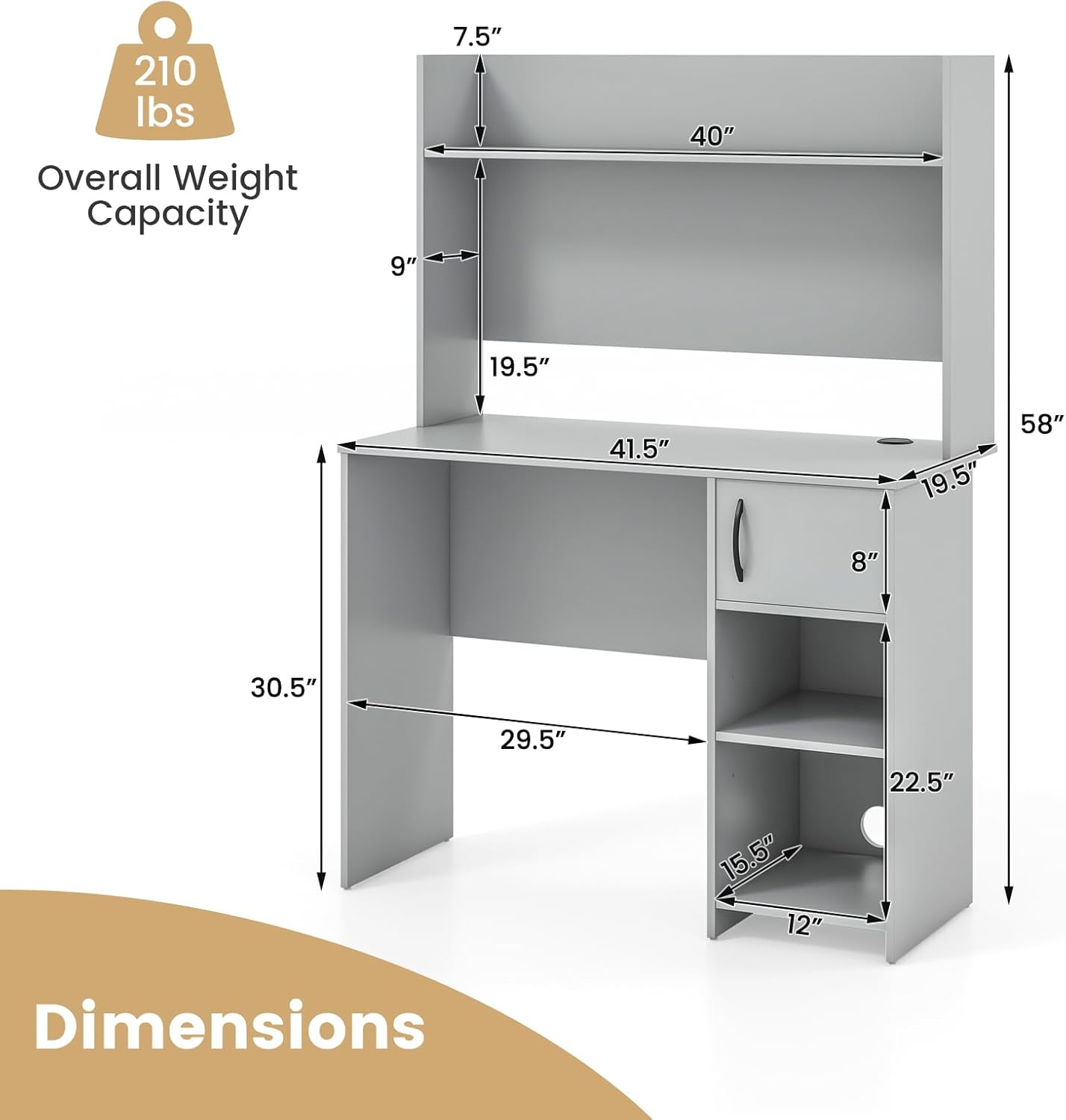
Image: A comprehensive diagram illustrating all key dimensions of the desk, including the hutch, desktop, and storage compartments, along with the overall weight capacity.
Warranty and Support
For warranty information or product support, please contact Giantex customer service. Refer to the contact details provided in your product packaging or visit the official Giantex website for assistance.
You can also visit the Giantex Store on Amazon for more information and products.


