
1. Introduction
The VoleStay VS05F Biometric Mounted Handgun Safe provides secure storage and rapid access to your handgun. Designed for versatile placement, it can be mounted in various locations such as nightstands, desks, bedsides, walls, or vehicles. This safe offers multiple access methods including biometric fingerprint recognition, a 6-button backlit keypad, and traditional key access, ensuring reliable security and quick retrieval when needed.
The safe is constructed from 16-gauge carbon steel for durability and features an anti-impact latch for enhanced security. An interior LED light illuminates the contents, and a battery level display helps monitor power status. The interior is lined with thick, dense foam to protect your firearm.
2. What's Included
- VoleStay VS05F Biometric Mounted Handgun Safe
- Keys (2)
- User Manual
- Mounting Plate
3. Setup and Installation
The VoleStay VS05F safe is designed for flexible mounting in various locations. The included mounting plate allows for installation from the right, left, or top side, depending on your preference and the chosen location.
3.1 Mounting Options
The slim vertical design allows for discreet placement. Common installation areas include:
- Under a desk or nightstand
- Discreetly on a bookshelf
- On a wall
- At the bedside
- In a vehicle
Use the provided mounting plate and hardware to secure the safe to a solid surface. Ensure the mounting location is stable and can support the weight of the safe and its contents.
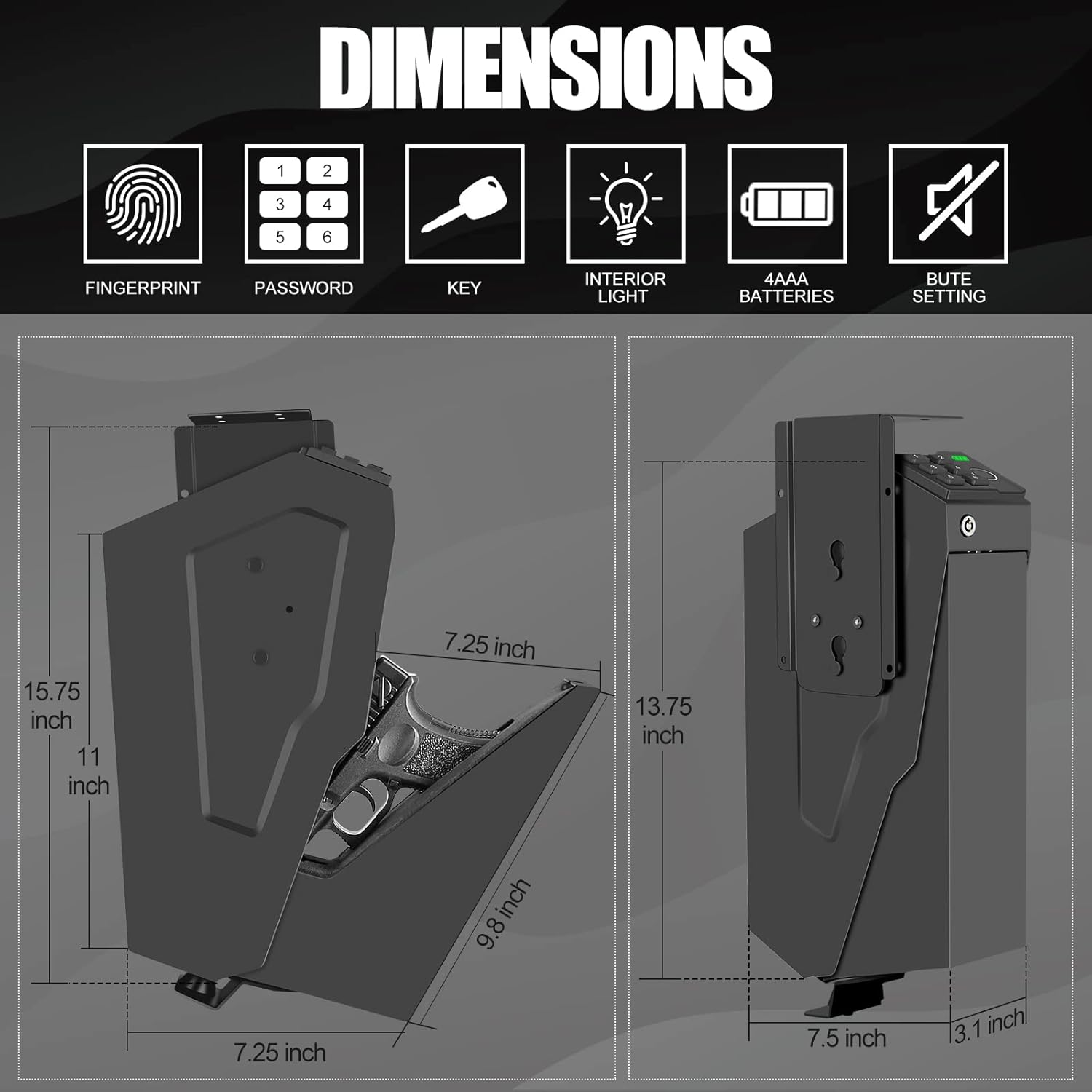
Image: VoleStay VS05F safe mounted under a nightstand, demonstrating easy storage and space-saving design.
3.2 Battery Installation
The safe requires 4 AAA batteries (not included) for operation of the biometric and keypad systems. Locate the battery compartment, typically inside the safe, and insert the batteries according to the polarity indicators. The battery level display on the keypad will indicate the current power status.
4. Operating Instructions
The VoleStay VS05F safe offers three primary methods for quick and secure access.

Image: Illustration of the three quick access methods: biometric identification, numeric password, and key unlock.
4.1 Biometric Fingerprint Access
The high-resolution biometric sensor can store up to 30 unique fingerprints, providing access in less than 0.2 seconds.
4.1.1 Registering Fingerprints
- Open the safe using the default code or key.
- Locate the 'Program' button inside the safe.
- Press and hold the 'Program' button for 3 seconds until you hear a beep and the fingerprint scanner lights up.
- Place the finger you wish to register on the scanner. The safe will prompt for multiple scans (typically four) to capture different angles of your fingerprint.
- After successful registration, you will hear a confirmation sound.
- It is recommended to register multiple fingers and multiple scans for each finger to ensure reliable access, especially for fingers that may experience wear or changes.
4.1.2 Opening with Fingerprint
Simply place a registered finger on the biometric sensor. The safe will open automatically upon successful identification.
4.2 6-Button Backlit Keypad Access
The 6-button backlit keypad offers an alternative access method. This design is more secure than standard 4-button keypads.
4.2.1 Setting Keypad Code
- Open the safe using the default code or key.
- Locate the 'Program' button inside the safe.
- Press the 'Program' button once.
- Enter your desired 4-6 digit code on the keypad, then press the '#' button.
- Re-enter the same code and press '#' again to confirm.
- A confirmation sound will indicate successful code setup.
4.2.2 Opening with Keypad
Enter your programmed code on the keypad. The safe will open automatically upon correct entry.
4.3 Key Access
Two manual keys are provided for emergency access or in case of battery depletion. The keyhole is discreetly located on the safe.
4.3.1 Opening with Key
Insert the key into the keyhole and turn it to unlock the safe. Keep the keys in a secure location separate from the safe.
5. Features
- Interior LED Light: The safe features an internal LED light that illuminates the contents, which is particularly useful in low-light conditions or at night.
- Battery Level Display: A clear battery level indicator on the keypad prevents unexpected power loss, ensuring the safe remains operational when needed.
- Super Dense Foam Interior: The entire interior of the safe is lined with thick, dense foam to prevent movement, shaking, or damage to the stored firearm.
- Anti-Theft Protection: The safe includes a strong anti-impact latch to keep it securely locked.
- Wrong Access Beep: If an incorrect PIN code is entered three times consecutively, the safe will emit a warning beep and the keypad will temporarily lock to deter unauthorized access.
- Silent Mode: An optional silent mode allows for discreet operation without audible beeps, which is important for maintaining stealth in certain situations or avoiding disturbance.

Image: Depiction of the smart alarm system, which locks the keypad after three wrong code inputs, and the optional silent mode feature.
6. Maintenance
- Battery Replacement: Replace the 4 AAA batteries when the battery level indicator shows low power. Ensure correct polarity during installation.
- Cleaning: Keep the fingerprint sensor and keypad clean and free from dirt or debris to ensure optimal performance. Use a soft, dry cloth for cleaning.
- Key Storage: Store the manual keys in a secure location away from the safe.
7. Troubleshooting
- Safe does not open with fingerprint: Ensure your finger is clean and dry. Try re-registering your fingerprint, making sure to capture multiple scans from different angles. If your hands are rough or calloused, consider registering a different finger or using the keypad/key access.
- Keypad is locked: The keypad will lock after 3 consecutive incorrect PIN code entries. Wait for the lockout period to expire before attempting to enter the code again, or use fingerprint/key access.
- No power/Safe unresponsive: Check the battery level indicator. If batteries are low or depleted, replace all 4 AAA batteries. Use the manual key for immediate access if necessary.
- Program button not responding: Ensure the safe is open and the batteries are properly installed and charged. If the issue persists, contact customer service.
8. Specifications

Image: Detailed diagram showing the exterior and interior dimensions of the VoleStay VS05F handgun safe.
| Feature | Detail |
|---|---|
| Brand | VoleStay |
| Model Number | VS05F |
| Product Dimensions | 7.5"D x 2.9"W x 13.75"H |
| Item Weight | 8.3 Pounds |
| Material | Alloy Steel, Carbon Steel |
| Lock Type | Biometric, Keypad, Key |
| Special Feature | Fingerprint Sensor, Interior LED Light, Battery Display, Silent Mode, Anti-theft Alarm |
| Mounting Type | Wall Mount (with included plate) |
| Capacity | Holds handguns up to 9.5" in length |
| Batteries Required | Yes (4 AAA, not included) |
9. Warranty and Support
VoleStay provides high-standard 24/7 customer service. If you have any questions or require assistance with your product, please contact us through your order details or via email. Refer to the product packaging or official VoleStay website for specific warranty information and contact details.