
1. Introduction
This manual provides comprehensive instructions for the operation and maintenance of your JeeJTek Smart Watch. Designed for both men and women, this HD smartwatch offers a wide range of features including Bluetooth calling, extensive sport modes, health monitoring, and smart notifications. Please read this manual thoroughly to ensure proper use and to maximize your device's capabilities.

Image: The JeeJTek Smart Watch in pink, showcasing its round display and silicone strap.
2. What's in the Box
Upon opening the package, verify that all the following items are included:
- Smartwatch
- User Manual
- Charging Cable
3. Setup Guide
3.1 Initial Charging
Before first use, fully charge your smartwatch. Connect the provided charging cable to the charging contacts on the back of the watch and to a USB power source. A full charge typically takes approximately 1.5 hours.
3.2 App Installation and Pairing
To unlock the full potential of your smartwatch, download and install the "Halofit" app on your smartphone. The app is compatible with Android 6.0 and above, and iOS 10.0 and above.
- Download the "Halofit" App from Google Play Store or Apple App Store.
- Ensure your phone's Bluetooth is turned on.
- Open the "Halofit" App, navigate to Device > Start Pairing, and search for your watch (e.g., "Gaea_xxxx").
- Click "pair" in the pop-up window on your phone and within the app.
- For iOS users, you may need to go to your phone's Bluetooth settings and connect to "Gaea_BT_xxxx" again to enable call functions.
Note: Please tap "Allow", "Agree", and "OK" when prompted by the app to grant necessary permissions for full functionality, including phone calls.

Image: Visual guide demonstrating the five steps to connect the smartwatch to your phone via the Halofit app.
4. Operating Instructions
4.1 Bluetooth Call and Voice Assistant
Your smartwatch features a built-in microphone and HD speaker, allowing you to make and receive calls directly from your wrist. It also includes a voice assistant for hands-free control.
- Making a Call: Open the dialpad on the watch and enter the number, or select from your frequent contacts.
- Answering a Call: When a call comes in, the watch will ring and vibrate. You can answer directly from the watch. Ensure incoming call notifications are enabled in the Halofit app (Device > Phone > Incoming Call Notification).
- Voice Assistant: Use the voice assistant to ask questions, control music playback, set alarms, check weather, and more.

Image: The smartwatch displaying a call interface and various app notifications, highlighting its communication features.

Image: Step-by-step guide on making and answering calls, and adding contacts via the Halofit app.
Video: An official product video demonstrating the features of the JeeJTek Smart Watch for Women Men, including its interface and functionalities.
4.2 Smart Notifications and Quick Reply
Receive real-time notifications for messages, calls, and app alerts directly on your watch. For Android users, a quick reply function is available.
- Receiving Messages: Ensure the watch is connected and message notification permissions are enabled in the Halofit app (Device > Notification). The watch will vibrate or ring to alert you.
- Quick Reply (Android Only): For Android phones, you can send preset short replies to received messages. This function is not compatible with iOS. The content of quick replies cannot be edited directly on the watch.
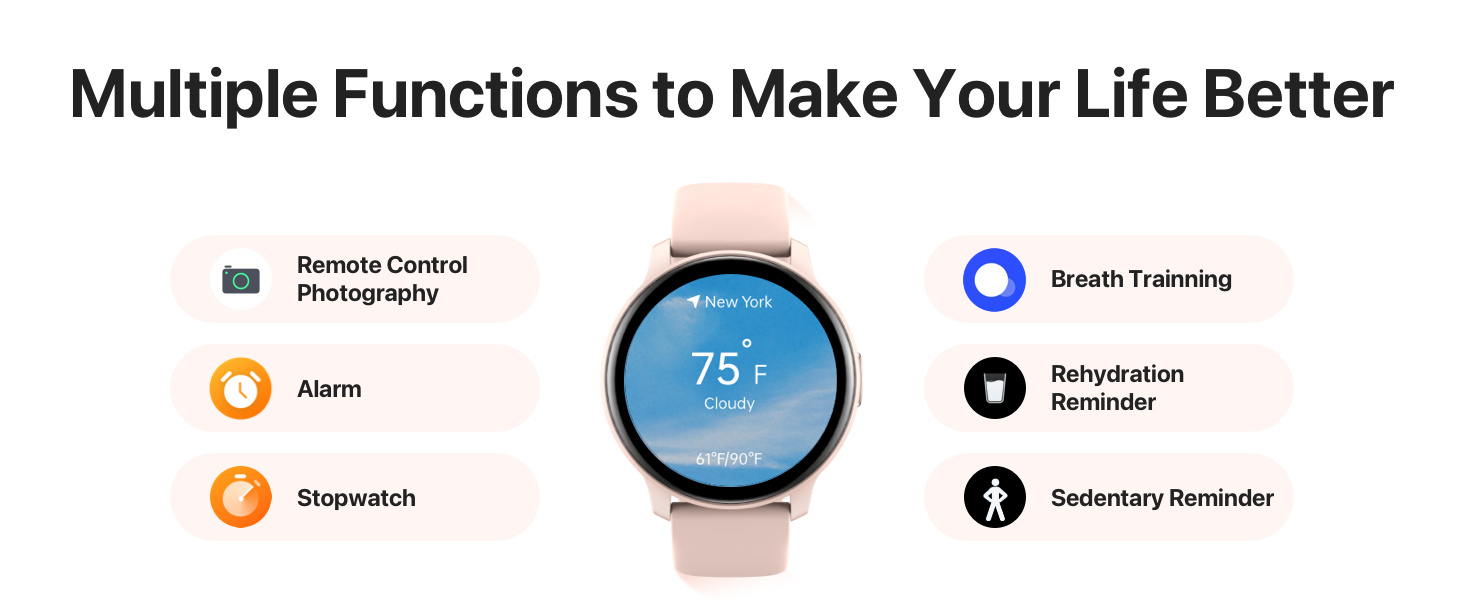
Image: Visual instructions on how to enable and receive message notifications on your smartwatch.

Image: A three-step guide illustrating how to activate and use the quick reply feature for Android users.
4.3 Health Monitoring
The smartwatch is equipped with advanced sensors to monitor various health metrics, providing valuable insights into your well-being. All recorded data can be synced to the "Halofit" app for detailed analysis.
- Heart Rate Monitoring: Real-time 24-hour heart rate tracking.
- Blood Oxygen (SpO2) Measurement: Monitor your blood oxygen saturation levels.
- Sleep Quality Tracking: Timely tracking of sleep quality, including deep sleep, light sleep, REM, and awake times.
- Stress Monitoring: Track your stress levels throughout the day.
- Female Cycle Tracking: Get predictions and reminders for upcoming fertile and menstrual periods.
Note: The health monitoring features are for reference only and are not intended for medical diagnosis or treatment.

Image: Overview of the 24-hour health tracking features including heart rate, stress, blood oxygen, and sleep monitoring.

Image: Detailed view of the 24-hour sleep quality monitoring feature, showing different sleep stages.

Image: Illustration of the cycling tracker feature, providing predictions and reminders for menstrual and fertile periods.
4.4 Sports Modes and Activity Tracking
The smartwatch supports over 100 sports modes to help you track your fitness activities and achieve a healthier lifestyle. Real-time stats are displayed on your wrist and recorded in the "Halofit" app.
- Includes modes for walking, running, cycling, hiking, yoga, football, strength training, and more.
- Features smart recognition for outdoor running, outdoor walking, and treadmill activities.

Image: Displaying the variety of over 102 sport modes available on the smartwatch for comprehensive workout tracking.
4.5 Other Functions
Your smartwatch offers a variety of additional features to enhance your daily life:
- Music Control: Control music playback on your phone directly from the watch.
- Camera Control: Remotely control your phone's camera.
- Weather Forecast: Get real-time weather updates.
- Alarm Clock, Stopwatch, Timer: Essential time management tools.
- Calculator: A convenient calculator on your wrist.
- Games: Includes small puzzle games for leisure.
- Find Your Phone: Locate your misplaced phone.
- Sedentary Reminder: Prompts you to move after periods of inactivity.
- Rehydration Reminder: Reminds you to drink water.
- Breath Training: Guided breathing exercises.

Image: A visual representation of various additional functions available on the smartwatch, such as games, weather, camera control, alarm, calculator, and multi-functional reminders.

Image: The smartwatch displaying music control options, allowing users to manage their phone's music directly from the watch.

Image: Three circular displays showing different small puzzle games available on the smartwatch.
5. Maintenance
5.1 Waterproof Rating
Your smartwatch has an IP68 waterproof rating, meaning it can withstand splashes, sweat, and brief immersion in water. It can be used normally when washing hands or face.
Important Note: The watch is not suitable for long-term immersion in water, hot water, or steam. Avoid using it during swimming, showering, or diving to prevent damage.

Image: The smartwatch being splashed with water, illustrating its IP68 waterproof capability.
5.2 Battery Care
The smartwatch is equipped with a 300mAh battery. To prolong battery life:
- Avoid extreme temperatures.
- Charge the device fully before first use.
- Regularly update the watch firmware via the Halofit app for optimized performance.
Typical usage provides up to 10 days of battery life, while standby time can extend to 30 days. Heavy usage, especially with continuous Bluetooth calling, may reduce battery life to approximately 3 days.

Image: An illustration showing the smartwatch's battery life with typical usage (10 days), heavy usage (3 days), and standby time (30 days), along with a 1.5-hour charging time.
6. Troubleshooting
If you encounter any issues with your smartwatch, please refer to the following common solutions:
- Watch not turning on: Ensure the watch is fully charged. Try connecting it to the charging cable and a power source.
- Cannot connect to phone:
- Ensure Bluetooth is enabled on your phone.
- Make sure the Halofit app has all necessary permissions.
- Restart both your phone and the smartwatch.
- Try unpairing and re-pairing the device through the Halofit app and your phone's Bluetooth settings.
- Notifications not appearing:
- Check notification settings within the Halofit app.
- Ensure your phone's notification settings allow the Halofit app to display alerts.
- Verify that the watch is properly connected to your phone.
- Inaccurate health data: Ensure the watch is worn snugly on your wrist, not too tight or too loose. Clean the sensors regularly.
For persistent issues or quality problems, please contact customer support as detailed in the Warranty and Support section.
7. Specifications
| Model Number | TGW008 |
| Product Dimensions | 10.28 x 1.85 x 0.47 inches |
| Item Weight | 3.52 ounces |
| Screen Size | 1.28 Inches (Standing screen display size: 1.28 Inches) |
| Battery Capacity | 300 Milliamp Hours (Lithium Polymer) |
| Connectivity Technology | Bluetooth (Wireless Communication Standard: Bluetooth) |
| Operating System | RTOS, Smartwatch |
| Waterproof Rating | IP68 |
| Memory Storage Capacity | 128 MB |
| RAM Memory Installed Size | 892 KB |
| Manufacturer | JeeJTek |
| Country of Origin | China |

Image: Detailed diagram showing the dimensions of the smartwatch and strap, including screen size and wrist circumference compatibility.
8. Warranty and Support
Your JeeJTek Smart Watch comes with a 12-month quality assurance. If you encounter any quality problems, operational issues, or charging problems, please contact us immediately. We are committed to providing a solution within 24 hours.
For support, please refer to the contact information provided with your purchase or visit the official JeeJTek website.