
1. Introduction
This manual provides essential instructions for the safe and efficient operation, installation, and maintenance of your Nairtech Variable Frequency Drive (VFD) Inverter. This device is designed to control the speed of AC induction motors by varying the frequency and voltage of the power supplied to the motor. Please read this manual thoroughly before installation or operation to ensure proper usage and to prevent damage to the equipment or personal injury.
2. Safety Instructions
WARNING: Improper installation or operation can lead to serious injury or death. Only qualified personnel should install, operate, or maintain this equipment.
- Always disconnect power before performing any wiring or maintenance.
- Ensure proper grounding of the VFD and the motor.
- Do not touch electrical components immediately after power-off; residual voltage may be present for up to 5 minutes. Observe the "DANGER 5 min" warning on the unit.
- Install the VFD in a clean, dry, and well-ventilated area, away from direct sunlight, corrosive gases, and flammable materials.
- Verify that the input voltage matches the VFD's specifications.
- Use appropriate personal protective equipment (PPE) during installation and maintenance.
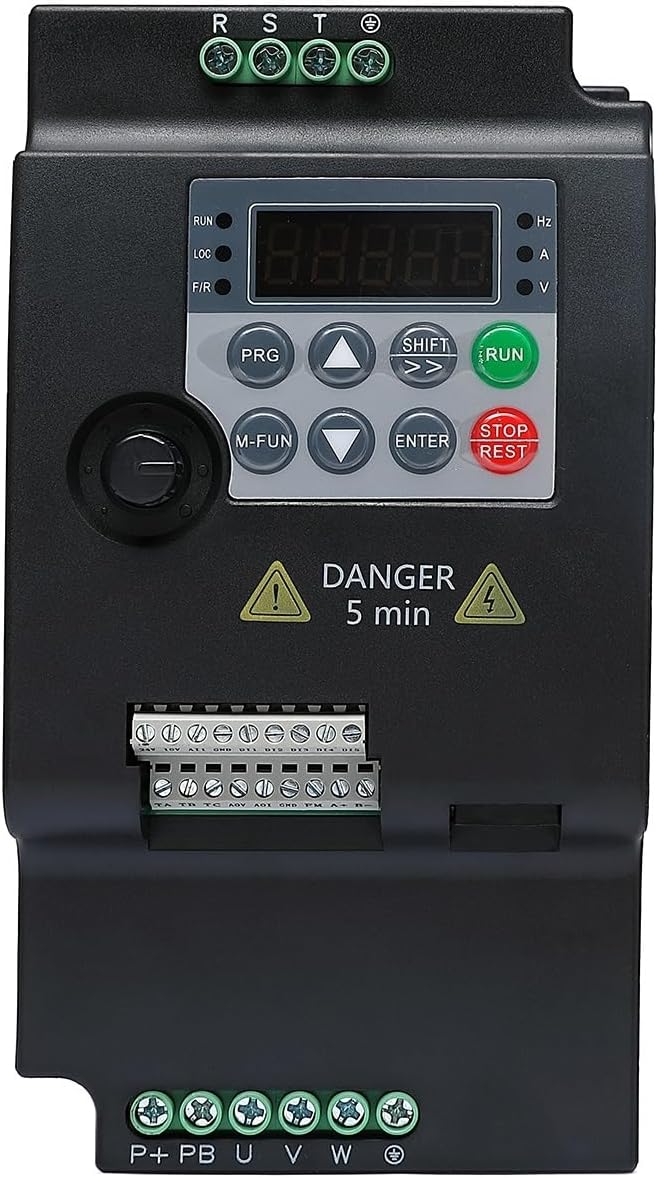
Figure 2.1: Front view of the Nairtech VFD Frequency Inverter, showing the digital display, control buttons, and terminal blocks. Note the "DANGER 5 min" warning indicating residual voltage after power-off.
3. Product Overview
The Nairtech VFD Frequency Inverter is a robust device designed for precise motor speed control. It features a user-friendly interface and compact design, making it suitable for various industrial and commercial applications.
3.1 Key Features
- Variable frequency and voltage output for motor speed control.
- Digital display for monitoring operational parameters.
- Intuitive control panel with dedicated function buttons.
- Compact design for space-saving installation.
- Robust construction for industrial environments.

Figure 3.1: Two Nairtech VFD units, illustrating their compact design and highlighting advantages such as low repair rate, reduced volume, ease of installation, and strong parameter stability.
3.2 Dimensions

Figure 3.2: Dimensional drawing of the Nairtech VFD, showing a height of 18.0 CM, a depth of 11.3 CM, and a width of 9.5 CM. These measurements are crucial for installation planning.
4. Specifications
| Parameter | Value |
|---|---|
| Brand | Nairtech |
| Model Series | VFD 2.2KW, 4KW, 5.5KW |
| Input Voltage | 3-Phase 380V |
| Output Frequency | Variable |
| Manufacturer | Nairtech |
| Date First Available | May 4, 2024 |
5. Setup and Wiring
Proper wiring is critical for the safe and correct operation of the VFD. Refer to the wiring diagrams below and ensure all connections are secure and comply with local electrical codes.
5.1 Power Supply Connections
The VFD supports both single-phase and three-phase power supply configurations. Ensure the correct input is selected and wired according to the diagram.

Figure 5.1: Detailed wiring diagrams for connecting the VFD to both single-phase and three-phase power supplies. This includes connections for input reactors, fuses, braking resistors, output reactors, wave filters, and the motor (U, V, W, PE terminals).
5.2 Control Terminal Connections
The VFD provides various control terminals for external signals, including digital inputs (S5/Y), analog outputs (AO), analog inputs (AI), and RS485 communication. Refer to the terminal block labels for specific connections.
- S5/Y: Digital input terminals.
- AO: Analog output terminals (e.g., for frequency or current monitoring).
- AI: Analog input terminals (e.g., for external speed reference).
- 485: RS485 communication terminals for remote control and monitoring.
6. Operating Instructions
This section outlines the basic steps for operating your Nairtech VFD. For detailed parameter settings, refer to the comprehensive programming manual (if available).
6.1 Control Panel Overview
The VFD features a digital display and several buttons for control and parameter adjustment:
- RUN: Starts the motor.
- STOP/RESET: Stops the motor or resets alarms.
- PRG: Enters/exits parameter programming mode.
- M-FUN: Multi-function button, typically for menu navigation or special functions.
- UP/DOWN Arrows: Adjust parameter values or navigate menus.
- SHIFT (>>): Shifts cursor during parameter entry.
- ENTER: Confirms selections or parameter changes.
6.2 Basic Operation Sequence
- Power On: Apply power to the VFD. The display will illuminate.
- Parameter Check: Ensure essential parameters (e.g., motor rated frequency, maximum output frequency) are set correctly.
- Start Motor: Press the RUN button. The motor will accelerate to the set frequency.
- Adjust Speed: Use the UP/DOWN arrow buttons to adjust the output frequency and motor speed (if configured for keypad control).
- Stop Motor: Press the STOP/RESET button. The motor will decelerate and stop.
7. Maintenance
Regular maintenance ensures the longevity and reliable operation of your VFD.
- Cleaning: Periodically clean the VFD's exterior and cooling fins to prevent dust accumulation, which can hinder heat dissipation. Use a soft, dry cloth.
- Inspection: Regularly inspect wiring connections for tightness and signs of wear or damage.
- Ventilation: Ensure adequate airflow around the VFD. Keep ventilation openings clear of obstructions.
- Environmental Conditions: Verify that the operating environment remains within specified temperature and humidity ranges.
- Capacitor Life: Electrolytic capacitors have a finite lifespan. Consider professional inspection or replacement after several years of continuous operation.
8. Troubleshooting
This section provides solutions for common issues. For complex problems, contact technical support.
| Problem | Possible Cause | Solution |
|---|---|---|
| VFD does not power on | No input power; Blown fuse; Incorrect wiring | Check power supply; Replace fuse; Verify wiring connections |
| Motor does not run | Incorrect parameters; Motor wiring error; Overload | Check motor parameters; Verify motor wiring; Reduce load |
| Overcurrent fault | Motor overload; Short circuit in motor wiring; Rapid acceleration | Check motor load; Inspect motor wiring; Adjust acceleration time |
| Overvoltage fault | Regenerative braking; Input voltage too high | Install braking resistor; Check input voltage |
9. Application Examples
The Nairtech VFD Frequency Inverter is versatile and can be used in a wide range of applications requiring precise motor speed control.

Figure 9.1: Examples of common applications for the VFD, including general motors, blenders, ball mills, water pumps, cranes, transport planes (conveyors), flat knitting machines, industrial hair driers, and CNC lathes. This illustrates the broad utility of the device.
10. Warranty and Support
Specific warranty information for the Nairtech VFD Frequency Inverter is not provided in this document. Please refer to your purchase documentation or contact the retailer for warranty details.
For technical support, inquiries, or service requests, please contact Nairtech customer service through the contact information provided at the point of purchase or on the official Nairtech website.