
DHP DA4075649
DHP Aliyah Upholstered Bed Instruction Manual
Model: DA4075649 | Brand: DHP
Introduction
This instruction manual provides essential information for the safe and efficient assembly, operation, and maintenance of your DHP Aliyah Upholstered Bed. Please read this manual thoroughly before beginning assembly and retain it for future reference. The DHP Aliyah Upholstered Bed is designed for comfort and stability, featuring a low-profile platform frame and a tufted headboard.
Safety Information
WARNING: To prevent serious injury, always follow these safety guidelines:
- Do not exceed the maximum weight limit of 500 lbs (227 kg). Overloading the bed can cause structural failure and injury.
- Ensure all bolts and screws are securely tightened before use. Periodically check and re-tighten fasteners as needed.
- Keep small parts away from children during assembly to prevent choking hazards.
- Assemble the bed on a soft, clean surface to prevent scratching the product or your floor.
- Do not stand or jump on the bed frame.
- Use only the mattress size compatible with this bed frame (King U.S. Standard).
Components List
Before assembly, verify that all components are present and undamaged. If any parts are missing or damaged, contact DHP customer support.
- Headboard (1)
- Footboard (1)
- Side Rails (2)
- Center Support Beam (1)
- Bentwood Slats (multiple)
- Support Legs (for center beam and frame corners)
- Hardware Pack (bolts, washers, nuts, Allen wrench)

Image: Overview of the DHP Aliyah Upholstered Bed frame components, including the headboard, side rails, and slat system.
Setup and Assembly Instructions
Follow these steps carefully for proper assembly. It is recommended to have two people for assembly.
- Step 1: Unpack and Identify Parts. Carefully remove all components from the packaging. Lay them out on a clean, soft surface to prevent damage. Refer to the components list to ensure all parts are present.
- Step 2: Attach Side Rails to Headboard. Align the side rails with the pre-drilled holes on the headboard. Secure them using the provided bolts and an Allen wrench. Do not fully tighten yet.
- Step 3: Attach Footboard. Connect the other end of the side rails to the footboard, aligning the holes and securing with bolts. Once all four corners are connected, fully tighten all bolts.
- Step 4: Install Center Support and Slats. Attach the center support beam to the designated brackets on the headboard and footboard. Place the bentwood slats into the side rail supports, ensuring they are evenly spaced and securely seated. The slats provide direct support for your mattress, eliminating the need for a box spring.
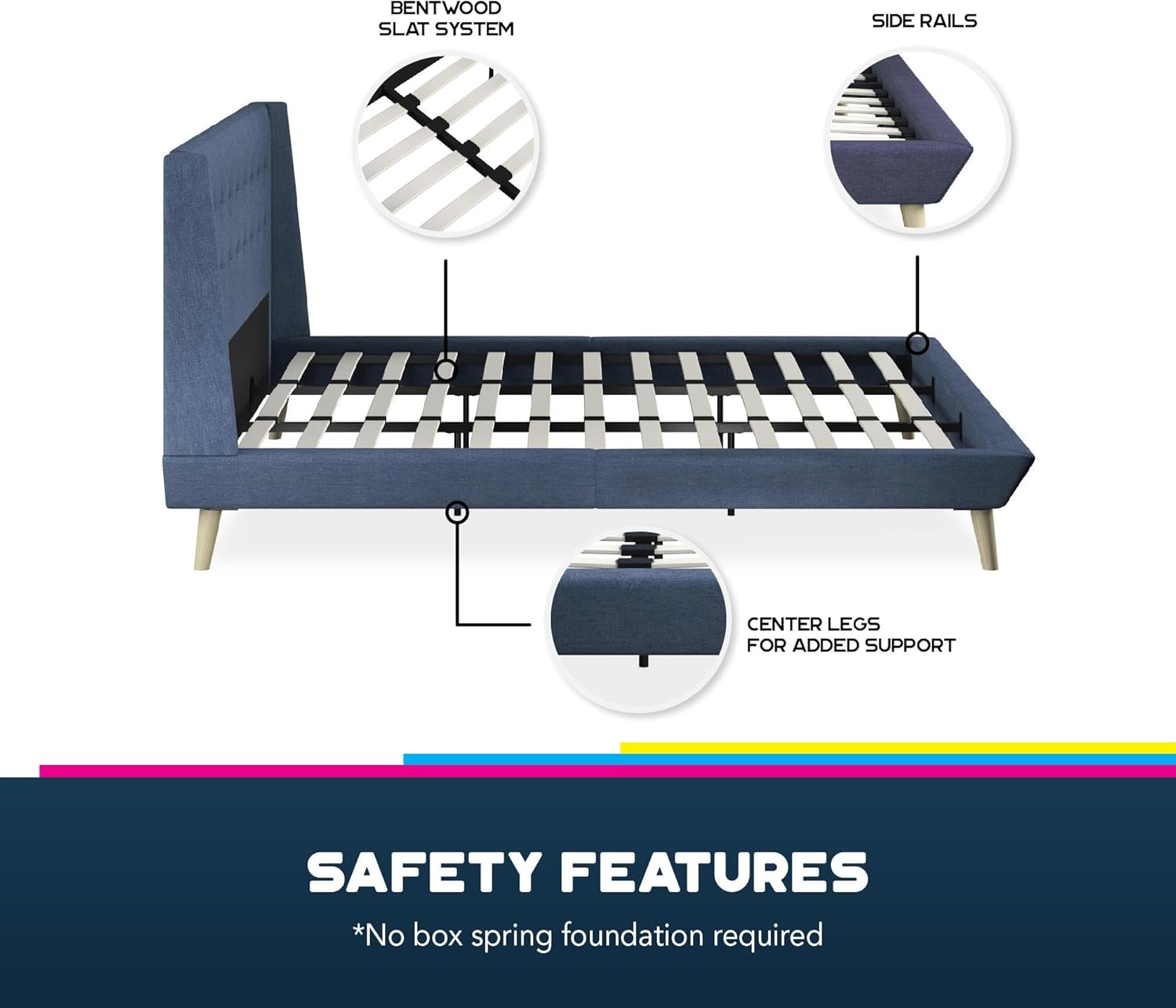
Image: Diagram illustrating the safety features and structural components, including the bentwood slat system, side rails, and center legs for added support. No box spring foundation is required.
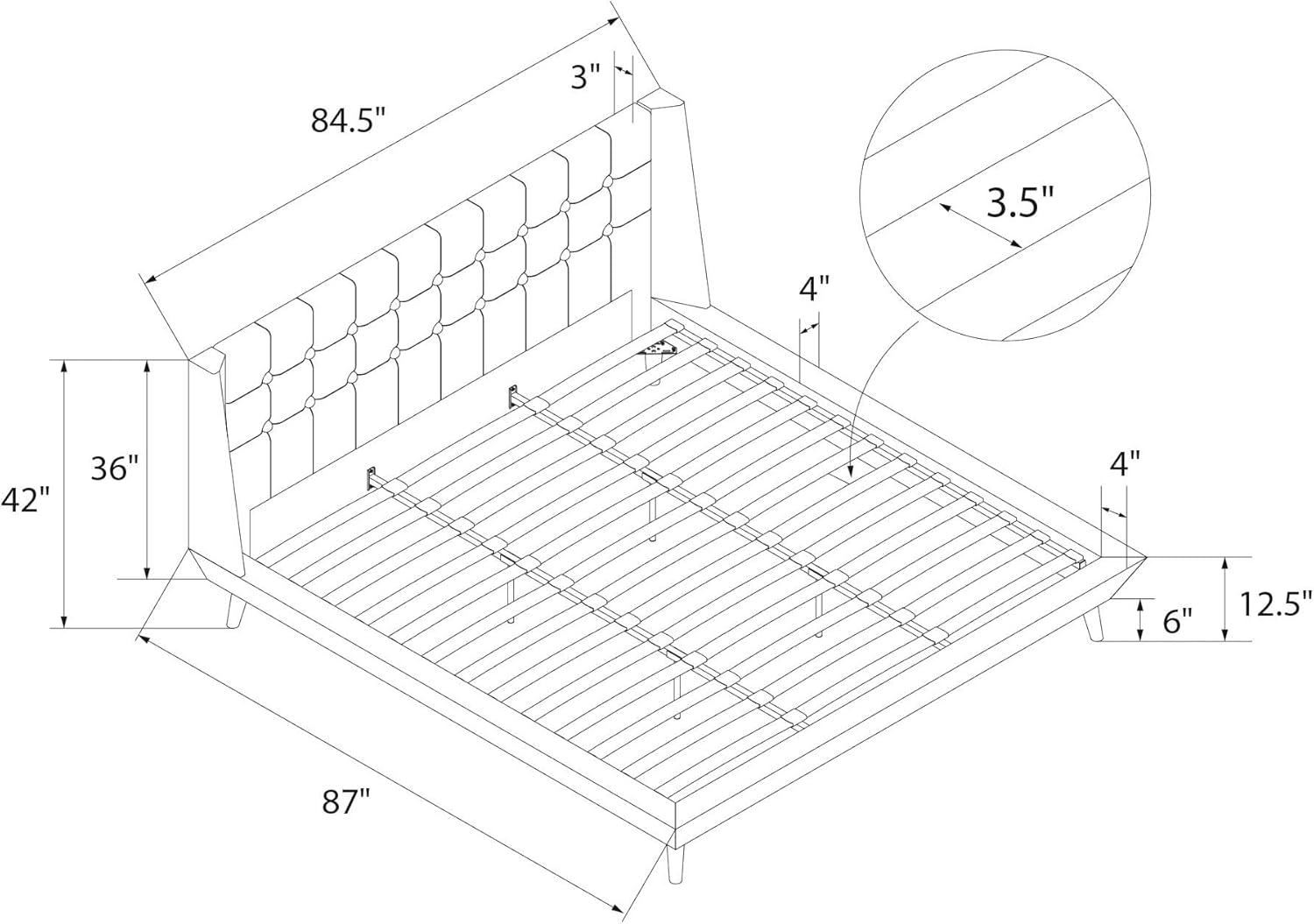
Image: Detailed dimensional drawing of the DHP Aliyah Upholstered Bed, showing length, width, and height measurements for the King size.
Operating Instructions
Once assembled, the DHP Aliyah Upholstered Bed is ready for use. Simply place your King-sized mattress directly onto the bentwood slats. No box spring is required due to the robust slat system. Ensure the mattress is centered and lies flat on the slats for optimal support and comfort.

Image: The DHP Aliyah Upholstered Bed shown with a mattress in place, ready for use.
Maintenance
To maintain the appearance and longevity of your DHP Aliyah Upholstered Bed, follow these care instructions:
- Cleaning: Wipe the upholstered surfaces with a damp cloth. For spills, blot immediately with a clean, dry cloth. Avoid harsh chemicals or abrasive cleaners.
- Fasteners: Periodically check all bolts and screws to ensure they remain tight. Re-tighten as necessary to maintain structural integrity and prevent squeaking.
- Environment: Avoid exposing the bed to direct sunlight or extreme temperature changes, which can affect the fabric and wood finish.

Image: Close-up view of the blue linen fabric and tufted detail on the headboard, highlighting the material texture.
Troubleshooting
If you encounter any issues with your DHP Aliyah Upholstered Bed, refer to the following common problems and solutions:
- Squeaking Noises:
- Ensure all assembly bolts are securely tightened. Loose connections are a common cause of squeaking.
- Check that the bentwood slats are properly seated in their holders and are not rubbing against the frame.
- Bed Feels Unstable/Wobbly:
- Verify that all support legs (including those for the center beam) are firmly on the floor and not damaged.
- Re-check all assembly connections to ensure they are tight and correctly aligned.
- Mattress Sagging:
- Confirm that the mattress is the correct size for the King frame.
- Inspect the bentwood slats for any damage or breakage. Replace any damaged slats immediately.
- Ensure the center support beam is correctly installed and providing adequate support.
Specifications
| Feature | Detail |
|---|---|
| Model Number | DA4075649 |
| Size | King (U.S. Standard) |
| Product Dimensions (L x W x H) | 87" x 84.5" x 42" |
| Net Weight | 108 lbs |
| Weight Limit | 500 lbs |
| Color | Blue Linen |
| Finish Type | Wood (legs) |
| Assembly Required | Yes |
| Box Spring Required | No (platform bed with slats) |

Image: Visual representation of the DHP Aliyah Upholstered Bed's dimensions, including height relative to a human figure, and overall length and width.
Warranty Information
The DHP Aliyah Upholstered Bed comes with a 1-year limited warranty. This warranty covers manufacturing defects in materials and workmanship under normal use. It does not cover damage resulting from improper assembly, misuse, abuse, accidents, or normal wear and tear. Please retain your proof of purchase for warranty claims.
Customer Support
For assistance with assembly, missing parts, or warranty claims, please contact DHP customer support. Refer to the contact information provided with your product packaging or visit the official DHP website for support details.
Product Care Instructions: Wipe with Damp Cloth.
Ask a question about this manual
Ask about setup, troubleshooting, compatibility, parts, safety, or missing instructions. Manuals+ will review the question and use this page’s manual context to help answer it.