
Introduction
This manual provides detailed instructions for the safe and efficient operation, maintenance, and troubleshooting of your Vacson VM-01 Electric Mason Jar Vacuum Sealer. Please read this manual thoroughly before first use and retain it for future reference.
Package Contents
Verify that all items listed below are included in your package:
- 1 x Vacson VM-01 Electric Mason Jar Vacuum Sealer
- 5 x Wide Mouth Canning Lids
- 5 x Regular Mouth Canning Lids
- 1 x USB Charging Cable (Type-C)
- 1 x Bottle Top Opener

Product Overview
The Vacson VM-01 is an automatic electric vacuum sealer designed for both wide and regular mouth mason jars. It features a built-in sensor for automatic shut-off once a seal is achieved.
Components
- Power Button: Activates and deactivates the sealing process.
- LED Display: Shows battery status and sealing progress.
- Type-C Charging Port: For recharging the internal battery.
- Sealing Base: The part that creates the vacuum seal on the jar lid.


Setup
Initial Charging
Before first use, fully charge the Vacson VM-01 sealer. Connect the provided USB Type-C cable to the charging port on the device and a suitable USB power adapter (not included). The LED display will indicate charging status. A full charge provides approximately 150-155 seals.
Preparing Jars and Lids
For optimal sealing, ensure that the rim of the mason jar and the canning lid are completely clean and dry. Any moisture or food debris can prevent a proper vacuum seal.
Operating Instructions
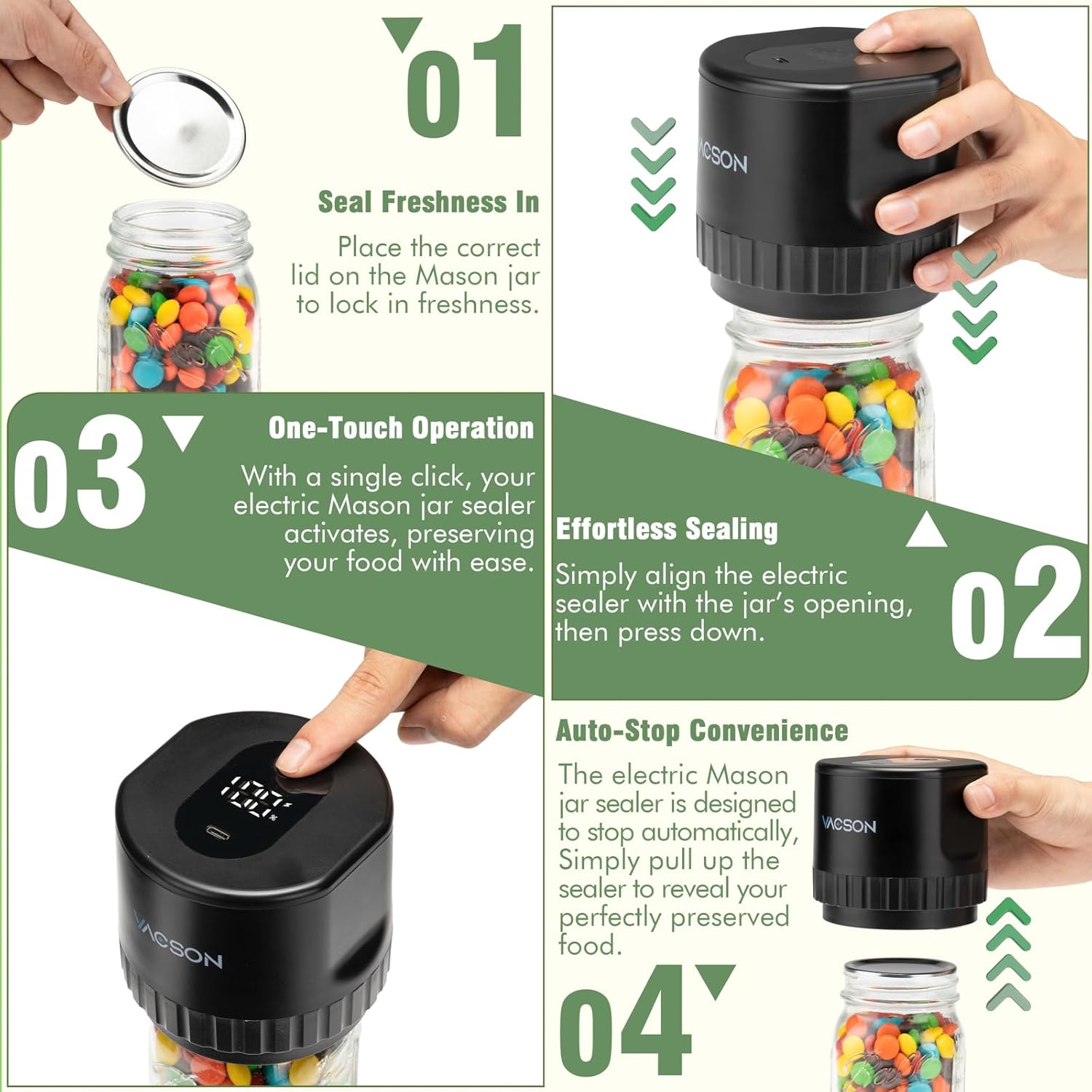
Follow these steps to vacuum seal your mason jars:
- Place Lid: Position a clean canning lid (either wide or regular mouth, depending on your jar) onto the mason jar.
- Position Sealer: Place the Vacson VM-01 electric sealer directly over the canning lid, ensuring it is centered and sits flush on the jar's opening.
- Activate Sealing: Press the power button on the top of the sealer. The device will begin to extract air from the jar.
- Automatic Stop: The sealer will automatically stop once a sufficient vacuum pressure is achieved. This indicates a successful seal.
- Remove Sealer: Gently lift the sealer from the jar. The lid should now be securely sealed.
Tips for Successful Sealing
- Thoroughly clean the rim of the jar and the lid before sealing.
- When sealing solid foods, leave approximately 1/2 inch of headspace in the jar.
- When sealing liquids, leave approximately 1 inch of headspace in the jar.

Benefits of Vacuum Sealing
Vacuum sealing helps preserve food by removing air, which slows down spoilage. This method can extend the freshness of food up to five times longer than traditional storage methods, maintaining nutrients and flavor.

Maintenance
Cleaning
Wipe the exterior of the Vacson VM-01 sealer with a soft, damp cloth. Do not immerse the device in water or use abrasive cleaners. Ensure the sealing base is free of food particles.
Battery Care
The device is equipped with a 1200mAh lithium battery. To ensure optimal performance and longevity, avoid overcharging. Disconnect the charger once the battery is full.
Troubleshooting
If you encounter issues with your Vacson VM-01 sealer, refer to the following common problems and solutions:
- Device does not turn on or operate:
- Ensure the device is fully charged. Connect it to the USB charging cable and allow sufficient time to charge.
- Check the USB cable and power source for proper connection.
- Jar does not seal properly:
- Verify that the rim of the mason jar and the canning lid are completely clean and dry. Moisture or food particles can break the seal.
- Ensure the sealer is centered and flush on the jar lid during operation.
- Check if the canning lid is damaged or bent. Use new, undamaged lids for best results.
- Confirm that the jar is suitable for vacuum sealing (standard mason jars).
- Lid appears off-centered after sealing:
- While the sealer is designed for automatic operation, ensure the sealer is held steady and centered on the jar during the sealing process to prevent slight shifts. The seal should still be effective if the lid is depressed.
Specifications
| Brand | Vacson |
| Model Number | VM-01 |
| Material | Acrylonitrile Butadiene Styrene (ABS) |
| Color | Black |
| Product Dimensions | 4"L x 4"W x 3.38"H |
| Item Weight | 0.71 Pounds (11.4 ounces) |
| Power Source | Cordless Electric |
| Operation Mode | Automatic |
| Wattage | 5 watts |
| Battery | 1 Lithium Ion battery (included), 1200mAh |
| UPC | 198168498996 |
Safety Information
- Keep the device out of reach of children.
- Do not attempt to disassemble or repair the device yourself. Contact customer support for assistance.
- Use only the provided USB cable for charging.
- Do not use the device in wet environments or immerse it in water.
- Ensure proper ventilation during charging.
Customer Support
For any questions, concerns, or technical assistance regarding your Vacson VM-01 Electric Mason Jar Vacuum Sealer, please contact Vacson customer support. Refer to your product packaging or the seller's information for contact details.