ACEMIC UHF Wireless Microphone System Q4 User Manual
Model: Q4
1. Introduction
The ACEMIC Q4 UHF Wireless Microphone System provides reliable and clear audio for various applications. This system includes four handheld dynamic microphones and a compact receiver, designed for ease of use and robust performance.
Key Features:
Truly Wireless Freedom: Enjoy an exceptional line-of-sight range of up to 130 feet with a reliable signal, allowing free movement during performances.
Clear and Pristine Sound Quality: High-quality dynamic cartridges limit feedback and interference, delivering clear, robust, and optimal true sound.
Sturdy and Durable Construction: All-metal mic heads and steel mesh grilles resist impact and corrosion. The handle features a rubber oil feel for a comfortable and secure grip.
Long Working Time: Each microphone operates for up to 6 hours on 2 AA batteries (not included). The receiver's built-in rechargeable battery provides up to 4 hours of continuous use.
Plug and Play: Features 4-channel fixed frequency and automatic pairing with the receiver. Simply plug into your audio equipment's 6.35mm (1/4'') or 3.5mm (1/8'') input.
2. What's in the Box
Upon opening your ACEMIC Q4 Wireless Microphone System, you will find the following components:
4 x Handheld Microphones (Transmitters)
1 x Receiver
1 x 3.5MM to 6.35MM Adapter
1 x Type C Charging Cable
1 x User Manual
4 x Antiskid Rings (various colors)
Image: All components included in the ACEMIC Q4 Wireless Microphone System package. This includes four black handheld microphones, a compact black receiver with an antenna, a 3.5mm to 6.35mm adapter, a USB-C charging cable, a user manual, and four colorful antiskid rings.
3. Setup Instructions
3.1. Installing Batteries in Microphones
Unscrew the bottom part of each handheld microphone.
Insert two AA batteries into each microphone, ensuring correct polarity (+/-). (AA batteries are NOT included)
Screw the bottom part back onto the microphone securely.
Image: A diagram showing the internal structure of the ACEMIC handheld microphone, highlighting the battery compartment where two AA batteries are inserted. The image also shows the steel mic head and high-quality capsule.
3.2. Charging the Receiver
The receiver has a built-in rechargeable battery. Before first use, fully charge the receiver using the provided Type C charging cable. A full charge takes approximately 4 hours and provides up to 4 hours of continuous working time.
Image: An illustration showing the compact receiver connected to a power source via a USB-C charging cable. Text indicates "6 Hours Working Time" for microphones (2 AA Batteries NOT INCLUDED) and "4 Hours Working Time" for the receiver (integrated lithium battery, 4 hours to fully charge).
3.3. Connecting the Receiver to Audio Equipment
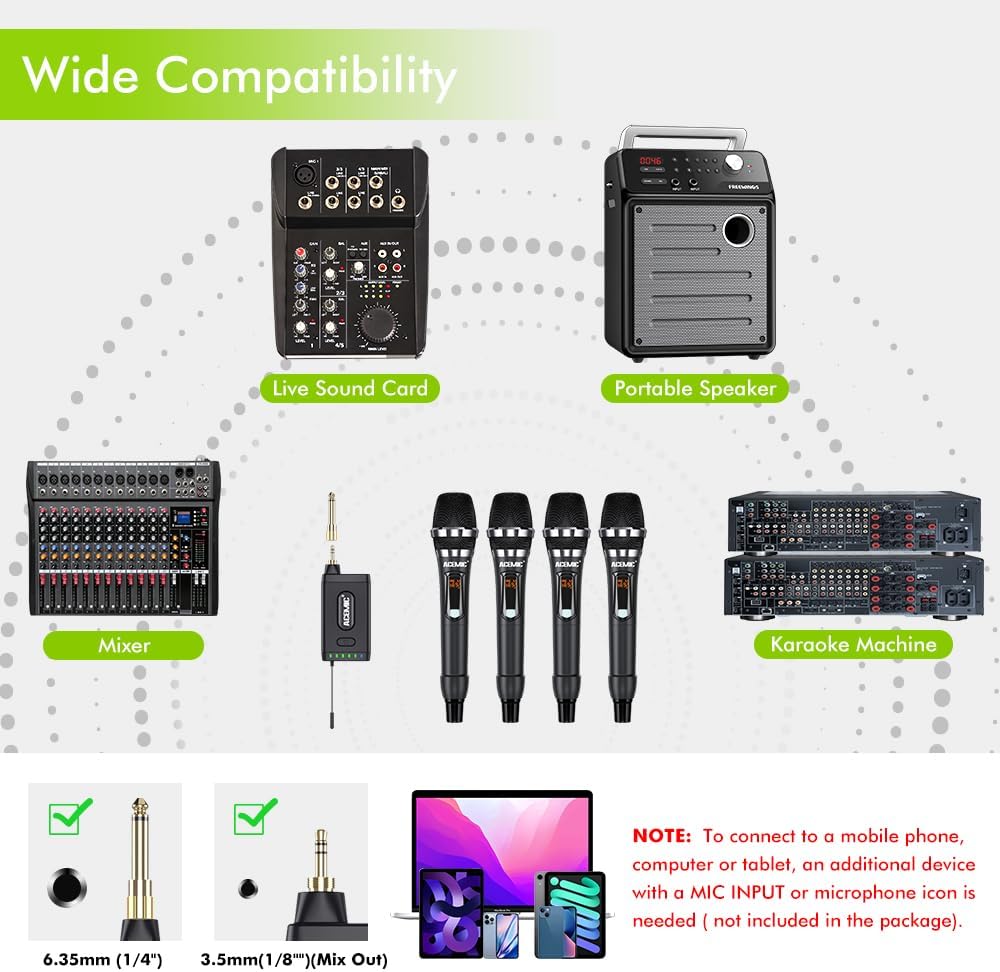
Identify the 6.35mm (1/4'') or 3.5mm (1/8'') input interface on your audio equipment (e.g., karaoke machine, audio/voice amplifier, mixer, portable speaker, live sound card).
Plug the UHF receiver directly into the appropriate input jack. If your equipment requires a 3.5mm input, use the provided 3.5mm to 6.35mm adapter.
Ensure the receiver's antenna is extended for optimal signal reception.
Image: A diagram illustrating the wide compatibility of the ACEMIC Q4 system. It shows the receiver connecting to various audio devices like a Live Sound Card, Portable Speaker, Mixer, and Karaoke Machine. It also highlights the 6.35mm (1/4") and 3.5mm (1/8") (Mix Out) connector types. A note advises that connecting to mobile phones, computers, or tablets may require an additional device with a MIC INPUT or microphone icon (not included).
4. Operating Instructions
4.1. Powering On/Off
Microphones: Press and hold the power button on each microphone to turn it on or off. The display will illuminate when on.
Receiver: Press and hold the power button on the receiver to turn it on or off. Blue indicator lights will show the status.
4.2. Automatic Pairing
The ACEMIC Q4 system features fixed frequencies for each of its 4 channels and automatically pairs the microphones with the receiver upon power-up. No manual frequency adjustment is typically required for initial setup.
Image: A schematic drawing of four handheld microphones and a receiver, with text explaining "Auto Pairing: UHF handheld transmitters of Q4 come with fixed frequencies for each channel and do not require adjusting frequency. The receiver will pair with them automatically."
4.3. Adjusting Microphone Volume/Channel
Each microphone has a button for volume adjustment and channel switching. Refer to the user manual for detailed instructions on how to access these settings if needed. The receiver will indicate which microphone channel is active (A, B, C, or D).
Image: A detailed diagram showing the components and functions of both the handheld transmitters (microphones) and the receiver. For the microphone, it points out the signal indicator, battery level, channel/free display, volume display/button, lock mode display, steel mic, premium capsule, power button/function, settings auxiliary button, and set button/channel switch/volume adjustment/button lock settings. For the receiver, it shows the power button, indicator light, Type-C charging port, and antenna, along with the 3.5mm to 6.35mm adapter and TRS 3.5mm (Mix) output plug.
4.4. Optimal Usage
For best sound quality, hold the microphone about 1-2 inches (3-5 cm) away from your mouth.
Utilize the provided anti-skid rings to prevent microphones from rolling off surfaces and to easily identify individual microphones.
The system offers a wireless range of up to 130 feet (approximately 40 meters) in line-of-sight conditions.
Image: A close-up of the microphone head with a diagram showing sound pickup patterns. Text states: "Engineered For Better Sound: Dynamic mic with cardioid polar pattern is designed for original sound, delivering clear, natural, lossless audio. Note: Keep your microphone about 1-2 inches (3-5 cm) away from your mouth for optimal sound capture."Image: An illustration depicting the UHF transmission range of the ACEMIC Q4 system. It shows the receiver and four microphones in a crowd setting, indicating a maximum UHF distance of 130 feet (approximately 40 meters).
5. Maintenance
Cleaning: Use a soft, dry cloth to clean the microphones and receiver. Avoid using harsh chemicals or abrasive materials.
Storage: Store the system in a cool, dry place away from direct sunlight and extreme temperatures. Remove AA batteries from microphones if not in use for extended periods to prevent leakage.
Battery Care: Ensure the receiver is charged regularly to maintain battery health.
6. Troubleshooting
6.1. No Sound or Intermittent Audio
Check if both the microphones and receiver are powered on and fully charged/have fresh batteries.
Ensure the receiver is securely plugged into the correct input of your audio equipment.
Verify that the volume on your audio equipment and the microphones is turned up.
Confirm that the microphones have automatically paired with the receiver (check indicator lights on the receiver).
Reduce the distance between the microphones and the receiver, ensuring no major obstructions.
6.2. Feedback or Whistling Noise
Do not point the microphones directly at speakers.
Avoid getting the microphones too close to the speakers, especially when the volume is high.
Lower the volume on your audio equipment or the microphones.
Image: A graphic showing a microphone pointed towards a speaker with a red 'X' over it, indicating that users should avoid pointing microphones at speakers to prevent feedback and whistling.
6.3. Interference or Poor Signal
No Multiset Operation: This system uses fixed frequencies. Using more than one receiver simultaneously (including two) will cause interference and prevent proper operation.
Avoid Personal Electronics: Keep the receiver away from multiple personal electronic devices (laptops, tablets, smartphones, cameras) as they may cause interference.
No Bluetooth Function: This system does not have a Bluetooth function. Ensure you are not attempting to connect via Bluetooth.
Image: A graphic showing two audio receivers connected to separate audio systems with a large red 'X' over them. Text warns: "No Multiset Operation: Fixed frequency design allows you to use ONLY ONE RECEIVER simultaneously, more than two (including two) receivers at the same time will interfere with each other and cannot be used properly."Image: A graphic showing various personal electronic devices (laptop, tablet, smartphone, camera) with a large red 'X' over them. Text warns: "No Personal Electronics: You are not suggested to use it with multiple personal electronics because interference may occur. Please place it away from them for better reception."Image: A graphic of the Bluetooth symbol with a large red 'X' over it. Text states: "No Bluetooth: This system does not have a Bluetooth function."
7. Specifications
Feature
Detail
Brand
ACEMIC
Model Name
ACEMIC Q4
Connectivity Technology
Auxiliary
Connector Type
3.5 mm Jack, 6.35 mm Jack
Special Feature
Battery Indicator Light
Compatible Devices
Amplifier, Karaoke Machine
Polar Pattern
Hyper Cardioid
Microphone Form Factor
Handheld
Power Source
Battery Powered
Number of Channels
4
Frequency Range
902-928 MHz
Item Weight
1.15 Kilograms
Microphone Battery Life
Up to 6 hours (2 AA batteries per mic, not included)
Receiver Battery Life
Up to 4 hours (built-in rechargeable battery)
Wireless Range
Up to 130 feet (line-of-sight)
8. Warranty & Support
8.1. Warranty Information
The ACEMIC Q4 UHF Wireless Microphone System comes with a 1 Year Manufacturer Warranty. Please retain your proof of purchase for any warranty claims.
8.2. Customer Support
For technical assistance, troubleshooting, or warranty inquiries, please contact ACEMIC customer support through the retailer where the product was purchased or visit the official ACEMIC website for contact details.
9. Product Videos
9.1. ACEMIC Q4 Wireless Microphones Quality On A Budget
Video: A review of the ACEMIC Q4 wireless microphone system, highlighting its quality and affordability. The video demonstrates the product's features and sound performance, offering insights for potential users.
9.2. Great Sounding Wireless Handheld Mics with Long Range
Video: A demonstration showcasing the clear sound quality and extended wireless range of the ACEMIC Q4 handheld microphones. The video provides practical examples of the system's performance in various settings.
Ask about setup, troubleshooting, compatibility, parts, safety, or missing instructions. Manuals+ will review the question and use this page’s manual context to help answer it.