
Introduction
The Yale Keypad Touch is designed to be the perfect companion for your compatible Yale or August smart lock. It provides key-free and phone-free access to your home through biometric fingerprint scanning and traditional PIN code entry. This manual provides detailed instructions for the installation, operation, and maintenance of your Yale Keypad Touch.
Key Features
- Fingerprint Unlock: Access your home in less than 0.5 seconds with 99% accuracy using your unique fingerprint.
- Key-Free & Phone-Free Access: Seamlessly pairs with compatible Yale and August smart locks for convenient entry.
- Secure Access Sharing: Create customizable entry codes or add fingerprints for family, friends, and service personnel via the Yale Access App.
- Flexible Placement: Mounts easily on your doorframe, exterior wall, or door within Bluetooth range of your smart lock using included adhesive or screws.
- One-Touch Locking: Quickly lock your door with a single touch for added convenience when leaving.
- Backlit Keypad: Ensures visibility and ease of use in low-light conditions, with numbers designed to resist wear and fading.
- Battery Powered: Operates on 4 AAA batteries (included), ensuring functionality during power outages.
What's Included
Your Yale Keypad Touch package includes the following components:
- Yale Keypad Touch unit
- 4 AAA Batteries
- Mounting Adhesive
- Mounting Hardware (screws)

Figure 1: Front view of the Yale Keypad Touch, showing the numerical keypad, fingerprint sensor, and Yale logo.
Setup
1. Battery Installation
- Locate the battery compartment on the back of the Yale Keypad Touch.
- Open the compartment cover.
- Insert the 4 AAA batteries, ensuring correct polarity (+/-).
- Close the battery compartment cover securely.
2. Mounting the Keypad
The Yale Keypad Touch can be mounted on your doorframe, exterior wall, or directly on your door. Ensure the chosen location is within Bluetooth range of your compatible Yale or August smart lock.
- Using Adhesive: For a non-permanent installation, peel the backing from the included mounting adhesive and firmly press the keypad onto a clean, dry surface.
- Using Screws: For a more secure installation, use the provided mounting hardware (screws) to attach the keypad to the desired surface.
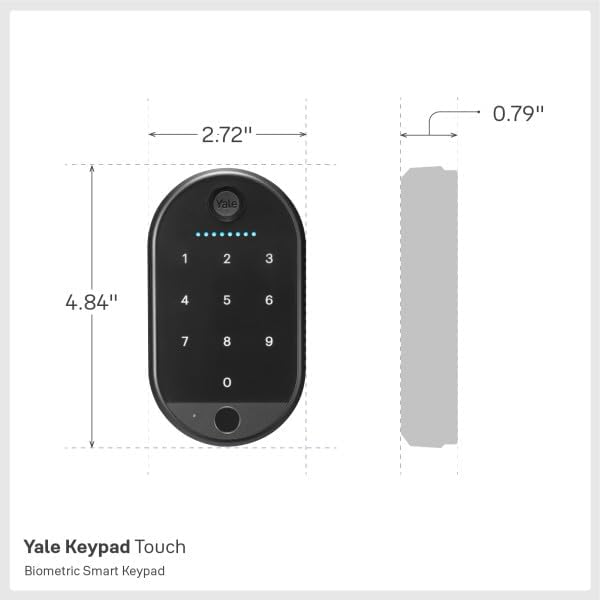
Figure 2: Diagram showing the dimensions of the Yale Keypad Touch (4.84" H x 2.72" W x 0.79" D).
3. Pairing with Your Smart Lock
The Yale Keypad Touch must be paired with a compatible Yale or August smart lock via the Yale Access App. Remote access features require a Wi-Fi connected Yale or August smart lock.
- Download and open the Yale Access App on your Android or iOS device.
- Follow the in-app instructions to add a new device and pair your Yale Keypad Touch with your existing smart lock.
- During the pairing process, you will be prompted to create and manage entry codes and register fingerprints for users.
Operating Instructions
Unlocking Your Door
- Using Fingerprint: Place your registered finger on the fingerprint sensor located at the bottom of the keypad. The lock will unlock if the fingerprint is recognized.
- Using PIN Code: Enter your assigned PIN code on the numerical keypad. The backlit buttons will illuminate as you press them. After entering the full code, the lock will unlock.
Locking Your Door (One-Touch Locking)

Figure 3: A child demonstrating the One-Touch Locking feature on the Yale Keypad Touch.
To lock your door quickly, simply press and hold the top button on the keypad. This will activate the One-Touch Locking feature, securing your door without needing to enter a code or use the app.
Managing Access
Through the Yale Access App, you can easily manage access for multiple users:
- Create Entry Codes: Generate temporary or permanent PIN codes for guests, family members, or service providers.
- Add Fingerprints: Register additional fingerprints for authorized users directly through the app.
- Real-Time Notifications: Receive alerts on your smartphone whenever the lock is accessed, providing peace of mind and control.
Maintenance
Battery Replacement
The Yale Keypad Touch is powered by 4 AAA batteries. When the battery level is low, the keypad will provide an indication (e.g., a specific light pattern or sound). To replace the batteries:
- Locate and open the battery compartment on the back of the unit.
- Remove the old batteries.
- Insert new 4 AAA alkaline batteries, observing correct polarity.
- Close the battery compartment cover securely.
Cleaning
To maintain the appearance and functionality of your keypad, wipe it regularly with a soft, dry cloth. Avoid using abrasive cleaners or solvents, as these can damage the finish and electronic components.
Troubleshooting
| Problem | Possible Cause | Solution |
|---|---|---|
| Fingerprint not recognized or inconsistent. | Finger placement, dirty sensor, dry/oily fingers, unregistered fingerprint. | Ensure proper finger placement covering the sensor. Clean the sensor with a soft, dry cloth. Re-register your fingerprint in the Yale Access App if issues persist. Ensure your finger is clean and dry. |
| PIN code entry is unresponsive or fails frequently. | Incorrect code, rapid entry, keypad unresponsiveness. | Double-check the PIN code. Enter the code at a moderate, consistent speed. If the keypad is consistently unresponsive, try resetting the device or checking battery levels. |
| Keypad disconnects from the smart lock or app. | Out of Bluetooth range, low batteries, app/device glitch. | Ensure the keypad is within Bluetooth range of your smart lock. Replace batteries if low. Try deleting the device from the Yale Access App and re-adding it, followed by a full reset if necessary. |
| Keypad does not work with August 4th Gen lock or requires August Connect bridge. | Compatibility limitations. | The Yale Keypad Touch is designed to pair with compatible Yale and August smart locks. Some August lock models, like the 4th Gen, may not be directly compatible or may require an August Connect bridge for full functionality. Verify compatibility on ShopYaleHome.com. |
| Cannot register or use in certain regions (e.g., Mexico). | Regional restrictions or registration policies. | Product functionality and registration may vary by region due to local Yale/August provider policies. Contact local Yale support for region-specific compatibility and registration information. |
Specifications
- Brand: Yale
- Model Name: Yale Approach (Keypad Touch)
- Item Model Number: YRK110-F-BLE-BLK
- Lock Type: Biometric
- Special Features: Back-Lit Keypad, Battery Indicator, Fingerprint, One-Touch Lock, Passcode Unlock
- Material: Metal
- Color: Black
- Item Dimensions (L x W x H): 4 x 2 x 6 inches
- Item Weight: 9.6 ounces
- Power Source: 4 AAA batteries (included)
- Connectivity Protocol: Bluetooth
- Controller Type: Android, iOS (via Yale Access App)
- UPC: 081023131643
Warranty and Support
For warranty information, technical support, or further assistance, please visit the official Yale Home website or contact Yale customer service. Keep your purchase receipt for warranty claims.
Official Website: ShopYaleHome.com

