
1. Introduction
This manual provides detailed instructions for the setup, operation, and maintenance of your Bmi Muse M-09-C LCD Alarm Clock. Please read this manual thoroughly before using the device to ensure proper function and longevity.
2. Package Contents
- Bmi Muse M-09-C LCD Alarm Clock
- 2 x 1.5V AAA/R03/UM4 Batteries
- User Manual (this document)
3. Product Overview
The Bmi Muse M-09-C is a compact digital alarm clock featuring an LCD screen with a white backlight. It includes functions for time display, alarm, snooze, nap, temperature display, and calendar.
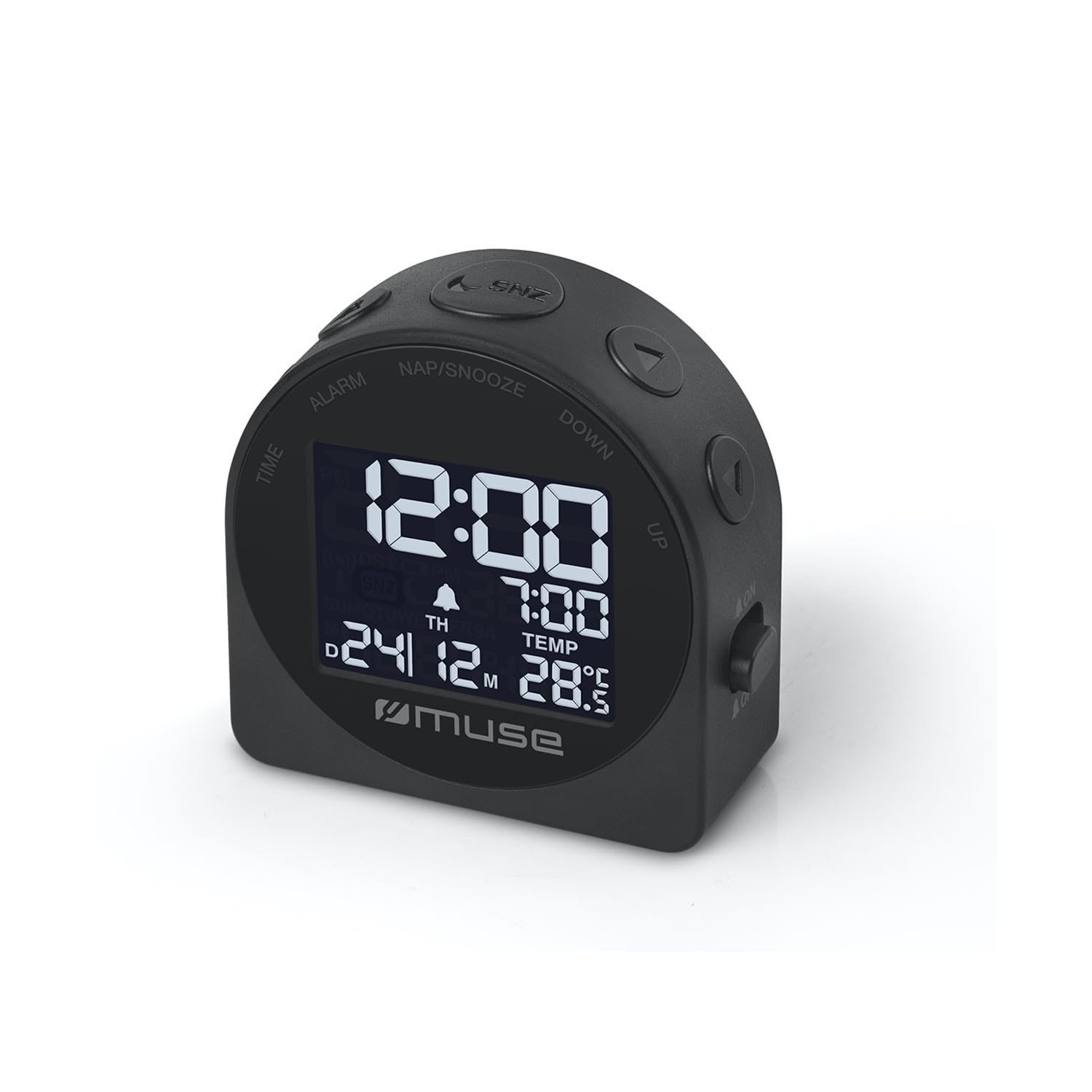
Figure 1: Front view of the Bmi Muse M-09-C LCD alarm clock. The display shows the current time, an alarm setting, the date, and the ambient temperature. Control buttons for 'TIME', 'ALARM', 'NAP/SNOOZE', 'DOWN', and 'UP' are located around the screen.
Key Features:
- LCD display with white backlight
- 12 or 24-hour time format display
- Single buzzer alarm
- Snooze and Nap functions
- Temperature display
- Calendar display
- Battery powered (2x AAA batteries included)
4. Setup
4.1 Battery Installation
- Locate the battery compartment cover on the back of the alarm clock.
- Slide or lift the cover to open the compartment.
- Insert two (2) 1.5V AAA/R03/UM4 batteries, ensuring the correct polarity (+ and -) as indicated inside the compartment.
- Replace the battery compartment cover securely.
The clock will power on automatically once batteries are inserted. The display may flash, indicating it is ready for time setting.
5. Operating Instructions
5.1 Setting the Time
- Press and hold the TIME button until the hour digits begin to flash.
- Use the UP or DOWN buttons to adjust the hour.
- Press the TIME button again to confirm the hour and move to minute setting.
- Use the UP or DOWN buttons to adjust the minutes.
- Press the TIME button once more to save the time setting and exit.
5.2 Setting the Alarm
- Press and hold the ALARM button until the alarm hour digits begin to flash.
- Use the UP or DOWN buttons to set the desired alarm hour.
- Press the ALARM button again to confirm the alarm hour and move to alarm minute setting.
- Use the UP or DOWN buttons to set the desired alarm minutes.
- Press the ALARM button once more to save the alarm setting. The alarm icon will appear on the display, indicating the alarm is active.
5.3 Activating/Deactivating Alarm
- In normal time display mode, press the ALARM button briefly to toggle the alarm ON or OFF. The alarm icon on the display indicates its status.
5.4 Snooze and Nap Functions
- When the alarm sounds, press the NAP/SNOOZE button to activate the snooze function. The alarm will temporarily stop and sound again after a few minutes (default snooze time).
- To stop the alarm completely, press any other button (e.g., ALARM, TIME, UP, DOWN).
- The Nap function allows for a short, temporary alarm. Refer to the specific instructions for setting the Nap duration, usually by pressing and holding NAP/SNOOZE and using UP/DOWN.
5.5 12/24 Hour Format
- In normal time display mode, press the UP button briefly to switch between 12-hour (with AM/PM indicator) and 24-hour formats.
5.6 Viewing Temperature and Calendar
- The clock automatically displays the current temperature and date. No specific action is usually required to view these.
- To adjust the calendar (year, month, day), typically this is done within the time setting mode or a dedicated calendar setting mode. Consult the device's on-screen prompts if available.
6. Maintenance
- Clean the clock with a soft, dry cloth. Do not use abrasive cleaners or solvents.
- Avoid exposing the clock to extreme temperatures, direct sunlight, or high humidity.
- If the clock will not be used for an extended period, remove the batteries to prevent leakage.
- Replace batteries promptly when the display becomes dim or functions become erratic.
7. Troubleshooting
- No display or dim display: Check battery polarity. Replace with fresh AAA batteries.
- Alarm not sounding: Ensure the alarm is activated (alarm icon visible). Check alarm time setting.
- Incorrect time/date: Re-set the time and date following the instructions in Section 5.1.
- Buttons unresponsive: Remove and re-insert batteries to perform a soft reset. If the issue persists, replace batteries.
8. Specifications
| Feature | Specification |
|---|---|
| Model | M-09-C |
| Brand | Bmi |
| Display Type | LCD with White Backlight |
| Functions | Time, Alarm, Snooze, Nap, Temperature, Calendar |
| Time Format | 12-hour or 24-hour |
| Alarm Type | Buzzer |
| Power Source | 2 x 1.5V AAA/R03/UM4 Batteries |
| Batteries Included | Yes |
| Product Dimensions (L x D x H) | 62 mm x 25 mm x 62 mm |
| Net Weight | 0.06 kg |
| Material | Plastic |
| Mounting Type | Table Mount |
| Usage Environment | Indoor |
9. Warranty and Support
This product is covered by a standard manufacturer's warranty. For specific warranty terms and conditions, please refer to the documentation provided at the time of purchase or contact your retailer. For technical support or service inquiries, please contact the retailer or manufacturer directly.