
1. Introduction
Thank you for choosing the Rtktoup 4Pcs Waterproof LED Par Light. This product is designed for professional stage lighting, suitable for various events including outdoor shows, parties, bars, clubs, and architectural lighting. Featuring a robust IP65 waterproof design, RGBW color mixing, and multiple control modes, it offers versatile and dynamic lighting solutions. Please read this manual carefully before operation to ensure safe and correct usage.

Image: Four Rtktoup Waterproof LED Par Lights showcasing their design and waterproof capability.
2. Safety Instructions
- Always connect the unit to a grounded power outlet.
- Ensure the power supply voltage matches the specified voltage (240V AC).
- Do not open the housing; there are no user-serviceable parts inside. Refer all servicing to qualified personnel.
- Avoid direct eye exposure to the light source, as it can cause eye damage.
- Keep the unit away from flammable materials.
- Ensure proper ventilation around the unit to prevent overheating.
- Disconnect from power before cleaning or maintenance.
- This product is IP65 rated for water and dust resistance, making it suitable for outdoor use in various weather conditions. However, avoid submerging the unit in water.
3. Package Contents
Verify that all items listed below are included in your package:
- Stage Light Unit (x1 per light, total 4 for this package)
- Screws (x2 per light)
- Power Cable (x1 per light)
- DMX Cable (x1 per light)
- Mounting Bracket (x2 per light)
- User Manual (x1)

Image: Detailed view of the Rtktoup LED Par Light and its included accessories.
4. Setup and Installation
The Rtktoup LED Par Light is designed for flexible installation. It can be placed on the floor, mounted on a truss, or attached to a wall using the included mounting brackets.
4.1 Mounting the Bracket
- Attach the two mounting brackets to the sides of the light unit using the provided screws.
- Ensure the screws are tightened securely to prevent movement.
4.2 Power Connection
- Connect the power cable to the 'POWER IN' port on the back of the light.
- Plug the other end of the power cable into a suitable grounded power outlet (240V AC).
- Multiple units can be daisy-chained using the 'POWER OUT' port to connect to the next unit's 'POWER IN' port, simplifying power distribution.
4.3 DMX Connection (Optional)
- For DMX control, connect a DMX cable from your DMX controller's output to the 'DMX IN' port of the first light unit.
- To connect multiple units, use DMX cables to link the 'DMX OUT' port of one unit to the 'DMX IN' port of the next unit in a daisy-chain configuration.

Image: Rear panel connections for power and DMX, highlighting the IP65 waterproof and dustproof design.
5. Operating Modes
The Rtktoup LED Par Light offers four primary control modes for versatile operation:
- Automatic Mode (Auto Mode): The light cycles through pre-programmed color changes and effects automatically.
- Sound Control Mode: The light reacts to ambient sound or music, changing colors and patterns in sync with the audio.
- Master-Slave Mode: Connect multiple units, designate one as the 'Master', and the others as 'Slaves'. The slave units will mimic the master unit's settings and effects.
- DMX Mode: For professional control, connect the light to a DMX controller to precisely manage colors, dimming, and effects via DMX channels.
The 6 RGBW LED beads allow for a wide spectrum of colors and dynamic effects, including fade, jump, pulse, and strobe.

Image: Visual representation of the IP65 rating and the three primary control modes: Auto, Sound Control, and Master-Slave.

Image: Demonstration of RGBW color mixing and various lighting effects like fade, jump, pulse, and strobe.
6. DMX Control
The Rtktoup LED Par Light supports DMX 4/8CH control, allowing for precise and synchronized lighting effects with a DMX controller.
6.1 DMX Channel Modes
- 4-Channel Mode: Offers basic control over RGBW colors and master dimmer.
- 8-Channel Mode: Provides extended control, including individual RGBW dimming, strobe, and various pre-programmed effects.
Refer to your DMX controller's manual and the light's internal menu for detailed channel assignments and values.
7. Maintenance
Regular maintenance ensures the longevity and optimal performance of your LED Par Light.
- Cleaning: Periodically clean the lens and housing with a soft, lint-free cloth. For stubborn dirt, use a mild cleaning solution. Ensure the unit is disconnected from power before cleaning.
- Inspection: Regularly check power and DMX cables for any signs of damage. Ensure all connections are secure.
- Storage: When not in use for extended periods, store the light in a dry, dust-free environment.
8. Troubleshooting
If you encounter issues with your Rtktoup LED Par Light, refer to the following common problems and solutions:
| Problem | Possible Cause | Solution |
|---|---|---|
| Light does not turn on | No power supply; Faulty cable | Check power connection; Test with another cable/outlet. |
| No DMX control | Incorrect DMX address; Faulty DMX cable; Incorrect DMX mode selected | Verify DMX address and mode settings; Check DMX cable connections; Ensure DMX controller is functioning. |
| Colors are incorrect or inconsistent | Incorrect mode; Internal fault | Switch to a different operating mode; Reset the unit; Contact support if problem persists. |
| Light flickers | Unstable power; Loose connection | Ensure stable power supply; Check all cable connections. |
9. Specifications
Detailed technical specifications for the Rtktoup LED Par Light:
| Feature | Specification |
|---|---|
| Brand | Rtktoup |
| Model Number | MC-01011X4EU |
| Dimensions (L x W x H) | 38 x 19 x 40 cm |
| Material | Aluminum |
| Color | Black |
| Light Source Type | LED (6 RGBW beads) |
| Power of Light Source | 40 Watts |
| Luminous Flux | 3600 lumen |
| Voltage | 240 Volts (AC) |
| Plug Type | Electric Cable |
| Installation Type | Bracket Mount |
| Control Modes | Auto, Sound Control, Master-Slave, DMX (4/8CH) |
| Waterproof Rating | IP65 |
| Beam Angle | 25 degrees |
| Energy Efficiency Rating | F |
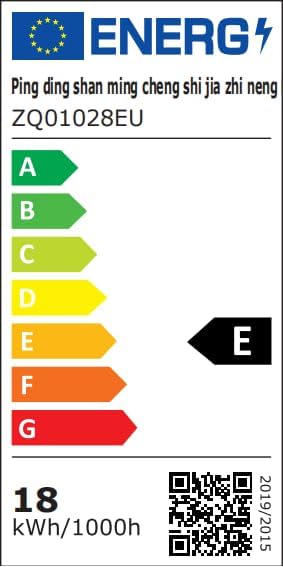
Image: Technical data sheet providing detailed product specifications.

Image: EU Energy Label for the product. For more details, visit EPREL Database.
10. Warranty and Support
Information regarding product warranty and dedicated customer support is not available in the provided product data. For any inquiries or support needs, please refer to the seller or the point of purchase.