
FAMIDUO DS-DUCK-1
FAMIDUO DoDo Duck Night Light Instruction Manual
Model: DS-DUCK-1
Introduction
Thank you for choosing the FAMIDUO DoDo Duck Night Light. This manual provides essential information for the safe and effective use of your new night light. Please read it thoroughly before use and retain it for future reference.
The DoDo Duck Night Light is a charming and functional addition to any child's room, offering soft illumination and a comforting presence. Its squishy silicone design and user-friendly features make it ideal for various uses, from bedtime companion to a gentle light for nighttime activities.
What's in the Box
- DoDo Duck Night Light (x1)
- USB-C Charging Cable (x1)
- Instruction Manual (x1)
Key Features
- Huggable Design: Inspired by a cute duck shape, made from soft, squishy silicone.
- Eye-Caring Illumination: Emits a 3000K warm white light that is soft, comfortable, anti-blue light, and flicker-free, ideal for sensitive eyes.
- Dimmable Touch Control: Easily switch between two brightness levels (low for sleep, normal for ambient light) by tapping the duck.
- 20-Minute Auto-Off Timer: Features an optional timer that automatically turns off the light after 20 minutes, conserving energy and aiding sleep.
- Rechargeable & Portable: Equipped with a 1200mAh built-in lithium-ion battery, offering up to 12 hours of cordless use on a single charge. Recharges via USB-C.
- Durable & Safe: Constructed from non-toxic, BPA-free silicone, making it 100% safe for children. It is water-resistant and drop-proof.
Setup and Charging
- Initial Charge: Before first use, fully charge the night light. Connect the provided USB-C cable to the charging port on the bottom of the duck and plug the other end into a compatible USB power adapter (not included).
- Charging Indicator: The light will indicate charging status (e.g., a red light may appear while charging and turn off when fully charged, refer to the product for specific indicator behavior).
- Charging Time: A full charge typically takes approximately 3 hours.

Image: The bottom of the DoDo Duck Night Light, highlighting the USB-C charging port and battery specifications.
Operating Instructions
- Power On/Off: Locate the power switch on the bottom of the night light. Slide it to the 'ON' position to activate the light. Slide it to 'OFF' to turn it off completely.
- Brightness Adjustment (Touch Control): Once powered on, gently tap the silicone body of the duck to cycle through brightness levels:
- First tap: Low brightness (ideal for sleeping).
- Second tap: Normal brightness (suitable for feeding or moving around).
- Third tap: Turns the light off.
- 20-Minute Timer Function: To activate the 20-minute auto-off timer, slide the switch on the bottom to the '20'' position. The light will remain on for 20 minutes and then automatically turn off. To disable the timer, slide the switch back to the 'ON' position.

Image: Demonstrating the touch control for dimming the DoDo Duck Night Light.

Image: The 20-minute auto-off timer function, ideal for bedtime.
Video: A demonstration of the FAMIDUO DODO Duck Night Light, showcasing its soft, squishy texture, touch control for turning on/off and dimming, and the charging port. The video highlights the product's ease of use and appealing design.
Care and Maintenance
- Cleaning: To clean the silicone surface, wipe gently with a soft, damp cloth. Do not use harsh chemicals or abrasive cleaners.
- Water Resistance: The night light is water-resistant, but it is not designed to be submerged in water. Avoid direct exposure to excessive moisture.
- Storage: Store the night light in a cool, dry place when not in use for extended periods.
- Battery Care: For optimal battery life, avoid fully discharging the battery frequently. Charge it regularly.
Troubleshooting
| Problem | Possible Cause | Solution |
|---|---|---|
| Light does not turn on. | Battery is low or depleted. Power switch is off. | Charge the night light using the USB-C cable. Ensure the power switch on the bottom is in the 'ON' or '20'' position. |
| Light turns off unexpectedly. | 20-minute timer is active. Battery is low. | Check if the switch is in the '20'' timer position. If so, slide it to 'ON' for continuous light. Recharge the night light if the battery is low. |
| Touch control is unresponsive. | Power switch is off. Internal malfunction. | Ensure the power switch is 'ON' or '20''. If the issue persists after charging and checking the switch, contact customer support. |
Specifications
- Model Name: DS-DUCK-1
- Brand: FAMIDUO
- Material: Silicone (Shade), ABS+PP (Base)
- Product Dimensions: 4.8"D x 3.62"W x 4.1"H
- Item Weight: 223 Grams (7.9 ounces)
- Light Source Type: LED
- Light Color: Warm light
- Color Temperature: 3000 Kelvin
- Switch Type: Touch
- Power Source: Rechargeable Lithium Ion Battery
- Battery Capacity: 1200mAh
- Battery Life: Up to 12 hours (depending on brightness setting)
- Charging Time: Approximately 3 hours
- Water Resistance Level: Water Resistant
- Special Features: Dimmable, Pat Control, Portable, Timer, Energy Efficient
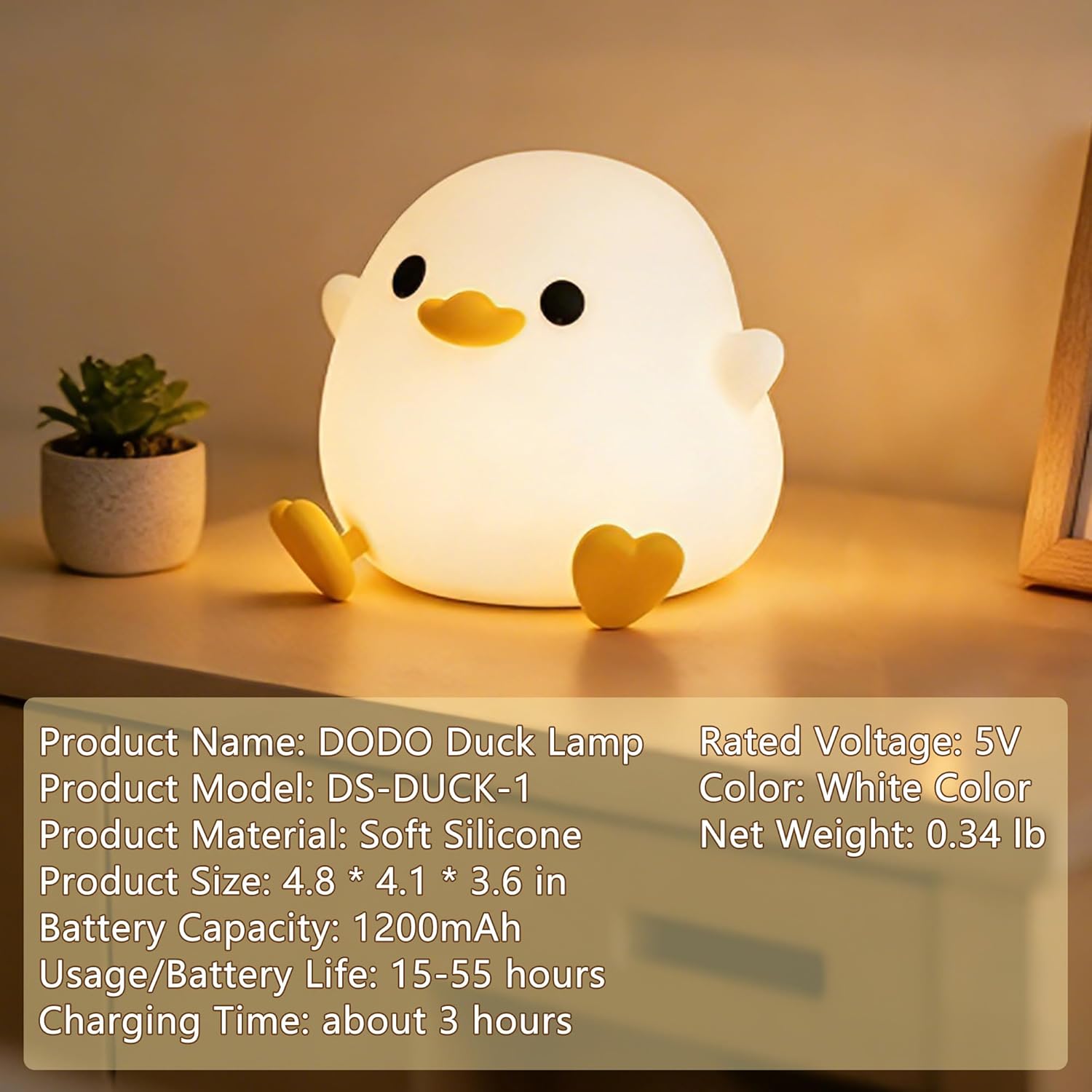
Image: Detailed product specifications of the DoDo Duck Night Light.
Safety Information
- Keep out of reach of very young children without supervision to prevent choking hazards from small parts (e.g., charging cable).
- Do not disassemble or attempt to repair the device yourself. This may void the warranty and pose a safety risk.
- Use only the provided USB-C cable for charging.
- Avoid exposing the night light to extreme temperatures or direct sunlight for prolonged periods.
- Dispose of the product and its battery responsibly according to local regulations.
Warranty and Support
For warranty information, technical support, or any questions regarding your FAMIDUO DoDo Duck Night Light, please refer to the contact information provided on the product packaging or visit the official FAMIDUO website.
Ask a question about this manual
Ask about setup, troubleshooting, compatibility, parts, safety, or missing instructions. Manuals+ will review the question and use this page’s manual context to help answer it.