
Introduction
This manual provides essential information for the installation, operation, and maintenance of your LADYSON Replacement Touch Screen. This high-quality resistive touchscreen is designed as a direct replacement for the Korg M3, Korg PA800, and Korg PA2X Pro digital synthesizers and workstations. It is intended to replace old, broken, cracked, or damaged screens, restoring full functionality and visual clarity to your device.
Each screen undergoes rigorous quality control to ensure it is 100% functional and free from defects such as scratches, dead areas, pixels, or dashed lines before shipping.
Product Overview

Figure 1: LADYSON Replacement Touch Screen. This image shows the LADYSON replacement touch screen, a clear rectangular panel with a flexible flat cable (FFC) extending from its bottom edge, ready for installation.
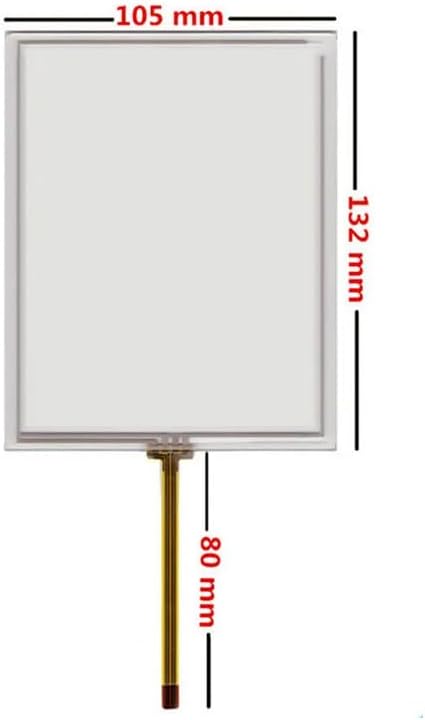
Figure 2: Touch Screen Dimensions. This image illustrates the precise dimensions of the LADYSON replacement touch screen. The screen measures 105 mm in width and 132 mm in height. The flexible flat cable (FFC) extends 80 mm from the bottom of the screen.
The LADYSON replacement screen is a 5.7-inch resistive touch panel, measuring 132mm x 105mm, designed with a 4-wire connection for accurate touch response. It is a glass digitizer, ensuring durability and clear display.
Installation Guidelines
Professional installation is highly recommended. Screen replacement is a delicate procedure. We will not be responsible for any damage incurred during installation if not performed by a qualified professional.
Important Notes Before Installation:
- Pre-Installation Test: Before fully installing the screen, it is crucial to test its functionality. Do not remove any protective films or labels during this test.
- Static Electricity Precaution: Static electricity can damage electronic components. Before attempting any repair, ensure you connect an ESD (Electrostatic Discharge) strap to the ground. This prevents static discharge from harming your device's electronics.
- Safety First: Always wear eye protection to prevent injury from glass shards. Handle the screen with extreme care to avoid cutting yourself.
- Test Simulation: Perform a test simulation by connecting the new screen's cable to the device's motherboard (without fully assembling the device). Power on the device and check if the screen displays correctly and touch functionality is responsive. If the test is successful, proceed with the full installation. If nothing appears or issues arise, contact support immediately. Do not force the installation.
- Cable Handling: Ensure the flexible flat cable (FFC) of the LCD is not over-bent. Bending the cable beyond 90 degrees can cause permanent damage, resulting in a black display or other malfunctions.
It is advisable to watch video tutorials related to screen installation on platforms like YouTube before beginning the process. If you are unsure about the installation, seek assistance from a professional technician.
The package includes: 1 compatible LCD screen for Korg M3 Korg PA800 PA2X Pro, 1 repair tool kit, 1 protective film, and 1 waterproof adhesive. Please note that the included repair tool kit is universal and may not be suitable for all specific needs; professional tools might be required for certain repairs.
Operation
Once correctly installed, the LADYSON replacement touch screen will restore the full interactive capabilities of your Korg M3, PA800, or PA2X Pro. The resistive touch technology allows for precise input using a stylus or finger, essential for navigating menus, adjusting parameters, and interacting with the device's interface.
Ensure the screen is clean and free of debris for optimal touch response. Calibrate the touch screen if your device offers this function, to ensure accurate touch point recognition.
Maintenance
- Cleaning: Use a soft, lint-free cloth, slightly dampened with water or a screen-safe cleaning solution, to gently wipe the screen. Avoid harsh chemicals, abrasive materials, or excessive moisture.
- Protection: While the screen comes with a protective film, consider applying an additional screen protector for enhanced durability against scratches and minor impacts.
- Handling: Avoid applying excessive pressure to the screen, especially with sharp objects, as this can damage the resistive layer.
- Storage: If the device is stored for extended periods, ensure it is in a clean, dry environment, away from extreme temperatures and direct sunlight.
Troubleshooting
| Problem | Possible Cause | Solution |
|---|---|---|
| Screen remains black after installation. |
|
|
| Touch response is inaccurate or unresponsive. |
|
|
| Visible lines or dead pixels on the display. |
|
|
Specifications
| Feature | Detail |
|---|---|
| Brand | LADYSON |
| Model Number | Touch for Korg M3 Korg PA800 PA2X Pro |
| Compatibility | Korg M3, Korg PA800, Korg PA2X Pro |
| Screen Type | Resistive Touchscreen, Glass Digitizer |
| Screen Size | 5.7 inches |
| Dimensions (W x H) | 105 mm x 132 mm |
| Connection Type | 4-wire Flexible Flat Cable (FFC) |
| ASIN | B0D2Z7TSK7 |
| First Available Date | April 30, 2024 |
Warranty and Support
The product is subject to a return policy allowing for refund or replacement within 14 days. Each screen undergoes strict quality control before shipment to ensure it is free from defects.
For any issues, questions, or support needs regarding your LADYSON replacement touch screen, please contact the seller directly through the Amazon platform. Provide your order details and a clear description of the issue to facilitate prompt assistance.