
POROMETISTO MT02
POROMETISTO Smart Digital Multimeter Tester User Manual
Model: MT02
Introduction
The POROMETISTO MT02 Smart Digital Multimeter Tester is a versatile and reliable tool designed for accurate electrical measurements. Featuring 6000 counts TRMS, it automatically identifies AC/DC voltage, resistance, and continuity, making it suitable for both professional and DIY applications. Its robust design and intelligent features ensure precision and safety in various electrical environments.

Safety Information
Always observe basic safety precautions when using this multimeter to prevent electric shock or damage to the device. Read all instructions carefully before operation.
- Do not apply voltage or current that exceeds the specified maximum limits.
- Ensure test leads are properly connected and in good condition before each use.
- Avoid using the multimeter in wet environments or with wet hands.
- Always disconnect power to the circuit before measuring resistance, continuity, or capacitance.
- Use caution when working with live circuits. Non-contact voltage (NCV) detection is a safety feature, but always verify with direct measurement if possible.
- Replace batteries promptly when the low battery indicator appears to ensure accurate readings.
What's in the Box
The POROMETISTO MT02 Smart Digital Multimeter Tester package includes the following items:
- 1x POROMETISTO MT02 Digital Multimeter
- 1x User Manual
- 1x Storage Pouch
- 1x Charging Cable
- 2x Test Leads (Red and Black)
- AAA Batteries (included)
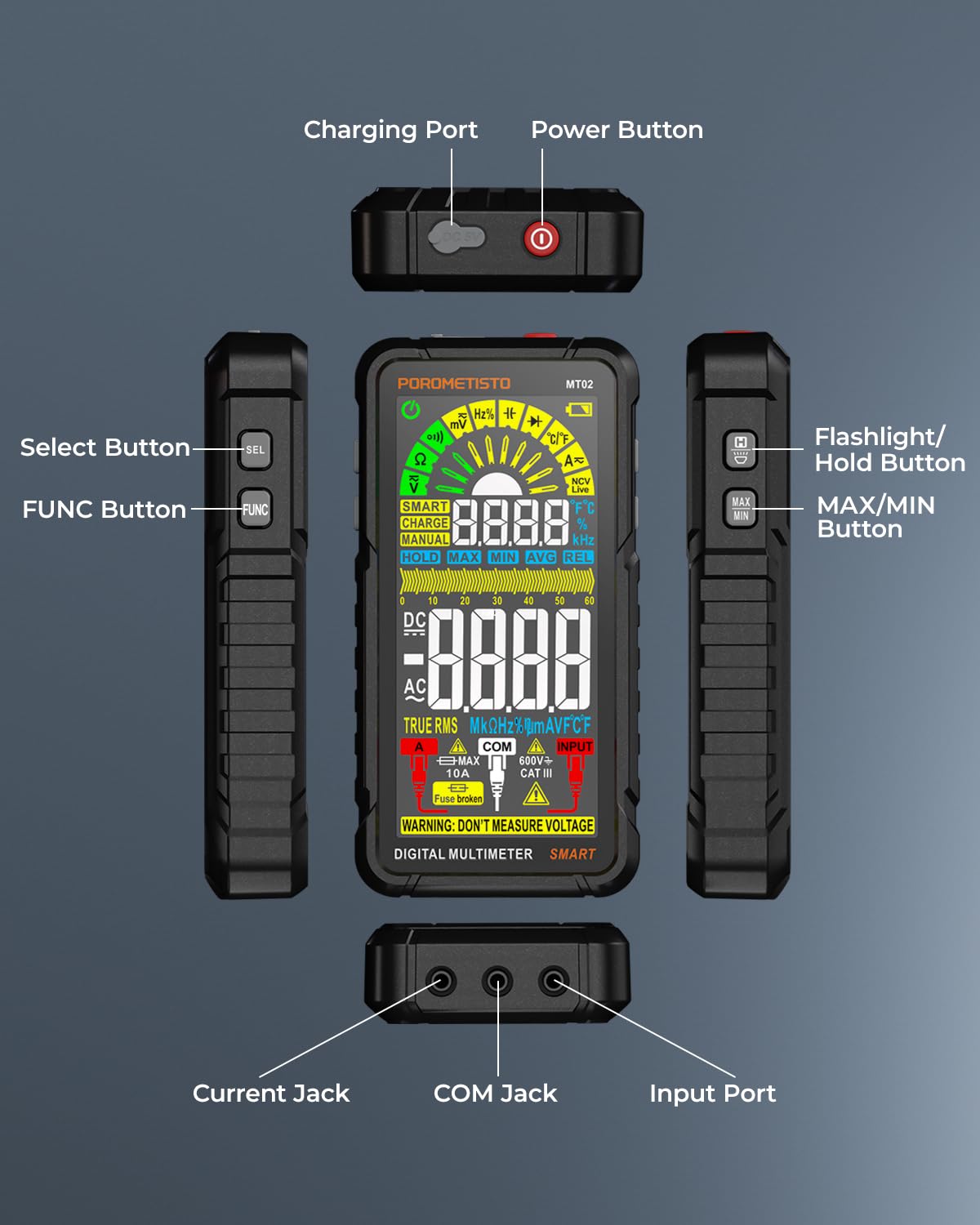
Setup
1. Charging the Multimeter
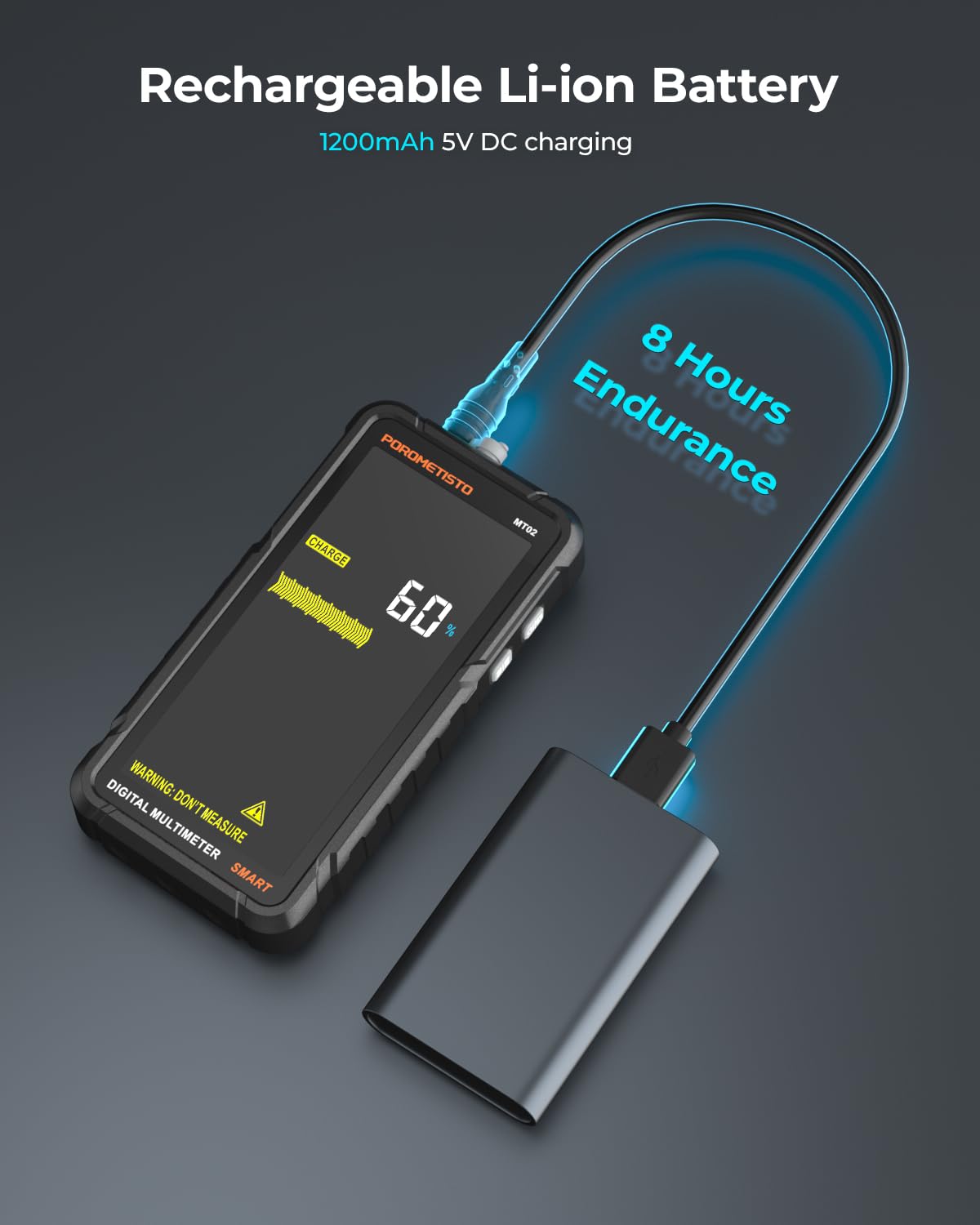
The MT02 multimeter is equipped with a rechargeable Li-ion battery. Before initial use, or when the low battery indicator appears, charge the device using the provided charging cable.
- Connect the small end of the charging cable to the charging port on the top of the multimeter.
- Connect the USB end of the charging cable to a standard USB power adapter (not included) or a computer USB port.
- The display will show a charging indicator. A full charge provides approximately 8 hours of endurance.
2. Connecting Test Leads
Proper connection of test leads is essential for accurate and safe measurements.
- Insert the black test lead into the "COM" (common) jack.
- Insert the red test lead into the "INPUT" jack for most voltage, resistance, continuity, capacitance, frequency, and diode measurements. For current measurements (up to 10A), use the dedicated "10A" jack.
3. Powering On/Off
Press the red power button located on the top of the multimeter to turn the device on or off.
Operating Modes and Measurements
The MT02 offers both Smart (Auto) and Manual modes for various electrical measurements.
1. Smart Mode (Auto-Ranging)
In Smart Mode, the multimeter automatically identifies and measures AC/DC voltage, resistance, and continuity. This simplifies operation by eliminating the need for manual range selection.

2. Manual Mode (Function Selection)
For specific measurements or to override Smart Mode, press the "FUNC" button to cycle through available functions such as Capacitance, Frequency, Duty Cycle, Diode, and Temperature. The display will indicate the selected function.

3. Non-Contact Voltage (NCV) Testing
The NCV feature allows for quick and safe detection of AC voltage on live wires without direct contact. Hold the top of the multimeter near the wire or outlet. The device will provide audible and visual alerts (buzzer sound and changing bar graph) indicating the presence and strength of the electric field.

4. Data Hold and MAX/MIN
Press the "HOLD" button to freeze the current reading on the display. Press it again to release. The "MAX/MIN" button allows you to view the maximum and minimum values recorded during a measurement session.
5. Flashlight
The built-in flashlight can be activated by pressing the flashlight button, providing illumination in dimly lit work areas.
Maintenance
1. Cleaning
Wipe the multimeter with a dry, soft cloth. Do not use abrasives or solvents. Ensure the device is powered off and disconnected from any circuits before cleaning.
2. Battery Care
To prolong battery life, charge the multimeter regularly, especially if it will not be used for an extended period. Avoid fully discharging the battery frequently.
3. Storage
Store the multimeter in its provided storage pouch in a cool, dry place, away from direct sunlight and extreme temperatures. Keep it out of reach of children.
Troubleshooting
If you encounter issues with your POROMETISTO MT02 multimeter, refer to the following common troubleshooting steps:
- No Power: Ensure the battery is charged. If the device does not turn on after charging, contact customer support.
- "OL" (Overload) Display: This indicates that the measured value exceeds the multimeter's range for the selected function. Switch to a higher range if available, or ensure the measurement is within the device's specifications.
- Inaccurate Readings: Check test lead connections. Ensure the correct function is selected for the measurement. Verify the battery level.
- No NCV Detection: Ensure the NCV sensor area is clear and positioned correctly near the AC voltage source.
For more detailed troubleshooting or persistent issues, consult the full user manual or contact POROMETISTO customer support.
Specifications
| Feature | Detail |
|---|---|
| Model Number | MT02 |
| Display Counts | 6000 Counts TRMS |
| Measurement Functions | AC/DC Voltage, Current, Resistance, Capacitance, Frequency, Duty Cycle, Diode, Temperature, Continuity, NCV |
| Auto-Ranging | Yes (Smart Mode for AC/DC Voltage, Resistance, Continuity) |
| Power Source | Rechargeable Lithium Metal Battery (included) |
| Product Dimensions | 3 x 1.1 x 5.7 inches |
| Item Weight | 1.08 Pounds |
| Manufacturer | POROMETISTO |
| Color | Black |
| Safety Rating | CAT III 600V |
Warranty and Support
POROMETISTO provides a 3-year warranty for the MT02 Smart Digital Multimeter Tester. Additionally, lifetime technical support is available 24/7 to assist you with any issues or questions regarding your product.
For further assistance, please visit the official POROMETISTO store on Amazon or contact their customer service directly.
Related Documents - MT02
 |
POROMETISTO CM06/CM06Pro Clamp Meter User Manual - True RMS Digital Multimeter Comprehensive user manual for the POROMETISTO CM06 and CM06Pro auto-ranging digital clamp meters. Covers features like True RMS, AC/DC voltage and current, resistance, frequency, capacitance, and NCV detection. Available in English, German, French, Italian, and Spanish. |
 |
POROMETISTO UT01C USB Tester User Manual Comprehensive user manual for the POROMETISTO UT01C USB Tester, covering technical specifications, operating instructions, and various testing modes including PD, QC, and ripple measurement. |
 |
POROMETISTO TI01 Thermal Imaging Camera User Manual User manual for the POROMETISTO TI01 Rechargeable Thermal Imaging Camera. This handheld device features a 240*240 resolution, 25Hz refresh rate, waterproof and anti-drop design, and a wide temperature range from -20 ℃ to 550 ℃. Provides comprehensive operational and specification details. |
 |
Automate Push PRO Remote: Advanced Smart Shade Control Discover the Automate Push PRO Remote, the most advanced remote for smart shade control. Features custom timers, enhanced visuals with a 2.4" LCD, long-lasting rechargeable battery, and personalized shade naming for effortless operation. |