
Retekess TT119
Retekess TT119 Assistive Listening System User Manual
Model: TT119
1. Introduction
The Retekess TT119 Assistive Listening System is designed to facilitate clear and effective communication in various settings such as churches, courts, and conferences. This system includes a powerful transmitter and multiple receivers, enabling simultaneous interpretation and assistive listening over long distances. Its user-friendly design ensures ease of setup and operation, providing a reliable audio solution for diverse needs.
2. Safety Information
- Do not expose the devices to extreme temperatures, humidity, or direct sunlight.
- Keep the devices away from water and other liquids.
- Use only the provided power adapter for the transmitter.
- Do not attempt to disassemble or repair the devices yourself. Refer to qualified personnel for service.
- Dispose of batteries responsibly according to local regulations.
3. Package Contents
Verify that all items are present in your package:
- 1 x TT119 Transmitter
- 10 x TT118 Receivers
- 10 x Earphones
- 10 x Lanyards
- 1 x Headset Microphone
- 1 x Power Adapter
- 1 x User Manual

Figure 3.1: Package Contents of the Retekess TT119 System.
4. Product Overview
The Retekess TT119 system comprises a central transmitter unit and multiple portable receivers. The transmitter broadcasts audio signals, while the receivers allow individual users to listen to the transmitted content.
4.1. Transmitter (TT119)
The transmitter features a clear display, control buttons for channel and volume adjustment, and various input/output ports for connectivity.

Figure 4.1: Retekess TT119 Transmitter and Receivers.
4.2. Receiver (TT118)
The compact TT118 receivers are designed for portability and ease of use, featuring volume controls and a channel display.
5. Setup
5.1. Connecting the Transmitter
- Connect the antenna to the ANT port on the back of the TT119 transmitter.
- Plug the headset microphone into the MIC input on the front panel.
- Connect the power adapter to the 12V DC input on the back of the transmitter and plug it into a power outlet.
- Turn on the transmitter using the ON/OFF switch on the back.
5.2. External Audio Input
The TT119 transmitter supports various external audio inputs, including XLR, AUX, USB, and RCA. This allows for integration with existing sound systems or direct audio sources.
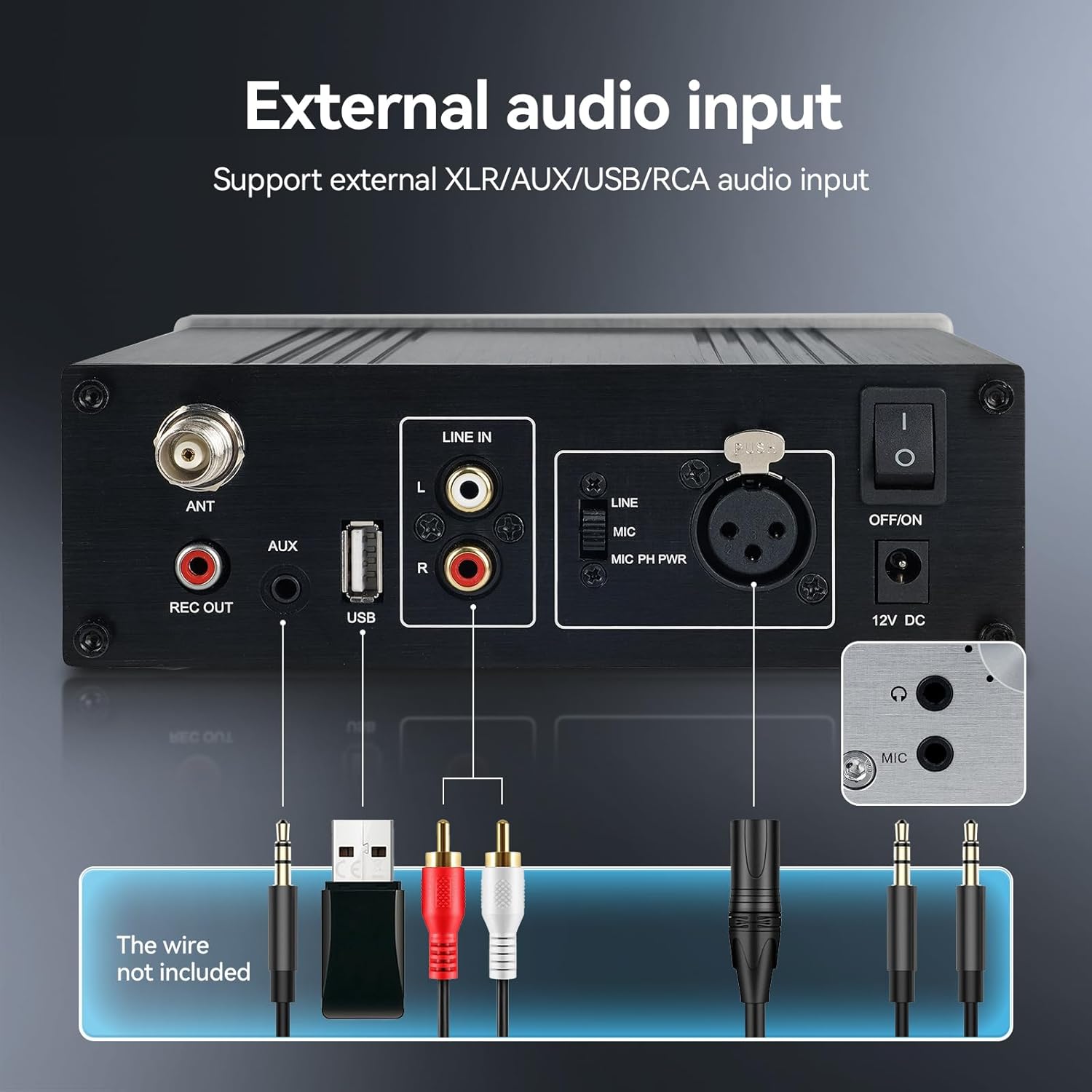
Figure 5.1: External Audio Input Ports.
5.3. Powering the Receivers
Each TT118 receiver requires 2 AA batteries. Open the battery compartment on the back of the receiver and insert the batteries, ensuring correct polarity. The receivers are designed for over 10 hours of continuous use on a fresh set of batteries.

Figure 5.2: Inserting Batteries into TT118 Receiver.
5.4. Initial Channel Synchronization
Ensure both the transmitter and receivers are set to the same channel for proper communication. The TT119 transmitter supports 17 channels.

Figure 5.3: Device Compatibility and Channel Synchronization.
6. Operating Instructions
6.1. Power On/Off
To power on the transmitter, flip the ON/OFF switch on the rear panel. For receivers, press and hold the power button until the display illuminates.
6.2. Channel Adjustment
On the transmitter, use the 'CH+' and 'CH-' buttons to cycle through the available channels. On the receivers, use their respective channel buttons to match the transmitter's channel.

Figure 6.1: Automatic Lock Feature.
6.3. Volume Control
Adjust the main volume on the transmitter using the 'MAIN VOLUME' knob. For individual listening, adjust the volume on each receiver using its dedicated volume controls.

Figure 6.2: Volume Adjustment on Transmitter.
6.4. Mute Function
The transmitter features a one-key mute function. Press the mute button to temporarily silence the audio transmission. This is useful for private conversations or breaks.
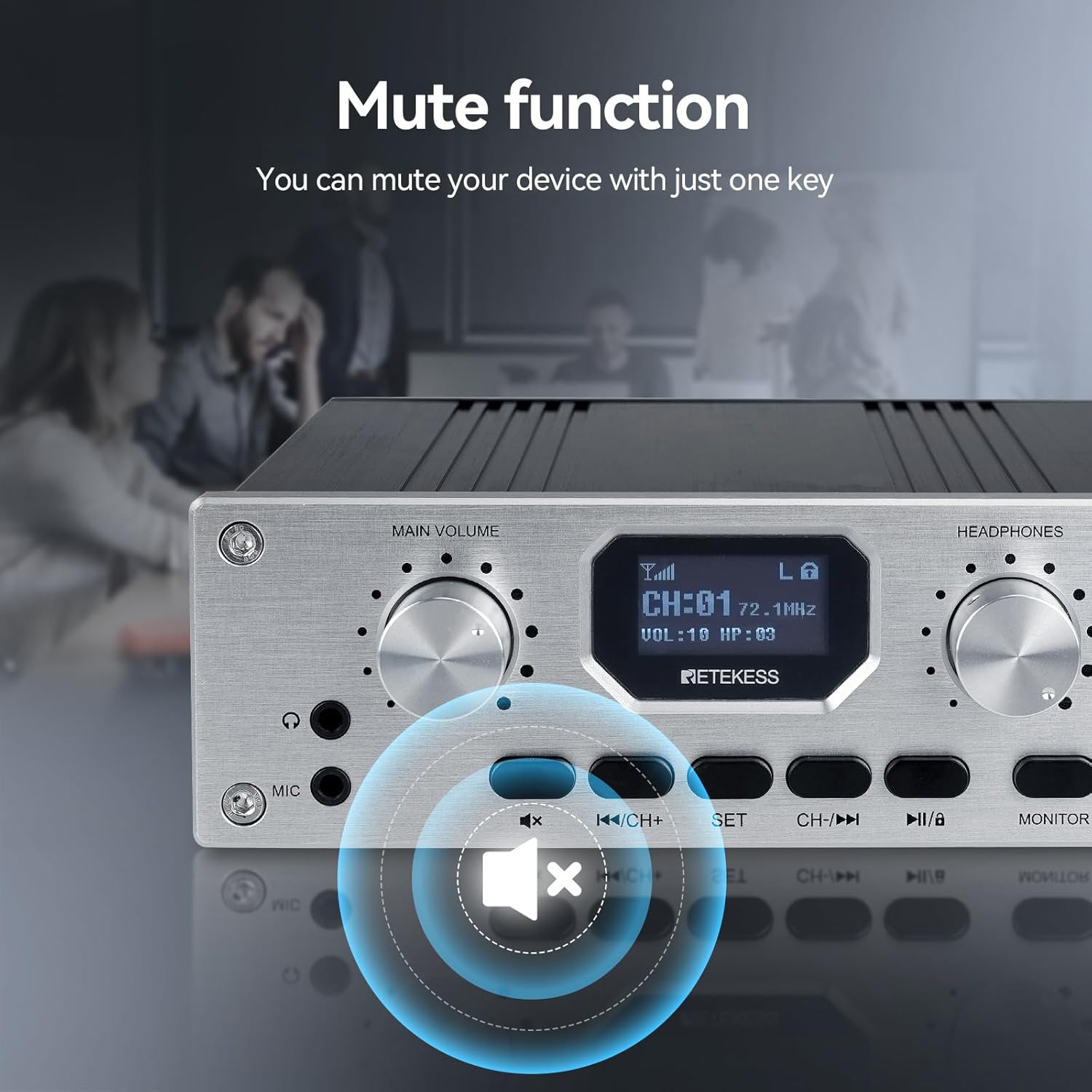
Figure 6.3: Mute Function.
6.5. Switching to Original Sound
If you wish for the audience to hear the original, untranslated content, you can use the original sound button on the transmitter. This allows for flexible switching between translated and original audio.
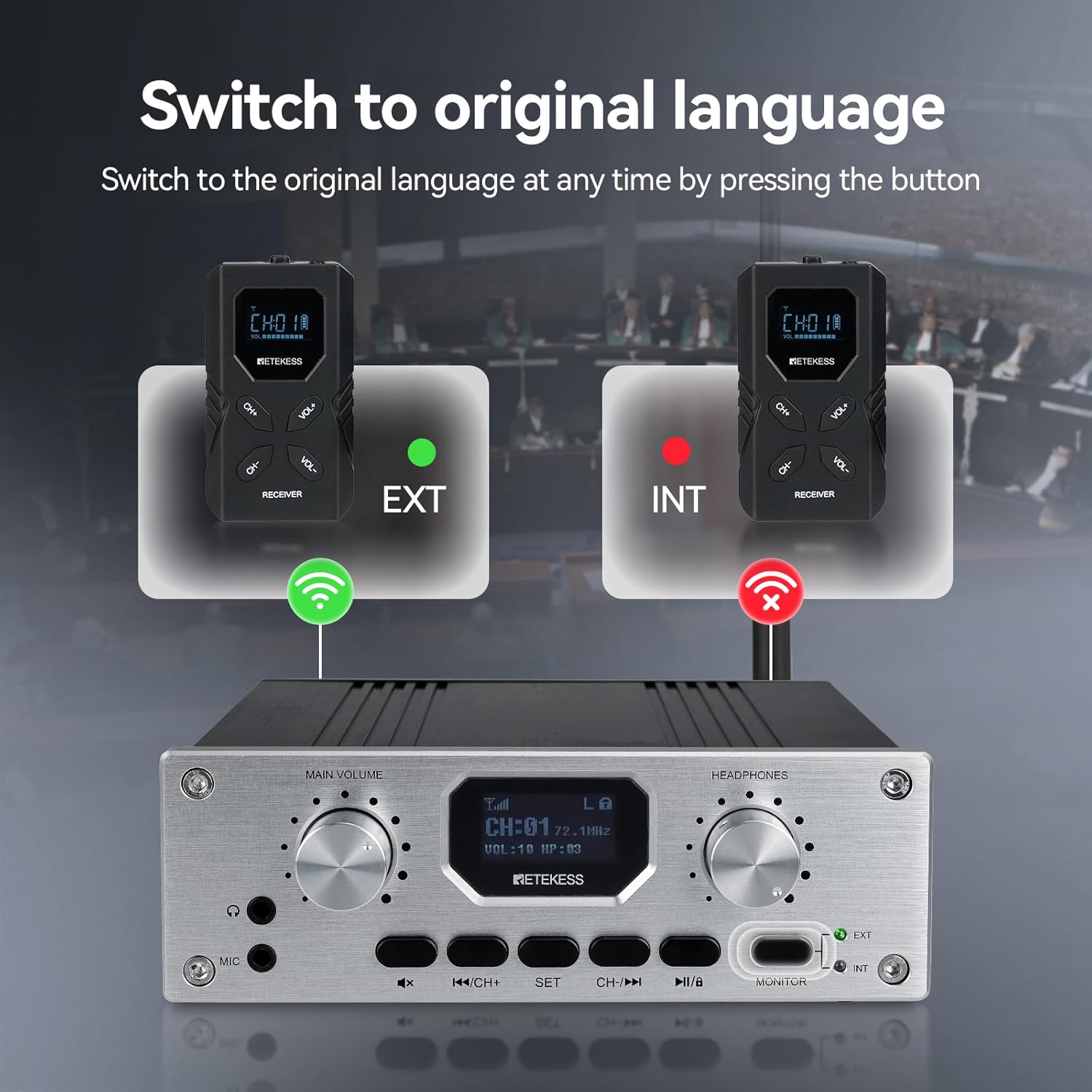
Figure 6.4: Switching to Original Language.
6.6. Recording Function
The TT119 transmitter offers two recording output methods. You can access the recording settings via the 'SET' button on the front panel. This allows for capturing transmitted audio for later review or archiving.

Figure 6.5: Recording Output Options.
6.7. Operational Range
The system provides a transmission range of up to 300m (980ft), making it suitable for large venues and outdoor events where the transmitter and receivers may be far apart.
Figure 6.6: Working Range of the System.
6.8. Product Functionality Video
Video 6.1: This video demonstrates the key functions of the Retekess TT119 tour guide system, including its multi-channel FM transmission, channel adjustment, mute function, and various input/output options. It highlights how the system facilitates clear audio transmission for simultaneous interpretation and assistive listening in different environments.
7. Maintenance
- Clean the devices with a soft, dry cloth. Do not use abrasive cleaners or solvents.
- Store the system in a cool, dry place when not in use.
- Regularly check battery compartments for corrosion and replace batteries as needed.
- Ensure all cables and connections are secure before and after use.
8. Troubleshooting
| Problem | Possible Cause | Solution |
|---|---|---|
| No sound from receiver | Receiver off, low battery, wrong channel, transmitter off, earphone not connected. | Turn on receiver, replace batteries, match channel with transmitter, turn on transmitter, ensure earphone is fully plugged in. |
| Poor sound quality/static | Interference, low signal strength, wrong channel, distance too far. | Change channel, reduce distance between transmitter and receiver, check for obstructions, ensure antenna is properly connected. |
| Transmitter not powering on | Power adapter not connected, faulty power outlet. | Ensure power adapter is securely connected and plugged into a working outlet. |
| Mute function not working | Button malfunction. | Ensure the mute button is pressed firmly. If issue persists, contact customer support. |
9. Specifications
| Feature | Detail |
|---|---|
| Model | TT119 (Transmitter), TT118 (Receiver) |
| Transmission Range | Up to 300m / 980ft |
| Channels | 17 (adjustable) |
| Transmitter Dimensions | 17.91 x 12.2 x 10.63 inches |
| Item Weight | 8.48 pounds (total package) |
| Receiver Battery Life | Up to 10 hours (with 2 AA batteries) |
| Connectivity | Wireless |
| Audio Inputs (Transmitter) | XLR, AUX, USB, RCA |
| Special Features | Mute Function, Original Sound Switch, Recording Output, Automatic Lock |
10. Warranty and Customer Support
Retekess provides a 3-year warranty for the TT119 Assistive Listening System. Additionally, a 30-day no-reason return policy is offered. For any inquiries, technical assistance, or warranty claims, please contact Retekess customer support via Amazon. We aim to respond within 12 hours.
For further information and support, you may visit the official Retekess Store: Retekess Amazon Store
Ask a question about this manual
Ask about setup, troubleshooting, compatibility, parts, safety, or missing instructions. Manuals+ will review the question and use this page’s manual context to help answer it.