
1. Introduction
Thank you for choosing the GESKS ICSEE WiFi Camera Security 3K 6MP Dual Lens Wireless PTZ Camera. This advanced security camera is designed to provide comprehensive surveillance with its dual-lens system, offering a 360-degree field of view and dual-screen monitoring. Equipped with 6MP HD imaging, full-color night vision, human detection, two-way audio, and flexible storage options, it ensures reliable protection for your outdoor areas.
This manual provides detailed instructions for setting up, operating, maintaining, and troubleshooting your camera to ensure optimal performance and longevity.
2. What's in the Box
Please check the package contents to ensure all items are present:
- CCTV Camera (Dual Lens Black 6MP)
- Power Adaptor
- User Manual (this document)
- User Screws
- Bracket
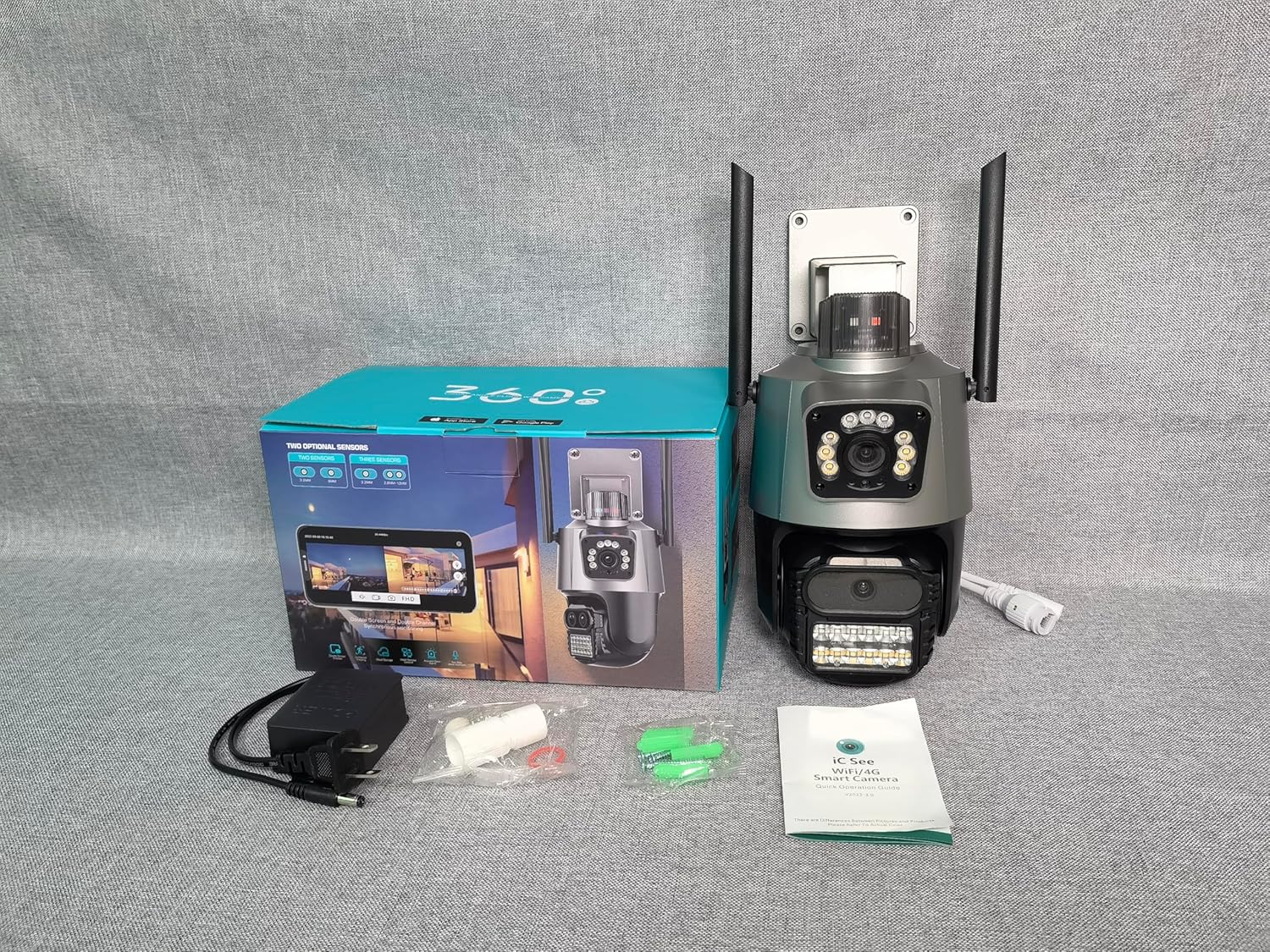
Image: Package contents of the GESKS ICSEE WiFi Camera.
3. Setup and Installation
3.1 Physical Installation
The camera is designed for outdoor use and can be mounted on a ceiling or wall using the provided screws and bracket. Ensure the mounting location provides a clear view of the area you wish to monitor and is within range of your Wi-Fi network.
- Secure the mounting bracket to your desired surface using the provided screws.
- Attach the camera securely to the mounting bracket.
- Connect the power adaptor to the camera's power charge interface and plug it into a power outlet.
3.2 Initial Connection and App Setup
To connect your camera, download the iCSee app from your smartphone's app store. Follow the in-app instructions for adding a new device.
Video: P-11 Dual Lens Camera Connection Guide. This video demonstrates the initial setup and connection process for the dual-lens camera.
Video: K-3 Camera Connection Video. This video provides an alternative or supplementary guide for connecting the camera to your network.
3.3 SD Card Installation and Reset Button
The camera supports local storage via a Micro SD card (up to 128GB). Locate the SD card slot, typically under a protective cover on the camera body. Insert the Micro SD card with the gold contacts facing down. The reset button is usually located near the SD card slot. Press and hold the reset button for several seconds until you hear a prompt to reset the device to factory settings.
4. Operating Instructions
4.1 Dual Lens and 360° View
Your camera features dual lenses: one fixed and one Pan-Tilt-Zoom (PTZ). This allows for a comprehensive 360-degree field of view. The iCSee app provides two integrated screens for simultaneous monitoring from different perspectives, enhancing surveillance efficiency.
4.2 6MP HD Image and Full-Color Night Vision
The camera delivers 6MP (3MP+3MP) Full HD images and video both day and night. It is equipped with white lamps and infrared lamps, offering three night vision modes:
- Full-color: Provides color images in low light.
- Infrared: Standard black and white night vision.
- Smart Vision: Automatically switches to full-color when ambient light is insufficient.

Image: Intelligent Full Color Night Vision capability.
4.3 Human Detection and Real-Time Alarm
The camera features advanced human detection. When a person is detected, the camera can track their movement and trigger real-time alarms. The iCSee app will send immediate notifications to your smartphone, capturing images or generating video of the suspicious activity.

Image: Automatic tracking of human movement.

Image: Floodlight and Alarm Siren functionality.
4.4 Two-Way Audio
The camera includes a built-in microphone and speaker, enabling two-way communication through the iCSee app. You can speak to visitors, give instructions, or deter intruders directly from your mobile device.

Image: Smoother 2-way Audio communication.
4.5 Storage Methods and Alexa Compatibility
The camera supports 24/7 recording. You can store recordings locally on a Micro SD card (up to 128GB) or utilize cloud storage services for convenient access to your videos. The camera is also compatible with Amazon Alexa for voice control, offering hands-free operation.

Image: Two Storage Methods available.
5. Maintenance
- Cleaning: Regularly wipe the camera lens and body with a soft, damp cloth to remove dust and dirt. Do not use harsh chemicals or abrasive cleaners.
- Firmware Updates: Check the iCSee app periodically for available firmware updates. Keeping your camera's firmware updated ensures optimal performance, security, and access to new features.
- Connection Check: Periodically verify that the power and network connections are secure and free from damage.
- Environmental Protection: While waterproof, avoid directing high-pressure water jets directly at the camera. Ensure proper drainage around the installation area.
6. Troubleshooting
| Problem | Possible Cause | Solution |
|---|---|---|
| Camera Offline | No power; Wi-Fi signal weak/disconnected; Incorrect Wi-Fi password; Router issues. | Check power connection. Verify Wi-Fi signal strength. Re-enter Wi-Fi password in app. Restart router. Use Ethernet connection if available. |
| Poor Image Quality | Dirty lens; Insufficient lighting; Network bandwidth issues. | Clean the camera lens. Ensure adequate lighting for night vision modes. Check network speed. |
| No Recording | SD card full/corrupted; Cloud storage subscription expired; Recording settings incorrect. | Format or replace SD card. Check cloud storage status. Verify recording settings in the app. |
| Two-Way Audio Not Working | Microphone/speaker blocked; App permissions; Volume settings. | Ensure nothing is obstructing the mic/speaker. Check app permissions for microphone access. Adjust volume settings in the app. |
| Camera Not Responding | Software glitch; Power issue. | Perform a hard reset by pressing and holding the reset button. Disconnect and reconnect power. |
7. Specifications
| Feature | Detail |
|---|---|
| Model Name | Dual Lens (IK-P11-Q6) |
| Indoor/Outdoor Usage | Outdoor |
| Video Capture Resolution | 1440p (6MP effective still resolution) |
| Connectivity Protocol | Wi-Fi, Ethernet, ONVIF |
| Controller Type | APP (iCSee), Amazon Alexa |
| Mounting Type | Ceiling Mount |
| Night Vision Range | Up to 65 Feet |
| Storage | Micro SD (up to 128GB), Cloud Storage |
| Two-Way Audio | Yes (Built-in microphone and speaker) |
| Human Detection | Yes (with automatic tracking) |
| Water Resistance Level | Waterproof |
| Dimensions (L x W x H) | 4.87 x 4.87 x 7.8 inches |
| Item Weight | 1.8 pounds |
| Material | Acrylonitrile Butadiene Styrene (ABS) |
8. Warranty and Support
For warranty information and technical support, please refer to the documentation provided with your purchase or contact the manufacturer, SKSTECH, directly. Details regarding protection plans may also be available from your retailer.