
Introduction
Thank you for purchasing the Zendstanding AK390 Stereo Amplifier Receiver. This manual provides detailed instructions for the setup, operation, maintenance, and troubleshooting of your new audio amplifier. Please read this manual thoroughly before using the product to ensure proper function and longevity.

Image: The Zendstanding AK390 Stereo Amplifier Receiver, a compact black unit with a blue digital display, various knobs, and input ports on the front panel. A remote control is visible in the upper left corner.
Package Contents
Verify that all items are present in the package:
- AK390 Audio Amplifier x 1
- 12V/5A DC Power Adapter x 1
- Remote Control x 1
- FM Antenna x 1
- User Manual x 1
Product Overview
The AK390 is a versatile 2-channel stereo amplifier receiver designed for home audio systems. It features Bluetooth 5.0 connectivity, multiple input options (USB, AUX, MIC, FM), and independent treble and bass controls. It also includes two microphone inputs for karaoke functionality.

Image: A diagram illustrating the functional description of the AK390 amplifier's front and back panels. Labels point to various ports and controls such as USB Input Jack, MIC1/MIC2, MODE Switch, Loop buttons, MIC VOL, BASS Control, TREBLE Control, Pause/Play, Back, Next, Volume Regulation and Power Switch Control on the front. On the back, labels point to Power Input DC 12V/3A, Right Channel Output, Left Channel Output, FM Radio ANT, and AUDIO INPUT L/R.
Front Panel Controls and Ports:
- USB Input Jack: For connecting USB storage devices.
- MODE Switch: Toggles between input modes (Bluetooth, USB, AUX, FM).
- MIC1 / MIC2: 6.35mm microphone input jacks.
- MIC VOL: Adjusts the volume of the microphones.
- BASS Control: Adjusts the low-frequency output.
- TREBLE Control: Adjusts the high-frequency output.
- Volume Regulation and Power Switch Control: Main volume knob, also functions as the power on/off switch.
- Playback Controls: Buttons for Next, Back, and Pause/Play.
Rear Panel Connections:
- Power Input DC 12V/5A: Connect the provided power adapter.
- Right Channel Output: Connect to the right speaker.
- Left Channel Output: Connect to the left speaker.
- FM Radio ANT: Connect the FM antenna for radio reception.
- AUDIO INPUT L/R: RCA input jacks for external audio sources (e.g., CD player, TV).
Setup
- Speaker Connection: Connect your passive speakers to the Left Channel Output and Right Channel Output terminals on the rear panel. Ensure correct polarity (+ to + and - to -).
- FM Antenna Connection: Connect the supplied FM antenna to the FM Radio ANT port on the rear panel for improved radio reception.
- Audio Input Connection:
- AUX Input: Connect external audio sources (e.g., TV, DVD player, computer) to the AUDIO INPUT L/R RCA jacks using an RCA cable.
- USB Input: Insert a USB flash drive containing audio files into the USB Input Jack on the front panel.
- Power Connection: Connect the 12V/5A DC Power Adapter to the Power Input DC 12V/5A port on the rear panel, then plug the adapter into a standard wall outlet.

Image: The AK390 amplifier positioned between two white tower speakers, connected to a television screen, illustrating a typical home theater setup.
Operating Instructions
Power On/Off:
Rotate the Volume Regulation and Power Switch Control knob clockwise until it clicks to turn the amplifier on. Rotate it counter-clockwise until it clicks to turn it off.
Input Mode Selection:
Press the MODE button on the front panel or the remote control to cycle through available input modes: Bluetooth (BT), USB, AUX, and FM.
Bluetooth Operation:
- Switch the amplifier to Bluetooth mode using the MODE button. The display will show "BLUE" or "BT".
- On your mobile device (phone, tablet, computer), enable Bluetooth and search for available devices.
- Select "BT-AUDIO" or a similar name from the list of devices to pair. A confirmation sound may be heard from the amplifier upon successful pairing.
- Begin playing audio from your device. Control playback (play/pause, next/previous track) using your device or the amplifier's playback buttons/remote.
Note: Maintain a distance of within 30 feet (10 meters) without wall obstruction for optimal Bluetooth connection. For TV or PC connections, keep the distance within 15 feet (5 meters).

Image: The AK390 amplifier on a table next to a speaker, with a hand holding a smartphone displaying Bluetooth settings, indicating compatibility with various wireless devices.

Image: A user's hands interacting with a smartphone showing Bluetooth pairing options, with the AK390 amplifier visible on a desk, demonstrating the ease of Bluetooth connection.
USB Playback:
- Insert a USB flash drive into the USB Input Jack.
- Switch the amplifier to USB mode using the MODE button. The amplifier will automatically detect and begin playing audio files from the USB drive.
- Use the playback buttons (Next, Back, Pause/Play) on the amplifier or remote control to navigate tracks.

Image: A hand inserting a USB flash drive into the USB port of the AK390 amplifier, highlighting the simplified and unified USB card slot for audio input.
FM Radio Operation:
- Ensure the FM antenna is connected.
- Switch the amplifier to FM mode using the MODE button.
- Use the Next/Back buttons to scan for radio stations. The amplifier can save up to 20+ radio stations.
- Use the remote control for convenient station switching.

Image: A close-up of the AK390 amplifier's front panel, showing "LINE" on the display, with a blurred radio dial in the background, illustrating its FM radio function.
Microphone (Karaoke) Function:
- Connect up to two microphones to the MIC1 and MIC2 input jacks on the front panel.
- Adjust the microphone volume using the MIC VOL knob.
- You can sing along to music playing from any input source (Bluetooth, USB, AUX).
Tone Control:
Use the BASS and TREBLE control knobs on the front panel to adjust the low and high frequencies of the audio output, respectively. This allows for fine-tuning the sound to your preference or to suit different audio content.
Maintenance
- Cleaning: Use a soft, dry cloth to clean the exterior of the amplifier. Do not use liquid cleaners or aerosols, as they may damage the unit.
- Ventilation: Ensure the amplifier has adequate ventilation. Do not block the ventilation openings.
- Storage: When not in use for extended periods, store the amplifier in a cool, dry place away from direct sunlight and extreme temperatures.
- Power Adapter: Only use the provided 12V/5A DC power adapter. Using an incorrect adapter may damage the unit.
Troubleshooting
| Problem | Possible Cause | Solution |
|---|---|---|
| No power | Power adapter not connected or faulty; power outlet not working. | Ensure the power adapter is securely connected to the amplifier and a working power outlet. Check the power outlet with another device. |
| No sound output | Incorrect input mode selected; speakers not connected properly; volume too low; audio source issue. |
|
| Bluetooth connection unstable or no pairing | Device too far; interference; amplifier not in pairing mode; device already paired with another unit. |
|
| Poor FM radio reception | Antenna not connected or positioned incorrectly; weak signal. | Ensure the FM antenna is securely connected. Try repositioning the antenna for better signal reception. |
| Microphone not working | Microphone not connected; MIC VOL too low; faulty microphone. | Ensure the microphone is securely plugged into MIC1 or MIC2. Increase the MIC VOL knob. Test with another microphone if available. |
Specifications
| Feature | Detail |
|---|---|
| Model | AK390 |
| Model Number | 7232459 |
| Brand | Zendstanding |
| Output Power (Peak) | 400W + 400W |
| Output Power (Rated) | 40W + 40W |
| Channels | 2.0 Channel Stereo |
| Bluetooth Version | 5.0 |
| Connectivity Technology | Auxiliary, Bluetooth, USB |
| Special Features | FM Tuner, 2 MIC Interfaces, Treble & Bass Control |
| Power Input | DC 12V/5A |
| Product Dimensions | 6.5 x 5.31 x 2.17 inches |
| Item Weight | 1.63 pounds |
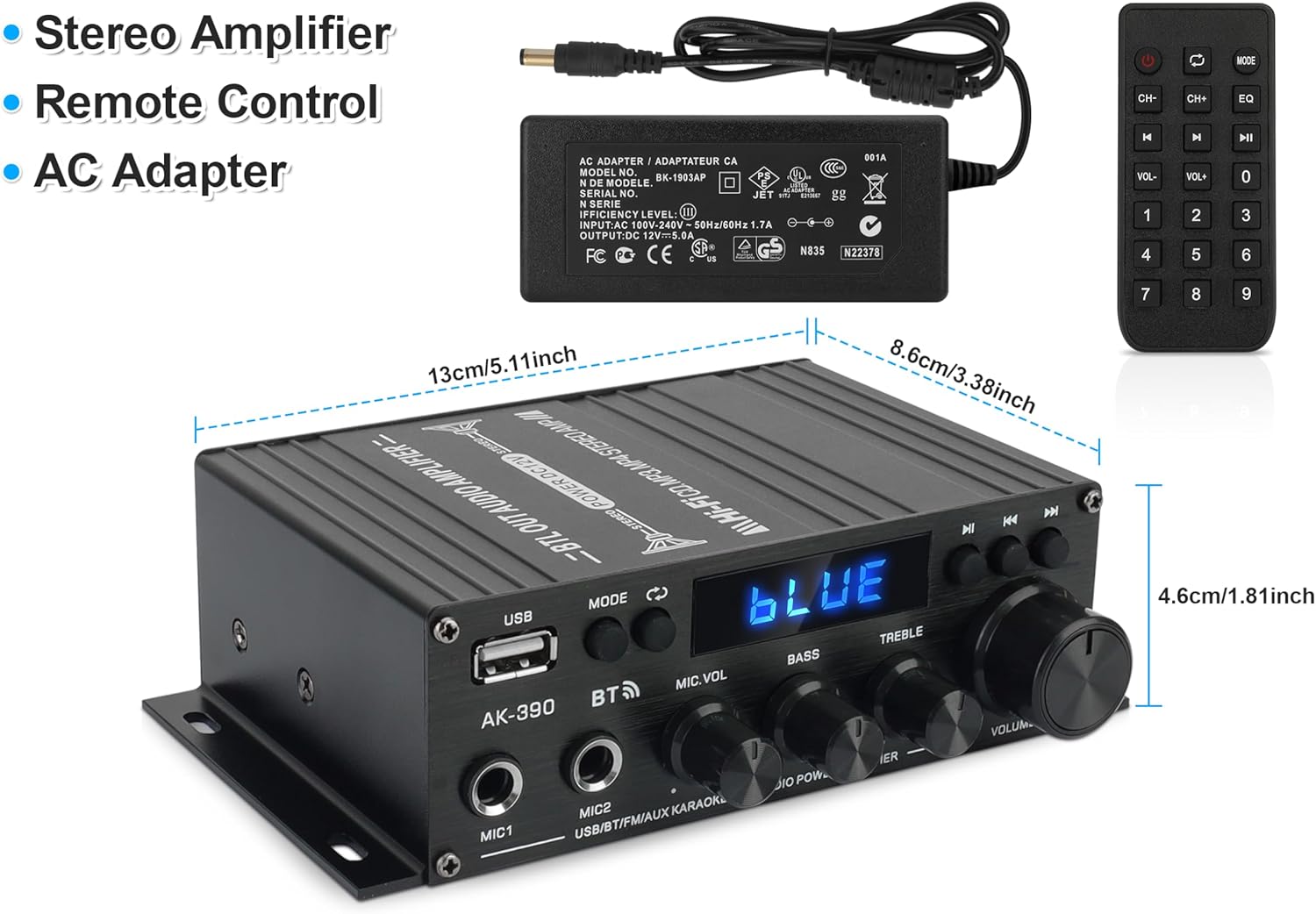
Image: The AK390 amplifier shown with its remote control and AC adapter, alongside its physical dimensions (length, width, height) in both centimeters and inches.
Warranty and Support
For warranty information and technical support, please refer to the contact details provided with your purchase documentation or visit the official Zendstanding website. Keep your purchase receipt as proof of purchase for warranty claims.
For further assistance, you may also contact the seller directly through the platform where the product was purchased.
Zendstanding Store: Visit Store