
1. Product Overview
The Wishiot 1.5g Micro Linear Digital Servo (GS-1502) is an ultra-micro linear actuator designed for precision control in lightweight applications. Its compact size and fast response make it ideal for 3D flight crafts, indoor aircraft, and small RC planes. This package typically includes two 1.5g linear servos, each equipped with a JR connector for easy integration.
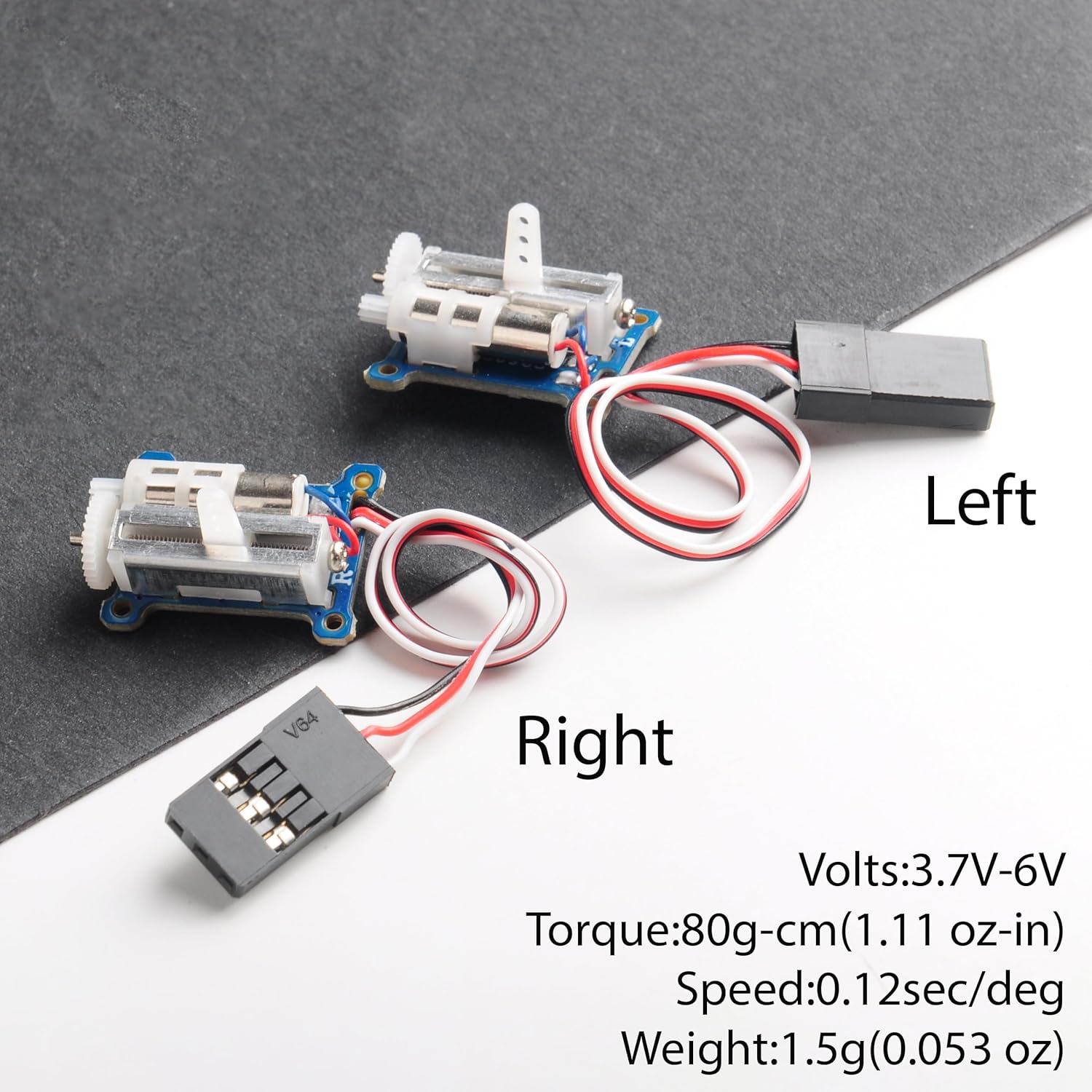
Figure 1: Two Wishiot 1.5g Micro Linear Servos with key specifications.

Figure 2: The compact size of the Wishiot 1.5g Micro Linear Servo.
2. Specifications
| Feature | Specification |
|---|---|
| Model | GS-1502 |
| Type | Sub Micro Linear Digital Servo |
| Dimensions | 21.4 x 15.2 x 6.0mm |
| Weight (net) | 1.5g |
| Operating Voltage | 3.7V - 6V |
| Torque | 80g-cm (1.11 oz-in) |
| Speed | 0.12 sec/deg |
| Connector Type | JR Plug |

Figure 3: Detailed dimensions of the micro linear servo.

Figure 4: Weight measurement of the servos, including wire and connector.
3. Setup
These micro linear servos are designed for easy integration into various RC projects. Follow these steps for proper setup:
- Identify Connections: Each servo features a standard JR plug with three wires: Signal (typically orange or yellow), Positive (red), and Negative (brown or black).
- Connect to Receiver/Controller: Plug the servo's JR connector into the appropriate channel on your RC receiver or servo controller. Ensure the polarity is correct (Signal, Positive, Negative).
- Power Supply: Provide a stable power supply within the specified voltage range of 3.7V to 6V. An unstable power supply can lead to erratic servo behavior.
- Mounting: Securely mount the servo in your model using appropriate adhesives or mounting hardware. Ensure the linear arm has a clear path of movement without obstruction.

Figure 5: Internal mechanism of the micro linear servo.
4. Operating Instructions
The GS-1502 linear servo operates by converting an electrical signal into precise linear motion. It is controlled by a pulse-width modulation (PWM) signal from your RC receiver or servo tester.
- Linear Movement: The servo's arm moves linearly back and forth, providing a stroke length suitable for small control surfaces or mechanisms.
- Response: These servos offer a fast response time of 0.12 seconds per degree, ensuring quick and accurate adjustments in your model.
- Control Modes (with compatible tester): When used with a servo tester, you can typically operate in manual mode (adjusting the knob for precise positioning), neutral mode (centering the servo), or automatic sweeping mode (continuous back-and-forth movement for testing range).
Video 1: Demonstration of the Wishiot Micro 1.5g Tiny Linear Servo in operation, showcasing its linear movement and responsiveness.
5. Maintenance
To ensure the longevity and optimal performance of your Wishiot micro linear servos, consider the following maintenance tips:
- Keep Clean: Regularly inspect the servo for dust, dirt, or debris that could impede the linear arm's movement or affect the internal gears. Clean gently with a soft, dry brush or compressed air.
- Avoid Overloading: Do not apply excessive force or load beyond the specified torque (80g-cm) to prevent damage to the motor or gears.
- Check Connections: Periodically verify that all electrical connections (JR plug) are secure and free from corrosion. Loose connections can cause intermittent operation.
- Storage: Store servos in a dry, cool environment away from direct sunlight and extreme temperatures.
6. Troubleshooting
If you encounter issues with your Wishiot 1.5g Micro Linear Digital Servo, refer to the following troubleshooting guide:
- Servo Not Responding:
- Check power supply: Ensure the voltage is within 3.7V-6V and the power source is stable.
- Verify connections: Confirm the JR plug is correctly inserted into the receiver/controller with proper polarity.
- Test with a servo tester: Use a dedicated servo tester to rule out issues with the RC receiver or flight controller.
- Erratic or Jittery Movement:
- Interference: Ensure the servo wires are not running too close to high-current wires or other sources of electrical interference.
- Power fluctuations: A weak or unstable power supply can cause jitter. Try a different power source or battery.
- Damaged gears: Inspect the linear arm and gears for any visible damage or obstruction.
- Noisy Operation:
- Normal operation: Some noise is normal for micro servos, especially under load.
- Excessive noise: May indicate worn or damaged gears. Consider replacement if performance is affected.