
Fanvace P6
Fanvace 96GB MP3 Player User Manual
Model: P6
Introduction
This manual provides comprehensive instructions for the Fanvace 96GB MP3 Player, a versatile multimedia device running on Android 13 OS. It features Bluetooth and Wi-Fi connectivity, a 5-inch touchscreen, and ample storage for music, videos, and apps. Please read this manual carefully to ensure proper use and maintenance of your device.
What's Included
Verify that all items are present in your package:
- 1 x Fanvace MP3 Player
- 1 x 64GB SD Card (pre-installed or separate)
- 1 x USB C Cable
- 1 x Wired Earphones
- 1 x Screen Protector
- 1 x Protective Case
- 1 x User Manual
Product Overview
Familiarize yourself with the physical components and controls of your Fanvace MP3 Player.

Image: Front and side views of the Fanvace MP3 Player, highlighting the Volume buttons, Reset button, On/Off button, Speaker, Card slot, 3.5mm audio output, and USB-C port.
- Volume + / Volume -: Adjust the audio output level.
- Reset: Small pinhole button for force restarting the device if it becomes unresponsive.
- On/Off: Power button to turn the device on or off, or to put it to sleep.
- Speaker: Integrated speaker for audio playback without headphones.
- Card slot: Slot for inserting the Micro SD card to expand storage.
- 3.5mm output: Standard audio jack for wired headphones.
- USB-C port: For charging the device and connecting to a computer for data transfer.
Setup
Initial Charge
Before first use, fully charge the device using the provided USB-C cable and a compatible power adapter. A full charge ensures optimal battery performance.
Inserting the SD Card
Locate the card slot on the side of the device. Gently insert the included 64GB SD card into the slot until it clicks into place. This expands your storage capacity significantly.
Power On/Off
To turn the device on, press and hold the On/Off button until the screen illuminates. To turn it off, press and hold the On/Off button, then select 'Power off' from the on-screen options.
Operating Instructions
Basic Navigation
The device features a 5-inch full-touchscreen for intuitive navigation. Swipe left or right to browse through app pages, swipe down from the top for quick settings and notifications, and tap icons to open applications or select options.
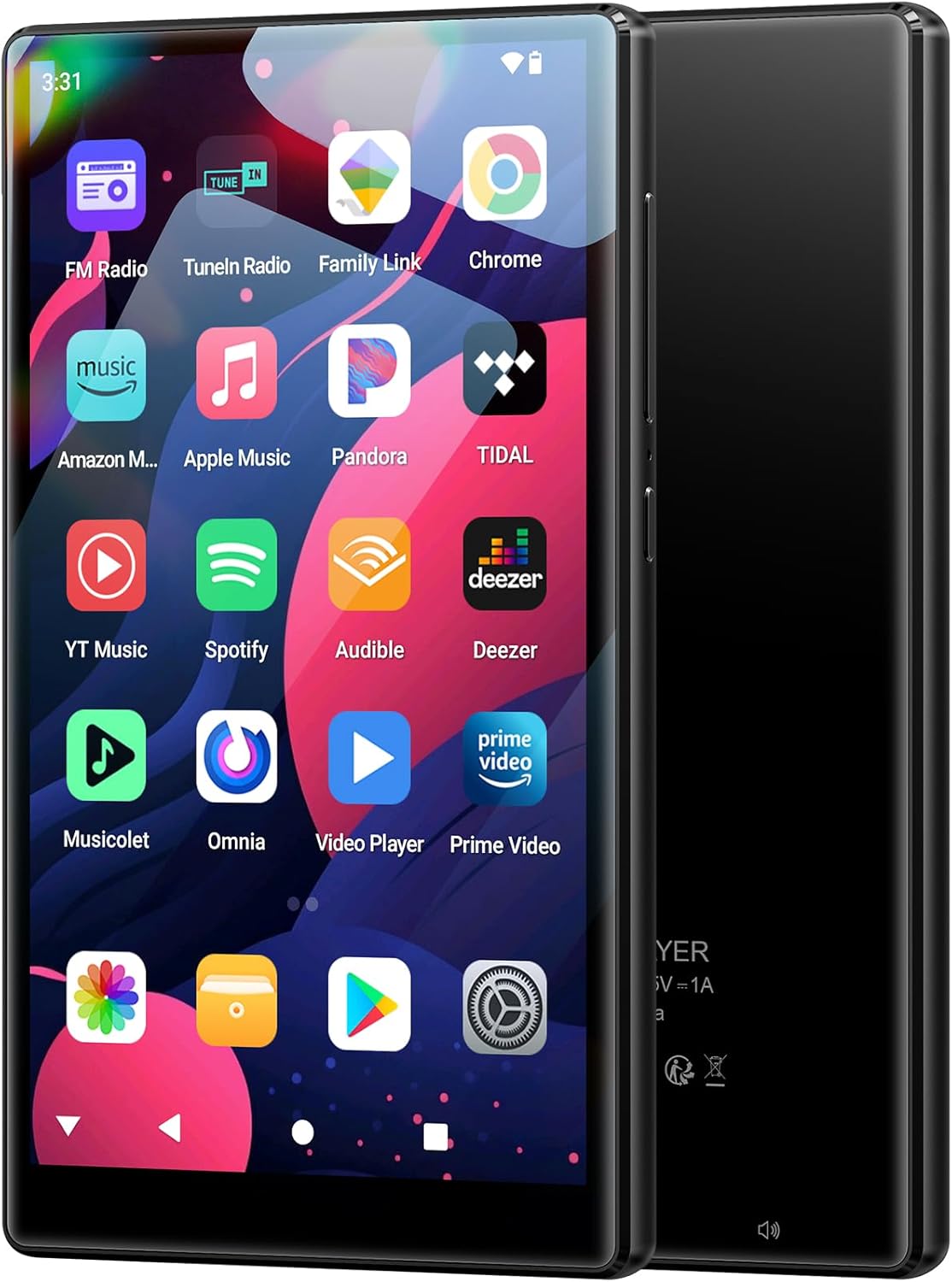
Image: The Fanvace MP3 Player's vibrant home screen, showcasing pre-installed applications like FM Radio, TuneIn Radio, Family Link, Chrome, Amazon Music, Apple Music, Pandora, TIDAL, YouTube Music, Spotify, Audible, Deezer, Musicolet, Omnia, Video Player, and Prime Video.
Connecting to Wi-Fi
To access online content and download apps, connect your device to a Wi-Fi network:
- From the home screen, tap the 'Settings' icon.
- Select 'Network & Internet'.
- Tap 'Wi-Fi' and toggle it 'On'.
- Select your desired Wi-Fi network from the list.
- Enter the network password if prompted, then tap 'Connect'.

Image: The Fanvace MP3 Player displaying the Google Play Store, illustrating the ability to download various applications. This highlights the device's Android 13 OS and 8-core MTK processor, enabling app personalization.
Connecting via Bluetooth
Pair your MP3 player with Bluetooth headphones, speakers, or car systems for wireless audio:
- From the home screen, tap the 'Settings' icon.
- Select 'Connected devices'.
- Tap 'Bluetooth' and toggle it 'On'.
- Ensure your Bluetooth audio device is in pairing mode.
- Select your device from the 'Available devices' list to pair.

Image: The Fanvace MP3 Player shown alongside various Bluetooth audio devices, including earbuds, a portable speaker, and over-ear headphones, demonstrating its Bluetooth 5.0 compatibility for seamless wireless connection.
Playing Music
Your Fanvace MP3 Player supports a wide range of audio formats and streaming services:
- Supported Formats: MP3, WAV, FLAC, APE, OGG, M4A, AAC, WMA.
- Streaming Apps: Pre-installed apps like Spotify, Omnia, Deezer, and Amazon Music allow you to stream music online.
- Local Playback: Transfer your own music files to the device's internal storage or the SD card for offline listening.

Image: The Fanvace MP3 Player's screen showing a music playback interface, with icons indicating features such as playlist synchronization, gapless playback, adjustable sound effects, Bluetooth autoplay, resume playback position, and support for various music formats.
Playing Videos
Enjoy videos on the 5-inch HD touchscreen:
- Supported Formats: RM, RMVB, FLV, MP4, DAT, MKV, MPG, MOV, TS.
- Video Playback: Use the pre-installed video player or download other video apps from the Play Store.

Image: The Fanvace MP3 Player showcasing its 1080P HD video playback capability on its 5.0-inch screen, emphasizing its 1080*1920PX resolution and IPS high color reproduction for an excellent visual experience.
Downloading Apps
Expand the functionality of your device by downloading additional applications from the Google Play Store:
- Ensure your device is connected to Wi-Fi.
- Tap the 'Play Store' icon on the home screen.
- Sign in with your Google account or create a new one.
- Browse or search for apps and tap 'Install' to download them.
Battery Management
The device is equipped with a 2500mAh battery designed for extended use:
- Music Playback: Up to 50 hours on a full charge.
- Video Playback: Up to 8 hours on a full charge.
- Charging Time: Approximately 3-4 hours for a full charge.
- To conserve battery, reduce screen brightness, turn off Wi-Fi/Bluetooth when not in use, and close background applications.

Image: The Fanvace MP3 Player illustrating its built-in 2500mAh battery capacity, showing estimated usage times: 80 hours standby, 50 hours music playback, 8 hours video playback, and 3-4 hours charging time.
Maintenance
To ensure the longevity and optimal performance of your Fanvace MP3 Player, follow these maintenance guidelines:
- Cleaning: Use a soft, dry, lint-free cloth to clean the screen and body of the device. Avoid using abrasive cleaners or solvents.
- Environmental Conditions: Do not expose the device to extreme temperatures (hot or cold), direct sunlight for prolonged periods, or high humidity.
- Protection: Use the provided protective case and screen protector to guard against scratches and minor impacts.
- Storage: If storing the device for an extended period, ensure it is partially charged (around 50%) and stored in a cool, dry place.
Troubleshooting
Here are solutions to common issues you might encounter:
Device Not Powering On
- Ensure the battery is sufficiently charged. Connect the device to a power source and allow it to charge for at least 30 minutes before attempting to power it on again.
- If unresponsive, use a small pin or paperclip to press the 'Reset' button.
Unable to Connect to Wi-Fi/Bluetooth
- Verify that Wi-Fi or Bluetooth is enabled in the device's settings.
- Ensure you are within range of the Wi-Fi router or Bluetooth device.
- Restart the MP3 player and the router/Bluetooth device, then attempt to connect again.
- For Wi-Fi, double-check the password.
Poor Audio Quality
- Ensure headphones are fully plugged into the 3.5mm jack or that the Bluetooth connection is stable.
- Check the volume levels on both the device and any connected audio accessories.
- Try playing different audio files to determine if the issue is with a specific file.
- If using the built-in speaker, note that external headphones or speakers will generally provide superior sound quality.
Freezing/Unresponsive Screen
- Press and hold the On/Off button for about 10-15 seconds to force a restart.
- If the issue persists, use the 'Reset' button.
- Consider performing a factory reset (Settings > System > Reset options > Erase all data) as a last resort. Note: This will delete all data on the device, so back up important files first.
Specifications

Image: The Fanvace MP3 Player emphasizing its 96GB massive storage capacity, composed of 4GB RAM, 32GB ROM, and an included 64GB SD card, highlighting its ability to store countless songs and media files.
| Feature | Specification |
|---|---|
| Brand | Fanvace |
| Model | P6 |
| Operating System | Android 13 |
| Processor | MTK 8-core |
| RAM | 4GB |
| Internal Storage | 32GB ROM |
| Expandable Storage | Up to 1TB (64GB TF card included) |
| Screen Size | 5 Inches |
| Display Technology | LCD |
| Battery Capacity | 2500mAh |
| Music Playback Time | Up to 50 hours |
| Video Playback Time | Up to 8 hours |
| Connectivity | Bluetooth 5.0, Wi-Fi (2.4 GHz, 5 GHz), USB-C |
| Supported Audio Formats | MP3, WAV, FLAC, APE, OGG, M4A, AAC, WMA |
| Supported Video Formats | RM, RMVB, FLV, MP4, DAT, MKV, MPG, MOV, TS |
| Special Features | Built-In Speaker, FM Radio, Touch Screen, Video Playback, Voice Recorder |
| Dimensions (approx.) | 124mm x 69mm x 9mm |
Warranty & Support
Your Fanvace MP3 Player comes with dedicated customer support to assist you with any inquiries or issues.
- Customer Service: Fanvace provides 12 hours of customer service.
- Contact: For more detailed user guidance or any problems encountered during use, please contact customer service online. Refer to the contact information provided in the packaging or on the official Fanvace website.
Related Documents - P6
 |
Fanvace P6 User Manual: Features, Setup, and Troubleshooting Comprehensive user manual for the Fanvace P6 MP3 player. Learn about its features, how to connect to WiFi and Bluetooth, tips for battery life, troubleshooting common issues, and specifications. |
 |
SWOFY D26 Digital Player User Manual Comprehensive user manual for the SWOFY D26 Digital Player, covering features, operations, settings, specifications, and warnings. Learn how to use your portable media device. |
 |
Zenwire Vibe P1 Bluetooth MP3/MP4 Player User Manual Comprehensive user manual for the Zenwire Vibe P1 Bluetooth MP3/MP4 Player, covering appearance, functions, connectivity, music playback, video, recording, radio, e-book, and settings. |
 |
Fanvace M32 User Manual: Features, Specifications, and Troubleshooting Comprehensive user manual for the Fanvace M32 music player, covering features, specifications, connectivity, troubleshooting, and compliance information. Learn how to use your device effectively. |
 |
Fanvace M36 User Manual: Features, Setup, and Troubleshooting Comprehensive user manual for the Fanvace M36 digital music player, detailing its Android 13 OS, Google Play Store access, Wi-Fi, Bluetooth 5.0 features, specifications, and troubleshooting guide. |
 |
INNIOASIS Y1 Mini Portable Bluetooth MP3 MP4 Player User Manual User manual for the INNIOASIS Y1 Mini Portable Bluetooth MP3 MP4 Player. Includes safety warnings, precautions, and after-sales service information. |
Ask a question about this manual
Ask about setup, troubleshooting, compatibility, parts, safety, or missing instructions. Manuals+ will review the question and use this page’s manual context to help answer it.