
1. Introduction
This manual provides comprehensive instructions for the assembly, operation, and maintenance of your Furnulem Night Stand with Charging Station. Please read all instructions carefully before assembly and use to ensure safe and proper functionality.
Safety Information
- Always ensure the nightstand is properly assembled and stable before use.
- Use the adjustable feet to level the nightstand on uneven surfaces.
- Do not overload the nightstand, as it may tip over and cause injury.
- Always follow the assembly instructions carefully to ensure the anti-toppling device is properly installed.
2. Package Contents
Before beginning assembly, verify that all parts are present and undamaged. If any parts are missing or damaged, please contact customer support.
- Metal Frame Components (O, P, Q, R)
- Wooden Top Panel
- Wooden Shelf Panels
- Back Panel with Charging Station Cutout (L)
- 4 Fabric Drawers with Handles
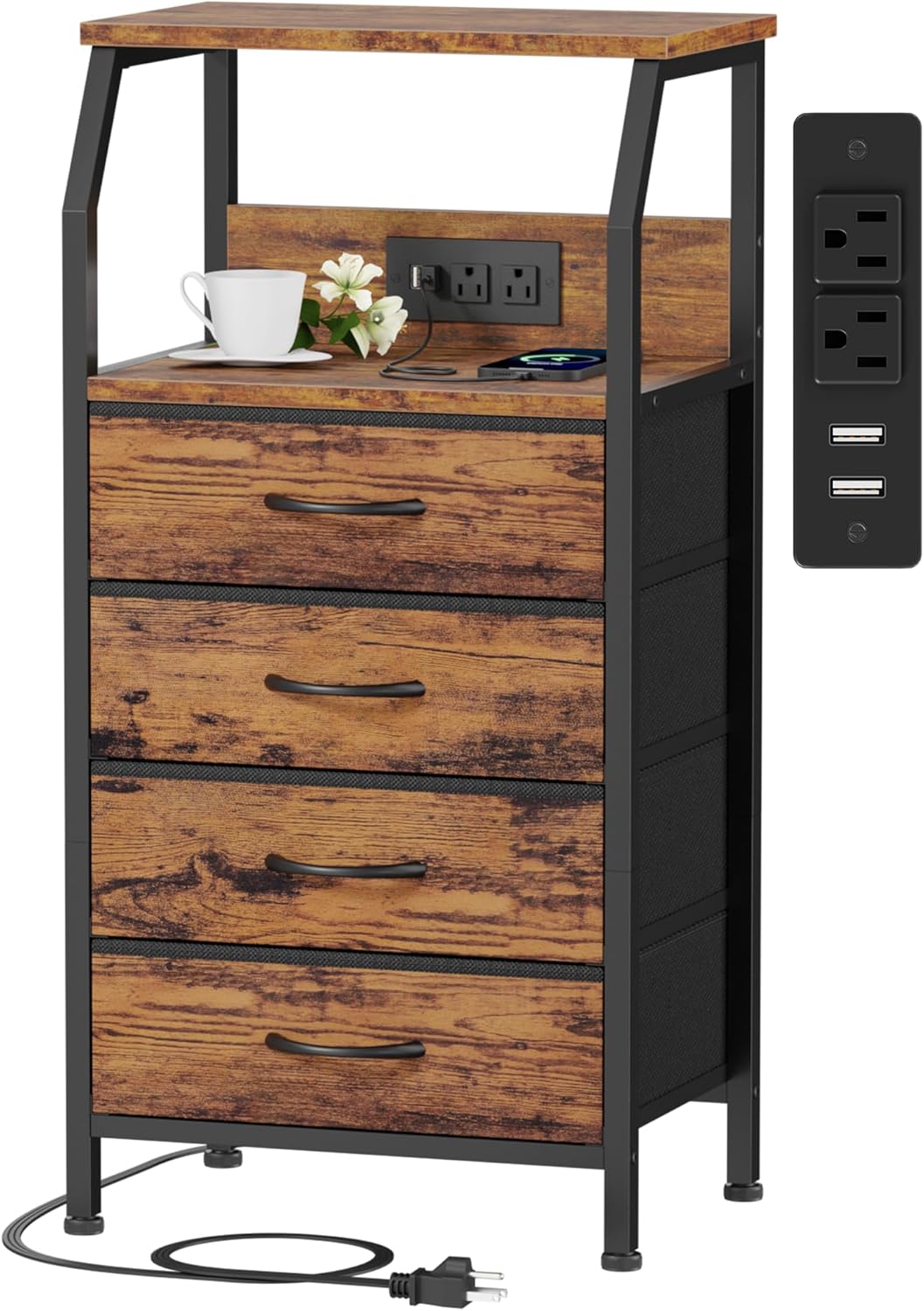
- Integrated Charging Station (J) with 2 AC Outlets and 2 USB Ports
- Adjustable Feet
- Anti-Toppling Device
- Assembly Guide
- Installation Tool (Allen Key, Screwdriver)
- Screws and Fasteners (C, D, F, K)


3. Setup and Assembly
Follow these steps to assemble your Furnulem Night Stand. An installation video is also available for visual guidance.
Video: Detailed installation instructions for the 4-drawer nightstand, demonstrating each step of the assembly process.
- Assemble the Metal Frame: Connect the vertical metal frame components (O, P, Q, R) using the provided fasteners. Ensure all connections are secure.
- Attach Bottom Bars: Secure the bottom support bars (M) to the base of the metal frame using screws (C).
- Install Wooden Shelves: Attach the wooden shelf panels to the designated positions on the metal frame using screws (D).
- Position the Charging Station Back Panel: The back panel (L) with the charging station cutout can be installed in three ways: on the front, on the back, or omitted entirely. Choose your preferred orientation and secure it with screws (D and K).
- Install the Top Panel: Place the main wooden top panel onto the assembled frame and secure it with screws (C).
- Insert Charging Station: Carefully insert the integrated charging station (J) into the cutout on the back panel and secure it with screws (F).
- Attach Adjustable Feet: Screw the adjustable feet into the bottom of the metal frame. Adjust them to ensure the nightstand is level and stable on any surface.
- Assemble and Insert Fabric Drawers: Unfold each fabric drawer and insert the bottom panel to create a sturdy box. Attach the handles. Slide the assembled drawers into their respective slots in the frame.
- Install Anti-Toppling Device: For safety, attach the anti-toppling device to the back of the nightstand and secure it to a wall stud according to the included instructions.


4. Operating Instructions
Charging Station
The integrated charging station features 2 standard AC outlets (120V/12A) and 2 USB ports (5V/2A) with a 5.0 ft power cord. Plug the nightstand's power cord into a wall outlet. You can then use the outlets and USB ports to charge electronic devices such as phones, tablets, and lamps.

Fabric Drawers
The four fabric drawers provide ample storage space for various items. They are lightweight, durable, and designed to prevent pinching, making them safe for all users. Ideal for storing clothing, accessories, books, or other personal items.
Open Shelf
The 2-tier open shelf with a wooden top offers a hard surface suitable for placing items such as a desk lamp, mobile phone, books, or decorative objects.

5. Maintenance
- Cleaning: Wipe the wooden and metal surfaces with a dry cloth. For fabric drawers, spot clean with a damp cloth and mild detergent if necessary, then air dry.
- Inspection: Periodically check all fasteners to ensure they remain tight. Re-tighten if needed.
- Avoid Moisture: While the top is easy to clean, it is not water-resistant. Avoid prolonged exposure to liquids to prevent damage.
6. Troubleshooting
- Instability: If the nightstand wobbles, adjust the leveling feet at the bottom until it is stable. Ensure all assembly screws are tightened.
- Charging Station Not Working: Check if the power cord is securely plugged into a functional wall outlet. Ensure devices are properly connected to the outlets or USB ports.
- Drawers Sticking: Ensure the fabric drawers are correctly assembled and inserted into their slots. Check for any obstructions.
7. Specifications
| Feature | Detail |
|---|---|
| Brand | Furnulem |
| Model Number | HK-DS-003-C-4D-1-RB |
| Product Dimensions (D x W x H) | 11.5"D x 16.1"W x 33.3"H |
| Item Height | 33.3 inches |
| Item Weight | 12.9 Pounds |
| Maximum Weight Recommendation | 13 Pounds |
| Color | Rustic Brown |
| Number of Drawers | 4 |
| Frame Material Type | Metal |
| Top Material Type | Wood |
| Material Type | Fabric Drawer, Metal, Wood |
| Handle Material | Plastic |
| Product Care Instructions | Wipe with Dry Cloth |
| Included Components | Assembly Guide, Installation Tool |

8. Warranty Information
This Furnulem product comes with a Limited Warranty. For specific details regarding coverage and duration, please refer to the warranty documentation included with your purchase or contact Furnulem customer support.
9. Customer Support
If you have any questions, require assistance with assembly, or encounter any issues with your Furnulem Night Stand, please contact our customer support team. Our dedicated team is available to help resolve any problems within 24 hours.
For further assistance, please visit the official Furnulem store or contact us through the platform where you made your purchase.


