
Introduction
Thank you for choosing the Favourlite ALS-1487-US Telescopic Rechargeable Camping Lantern. This versatile and durable lighting solution is designed for various outdoor and indoor applications, including camping, hiking, power outages, and general utility. Featuring a telescopic design, multiple lighting modes, and a built-in power bank, this lantern provides reliable illumination and convenience. Please read this manual thoroughly to ensure proper use and maintenance of your device.
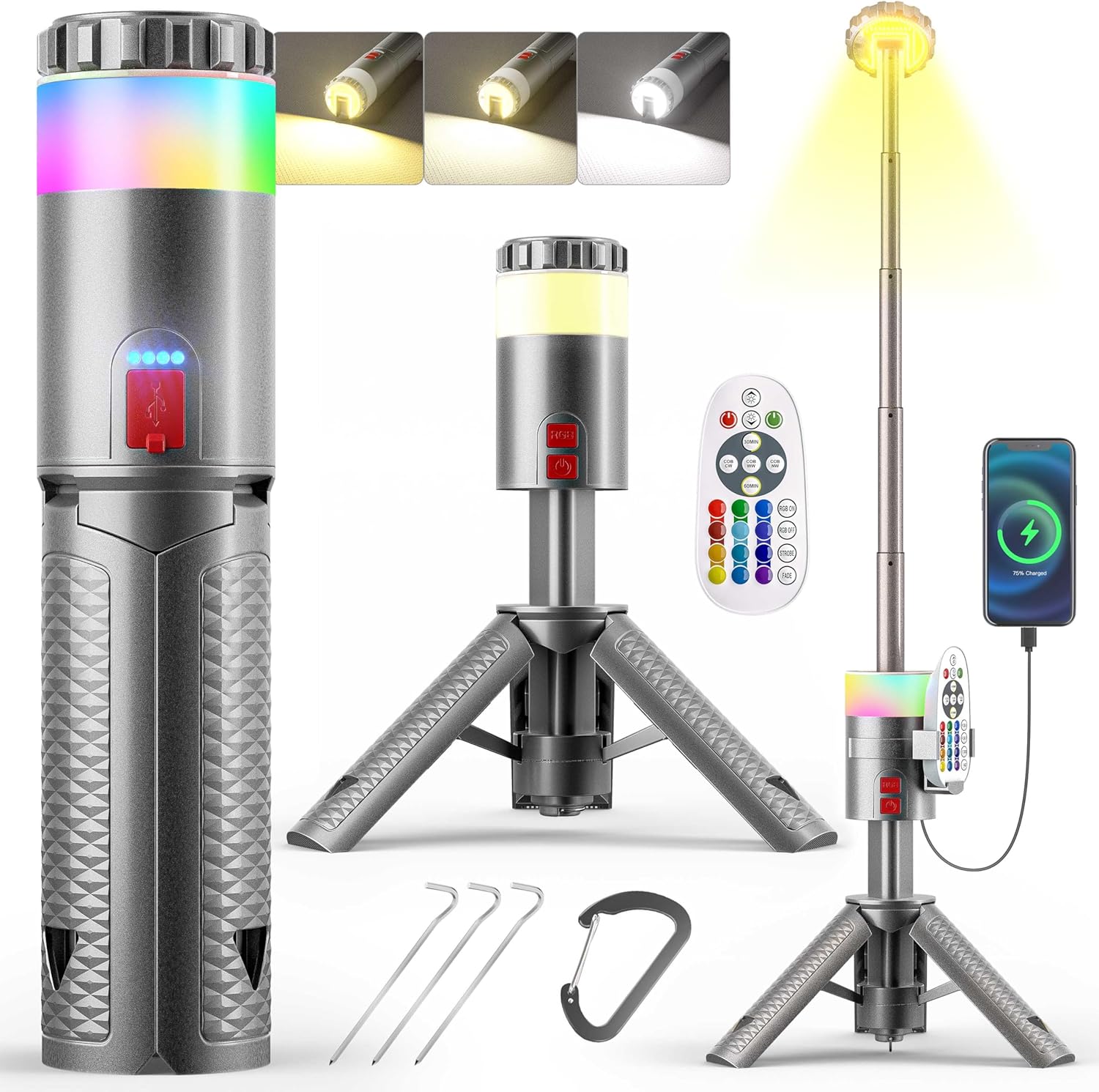
Image: The Favourlite ALS-1487-US Telescopic Rechargeable Camping Lantern shown with its remote control, charging cable, carabiner, and ground stakes.
Safety Instructions
- Do not disassemble or modify the lantern. Unauthorized modifications may cause damage or injury.
- Keep the lantern away from extreme temperatures, direct sunlight, and open flames.
- Avoid direct eye exposure to the light source, as it can be very bright.
- Ensure the charging port is dry before connecting the USB cable.
- Store the lantern in a cool, dry place when not in use.
- Keep out of reach of children.
Package Contents
Verify that all items are present in your package:
- 1 x Favourlite Telescopic Camping Light
- 1 x USB Cable
- 1 x Carabiner
- 3 x Fixing Nails
- 1 x Remote Control
- 1 x Remote Holder
- 1 x User Manual
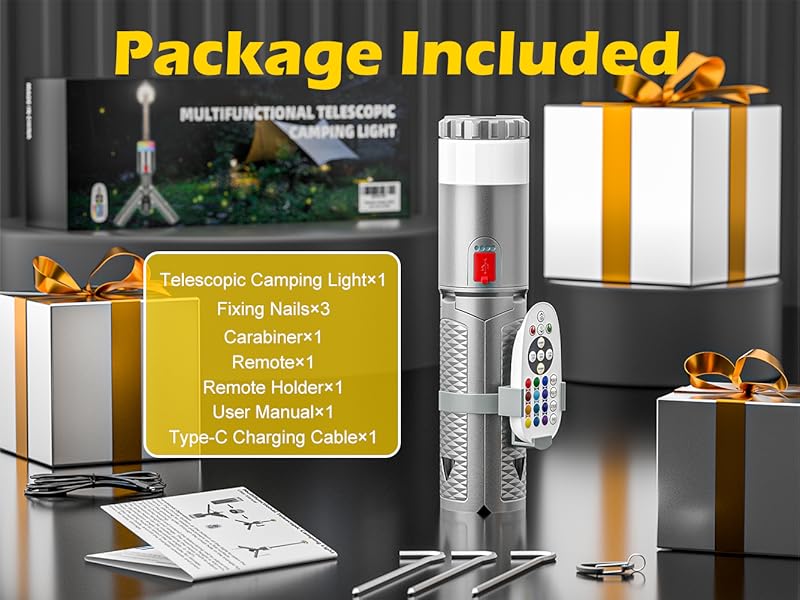
Image: All components included in the Favourlite Telescopic Rechargeable Camping Lantern package.
Product Features
- Telescopic Design: Extends from 12 inches (folded) to 45 inches (max extended height) for versatile lighting angles. The lamp head rotates 180 degrees.
- Multiple White Light Modes: Offers 3 color temperatures (3000K Warm White, 4000K Neutral Light, 6000K Cool White) and 20 levels of brightness.
- Dynamic RGB Lighting: Features 12 vibrant RGB colors with 10 brightness levels and 2 dynamic changing modes (Strobe and Fade).
- Ultra Bright Illumination: Delivers up to 1800 lumens with high-efficient COB LED chips for 360-degree uniform lighting.
- Long-lasting Battery & Power Bank: Built-in 10000mAh rechargeable lithium-ion polymer battery provides 6-60 hours of runtime and can charge external devices via USB.
- Durable & Waterproof: Constructed with a premium ABS housing and anodized aircraft-grade aluminum lamp head, offering IPX4 waterproof rating and wear-resistant properties.
- Versatile Application: Can be used as a desk lamp, searchlight, night light, work light, or ambient light. Includes a 30/60 minute timing function.

Image: Detailed view of the lantern's dimensions, power indicator, power button, carabiner, and anchor holes.
Setup
1. Deploying the Tripod Legs
- Locate the 'PRESS OPEN' button at the base of the lantern.
- Press the button to release the integrated tripod legs.
- Gently unfold the three legs until they lock into position, forming a stable base.

Image: The lantern's base with three fixing nails for securing it to the ground.
2. Extending the Telescopic Pole
- With the tripod legs deployed, grasp the top section of the lantern.
- Pull upwards to extend the telescopic pole. It has four sections that can be extended up to 45 inches.
- The lamp head can be rotated 180 degrees to direct light as needed.

Image: The telescopic pole extended, illustrating its adjustable height from 12 to 45 inches.
3. Charging the Lantern
- Connect the provided USB cable to the lantern's charging port.
- Connect the other end of the USB cable to a compatible power source (e.g., USB wall adapter, power bank, computer).
- The power indicator lights will show the charging status. A full charge typically takes 5 hours with a 30-65W PD charger.

Image: The lantern connected to a power source via its USB-C port, indicating its 10000mAh rechargeable battery.
Operating Instructions
1. Power On/Off and White Light Modes
- Press the main power button (red button) once to turn on the lantern.
- Subsequent presses of the main power button will cycle through the 3 white light color temperatures: Warm White (3000K), Neutral Light (4000K), and Cool White (6000K).
- To adjust brightness, use the remote control's brightness buttons (up/down arrows). There are 20 brightness levels.
- Long press the main power button to turn off the lantern.
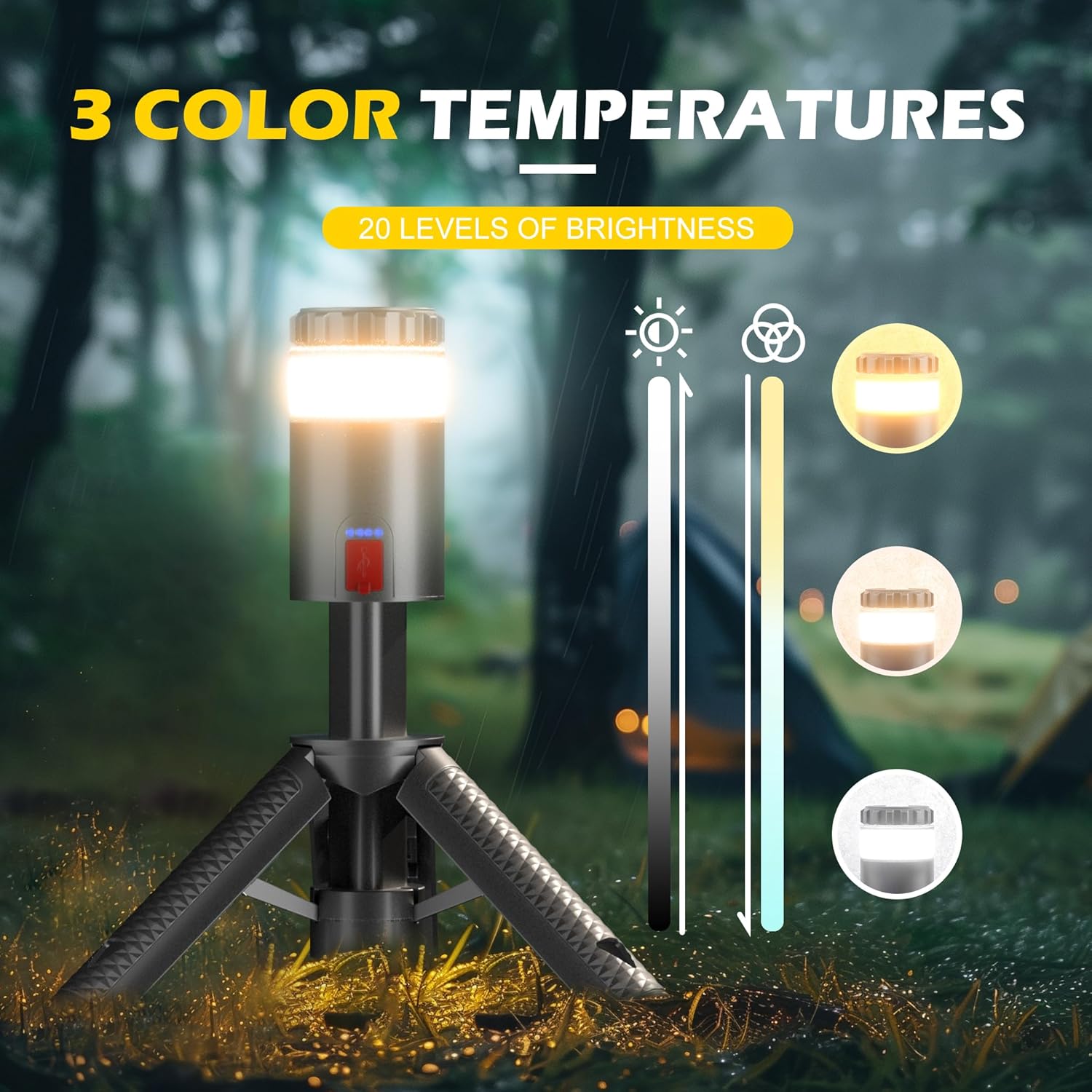
Image: The lantern showcasing its three white light color temperatures (Warm, Neutral, Cool) and brightness adjustment.
2. Directional Light Function
- To activate the directional light, lift the top cap of the lantern. This reveals a focused light source.
- The directional light can be used when the telescopic pole is extended, functioning as a spotlight or work light.

Image: The lamp head rotating 180 degrees, demonstrating its directional lighting capability.
3. Dynamic RGB 12 Colors
- Press the RGB button (lower red button) to activate the color-changing mode.
- Use the remote control to select from 12 static colors or choose between 'Strobe' and 'Fade' dynamic modes.
- Brightness for RGB colors can also be adjusted via the remote control.

Image: The lantern illuminating with various dynamic RGB colors, controlled by the remote.
4. Remote Control Usage
The included remote control allows for convenient operation of the lantern's functions:
- Power On/Off for both white and RGB lights.
- Adjusting brightness levels for all light modes.
- Selecting specific white light color temperatures.
- Choosing from 12 RGB colors and dynamic modes (Strobe, Fade).
- Activating the 30/60 minute timer.
5. Power Bank Function
The lantern can be used as a portable power bank to charge other devices:
- Connect your device's charging cable to the USB-A or USB-C output port on the lantern.
- The lantern's 10000mAh battery will begin charging your device.

Image: The lantern charging a smartphone, demonstrating its portable power bank capability.
6. Timer Function
Utilize the remote control to set a timer for the lantern to automatically turn off after 30 or 60 minutes.
Maintenance
Cleaning
Wipe the lantern with a soft, damp cloth. Do not use abrasive cleaners or solvents, as they may damage the finish.
Storage
When not in use for extended periods, fully charge the lantern and store it in a cool, dry place. Recharge every 3-6 months to maintain battery health.
Battery Care
The integrated 10000mAh lithium-ion polymer battery is designed for longevity. Avoid completely draining the battery frequently to prolong its lifespan.
Troubleshooting
| Problem | Possible Cause | Solution |
|---|---|---|
| Lantern does not turn on. | Low battery or power button not pressed correctly. | Charge the lantern. Ensure the power button is pressed firmly. |
| Remote control not working. | Remote battery depleted or obstruction. | Replace remote batteries. Ensure no obstructions between remote and lantern. Point remote directly at the lantern. |
| External device not charging. | Lantern battery low or incorrect cable. | Charge the lantern. Use a compatible USB cable. |
| Telescopic pole is stiff. | Dust or debris in the mechanism. | Gently clean the pole sections. Avoid forcing the extension. |
Specifications
| Feature | Detail |
|---|---|
| Model Number | ALS-1487-US |
| Brand | Favourlite |
| Material | Aluminum, Plastic |
| Product Dimensions (Folded) | 2.76"L x 2.76"W x 12.2"H |
| Item Weight | 1.76 Pounds |
| Brightness | Up to 1800 Lumens |
| Battery Type | Rechargeable Lithium-ion Polymer (10000mAh) |
| Voltage | 3.7 Volts |
| Water Resistance Level | IPX4 Waterproof |
| Light Source Type | Light Emitting Diode (LED) |
| Color Temperatures | 3000K, 4000K, 6000K |
| RGB Colors | 12 Dynamic Colors |
| Charging Time | Approx. 5 hours (with 30-65W PD) |
| Included Components | Camping Lantern, USB Cable, Carabiner, 3 Fixing Nails |
Official Product Video
Video: A demonstration of the Favourlite telescopic camping light's features and functionality.
Warranty and Support
For warranty information or technical support, please refer to the contact details provided on the product packaging or visit the official Favourlite website. Keep your purchase receipt as proof of purchase for any warranty claims.