
1. Introduction
This instruction manual provides essential information for the installation and maintenance of Tooldaddy replacement carbon brushes. These brushes are designed to restore optimal functionality to compatible Miele dryer models by replacing worn original components. Please read this manual thoroughly before proceeding with any installation or maintenance.
2. Product Overview
Carbon brushes are critical components in electric motors, including those found in dryers. They conduct electricity to the rotating parts of the motor (armature). Over time, these brushes wear down due to friction, leading to reduced motor performance or complete failure. Replacing worn carbon brushes is a common maintenance task that can significantly extend the life of your appliance and restore its efficiency.
3. Compatibility
These Tooldaddy carbon brushes are compatible with the following Miele dryer models:
- Miele T7770 Dryer
- Miele T7780C HOMECAREC Dryer
- Miele T7850WP Dryer
Ensure your dryer model matches one of the listed models for proper fit and function.
4. Specifications
| Product Model Number | KL-11-5913-3514-059-12-42/84 |
| Dimensions (W x L x H) | Approximately 5 x 30 x 16 mm |
| Cable Length | 67 mm |
| Quantity | 2 pieces (1 pair) |
| Weight | 20 grams (total for item) |
5. Installation Instructions
WARNING: Always disconnect the dryer from the main power supply before attempting any installation or repair. Failure to do so can result in electric shock or serious injury. If you are unsure about any step, consult a qualified technician.
The following steps provide a general guide for replacing carbon brushes. Specific disassembly procedures may vary depending on your Miele dryer model. Refer to your appliance's service manual for detailed instructions.
- Disconnect Power: Unplug the dryer from the electrical outlet.
- Access Motor: Carefully open the dryer's casing to gain access to the motor assembly. This may involve removing back panels, top panels, or front panels, depending on the model.
- Locate Carbon Brushes: Identify the existing carbon brushes, which are typically housed in brush holders on either side of the motor's commutator.
- Remove Old Brushes: Disconnect any wires attached to the brush holders. Carefully remove the old, worn carbon brushes from their housings. Note their orientation for correct installation of the new brushes.
- Install New Brushes: Insert the new Tooldaddy carbon brushes into the brush holders, ensuring they slide in smoothly and are correctly oriented. Reconnect any wires.
- Inspect Commutator: While the motor is accessible, inspect the commutator (the copper segments on the motor's rotor). It should be clean and smooth. If it's excessively grooved or dirty, professional servicing may be required.
- Reassemble Dryer: Carefully reassemble the dryer's casing, ensuring all panels are securely fastened.
- Test Appliance: Plug the dryer back into the electrical outlet and perform a test cycle to ensure proper operation.
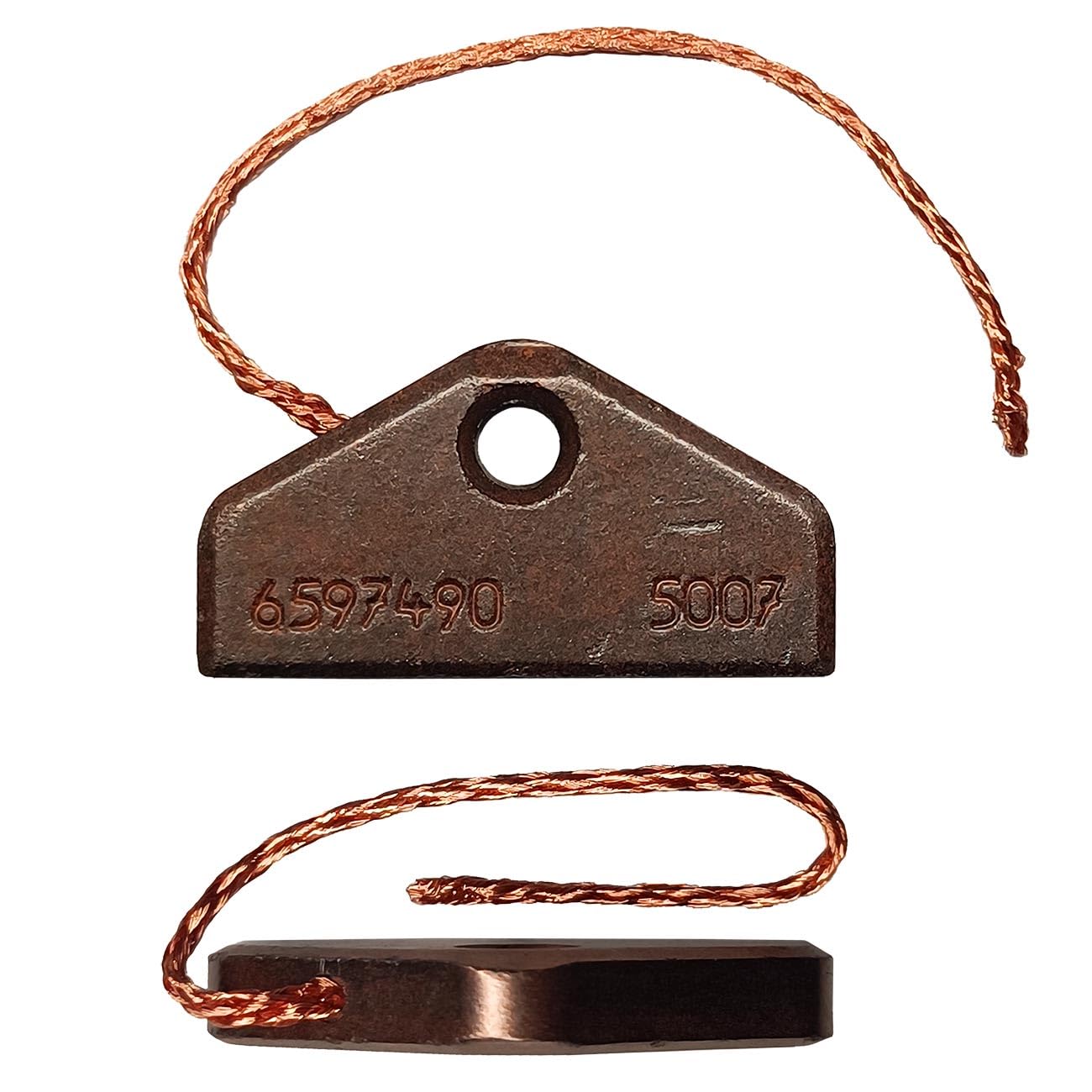
Image 1: Tooldaddy Carbon Brushes. This image shows the two carbon brushes with their attached wires and springs, ready for installation.
6. Troubleshooting (Symptoms of Worn Brushes)
Worn carbon brushes are a common cause of various dryer malfunctions. If your Miele dryer exhibits any of the following symptoms, replacing the carbon brushes may resolve the issue:
- Loss of Power: The dryer motor runs weakly or intermittently.
- Erratic Operation: The motor starts and stops unpredictably.
- Excessive Sparking: Visible sparks emanating from the motor area.
- Unusual Noises: Grinding, squealing, or other abnormal sounds from the motor.
- Complete Failure: The dryer motor does not start at all.
If these symptoms persist after replacing the carbon brushes, further diagnosis by a qualified technician may be necessary.
7. Safety Information
- Always ensure the appliance is disconnected from the power supply before handling any internal components.
- Wear appropriate personal protective equipment, such as gloves, if necessary.
- Keep small parts away from children.
- If you are not confident in performing the repair, seek assistance from a professional appliance technician.
8. Support
For further assistance or inquiries regarding Tooldaddy products, please refer to the retailer where you purchased this item or visit the official Tooldaddy website for contact information. When contacting support, please have your product model number (KL-11-5913-3514-059-12-42/84) and your Miele dryer model readily available.