
Z93pro
Z93 Pro Smart Watch User Manual
Model: Z93pro | Brand: Generic
1. Introduction
Thank you for choosing the Z93 Pro Smart Watch. This device is designed to enhance your daily life with its advanced features, including a vibrant 1.5-inch HD touch screen, comprehensive health and fitness tracking, Bluetooth calling, and smart notifications. Its IP67 waterproof rating ensures durability for everyday use. Please read this manual carefully to understand the full capabilities of your new smartwatch and ensure proper operation and maintenance.

The Z93 Pro Smart Watch in black, showcasing its round 1.5-inch HD screen.
Key Features Overview

An infographic highlighting the Z93 Pro's multiple core advantages, including its 1.52-inch high-definition display, 7-day normal use battery life, multiple customizable styles, Bluetooth call functionality, various smart functions, sports modes, health monitoring, and IP67 waterproof rating.
2. What's in the Box
Upon opening your Z93 Pro Smart Watch package, you should find the following items:
- Watch Band
- Watch
- Charger
- Instructions (this manual)
3. Setup
3.1 Initial Charging
Before first use, fully charge your Z93 Pro Smart Watch. Connect the provided wireless charger to a power source and place the watch onto the charging base. A full charge typically takes about 2 hours. Once fully charged, the watch provides approximately 2 days of continuous use and up to 15 days of standby time.
3.2 App Installation and Pairing
To unlock the full potential of your Z93 Pro Smart Watch, you need to pair it with your smartphone. The watch is compatible with iOS 9.0 and above, and Android 5.0 and above.
- Scan the QR code in the watch's settings or search for the companion app (refer to the watch's on-screen instructions or quick start guide for the app name) in your phone's app store (App Store for iOS, Google Play Store for Android).
- Download and install the app.
- Ensure Bluetooth is enabled on your smartphone.
- Open the app and follow the on-screen instructions to search for and connect to your Z93 Pro Smart Watch.
- Confirm the pairing request on both your phone and the watch.
4. Operating Instructions
4.1 Navigation and Display
The Z93 Pro features a 1.5-inch full touch color screen. Swipe left, right, up, or down to navigate through menus and features. The side button (crown) can also be used for navigation and selection.
4.2 Customizing Watch Dials
Personalize your watch with over 100 exquisite dials available in the system. You can also upload your favorite photos through the companion app to create custom watch faces that reflect your unique style.

The Z93 Pro offers a wide array of fashion dials to suit various preferences and moods.
4.3 Bluetooth Calling & Smart Notifications
Equipped with a microphone and speaker, the Z93 Pro Smart Watch allows you to make and answer calls directly from your wrist after connecting to Bluetooth. You can also view call records and set up common contacts for quick access. The watch will notify you of incoming text messages and alerts from various apps such as WhatsApp, Facebook, Twitter, Instagram, Skype, and Line.
4.4 Intelligent Voice Assistant
Utilize the AI voice assistant for convenient hands-free control. Simply activate the voice assistant on your watch to check the weather, play music, send messages, and more.
4.5 Health & Fitness Tracking
The Z93 Pro features motion sensors to monitor your steps, distance, and calories in real-time. It supports over 100 daily exercise modes, covering both indoor and outdoor activities, to help you track your fitness status. Please note: This device is not a medical device and its measurements are for reference only, not for diagnosis or treatment.

The Z93 Pro supports a wide range of movement modes, including outdoor running, indoor running, walking, biking, and other professional sports, providing detailed exercise data.
4.6 Other Smart Features
The smartwatch includes a variety of additional functions for your convenience:
- Camera Control: Remotely control your phone's camera.
- Music Control: Play, pause, skip tracks, and adjust volume for music playing on your phone.
- Weather: Get real-time weather updates.
- Alarm Clock: Set alarms directly from your wrist.
- Timer & Stopwatch: Useful tools for various activities.
- Drinking Water Reminder: Helps you stay hydrated.
- Sedentary Reminder: Prompts you to move after periods of inactivity.
- Find Phone: Locate your misplaced smartphone.
- Bedside Clock & Program Dock: Convenient features for daily use.
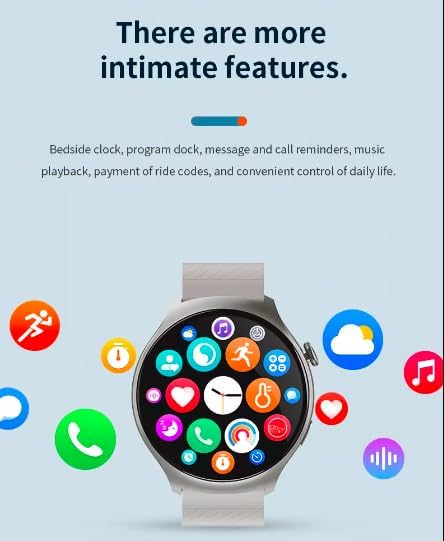
The Z93 Pro offers many intimate features for convenient control of daily life, including message and call reminders, music playback, and more.
4.7 Gesture Control
The Z93 Pro supports intuitive gesture controls for certain functions:
- Answering Calls: Click your fingers together twice to answer an incoming call.
- Turning Off Alarm: Use a hand gesture to dismiss an alarm without touching the screen.

Demonstration of gesture control for answering calls and turning off the alarm clock.
4.8 Product Video Demonstration
Watch this official product video for a visual guide on the Z93 Pro Smart Watch's features and functionalities, including its various watch faces, gesture controls, voice assistant, Bluetooth music playback, and heart rate monitoring.
Official Z93 Pro Smart Watch demonstration video, showcasing its design, customizable dials, gesture-based call answering, alarm dismissal, voice assistant integration, Bluetooth music control, and heart rate monitoring capabilities.
5. Maintenance
To ensure the longevity and optimal performance of your Z93 Pro Smart Watch, follow these maintenance guidelines:
- Cleaning: Wipe the watch and strap regularly with a soft, dry cloth. For stubborn dirt, a slightly damp cloth can be used, followed by drying.
- Water Resistance (IP67): The watch is IP67 waterproof, meaning it can withstand splashes, rain, and brief immersion (e.g., washing hands). Note: To avoid damaging the microphone and speaker function of the watch, please do not keep it in water for a long time, and avoid hot water, steam, or diving.
- Avoid Extreme Temperatures: Do not expose the watch to extremely high or low temperatures, as this can affect battery life and internal components.
- Avoid Chemicals: Do not use harsh chemicals, cleaning solvents, or strong detergents to clean the watch, as they may damage the finish or seals.
- Charging: Use only the provided charger. Ensure the charging contacts are clean and dry before charging.
6. Troubleshooting
If you encounter any issues with your Z93 Pro Smart Watch, please refer to the following common solutions:
| Problem | Possible Cause | Solution |
|---|---|---|
| Watch won't turn on | Low battery | Charge the watch for at least 30 minutes. |
| Unable to pair with phone | Bluetooth off, app issue, watch not discoverable | Ensure Bluetooth is on. Restart both watch and phone. Reinstall the app. Check watch's pairing mode. |
| Notifications not received | App permissions, notification settings | Check app notification permissions on your phone. Ensure notifications are enabled in the watch app. |
| Inaccurate health data | Improper fit, movement during measurement | Ensure the watch is snug on your wrist. Remain still during measurements. |
| Short battery life | Frequent use of features, high brightness | Reduce screen brightness. Limit continuous heart rate monitoring. Turn off unnecessary features. |
If the problem persists, please contact customer support for further assistance.
7. Specifications
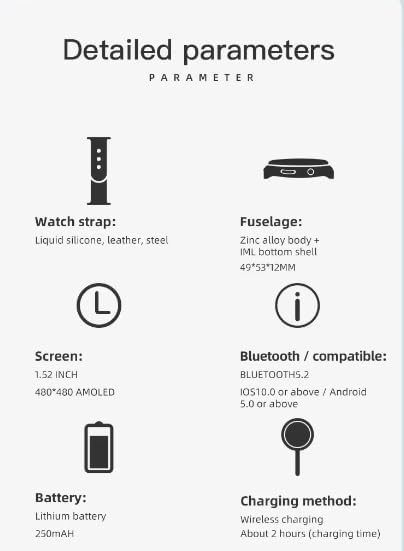
A visual representation of the Z93 Pro's detailed parameters.
| Feature | Detail |
|---|---|
| Model Number | Z93pro |
| Screen Size | 1.5 Inches (480x480 AMOLED) |
| Battery Capacity | 250 mAh Lithium Polymer |
| Connectivity | Bluetooth 5.2 |
| Compatibility | iOS 9.0+ / Android 5.0+ |
| Water Resistance | IP67 |
| Charging Method | Wireless Charging |
| Item Weight | 5.3 ounces (0.15 Kilograms) |
| Fuselage Material | Zinc alloy body + IML bottom shell (49*53*12MM) |
| Watch Strap Material | Liquid silicone, leather, steel (depending on variant) |

The Z93 Pro features an AMOLED Super Sensory 1.52-inch high-definition large screen with 480x480 resolution and anti-scratch mirror face.
8. Warranty and Support
The Z93 Pro Smart Watch comes with a 12-month warranty from the date of purchase. This warranty covers manufacturing defects and ensures after-sales service. Please retain your proof of purchase for warranty claims.
For technical support, troubleshooting assistance, or warranty inquiries, please refer to the contact information provided with your purchase or visit the manufacturer's official website.
Ask a question about this manual
Ask about setup, troubleshooting, compatibility, parts, safety, or missing instructions. Manuals+ will review the question and use this page’s manual context to help answer it.