
Signature Design by Ashley Fyne-Dyme
Signature Design by Ashley Fyne-Dyme Power Recliner User Manual
Model: Fyne-Dyme (3660313)
Introduction
This manual provides instructions for the assembly, operation, and maintenance of your Signature Design by Ashley Fyne-Dyme Power Recliner. Please read this manual thoroughly before use to ensure safe and proper operation.
The Fyne-Dyme Power Recliner is designed to enhance your living space with comfort and functionality, featuring power reclining, an adjustable headrest, integrated cup holders, storage arms, LED lighting, and a USB charging port.
Safety Information
- Weight Limit: Ensure the user's weight does not exceed 156 pounds (70.7 kg) for safe use.
- Stability: As the frame is made of metal, proper positioning and secure footing are necessary to prevent tipping or instability.
- Clearance: Maintain a minimum distance of 5 inches (12.7 cm) between the chair and any wall to allow for full reclining motion.
- Children and Pets: Keep children and pets away from the recliner's moving parts, especially during operation.
- Power Cord: Ensure the power cord is not pinched, tangled, or placed in a high-traffic area where it could be damaged.
- Liquid Spills: Avoid spilling liquids on the control panel or electrical components.
Package Contents
Verify that all components are present before beginning assembly:
- Power Recliner Base
- Recliner Back
- Power Cord (UL listed)
- Assembly Instructions (this document)
- Hardware Pack (if applicable, for securing back)
Assembly Instructions
The Signature Design by Ashley Fyne-Dyme Power Recliner requires light assembly. It is recommended to have two people for easier handling due to the weight of the unit.
- Unpack Components: Carefully remove all parts from the packaging. Ensure no packaging materials are left inside the recliner mechanisms.
- Attach Recliner Back: Align the metal brackets on the recliner back with the corresponding receivers on the recliner base. Slide the back down firmly until it clicks securely into place. You may need to apply gentle pressure.
- Connect Power: Locate the power cord. Connect the power cord from the recliner to a standard wall outlet. Ensure the connection is secure.
- Check Clearance: Position the recliner in its desired location, ensuring there is at least 5 inches (12.7 cm) of clearance from any wall or obstruction to allow for full reclining.
Note: The recliner is designed to fit through doorways 32 inches (81.3 cm) or wider.
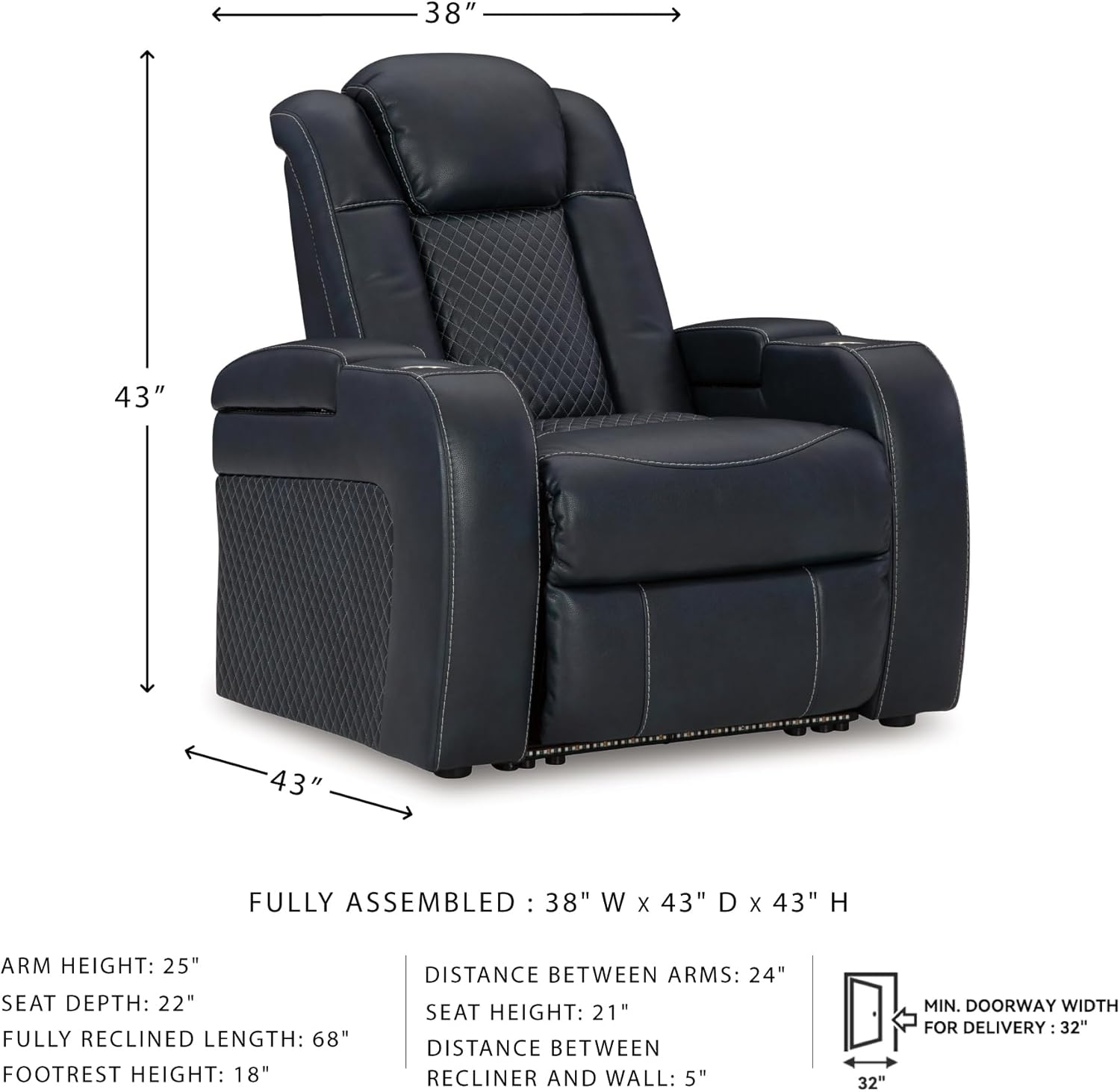
Figure 1: Recliner Dimensions and Clearance Requirements
Operating Instructions
Your Fyne-Dyme Power Recliner features intuitive controls for various functions.
Power Reclining and Adjustable Headrest
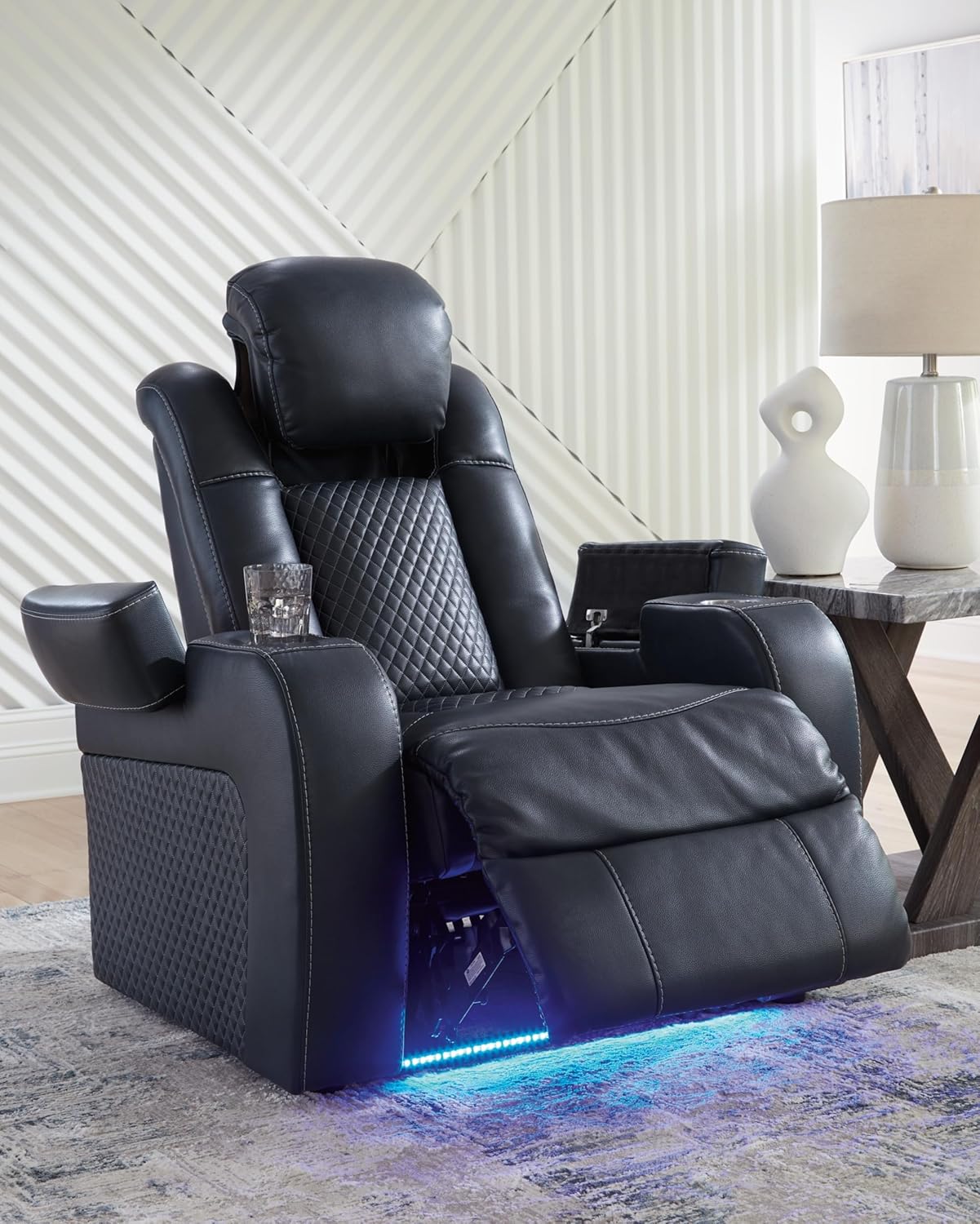
Figure 2: Control Panel with USB Port and Cup Holder
- Recline Function: Use the buttons on the side control panel to recline the chair to your desired position. Press and hold the recline button to smoothly adjust the backrest and footrest. Release the button to stop at any point.
- Adjustable Headrest: The headrest can be adjusted independently using dedicated buttons on the control panel. This allows you to find optimal neck and head support whether upright or fully reclined.
- Return to Upright: Press the corresponding button on the control panel to return the recliner to its original upright position.

Figure 3: Adjustable Headrest Detail
USB Charging Port
A zero-draw USB port is integrated into the control panel for convenient device charging. It only consumes power when a device is connected and actively charging.
- To Charge: Plug your USB cable directly into the USB port on the control panel. Your device will begin charging.

Figure 4: USB Charging Port in Use
LED Lighting
The recliner features ambient blue LED base lighting for enhanced atmosphere.
- To Activate/Deactivate: A dedicated button on the control panel controls the LED lighting. Press the button to turn the lights on or off.

Figure 5: Recliner with LED Base Lighting
Features Overview
- Power Reclining: Smooth, one-touch power control for infinite reclining positions.
- Adjustable Headrest: Electrically adjustable headrest for personalized comfort and support.
- Built-in Cup Holders: Conveniently located cup holders in the armrests.
- Flip-Top Storage Armrests: Armrests open to reveal storage compartments for remotes, magazines, or other small items.
- USB Charging Port: Integrated USB port for charging electronic devices.
- LED Base Lighting: Ambient blue LED lights along the base for a theater-style experience.
- Faux Leather Upholstery: Durable and easy-to-clean faux leather material with diamond stitching.

Figure 6: Storage Armrest Detail
Care and Maintenance
- Cleaning: Spot clean the faux leather upholstery with a damp cloth and mild soap. Avoid harsh chemicals or abrasive cleaners.
- Dusting: Regularly dust the recliner with a soft, dry cloth.
- Spills: Blot spills immediately with a clean, dry cloth. Do not rub.
- Sunlight: Avoid prolonged exposure to direct sunlight to prevent fading of the upholstery.
- Inspections: Periodically check all connections and hardware to ensure they are tight and secure.

Figure 7: Faux Leather Upholstery Texture
Troubleshooting
If you encounter issues with your recliner, refer to the following common solutions:
- Recliner Not Operating:
- Ensure the power cord is securely plugged into both the recliner and a working wall outlet.
- Check if the wall outlet is receiving power by plugging in another device.
- Verify that no objects are obstructing the reclining mechanism.
- USB Port Not Charging:
- Confirm the recliner is powered on and plugged in.
- Try a different USB cable or device to rule out cable/device issues.
- Ensure the device is properly connected to the USB port.
- LED Lights Not Working:
- Check if the recliner is powered on.
- Press the LED control button on the panel to ensure it is activated.
For issues not resolved by these steps, please contact customer support.
Specifications
| Brand | Signature Design by Ashley |
| Model Name | Fyne-Dyme Power Recliner |
| Model Number | 3660313 |
| Color | Navy |
| Product Dimensions (Upright) | 38" W x 43" D x 43" H (96.5 cm W x 109.2 cm D x 109.2 cm H) |
| Fully Reclined Length | 68" (172.7 cm) |
| Arm Height | 25" (63.5 cm) |
| Seat Depth | 22" (55.9 cm) |
| Seat Height | 21" (53.3 cm) |
| Maximum Weight Recommendation | 156 Pounds (70.7 kg) |
| Material | Faux Leather Upholstery, Metal Frame, Foam Fill |
| Special Features | Adjustable Headrest, Arm Rest Storage, Cup Holders, LED Lighting, USB Port |
| Assembly Required | Yes (Light Assembly) |
| Power Source | Corded Electric (UL listed) |
Warranty and Support
For warranty information or technical support, please contact Signature Design by Ashley customer service. Refer to your purchase documentation for specific warranty terms and contact details.
You can also visit the official Signature Design by Ashley Store for additional product information and support resources.
Ask a question about this manual
Ask about setup, troubleshooting, compatibility, parts, safety, or missing instructions. Manuals+ will review the question and use this page’s manual context to help answer it.