1. Introduction
This manual provides essential information for the safe and efficient operation of your WLLKIY Hybrid Solar Inverter. This device is a multi-functional inverter/charger that integrates an inverter, solar charger, and battery charger to provide uninterruptible power support in a compact design. Please read this manual thoroughly before installation and use, and retain it for future reference.
2. Safety Instructions
Please observe the following safety precautions during installation, operation, and maintenance of the inverter. Failure to comply with these instructions may result in electric shock, fire, or severe injury.
- Ensure all wiring is performed by qualified personnel.
- Do not attempt to disassemble or repair the inverter yourself. Refer to authorized service personnel.
- Verify that the input voltage and current ratings match the specifications of your solar panels and battery bank.
- Install the inverter in a well-ventilated area, away from flammable materials and moisture.
- Always disconnect all power sources (AC, PV, Battery) before performing any maintenance or wiring.
- Ensure proper grounding of the inverter.
3. Product Features
- Pure sine wave output for sensitive electronics.
- Configurable input voltage range for various applications (home appliances, personal computers).
- User-configurable battery charging current via LCD settings.
- Configurable AC/Solar charger priority via LCD settings.
- Compatibility with mains voltage or generator power.
- Automatic restart upon AC recovery.
- Integrated protection against overload, over-temperature, and short circuits.
- Smart charger design for optimized battery performance.
- Cold start function.
- Optional WIFI/GPRS module for remote monitoring.
- Supports connection to lithium batteries.
4. Product Overview
Familiarize yourself with the components and connections of your WLLKIY Hybrid Solar Inverter.

Figure 4.1: Front view of the WLLKIY Hybrid Solar Inverter, showing the main casing and front display panel.
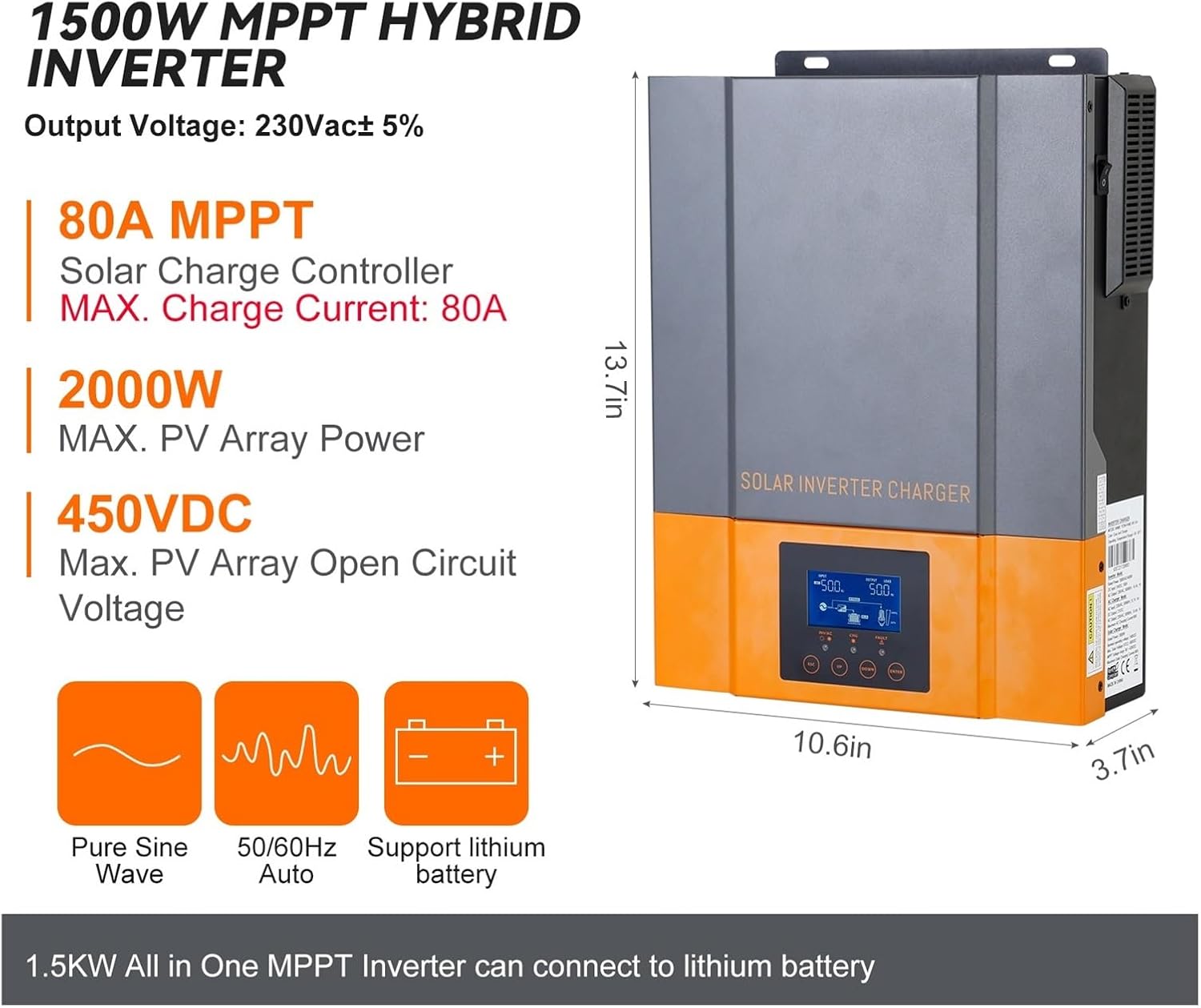
Figure 4.2: Inverter dimensions (13.7in H x 10.6in W x 3.7in D) and key electrical specifications including 230Vac output, 80A MPPT solar charge controller, 2000W max PV array power, and 450VDC max PV open circuit voltage. It supports pure sine wave output, 50/60Hz auto frequency, and lithium batteries.

Figure 4.3: Detailed view of the LCD display, LED indicators (AC/INV, CHG, FAULT), and function keys (ESC, UP, DOWN, ENTER) on the front panel. The power ON/OFF switch is located on the side of the unit.
LED Indicator Messages
| LED Indicator | State | Messages |
|---|---|---|
| AC / INV | Solid On (Green) | Output is powered by utility in Line mode. |
| Flashing (Green) | Output is powered by battery or PV in battery mode. | |
| CHG | Solid On (Green) | Battery is fully charged. |
| Flashing (Green) | Battery is charging. | |
| FAULT | Solid On (Red) | Fault occurs in the inverter. |
| Flashing (Red) | Warning condition occurs in the inverter. |
Function Key Descriptions
| Function Key | Description |
|---|---|
| ESC | To exit setting mode |
| UP | To go to previous selection |
| DOWN | To go to next selection |
| ENTER | To confirm the selection in setting mode or enter setting mode |
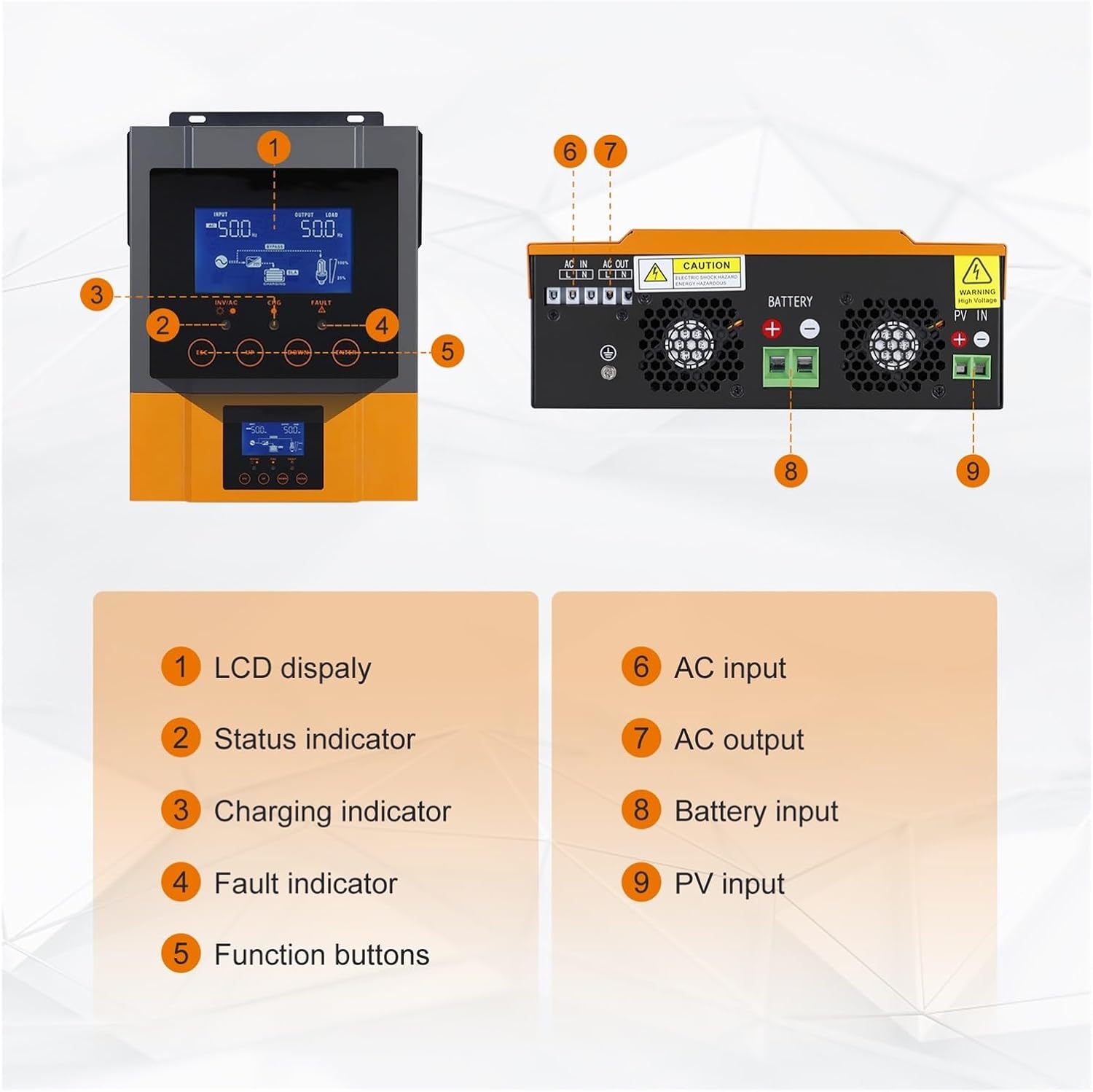
Figure 4.4: Key components and connection points. 1: LCD display, 2: Status indicator, 3: Charging indicator, 4: Fault indicator, 5: Function buttons, 6: AC input, 7: AC output, 8: Battery input, 9: PV input.

Figure 4.5: The inverter supports optional WIFI monitoring, allowing real-time performance viewing and parameter changes via a mobile application. The WIFI module is not included in the standard package.
5. Setup and Installation
This section outlines the steps for installing your hybrid solar inverter. Ensure all safety instructions are followed.
5.1 Mounting the Inverter
- Choose a suitable location: The inverter should be mounted indoors, in a dry, well-ventilated area, protected from direct sunlight, high temperatures, and moisture.
- Ensure adequate clearance: Allow at least 20 cm (8 inches) of clearance around the unit for proper heat dissipation.
- Secure mounting: Use appropriate screws and anchors to securely mount the inverter to a solid wall surface.
5.2 Wiring Connections
Refer to Figure 4.4 for connection port locations. All wiring must comply with local electrical codes.
- Battery Connection: Connect the battery cables to the Battery Input terminals (8). Ensure correct polarity (positive to positive, negative to negative).
- PV Array Connection: Connect the solar panel cables to the PV Input terminals (9). Observe correct polarity and ensure the PV array voltage is within the inverter's specified range.
- AC Input Connection: Connect the utility grid or generator AC power to the AC Input terminals (6).
- AC Output Connection: Connect your loads to the AC Output terminals (7).
- Grounding: Connect the inverter's ground terminal to a reliable earth ground.
5.3 Initial Power-Up
- After all connections are secure, switch on the battery breaker.
- Switch on the PV array breaker.
- Switch on the AC input breaker (if connected).
- Turn on the inverter's power switch (refer to Figure 4.3).
- Observe the LCD display and LED indicators for normal operation.
6. Operating Instructions
The inverter features an LCD display and function buttons for monitoring and configuration.
6.1 LCD Display and Button Operation
The LCD displays real-time system status, including input/output voltage, battery status, and charging information. Use the function keys (ESC, UP, DOWN, ENTER) to navigate through menus and adjust settings as described in Figure 4.3.
6.2 LED Indicators
The LED indicators provide a quick visual status of the inverter's operation. Refer to the table in Figure 4.3 for detailed descriptions of each indicator's state and corresponding message.
6.3 Configuring Settings
The inverter allows configuration of various parameters to optimize performance for your specific setup. These include:
- Battery charging current.
- AC/Solar charger priority.
- Input voltage range.
- Output frequency (50Hz/60Hz).
To access and modify settings, press the ENTER button to enter the setting mode, use UP/DOWN to navigate, and ENTER to confirm selections. Press ESC to exit.
7. Maintenance
Regular maintenance ensures the longevity and optimal performance of your inverter.
- Cleaning: Periodically clean the inverter's exterior with a dry cloth. Ensure ventilation openings are free from dust and debris.
- Connections: Annually check all electrical connections for tightness and signs of corrosion.
- Environment: Ensure the installation environment remains within specified temperature and humidity ranges.
- Battery Health: Monitor battery voltage and performance regularly, especially for lead-acid batteries.
8. Troubleshooting
This section provides solutions for common issues you might encounter.
| Problem | Possible Cause | Solution |
|---|---|---|
| Inverter not turning on | No battery connection or low battery voltage. Power switch off. | Check battery connections and voltage. Ensure power switch is ON. |
| No AC output | Overload. Short circuit. Inverter fault. | Reduce load. Check for short circuits. Refer to FAULT LED. |
| Battery not charging | PV input too low. AC input not present. Charger settings incorrect. | Check PV array and AC input. Verify charger settings on LCD. |
| FAULT LED is solid red | Internal fault. | Disconnect all power sources, wait 5 minutes, then reconnect. If fault persists, contact support. |
9. Specifications
Detailed technical specifications for the WLLKIY Hybrid Solar Inverter models.
| Feature | 1.5 kW 12V Model | 2.4 kW 24V Model | 3.2 KVA / 3 KW 24V Model |
|---|---|---|---|
| Rated Output Power | 1.5 kW | 2.4 kW | 3200 VA / 3000 W |
| Output Voltage Waveform | Pure Sine Wave | ||
| Output Voltage Regulation | 230 Vac ± 5% | ||
| Charging Algorithm | 3-stage | ||
| Max AC Charging Current | 60 Amp | ||
| Bulk Charging Voltage (Flooded Battery) | 14.6 V | 29.2 V | |
| Bulk Charging Voltage (AGM/Gel Battery) | 14.1 V | 28.2 V | |
| Floating Charging Voltage | 13.5 VDC | 27.0 VDC | |
| Max PV Array Power | 2000 W | 3000 W | |
| Nominal PV Voltage | 240 VDC | ||
| MPPT Voltage Range (PV Array) | 90 ~ 430 VDC | ||
| Max PV Open Circuit Voltage | 450 VDC | ||
| Max Charging Current (AC + Solar) | 80 Amp | ||
| Operating Temperature Range | -10°C to 50°C | ||
| Storage Temperature Range | -15°C to 60°C | ||
| Humidity | 5% to 95% Relative Humidity (non-condensing) | ||
10. Warranty and Support
For warranty information and technical support, please refer to the documentation provided with your purchase or contact your vendor. Keep your purchase receipt as proof of purchase.