
1. Introduction
Thank you for choosing the EaseZen EMS Foot Massager. This device combines advanced Electrical Muscle Stimulation (EMS), Transcutaneous Electrical Nerve Stimulation (TENS), and Electronic Pulse Therapy (EPT) technologies to provide effective relief from foot pain, cramps, swelling, numbness, and Restless Leg Syndrome (RLS). It is designed for both foot and body circulation stimulation, offering a versatile and convenient solution for your wellness needs.
Please read this manual thoroughly before first use to ensure safe and optimal operation.

Figure 1: EaseZen EMS Foot Massager (Model KTR-4021)
2. Important Safety Information
To ensure your safety and the proper functioning of the device, please adhere to the following guidelines:
- Always place both bare feet on the EMS foot stimulator simultaneously. The device will not function correctly if only one foot is placed or if socks/footwear are worn.
- When using the electrode pads for body stimulation, ensure both pads are connected to the main unit via the electrode cables and firmly stick to your body to complete the electrical circuit. Using only one pad will not initiate stimulation and may pose a risk.
- Do not use this device if you are pregnant, have heart conditions, have metal implants (such as a pacemaker), have experienced cerebral hemorrhage, deep venous thrombosis, abnormal blood pressure, acute cardiovascular or cerebrovascular conditions, or have wounds or inflammation in the area of application.
- Consult your physician before using this device if you have any pre-existing medical conditions or concerns.
- Statements regarding this device have not been evaluated by the FDA and are not intended to diagnose, treat, cure, or prevent any disease or health condition.

Figure 2: Contraindications for Use
3. Package Contents
Verify that all items are present and in good condition upon opening the package:
- 1 x EaseZen EMS Foot Massager Unit
- 1 x Wireless Remote Control
- 2 x Electrode Body Pads
- 1 x Electrode Cable
- 1 x USB Type-C Charging Cable
- 1 x Power Adapter
- 2 x AAA Batteries (for remote control)
- 1 x User Manual

Figure 3: Included Package Contents
4. Setup
4.1 Charging the Main Unit
The foot massager unit features a high-capacity rechargeable battery. Before first use, fully charge the device using the provided USB Type-C charging cable and power adapter. A full charge can provide up to 60 days of use (30 minutes per day).
- Connect the USB Type-C cable to the charging port on the main unit.
- Plug the USB-A end of the cable into the power adapter, then plug the adapter into a wall outlet.
- The charging indicator light will show the charging status. Once fully charged, the light will change or turn off.
4.2 Installing Remote Control Batteries
The wireless remote control requires 2 AAA batteries (included).
- Open the battery compartment on the back of the remote control.
- Insert the 2 AAA batteries, ensuring correct polarity (+/-).
- Close the battery compartment securely.

Figure 4: Charging the Device
5. Operating Instructions
5.1 Foot Stimulation
- Place the EaseZen Foot Massager on a flat surface.
- Sit comfortably and place both bare feet on the designated black areas of the massager. Ensure full contact for optimal stimulation.
- Press the power button on the main unit or the remote control to turn on the device.
- Use the remote control to select your desired mode (10 available) and intensity level (20 available). The LCD display on the remote will show the current settings.
- Adjust the intensity gradually from mild to strong (pulse frequency 1Hz-100Hz) until you find a comfortable and effective level.
- The device features an auto-off timer with options for 15, 30, 45, and 60 minutes. Short press the power button on the remote to cycle through timer settings.
5.2 Body Stimulation with Electrode Pads
For targeted relief on other body parts (e.g., ankle, legs, back, waist, shoulder), use the provided electrode pads:
- Connect the electrode cable to the main unit.
- Attach the two electrode pads to the ends of the electrode cable.
- Peel off the protective film from the pads and firmly stick both pads onto the desired painful areas of your body. Ensure good skin contact.
- Turn on the device and use the remote control to select the body stimulation mode and adjust intensity. The remote allows separate intensity control for foot and body.
- After use, gently remove the pads and reapply the protective film to maintain their adhesive quality.
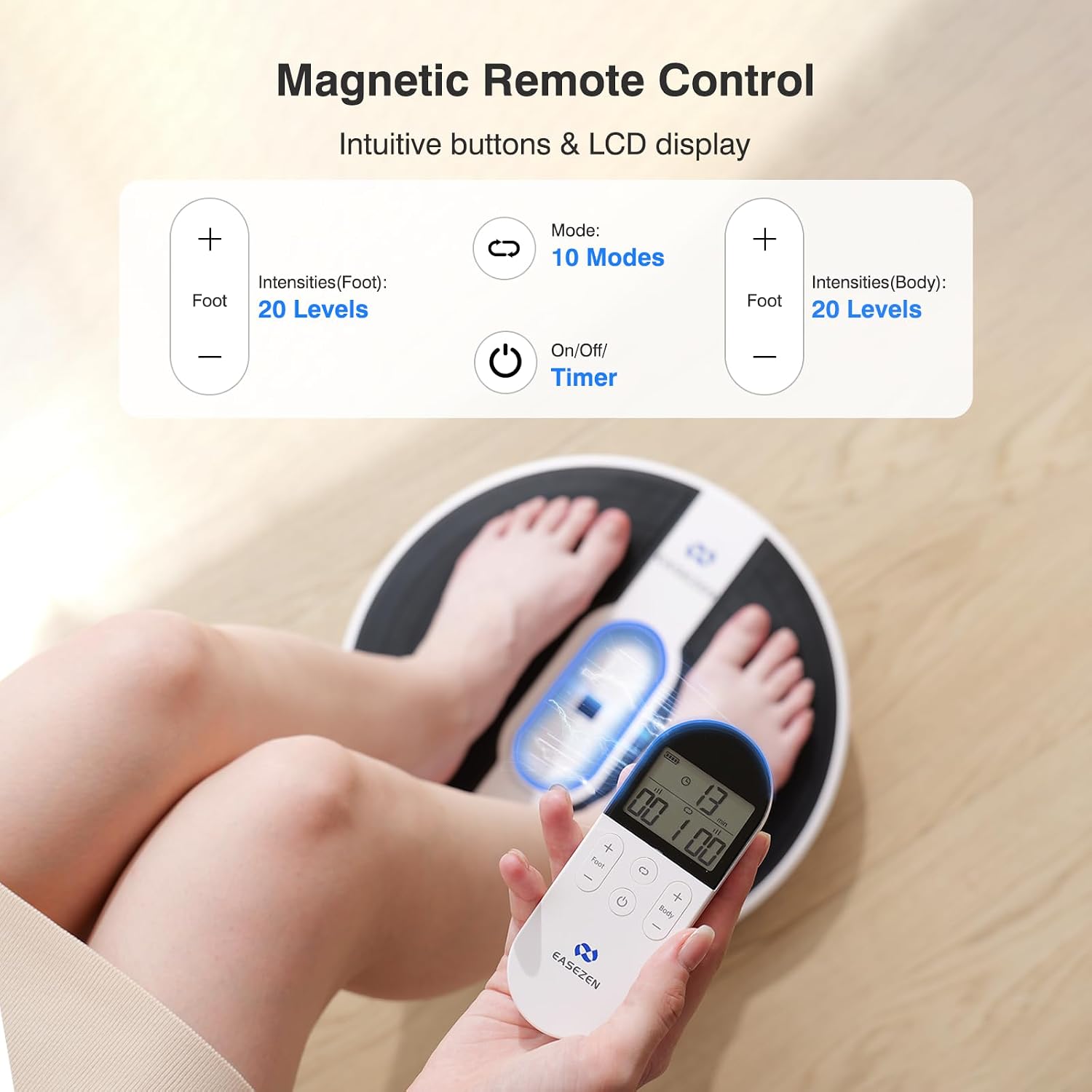
Figure 5: Wireless Remote Control

Figure 6: Dual Foot and Body Stimulation
6. Maintenance
- Cleaning: Wipe the main unit and remote control with a soft, damp cloth. Do not use abrasive cleaners or immerse the device in water.
- Electrode Pads: After each use, reapply the protective film to the electrode pads to preserve their adhesive quality and extend their lifespan. Store them in a cool, dry place. Replace pads when they lose their stickiness.
- Storage: Store the device in a cool, dry place away from direct sunlight and extreme temperatures. Its slim and lightweight design makes it easy to store.
7. Troubleshooting
| Problem | Possible Cause | Solution |
|---|---|---|
| Device does not turn on. | Low battery; Remote control batteries are dead or incorrectly installed. | Charge the main unit; Replace or correctly install AAA batteries in the remote. |
| No stimulation felt on feet. | Only one foot is on the device; Feet are not bare; Intensity level is too low. | Ensure both bare feet are on the device; Increase intensity gradually. |
| No stimulation felt with body pads. | Only one pad is attached; Pads are not making good contact; Pads have lost adhesiveness. | Ensure both pads are attached and making good contact; Replace old pads. |
| Remote control not responding. | Batteries are dead or incorrectly installed; Obstruction between remote and unit. | Replace or correctly install batteries; Ensure clear line of sight. |
8. Specifications
- Model: KTR-4021
- Product Dimensions: 14.37 x 2.7 x 14.37 inches
- Weight: 4.2 Pounds
- Power Source: Battery Powered (Rechargeable Lithium Ion)
- Battery Life: Up to 60 days (30 mins/day) on a single charge
- Modes: 10
- Intensity Levels: 20
- Pulse Frequency: 1Hz-100Hz
- Material: Silica gel
- Manufacturer: Shenzhen Kentro Medical Electronics Co,. Ltd
9. Warranty and Support
EaseZen offers a one-year warranty for this product. For any questions, technical support, or warranty claims, please contact EaseZen customer service through the retailer's platform or visit the official EaseZen website for contact information.