
1. Introduction
Thank you for purchasing the TOUCAN RC HOBBY L260H E592 1/16 Scale Remote Control Loader. This manual provides essential information for the safe operation, setup, maintenance, and troubleshooting of your RC loader. Please read this manual thoroughly before use to ensure proper function and longevity of the product.
This product is designed for users aged 18 years and up.
2. Safety Precautions
To prevent injury or damage, observe the following safety guidelines:
- Always operate the RC loader in open areas, away from people, pets, and obstacles.
- Do not operate near water or in wet conditions to avoid electrical damage.
- Keep fingers, hair, and loose clothing away from moving parts.
- Ensure all batteries are correctly installed and charged before operation.
- Do not attempt to modify or disassemble the product.
- Store the product and its components in a cool, dry place when not in use.
- Adult supervision is recommended for all operations.
3. Package Contents
Verify that all items listed below are included in your package:
- TOUCAN RC HOBBY L260H E592 1/16 RC Loader
- Remote Control Transmitter
- Rechargeable Battery for Loader (7.4V 1200mAh Lithium)
- USB Charging Cable
- Instruction Manual (this document)

Image: The complete package contents, including the L260H E592 RC Loader, its remote control, rechargeable battery, and USB charging cable.
4. Component Identification
4.1 RC Loader Components
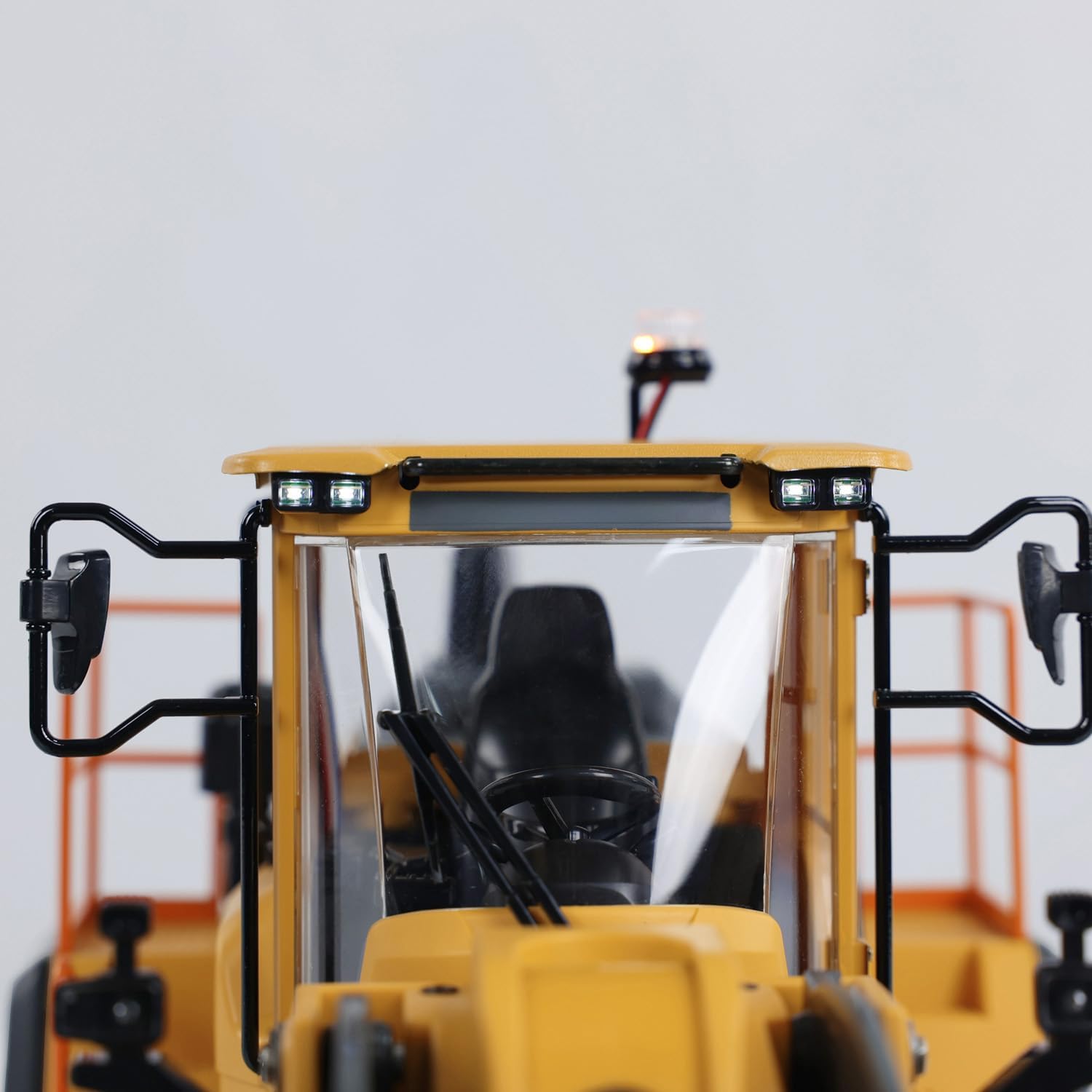
Image: Front view of the loader's cab, highlighting the detailed interior, side mirrors, and functional LED headlights and roof-mounted beacon light.
- Cab: Detailed driver's cabin.
- Headlights & Beacon: Functional LED lights for realistic operation.
- Side Mirrors: Adjustable mirrors for enhanced realism.

Image: Top-down view showing the integrated speaker for sound effects and the main power switch (ON/OFF) located near the cab.
- Speaker: Produces realistic engine and operation sounds.
- Power Switch: Located on the top deck, near the cab, to turn the loader ON/OFF.

Image: Detailed view of the loader's bucket and its hydraulic-like lifting arms, showcasing the robust metal construction and pivot points.
- Bucket: Front-mounted bucket for scooping and lifting materials.
- Lifting Arms: Articulated arms that control the vertical movement of the bucket.
- Tilting Mechanism: Allows the bucket to tilt for dumping.

Image: View of the loader's underside, revealing the central drive shaft, robust chassis, and large rubber tires.
- Wheels & Tires: Large, durable rubber tires for traction on various surfaces.
- Drive System: Internal motor and gearbox for propulsion.
4.2 Remote Control Transmitter

Image: The remote control transmitter, featuring dual joysticks for movement and bucket control, along with various function buttons.
- Left Joystick: Controls forward/backward movement and steering.
- Right Joystick: Controls bucket lifting/lowering and tilting.
- Power Button: Turns the remote control ON/OFF.
- Function Buttons: Activate lights, sounds, and other special features.
- Antenna: For 2.4GHz signal transmission.
5. Setup
5.1 Charging the Loader Battery
- Connect the rechargeable battery to the USB charging cable.
- Plug the USB charging cable into a standard USB power adapter (not included) or a computer USB port.
- The indicator light on the USB charger will show the charging status (e.g., red for charging, green for fully charged).
- Charging typically takes 2-3 hours. Do not overcharge the battery.
- Disconnect the battery once fully charged.
5.2 Installing the Loader Battery
- Locate the battery compartment on the underside or rear of the loader.
- Open the battery compartment cover.
- Connect the fully charged battery to the loader's power connector, ensuring correct polarity.
- Carefully place the battery inside the compartment and close the cover securely.

Image: A visual guide demonstrating the process of inserting the rechargeable battery into the designated compartment of the RC loader.
5.3 Installing Remote Control Batteries
- Open the battery compartment on the back of the remote control.
- Insert the required number of AA batteries (not included), observing the correct polarity (+/-).
- Close the battery compartment cover securely.
5.4 Pairing the Remote Control with the Loader
- Ensure the loader's battery is installed and fully charged.
- Turn on the loader using its power switch. The lights may flash, indicating it's searching for a signal.
- Turn on the remote control by pressing its power button.
- The remote control and loader should automatically pair. A successful connection is usually indicated by a solid light on the loader and/or a confirmation sound.
- If pairing fails, turn both devices off and repeat the steps.
6. Operating Instructions
6.1 Basic Controls
Familiarize yourself with the remote control functions before operating the loader.
- Forward/Backward: Push the left joystick forward or backward.
- Steering (Left/Right): Push the left joystick left or right.
- Bucket Lift/Lower: Push the right joystick forward or backward.
- Bucket Tilt (Scoop/Dump): Push the right joystick left or right.

Image: The RC loader in operation, demonstrating its ability to move and manipulate the bucket, controlled by the remote transmitter.
6.2 Light and Sound Functions
The loader features realistic light and sound effects:
- Lights: Use the designated button on the remote control to turn the headlights and beacon light ON/OFF.
- Sounds: The loader produces engine start-up, idle, and operational sounds. These can typically be toggled or adjusted using a specific button on the remote.

Image: The RC loader showcasing its functional LED lights and indicating the presence of realistic sound effects during operation.
6.3 Driving Tips
- Start with slow, gentle movements to get accustomed to the controls.
- Practice scooping and dumping materials in a controlled environment.
- Avoid driving on excessively rough terrain or through deep puddles.
- When lifting heavy loads, ensure the loader is on a stable, level surface.
7. Maintenance
7.1 Cleaning
- Turn off the loader and remote control before cleaning.
- Use a soft, dry cloth to wipe down the exterior of the loader and remote control.
- For stubborn dirt, a slightly damp cloth can be used, but ensure no water enters electronic components.
- Do not use chemical cleaners or solvents, as they may damage the finish.
7.2 Storage
- Remove all batteries from both the loader and the remote control if storing for an extended period.
- Store the product in a cool, dry place, away from direct sunlight and extreme temperatures.
- Keep the original packaging for safe storage and transport.
8. Troubleshooting
| Problem | Possible Cause | Solution |
|---|---|---|
| Loader does not turn on. | Battery not charged or incorrectly installed. | Charge the loader battery fully. Ensure it is connected correctly and the power switch is ON. |
| Remote control does not turn on. | Remote control batteries are dead or incorrectly installed. | Replace remote control batteries. Check polarity. |
| Loader is unresponsive to remote. | Not paired, out of range, or interference. | Ensure both are ON and paired. Move closer to the loader. Avoid areas with strong radio interference. |
| Weak performance or slow movement. | Low loader battery. | Recharge the loader battery. |
| Bucket mechanism not working. | Obstruction or mechanical issue. | Check for any obstructions in the bucket or lifting arms. Ensure the battery is sufficiently charged. |
9. Specifications
- Model: L260H E592
- Scale: 1:16
- Brand: TOUCAN RC HOBBY
- Dimensions: 13.76 x 11 x 25.55 inches (34.95 x 27.94 x 64.9 cm)
- Battery: 7.4V 1200mAh Lithium (for loader)
- Remote Control Frequency: 2.4GHz
- Recommended Age: 18 years and up
- Manufacturer: DoubleE
10. Warranty and Support
TOUCAN RC HOBBY products are manufactured to high-quality standards. For information regarding warranty coverage or technical support, please refer to the warranty card included with your purchase or contact TOUCAN RC HOBBY customer service directly. Contact details can typically be found on the product packaging or the official TOUCAN RC HOBBY website.
Please retain your proof of purchase for any warranty claims.