
Partslost ZT610
Ribbon Take Up Spindle User Manual
For Zebra ZT610 Thermal Barcode Label Printer
Model: ZT610 | Part Number: P1083320-068 | Brand: Partslost
Product Overview
This document provides instructions for the Partslost Ribbon Take Up Spindle, part number P1083320-068, designed specifically for the Zebra ZT610 Thermal Barcode Label Printer. This component is crucial for the proper handling and winding of used ribbon during the printing process, ensuring efficient and reliable printer operation.
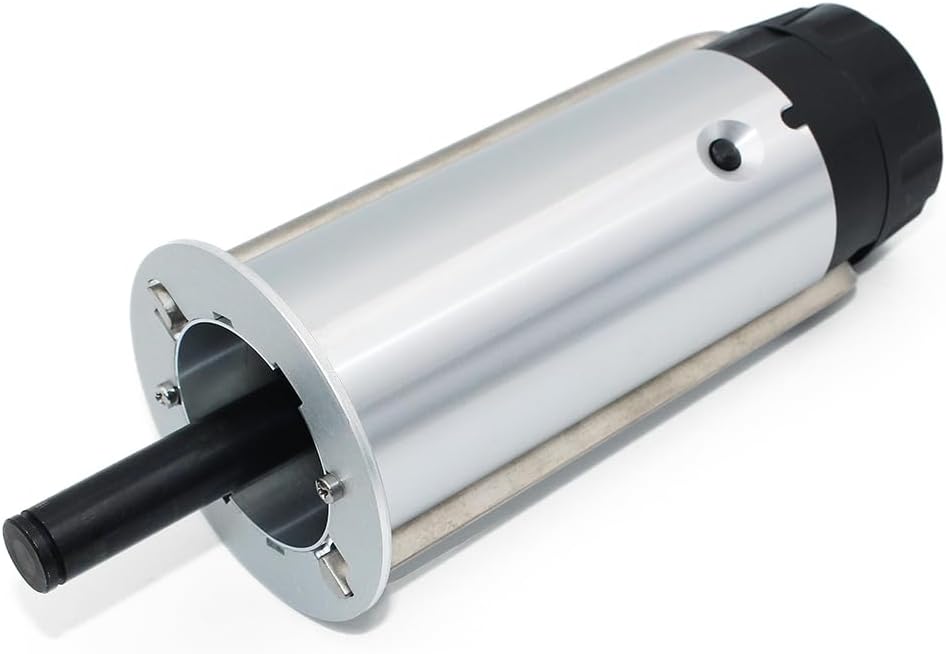
Figure 1: Overall view of the Ribbon Take Up Spindle, showing its cylindrical body and spindle shaft.
Installation and Setup
The Ribbon Take Up Spindle is a replacement part. Proper installation is essential for the Zebra ZT610 printer's functionality. Always ensure the printer is powered off and disconnected from the power source before attempting any installation or replacement.
- Preparation: Power off the Zebra ZT610 printer and unplug it from the electrical outlet. Open the printer's media cover to access the ribbon compartment.
- Remove Old Spindle (if applicable): Carefully locate the existing ribbon take-up spindle. Depending on the printer model, it may involve releasing a latch or sliding the spindle out of its housing. Refer to your Zebra ZT610 printer's specific service manual for detailed removal instructions.
- Install New Spindle: Align the new Partslost Ribbon Take Up Spindle (P1083320-068) with the designated slot or mounting points within the printer's ribbon compartment. Ensure it clicks securely into place or is properly seated. The spindle is designed for a precise fit.
- Load Ribbon: Once the spindle is installed, load the thermal transfer ribbon according to your printer's instructions, ensuring the ribbon leader is properly attached to the take-up spindle.
- Final Check: Close the printer's media cover. Reconnect the power cord and power on the printer. Perform a test print to verify correct ribbon take-up operation.

Figure 2: Angled view of the spindle, highlighting its robust construction and connection points.
Operation
The Ribbon Take Up Spindle operates automatically as part of the Zebra ZT610 printer's ribbon handling system. Its primary function is to collect and wind the used thermal transfer ribbon after it passes through the printhead. This ensures that the used ribbon is neatly stored, preventing jams and maintaining a clean printing environment.
- Automatic Winding: During printing, the spindle rotates to pull the used ribbon away from the print path.
- Ribbon Tension: It helps maintain appropriate tension on the ribbon, which is critical for consistent print quality and to prevent ribbon wrinkling or tearing.
- Waste Management: The spindle neatly spools the waste ribbon, making it easy to remove and dispose of once the ribbon roll is depleted.

Figure 3: End view of the spindle, showing the internal mechanism and connection interface.
Maintenance
The Ribbon Take Up Spindle is designed for durability and requires minimal maintenance. However, periodic inspection can help ensure its longevity and optimal performance.
- Regular Inspection: Periodically inspect the spindle for any signs of wear, damage, or accumulation of dust/debris.
- Cleaning: If dust or ribbon residue is present, gently wipe the spindle with a clean, lint-free cloth. Avoid using harsh chemicals or abrasive materials.
- Avoid Obstructions: Ensure that no foreign objects or tangled ribbon interfere with the spindle's rotation.

Figure 4: Close-up of the spindle's end cap, showing the textured grip and yellow ring detail.
Troubleshooting
If you encounter issues related to ribbon take-up, consider the following common problems and solutions:
| Problem | Possible Cause | Solution |
|---|---|---|
| Ribbon not winding onto spindle | Spindle not properly installed; ribbon not attached to spindle; spindle mechanism jammed. | Ensure spindle is securely seated. Verify ribbon leader is correctly attached. Check for obstructions and clean the spindle. |
| Ribbon wrinkling or tearing | Incorrect ribbon tension; damaged spindle; ribbon not loaded correctly. | Adjust ribbon tension settings on the printer if available. Inspect spindle for damage. Reload ribbon carefully. |
| Spindle not rotating | Internal printer issue; spindle motor failure; severe obstruction. | Power cycle the printer. Check for any visible obstructions. If the issue persists, contact Partslost customer service or a qualified printer technician. |

Figure 5: Close-up of the spindle's shaft end, showing the mounting plate and screw details.
Specifications
- Product Name: Ribbon Take Up Spindle
- Part Number: P1083320-068
- Brand: Partslost
- Model Compatibility: Zebra ZT610 Thermal Barcode Label Printer
- Included Components: 1x ZT610 Ribbon Take Up Spindle
- Material: Durable and strong construction suitable for industrial use.
- Purpose: Collects and winds used thermal transfer ribbon.
Warranty and Support
Partslost is committed to customer satisfaction and product quality. The Ribbon Take Up Spindle (P1083320-068) comes with a Lifetime Warranty.
All Partslost customers benefit from comprehensive customer service for our products. We provide dedicated after-sale support for our printer accessories, ensuring that every purchase is backed by our commitment to quality. Should you have any questions, concerns, or require assistance with your Ribbon Take Up Spindle, our customer service team is readily available to assist you.
For support, please refer to the contact information provided with your purchase or visit the official Partslost store on Amazon: Partslost Store.
Related Documents - ZT610
 |
Zebra ZT600 系列工业打印机用户指南 本用户指南为 Zebra ZT600 系列工业打印机提供了全面的信息,包括 ZT610 和 ZT620 等型号。它提供了设置、操作、维护、故障排除和技术规格,是帮助用户充分利用这些高性能打印解决方案的必备资源。 |
 |
Zebra ZT610/ZT620 Industrial Printer User Guide Comprehensive user guide for Zebra ZT610 and ZT620 industrial printers, covering setup, configuration, operation, maintenance, and troubleshooting for efficient label printing. Visit zebra.com for support. |
 |
Zebra ZT610 and ZT620 Printer Setup and Media Loading Guide Comprehensive guide for setting up Zebra ZT610 and ZT620 industrial printers, including software installation, driver setup, and media loading instructions. |
 |
Zebra ZT610, ZT620 Quick Start Guide: Setup and Installation Concise guide to setting up and installing Zebra ZT610 and ZT620 industrial printers. Includes unboxing, connection, media loading, and ribbon loading instructions. |
 |
Zebra ZT600 Series User Guide: Loading Media and Print Modes Comprehensive guide for Zebra ZT600 Series printers, detailing how to load various media types (roll, fanfold) and configure print modes like Tear-Off, Peel-Off, Rewind, and Cutter for optimal performance. |
 |
Zebra ZPL & CPCL Printer Driver for OPOS: Application Programmer's Guide A comprehensive guide for developers on using Zebra's ZPL and CPCL printer drivers with OPOS systems. Covers installation, configuration, barcode support, font management, and programming examples for POS environments. |