
1. Important Safety Instructions
Read all safety warnings and instructions before operating this tool. Failure to follow the warnings and instructions may result in electric shock, fire, and/or serious injury.
General Power Tool Safety
- Work Area Safety: Keep the work area clean and well-lit. Cluttered or dark areas invite accidents. Do not operate power tools in explosive atmospheres, such as in the presence of flammable liquids, gases, or dust.
- Electrical Safety: Power tool plugs must match the outlet. Never modify the plug in any way. Do not use any adapter plugs with earthed (grounded) power tools. Avoid body contact with earthed or grounded surfaces.
- Personal Safety: Always wear eye protection (safety glasses or goggles), hearing protection, and a dust mask or respirator. Dress properly. Do not wear loose clothing or jewelry. Keep hair and clothing away from moving parts.
- Tool Use and Care: Do not force the power tool. Use the correct power tool for your application. Disconnect the plug from the power source before making any adjustments, changing accessories, or storing power tools.
Specific Drywall Sander Safety
- Dust Control: This sander is designed with a vacuum system to reduce dust. However, always use a respirator or dust mask, especially when sanding drywall or popcorn ceilings, as fine dust can be harmful. Ensure the dust collection bag is properly attached and emptied regularly.
- Secure Workpiece: Ensure the surface being sanded is stable and secure.
- Handle Grip: Always maintain a firm grip on the sander's handle during operation.
- LED Light: The integrated LED light is for illuminating the work area. Do not stare directly into the light.
2. Product Overview
The bsdonte DWSD321 Electric Drywall Sander is designed for efficient sanding of drywall, ceilings, and walls. It features a powerful motor, variable speed control, an integrated vacuum system, and an extendable handle for versatile use.
Package Contents
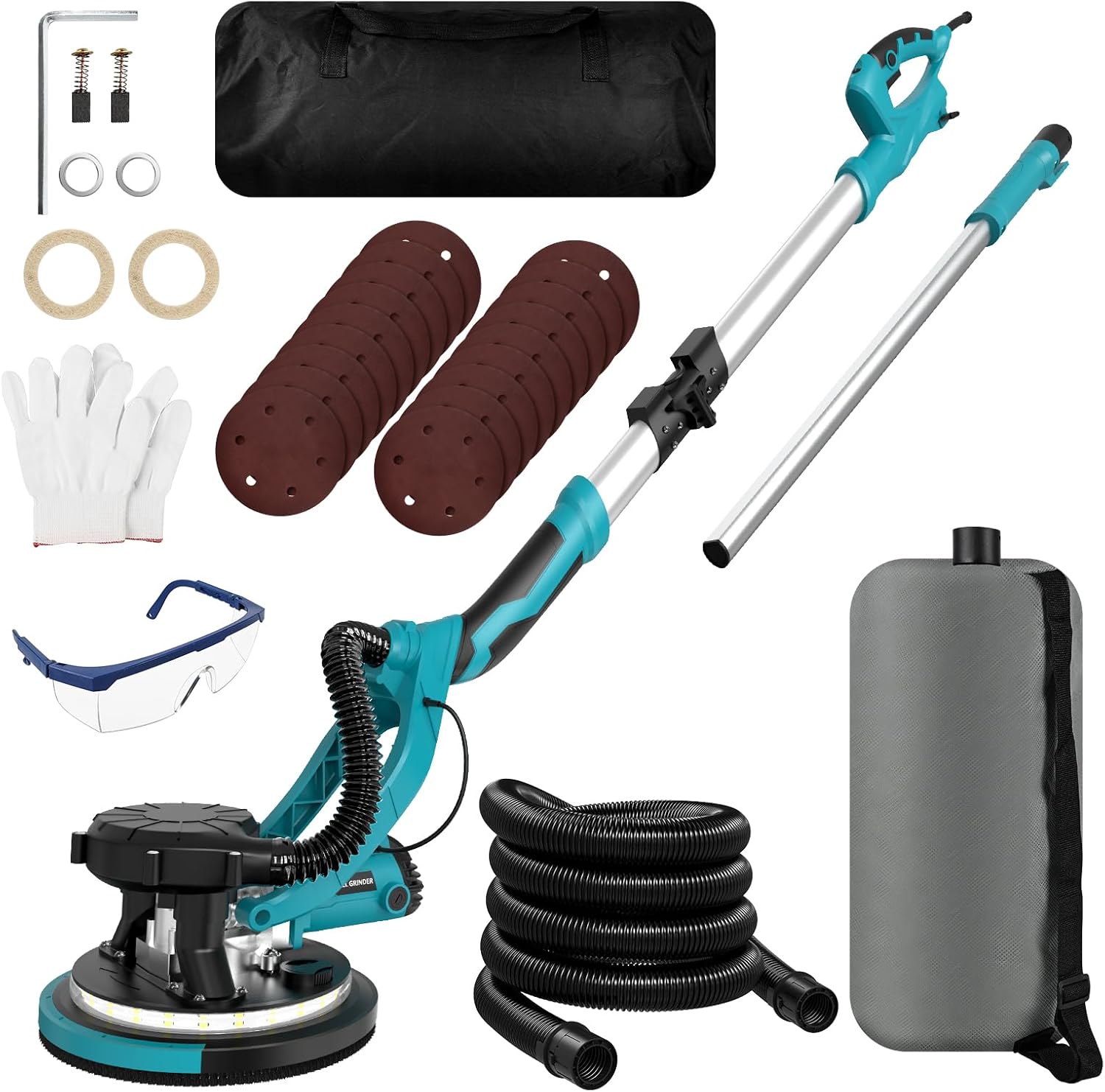
Image: The bsdonte DWSD321 Drywall Sander with its included accessories, such as sanding discs, dust collection bag, hose, safety glasses, gloves, and assembly tools.
- Drywall Sander Unit
- Extension Handle
- Dust Collection Hose
- Dust Collection Bag
- Sanding Discs (18 pieces)
- Safety Glasses
- Work Gloves
- Assembly Tools
- Carry Bag
Key Features

Image: Close-up view of the sander's motor housing, highlighting its powerful 1250W all-copper motor with 11.5A current and variable speed from 800-1800 RPM.
- Powerful Motor: 1250W, 11.5-Amp all-copper motor for efficient sanding.
- Variable Speed: Adjustable speed from 800 to 1800 RPM for different applications.
- Integrated Vacuum System: Designed for effective dust absorption, reducing airborne particles.
- Foldable & Extendable Handle: Allows for compact storage and reaching high or low areas (up to 6.6 ft).
- LED Light: Provides illumination for improved visibility in low-light conditions.
- 90° Pivoting Head: Enables flexible sanding of walls, ceilings, and floors.
- Removable Edge: Facilitates sanding in corners and tight spaces.
Component Identification

Image: Diagram showing the various labeled components of the drywall sander, including the power cable, extension handle, rear handle, multi-speed button, on/off switch, collapsible lock knob, LED switch, motor, LED light, detachable edge, vented disc, dust hose, and dust collection bag.
- 13.1ft Power Cable
- Extension Handle
- Rear Handle
- Multi-speed Button (Variable Speed Control)
- On/Off Switch
- Collapsible Lock Knob
- LED Switch
- Vented Disc
- Motor
- LED Light Ring
- Detachable Edge
- 6.6ft Dust Hose
- Dust Collection Bag
3. Setup and Assembly
Follow these steps to assemble your drywall sander before first use.
Handle Assembly

Image: Illustration demonstrating the foldable and telescopic design of the sander's handle, showing how it can be extended from 2.4 ft to 5.0 ft and up to 6.6 ft with the extension pole, and how it folds for storage.
- Unfold the main handle section and secure it using the collapsible lock knob.
- If extended reach is required, attach the extension handle to the main handle. Ensure it clicks securely into place.
- Adjust the handle length to your desired working height and lock it.
Dust Collection System Connection

Image: A person demonstrating the connection of the dust collection hose from the sander to the dust collection bag, illustrating the automatic dust removal system with 95% effective dust absorption.
- Connect one end of the dust collection hose to the dust port on the sander head.
- Connect the other end of the dust collection hose to the inlet on the dust collection bag.
- Ensure all connections are tight to maximize dust absorption efficiency.
Attaching Sanding Discs
- Ensure the sander is unplugged from the power source.
- Align the holes on the sanding disc with the holes on the sanding pad.
- Press the sanding disc firmly onto the hook-and-loop sanding pad until it is securely attached.
- Select the appropriate grit for your task. Lower grit numbers (e.g., 80-120) are for rough sanding and material removal, while higher grit numbers (e.g., 180-240) are for fine finishing.
4. Operating Instructions
Before operating, ensure all safety precautions are followed and the sander is properly assembled.
Powering On/Off and Speed Control
- Plug the power cable into a suitable 120V electrical outlet.
- Press the On/Off switch to start the sander.
- Use the multi-speed button to adjust the sanding speed (800-1800 RPM) according to the material and desired finish. Start with a lower speed and increase as needed.
- To turn off the sander, press the On/Off switch again.
Using the LED Light

Image: A person using the drywall sander with its integrated LED light illuminating the work surface, demonstrating its utility in low-light or dark environments for better visibility and progress monitoring.
- Press the LED switch to turn the integrated LED light on or off.
- The LED light is useful for illuminating the work surface, especially in dimly lit areas, to ensure even sanding and monitor progress.
Sanding Techniques

Image: Four panels illustrating key features: a 90° adjustable pivoting head for sanding various surfaces, a removable edge for corner sanding, fixed springs for effortless vertical ceiling sanding, and a suspended grinding disk for smoother results.
- General Sanding: Apply light, even pressure. Move the sander in smooth, overlapping passes. Avoid pressing too hard, as this can create gouges or uneven surfaces and reduce motor life.
- Ceiling and Wall Sanding: Utilize the extendable handle for comfortable reach. The 90° pivoting head allows the sanding pad to remain flat against the surface. The fixed springs assist in vertical sanding, reducing user fatigue.
- Corner Sanding: The detachable edge allows you to sand closer to corners and edges. Remove the edge guard when working in these areas.
- Dust Collection: The integrated vacuum system and dust collection bag will capture most of the dust. Regularly check and empty the dust bag to maintain optimal suction.
5. Maintenance
Regular maintenance ensures the longevity and optimal performance of your drywall sander.
- Cleaning: After each use, unplug the sander and clean off any dust or debris from the tool, especially around the motor vents and sanding pad. Use a soft brush or compressed air.
- Dust Bag: Empty the dust collection bag regularly, ideally when it is half to two-thirds full, to maintain effective dust suction. Clean the bag periodically.
- Sanding Discs: Replace sanding discs when they become worn or clogged to ensure efficient sanding and prevent damage to the workpiece.
- Power Cord: Inspect the power cord for any damage before each use. Do not use the tool if the cord is damaged.
- Storage: Store the sander in a dry, secure location, out of reach of children. The foldable design allows for compact storage in the provided carry bag.
6. Troubleshooting
This section addresses common issues you might encounter with your drywall sander.
| Problem | Possible Cause | Solution |
|---|---|---|
| Sander does not turn on. | No power supply; faulty switch; damaged power cord. | Check power outlet and connections. Inspect power cord for damage. If issues persist, contact support. |
| Poor dust collection. | Dust bag full; hose clogged; loose connections; worn sanding disc. | Empty dust bag. Check hose for blockages. Ensure all hose connections are tight. Replace sanding disc. |
| Sander vibrates excessively. | Sanding disc improperly attached; damaged sanding pad; motor issue. | Re-attach sanding disc correctly. Inspect sanding pad for damage. If vibration continues, contact support. |
| Uneven sanding results. | Uneven pressure; worn sanding disc; incorrect grit. | Apply even pressure. Replace worn sanding disc. Use appropriate grit for the task. |
7. Specifications
| Feature | Specification |
|---|---|
| Model Number | DWSD321 |
| Brand | bsdonte |
| Power | 1250W (11.5-Amp) |
| Voltage | 120 Volts |
| Variable Speed | 800-1800 RPM |
| Item Weight | 14.42 pounds |
| Package Dimensions | 30 x 11.5 x 8.75 inches |
| Handle Length (Extendable) | Up to 6.6 feet |
| Sanding Discs Included | 18 pieces |
8. Warranty and Support
For warranty information or technical support, please refer to the documentation included with your purchase or contact bsdonte customer service directly. Keep your purchase receipt as proof of purchase for any warranty claims.
Contact information for bsdonte can typically be found on their official website or through the retailer where the product was purchased.