
Introduction
Thank you for choosing the Lekaby Wireless Ear Buds, Model Q26-GB-2024. This manual provides detailed instructions for the proper setup, operation, maintenance, and troubleshooting of your new Bluetooth 5.3 headphones. Please read this manual thoroughly before use to ensure optimal performance and longevity of your device.
Package Contents
Please verify that all items listed below are included in your package:
- Earbuds (2 units)
- 2600 mAh Charging Case (1 unit)
- Type-C Charging Cable (1 unit)
- Ear Caps (6 units - S/M/L sizes)
- User Manual (1 unit)
Product Overview
The Lekaby Q26-GB-2024 Wireless Ear Buds feature Bluetooth 5.3 connectivity, Environmental Noise Cancelling (ENC) for clear calls, a digital LED display for battery status, and IPX7 waterproofing. They are designed for comfort and provide powerful audio performance.

LED Digital Power Display: The charging case features an LED screen that accurately displays the battery percentage of both the charging case and each earbud.

Enhanced Audio Driver: Equipped with a 13.44mm graphene diaphragm for an 85% bass boost and high-fidelity sound.

Ergonomic Design: Lightweight at 4.5g per earbud, designed for a comfortable and secure fit with multiple ear cap sizes (S/M/L) included.
Setup
1. Charging the Earbuds and Case
Before first use, fully charge the earbuds and charging case.
- Place the earbuds into the charging case.
- Connect the Type-C charging cable to the charging port on the case and to a USB power source.
- The LED digital display on the case will show the charging progress.
- The charging case takes approximately 2 hours to fully charge. Earbuds can be fully charged in the case in about 1.5 hours. A 10-minute charge provides up to 2 hours of music playback for the earbuds.

Battery Life: Earbuds provide 8 hours of playback on a single charge, with the charging case extending total playtime up to 128 hours.
2. Pairing with Your Device
The earbuds feature one-step auto-pairing for convenience.
- Open the lid of the charging case. The earbuds will automatically enter pairing mode.
- On your device (smartphone, tablet, laptop), go to Bluetooth settings and enable Bluetooth.
- Search for available devices and select "Q26" from the list.
- Once connected, you will hear a confirmation sound, and the device will show "Connected".
- After the initial pairing, the earbuds will automatically connect to the last paired device when removed from the case.
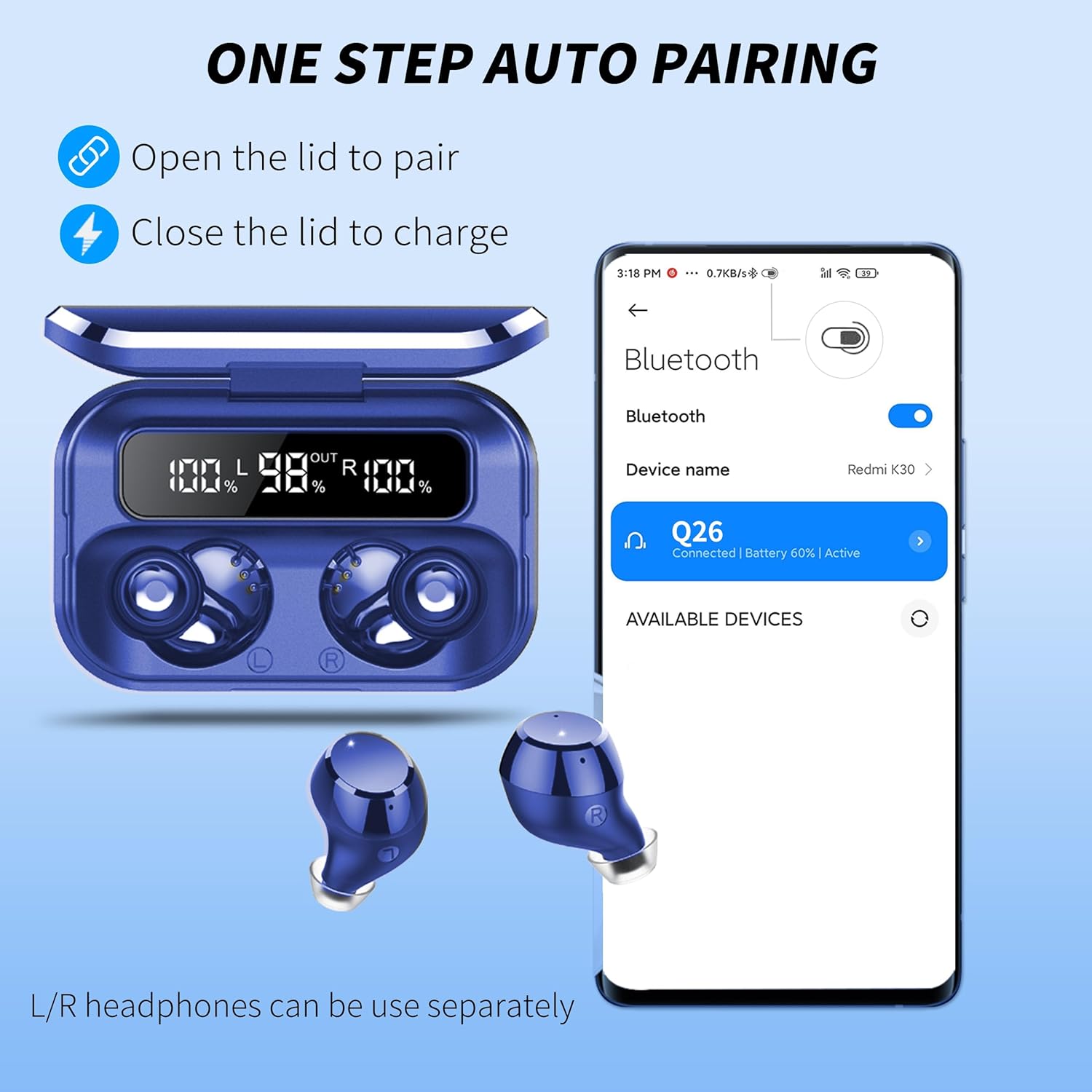
One-Step Auto Pairing: Simply open the charging case lid to initiate pairing. Close the lid to charge the earbuds.
Operating Instructions
Touch Controls
The earbuds are equipped with smart touch controls. Tap the touch area on either earbud to perform various functions:
- Play/Pause: Single tap.
- Next Track: Double tap the right earbud.
- Previous Track: Double tap the left earbud.
- Volume Up: Triple tap the right earbud.
- Volume Down: Triple tap the left earbud.
- Answer/End Call: Single tap during an incoming call or active call.
- Reject Call: Press and hold for 2 seconds during an incoming call.
- Activate Voice Assistant (Siri/Google Assistant): Press and hold for 2 seconds (when not on a call).
- Power On/Off: Earbuds power on automatically when removed from the case and power off when placed back in the case. Manual power on/off may be available by pressing and holding the touch area for 5 seconds.
Emergency Power Bank Function
The 2600mAh charging case can also serve as an emergency power bank for other devices.
- Connect your smartphone or other compatible device to the USB-A output port on the charging case using an appropriate cable (not included).
- The charging case will begin to charge your device.

Emergency Charging: The 2600mAh charging case can provide emergency power to your mobile phone or other devices.
Maintenance
Cleaning
- Regularly clean the earbuds and charging case with a soft, dry, lint-free cloth.
- Do not use abrasive cleaners, alcohol, or chemical solvents.
- Gently remove any earwax or debris from the earbud mesh using a small, clean brush or cotton swab.
Water Resistance
The earbuds feature IPX7 nano-coating technology, protecting them from sweat and light rain. They are not designed for swimming or prolonged submersion. Ensure the earbuds are dry before placing them back into the charging case to prevent damage.
Storage
When not in use, store the earbuds in their charging case to protect them from dust, damage, and to keep them charged.
Troubleshooting
If you encounter issues with your Lekaby Wireless Ear Buds, please refer to the following common solutions:
- Earbuds not pairing:
- Ensure both earbuds are charged.
- Turn off Bluetooth on your device, then turn it back on.
- Delete "Q26" from your device's Bluetooth list and attempt to re-pair.
- Place earbuds back in the case, close the lid, wait a few seconds, then open to re-initiate pairing mode.
- Only one earbud working:
- Ensure both earbuds are charged.
- Try resetting the earbuds by placing them in the charging case, closing the lid, and then opening it again.
- Check if the earbuds are connected as separate devices in your Bluetooth settings; if so, disconnect both and re-pair.
- Earbuds not charging:
- Ensure the charging cable is securely connected to both the case and the power source.
- Check if the charging contacts on the earbuds and inside the case are clean and free of debris.
- Try a different charging cable or power adapter.
- Poor sound quality or disconnections:
- Ensure the earbuds are within the 15-meter Bluetooth range of your device.
- Reduce interference by moving away from other wireless devices or obstacles.
- Try adjusting the earbud fit or changing ear cap sizes.
If the issue persists, please contact customer support.
Specifications
| Feature | Specification |
|---|---|
| Model Name | Q26-GB-2024 |
| Connectivity Technology | Wireless (Bluetooth 5.3) |
| Bluetooth Range | Up to 15 meters |
| Earbud Battery Life | 8 Hours (single charge) |
| Total Playtime (with case) | Up to 128 Hours |
| Charging Case Capacity | 2600 mAh |
| Charging Time (Case) | Approx. 2 Hours |
| Water Resistance Level | IPX7 (Waterproof) |
| Noise Control | ENC Noise Cancelling |
| Control Method | Touch Control, Siri Voice Assistant |
| Ear Placement | In Ear |
| Material | Plastic |
| Product Dimensions | 0.79 x 0.39 x 0.39 inches |
Warranty and Support
Your Lekaby Wireless Ear Buds Model Q26-GB-2024 come with a 12-month warranty from the date of purchase. We also offer a 30-day hassle-free return policy.
For any questions, technical support, or warranty claims, please contact our customer service team. We are available 24 hours online to assist you.
Customer satisfaction is our top priority.