
HENGCMM 12V 3000W
HENGCMM 12V 3000W Wind Solar MPPT Hybrid Charge Controller User Manual
Model: 12V 3000W
1. Introduction
This manual provides detailed instructions for the installation, operation, and maintenance of the HENGCMM Wind Solar MPPT Hybrid Charge Controller. This controller is designed for small off-grid installations, efficiently managing power from wind turbines and solar panels to charge batteries.
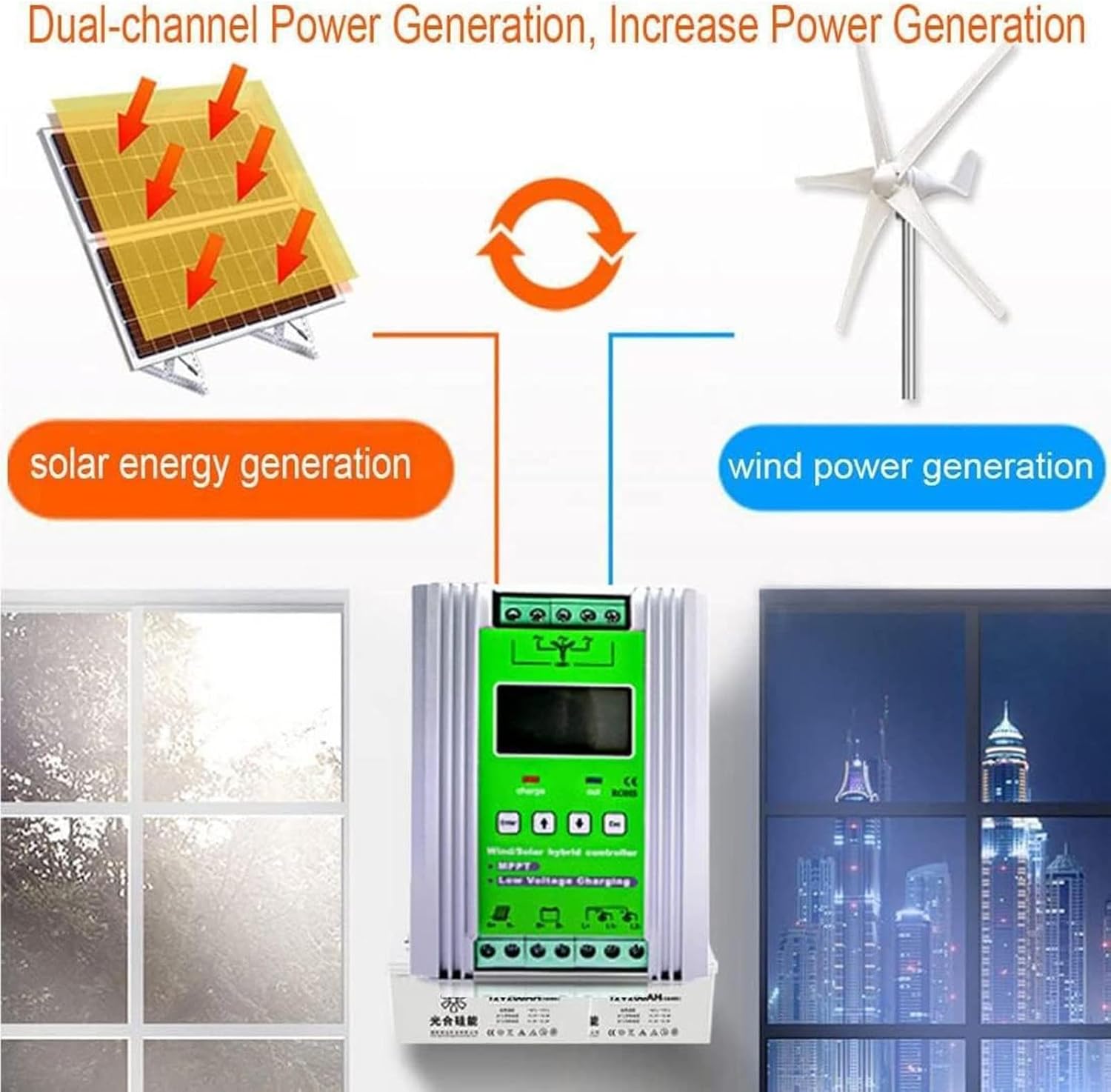
Figure 1.1: Dual-Channel Power Generation. This diagram illustrates how the hybrid controller integrates both solar energy generation (from solar panels) and wind power generation (from a wind turbine) to efficiently charge a battery system, showcasing its dual-source capability.
Key Features:
- Automatic identification and combination of 12V, 24V, 48V batteries.
- Wind turbine charging with boost MPPT control algorithm for efficient charging even at low wind speeds.
- Stepless discharge function with external unloading resistor.
- Solar panel charging using PWM technology via series MOS tubes.
- Compatibility with various battery types, with adjustable parameters.
- Large LCD screen for clear display of operational parameters.
- Multiple protection features: solar reverse connection, overcharge, undervoltage, overload, battery reverse connection, open circuit, and lightning protection.
- Adjustable output modes.
2. Safety Instructions
- Do not plug or unplug the power adapter with wet hands. This can lead to electric shock.
- Always pay close attention to connection methods and polarity during installation to prevent damage to the controller or other components.
- Ensure proper ventilation around the controller to prevent overheating.
- The internal circuit board is coated with three-proof paint for protection against dust, moisture, and static electricity. However, avoid exposing the controller to excessive moisture or extreme environmental conditions.
- Only qualified personnel should perform installation and maintenance.
3. Product Components and Interface
Familiarize yourself with the various components and interfaces of the hybrid charge controller.
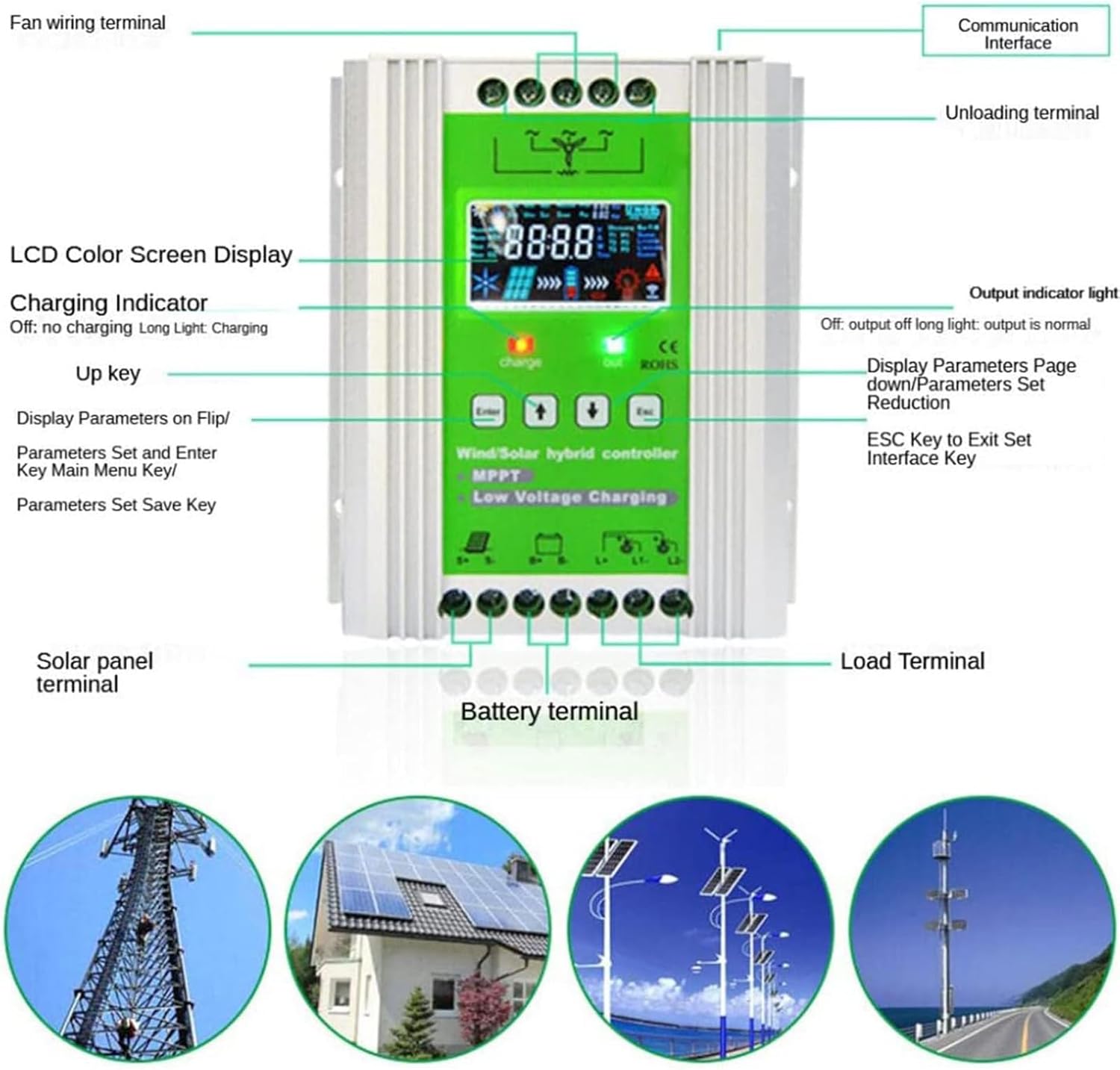
Figure 3.1: Controller Components Overview. This image displays the front panel of the hybrid controller, highlighting key features such as the LCD color screen display, charging indicator, 'Enter', 'Up', 'Down', and 'Esc' keys, fan wiring terminal, communication interface, unloading terminal, solar panel terminal, battery terminal, and load terminal. It provides a visual guide to the physical layout and controls of the device.
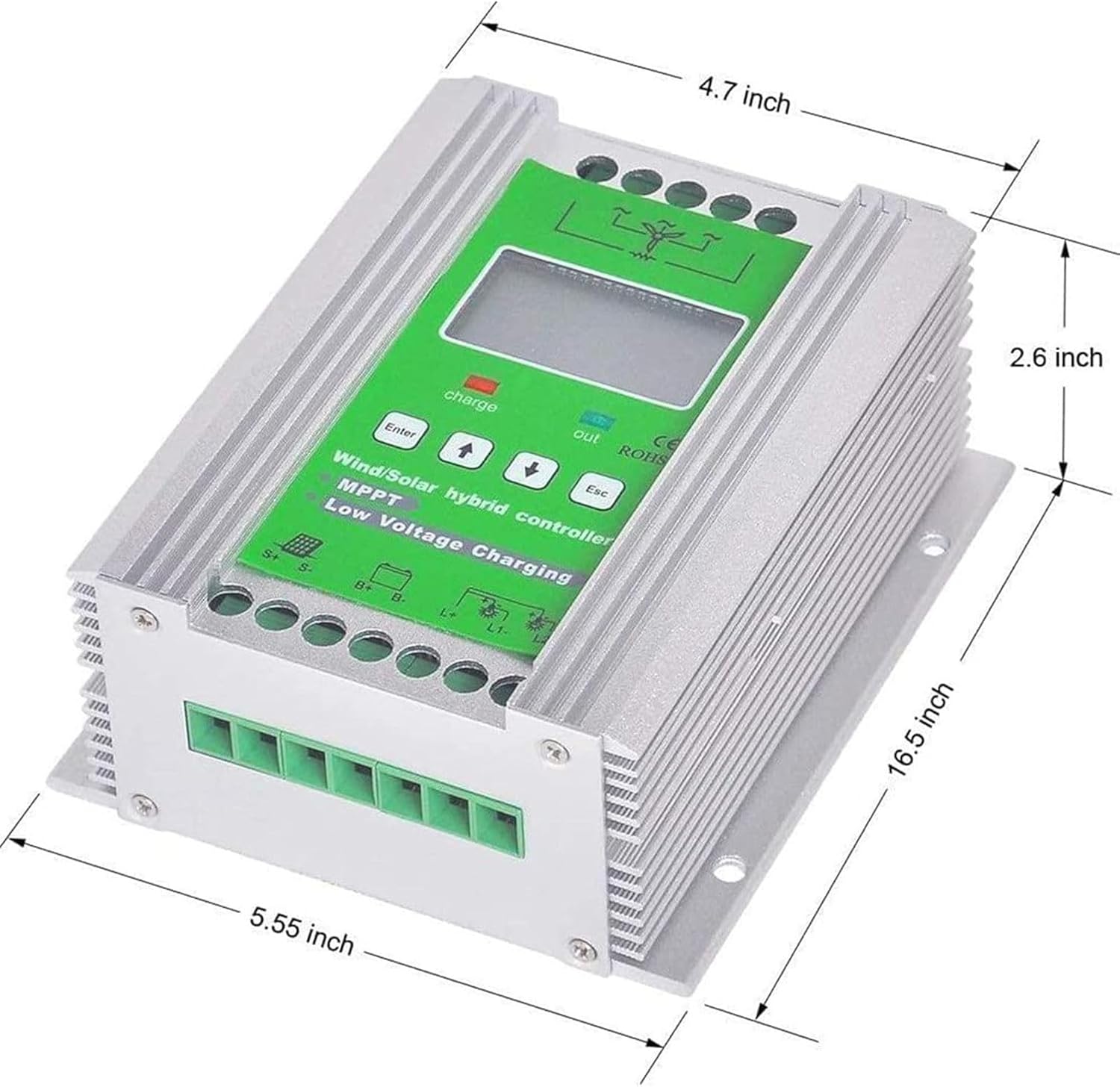
Figure 3.2: LCD Smart Display. A close-up view of the controller's LCD screen, showing various parameters and indicators such as battery voltage (Ubat), fan voltage (Ufan), solar panel voltage (Upv), fan current (Ifan), solar panel current (Ipv), load current (Iload), power (Ppv, Pfan), and error messages. It also shows battery type settings (Sealed, Gel, Flooded, LiFePO4, LiNiCoMn, Custom) and operational modes (Under MPPT, Under BCV, Over Float, Rover CC). This display provides comprehensive real-time system status.
4. Setup and Installation
Proper installation is crucial for the safe and efficient operation of your hybrid charge controller. Follow these steps carefully.
4.1 Wiring Diagram

Figure 4.1: Wind and Solar Hybrid Controller Installation Diagram. This diagram illustrates the complete wiring setup for the hybrid controller. It shows connections for the wind turbine (Fan), solar panel array (PV Array), storage battery, and electrical load. It also indicates the RS485 communication port and the external unloading resistor. Ensure all connections follow this diagram for correct functionality.
4.2 Installation Steps:
- Mount the Controller: Choose a dry, well-ventilated location for mounting the controller. Ensure it is protected from direct sunlight and moisture.
- Connect the Battery: Connect the battery to the controller's battery terminals (B+ and B-). Ensure correct polarity. The controller will power on once the battery is connected.
- Connect the Wind Turbine: Connect the wind turbine's output wires to the fan wiring terminals (S+ and S-).
- Connect the Solar Panels: Connect the solar panel array to the solar panel terminals (S+ and S-). Ensure correct polarity.
- Connect the Unloading Resistor: Connect the external unloading resistor to the designated unloading terminals. This is crucial for the stepless discharge function.
- Connect the Load: Connect your DC loads to the load terminals (L1+ and L1-).
- Verify Connections: Double-check all wiring for correct polarity and secure connections before proceeding.
5. Operating Instructions
The controller features an LCD display and intuitive buttons for easy operation and monitoring.
5.1 LCD Display and Buttons:
- LCD Display: Shows real-time system parameters such as voltage, battery power, current, power, load mode, and temperature.
- "Enter" Key: Used to enter the main menu and save parameter settings.
- "Up" Key: Used to navigate through display parameters or increase values during settings.
- "Down" Key: Used to navigate through display parameters or decrease values during settings.
- "Esc" Key: Used to exit the setting interface.
- Charging Indicator: Indicates charging status (Off: no charging, Long Light: charging).
- Output Indicator: Indicates load output status (Off: output off, Long Light: output is normal).
5.2 Setting Operating Modes:
The controller supports multiple load output working modes:
- Pure Light Control Mode: Load output is controlled solely by ambient light levels.
- Normally Open Mode: Load output is continuously active.
- Light Control + Time Control Mode: Combines ambient light sensing with programmable time periods (four periods + morning light) for load control.
Refer to the on-screen menu using the "Enter", "Up", "Down", and "Esc" keys to configure these modes and other parameters like battery type.
6. Maintenance
Regular maintenance ensures the longevity and optimal performance of your hybrid charge controller.
- Visual Inspection: Periodically inspect all wiring connections for tightness and signs of corrosion or damage.
- Cleanliness: Keep the controller clean and free from dust and debris. The internal circuit board has a three-proof paint coating, but external cleanliness is still important.
- Ventilation: Ensure that the heat dissipation fins are not obstructed to allow for proper airflow and self-cooling.
- Parameter Check: Occasionally check the parameters displayed on the LCD to ensure the system is operating within expected ranges.
7. Troubleshooting
This section provides guidance for common issues. For more complex problems, contact customer support.
| Problem | Possible Cause | Solution |
|---|---|---|
| Controller not powering on | Battery not connected or low voltage; incorrect battery polarity. | Check battery connections and voltage. Ensure correct polarity. |
| No charging from solar panels | Solar panels not connected; insufficient sunlight; incorrect polarity. | Verify solar panel connections and polarity. Ensure panels are exposed to adequate sunlight. |
| No charging from wind turbine | Wind turbine not connected; insufficient wind speed; incorrect polarity. | Check wind turbine connections and polarity. Ensure adequate wind conditions. |
| Load not receiving power | Load not connected; load mode incorrect; battery low voltage protection activated. | Check load connections. Verify load operating mode settings. Check battery voltage. |
| Error message on LCD | Indicates a specific system fault (e.g., overvoltage, undervoltage, short circuit). | Refer to the LCD display for the specific error code and consult the manual or contact support for resolution. |
8. Specifications
| Feature | Detail |
|---|---|
| System Rated Voltage | 12V/24V/48V (Automatic Identification) |
| No-load Current (DC) | ≤0.05A |
| Controller Power Supply Mode | Battery or Photovoltaic Panel |
| Control Method | Fan MPPT Boost, PWM Unloading, PWM Overcurrent |
| Load Working Modes | Pure Light Control, Normally Open, Light Control + Time Control (Four Periods + Morning Light) |
| Display Mode | LCD Display |
| Display Parameters | Voltage, Battery Power, Current, Power, Load Mode, Temperature, etc. |
| Heat Dissipation Method | Aluminum Profile Heat Dissipation and Self-cooling |
| Working Temperature & Humidity | -20~+55℃ / 35~85%RH (non-condensing) |
| Package Dimensions | 3.94 x 3.94 x 3.94 inches |
| Item Weight | 2.2 pounds |
| Manufacturer | HENGCMM |

Figure 8.1: Controller Dimensions. This image provides the physical dimensions of the hybrid charge controller, showing its length, width, and height for installation planning. The dimensions are approximately 16.5 inches (length), 5.55 inches (width), and 2.6 inches (height).
9. Warranty and Support
For any questions, suggestions, or technical support regarding your HENGCMM Wind Solar MPPT Hybrid Charge Controller, please contact the manufacturer or your point of purchase. Specific warranty details may vary by region and retailer; please refer to your purchase documentation for warranty information.
Manufacturer: HENGCMM
If you have any questions or suggestions, please feel free to contact us.
Ask a question about this manual
Ask about setup, troubleshooting, compatibility, parts, safety, or missing instructions. Manuals+ will review the question and use this page’s manual context to help answer it.