1. Introduction
Thank you for purchasing the MOREKA A6 60W Bluetooth Speaker. This manual provides essential information for the safe and efficient use of your speaker. Please read it thoroughly before operation and retain it for future reference.
2. Safety Information
- Do not expose the speaker to extreme temperatures, direct sunlight, or open flames.
- While the speaker is IPX6 water-resistant, do not submerge it in water.
- Avoid dropping or subjecting the speaker to strong impacts.
- Do not attempt to disassemble, repair, or modify the speaker yourself. Contact qualified service personnel.
- Keep the speaker away from children and pets.
- Use only the provided charging cable or a certified equivalent.
- Clean the speaker with a soft, dry cloth. Do not use abrasive cleaners or solvents.
3. Package Contents
Please check the package for the following items:
- MOREKA A6 Bluetooth Speaker
- USB Charging Cable
- AUX Audio Cable
- Shoulder Strap
- User Manual
4. Product Overview
Familiarize yourself with the speaker's components and controls.

Figure 4.1: Front view of the MOREKA A6 Bluetooth Speaker, showcasing its cylindrical design and illuminated end panel.

Figure 4.2: The MOREKA A6 speaker shown with its detachable shoulder strap attached, highlighting its portability.
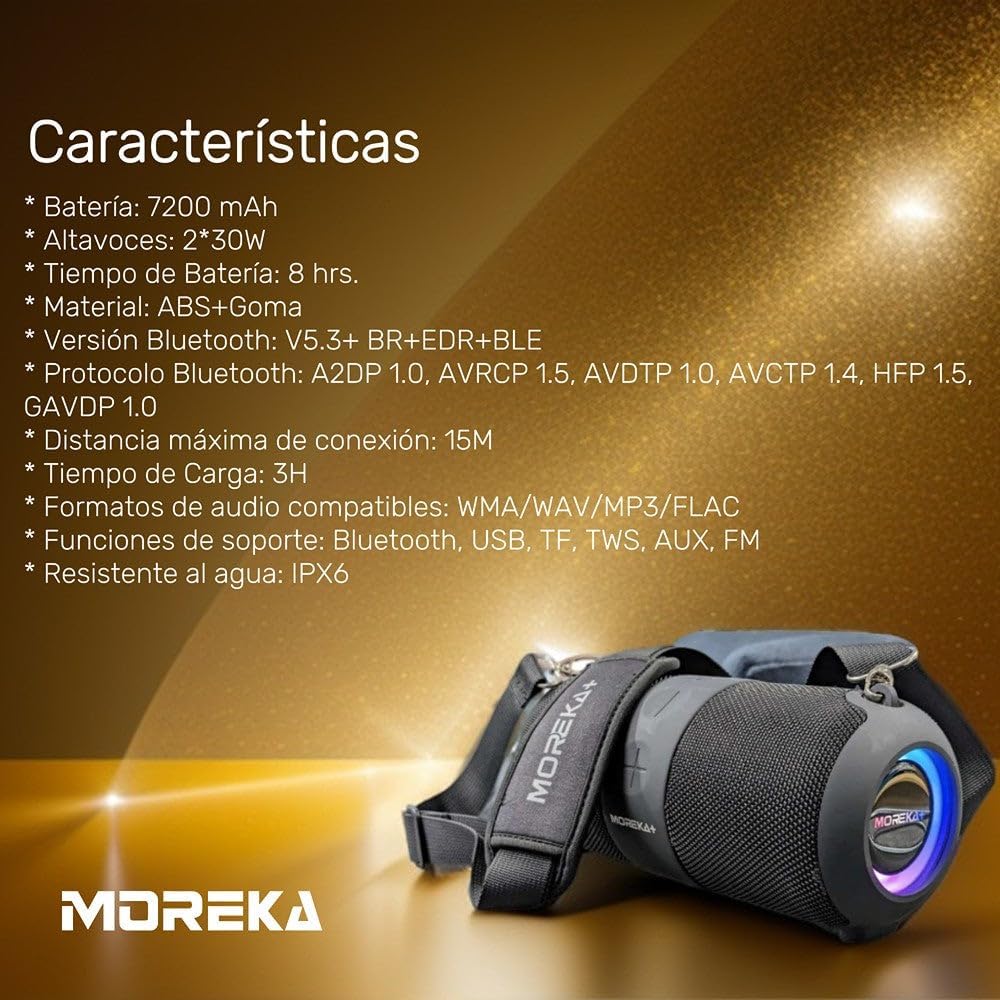
Figure 4.3: Diagram illustrating the dimensions of the MOREKA A6 speaker: approximately 290mm length, 122mm width, and 129mm height.
Control Panel (Top/Side)
- Power Button: Press and hold to power on/off. Short press to play/pause.
- Volume Up (+): Short press to increase volume. Long press for next track.
- Volume Down (-): Short press to decrease volume. Long press for previous track.
- Mode Button (M): Short press to switch between Bluetooth, TF Card, FM Radio, USB, and AUX modes.
- TWS Button: Press to activate True Wireless Stereo pairing.
Ports (Rear/Side)
- USB Port: For USB drive playback.
- TF Card Slot: For TF (Micro SD) card playback.
- AUX Input: For connecting external audio devices via 3.5mm cable.
- USB-C Charging Port: For charging the speaker.
5. Setup
5.1 Charging the Speaker
- Connect the USB charging cable to the speaker's USB-C charging port.
- Connect the other end of the cable to a USB power adapter (5V/2A recommended) or a computer's USB port.
- The charging indicator light will illuminate. It will turn off or change color once fully charged.
- A full charge typically takes approximately 3 hours.
5.2 Power On/Off
- To Power On: Press and hold the Power button for approximately 3 seconds until you hear an audible prompt and the indicator lights illuminate.
- To Power Off: Press and hold the Power button for approximately 3 seconds until you hear an audible prompt and the indicator lights turn off.
6. Operating Instructions
6.1 Bluetooth Pairing
- Ensure the speaker is powered on and in Bluetooth mode (indicated by a flashing blue light and an audible prompt). If not, short press the Mode button to switch to Bluetooth mode.
- Enable Bluetooth on your device (smartphone, tablet, laptop).
- Search for available Bluetooth devices and select "MOREKA A6" from the list.
- Once paired, the speaker will emit an audible confirmation, and the blue indicator light will remain solid.
- The speaker will automatically attempt to reconnect to the last paired device when powered on.
6.2 TF Card Playback
- Insert a TF (Micro SD) card with compatible audio files (WMA/WAV/MP3/FLAC) into the TF card slot.
- The speaker will automatically switch to TF card mode and begin playback. If not, short press the Mode button to select TF card mode.
- Use the Power button for play/pause, and Volume +/- buttons for track control.
6.3 FM Radio Mode
- Short press the Mode button to switch to FM Radio mode.
- To auto-scan and save available stations, press and hold the Power button. The speaker will scan and store stations.
- Short press the Volume +/- buttons to navigate between saved stations.
6.4 USB Playback
- Insert a USB flash drive with compatible audio files (WMA/WAV/MP3/FLAC) into the USB port.
- The speaker will automatically switch to USB mode and begin playback. If not, short press the Mode button to select USB mode.
- Use the Power button for play/pause, and Volume +/- buttons for track control.
6.5 True Wireless Stereo (TWS) Function
The TWS function allows you to pair two MOREKA A6 speakers together for a stereo sound experience.
- Ensure both MOREKA A6 speakers are powered on and in Bluetooth mode, but not connected to any device.
- On one of the speakers (this will be the primary speaker), short press the TWS button. You will hear an audible prompt.
- The two speakers will automatically search and pair with each other. Once connected, you will hear a confirmation sound.
- Now, connect your device to the primary speaker via Bluetooth as described in section 6.1.
- To disconnect TWS, press the TWS button on either speaker.
6.6 AUX Input
- Connect one end of the 3.5mm AUX audio cable to the speaker's AUX input port.
- Connect the other end to the audio output jack of your external device.
- The speaker will automatically switch to AUX mode. If not, short press the Mode button to select AUX mode.
- Audio playback is controlled via your external device.
6.7 Volume and Track Control
- Volume Up: Short press the "+" button.
- Volume Down: Short press the "-" button.
- Next Track: Long press the "+" button (in Bluetooth, TF, or USB modes).
- Previous Track: Long press the "-" button (in Bluetooth, TF, or USB modes).
- Play/Pause: Short press the Power button (in Bluetooth, TF, or USB modes).
7. Maintenance
- Keep the speaker clean by wiping it with a soft, dry cloth.
- Avoid using harsh chemicals or abrasive materials for cleaning.
- Store the speaker in a cool, dry place when not in use.
- If the speaker will not be used for an extended period, charge it periodically to maintain battery health.
8. Troubleshooting
| Problem | Possible Cause | Solution |
|---|---|---|
| Speaker does not power on. | Low battery. | Charge the speaker fully. |
| Cannot pair via Bluetooth. | Speaker not in pairing mode; device Bluetooth off; too far from speaker. | Ensure speaker is in Bluetooth pairing mode. Turn on device Bluetooth. Move device closer to speaker (within 15m). |
| No sound. | Volume too low; incorrect mode; audio source issue. | Increase speaker and device volume. Ensure correct mode (Bluetooth, AUX, TF, USB). Check audio source playback. |
| Sound distortion. | Volume too high; low battery; interference. | Reduce volume. Charge speaker. Move away from other electronic devices. |
| TF card/USB not playing. | Unsupported file format; card/drive not inserted correctly; corrupted files. | Ensure files are WMA/WAV/MP3/FLAC. Reinsert card/drive. Try different files or card/drive. |
9. Specifications
- Model: A6
- Output Power: 60 Watts (2 x 30W speakers)
- Speaker Type: Woofer
- Audio Output Mode: Stereo
- Frequency Response: 18 kHz
- Connectivity Technology: Bluetooth V5.3+BR+EDR+BLE
- Bluetooth Protocols: A2DP 1.0, AVRCP 1.5, AVCTP 1.4, HFP 1.5, GAVDP 1.0
- Wireless Range: Up to 15 meters (49 feet)
- Compatible Audio Formats: WMA, WAV, MP3, FLAC
- Control Method: Touch
- Power Source: Battery
- Battery Capacity: 7200 mAh
- Average Battery Life: 5 Hours
- Charging Time: 3 Hours
- Water Resistance: IPX6
- Material: ABS + Rubber
- Product Dimensions: Approximately 290mm (L) x 122mm (W) x 129mm (H)
- Compatible Devices: Smartphone, Tablet, Laptop, Television
- Recommended Use: Indoor/Outdoor (Water-resistant for outdoor use)

Figure 9.1: The MOREKA A6 speaker demonstrating its IPX6 water resistance, suitable for splashes and light rain.
10. Warranty and Support
MOREKA products are designed and manufactured to the highest quality standards. For warranty information, technical support, or service inquiries, please refer to the contact information provided with your purchase or visit the official MOREKA website.