1. Product Overview
This manual provides essential information and guidelines for the installation of the Arbilato screen replacement for the Samsung Galaxy F13 4G. This product is designed to address various screen issues such as white screen, dead pixels, liquid leakage, and unresponsive touch functionality.
1.1 Compatibility
This screen replacement is compatible with the following Samsung Galaxy F13 4G models:
- SM-E135F
- SM-E135F/DS
Please verify your device's model number before proceeding with installation to ensure correct compatibility.

Image 1.1: Front and back view of the Arbilato screen replacement assembly, showing the display panel and the integrated frame with flex cables.
2. Safety Guidelines
Adhering to these safety guidelines is crucial to prevent damage to your device and ensure a successful replacement process.
- Professional Installation Recommended: Screen replacement requires specialized skills and tools. It is highly recommended to seek assistance from a professional technician to perform the replacement.
- Battery Disconnection: Always unplug the battery connector and remove the battery before beginning any installation to prevent short circuits and potential damage.
- Old Adhesive Removal: Before installing the new LCD, ensure all old adhesive residue is completely removed from the device frame. Residual adhesive can affect the new screen's fit and adhesion.
- Inspect Device Frame: If your phone's frame is bent or damaged, it must be repaired or replaced before installing the new screen. A distorted frame can cause uneven pressure on the new screen, leading to cracks or malfunction.
- Handle with Care: The screen assembly contains delicate components. Handle it gently to avoid damage to the flex cables and display panel.
3. Package Contents
Please verify that all items listed below are included in your package upon receipt.
- 1x Arbilato Screen Replacement with Frame for Samsung Galaxy F13 4G
- 1x Tempered Glass Screen Protector
- 1x Set of Repair Tools (screwdrivers, pry tools, suction cup)
- 1x Waterproof Sticker
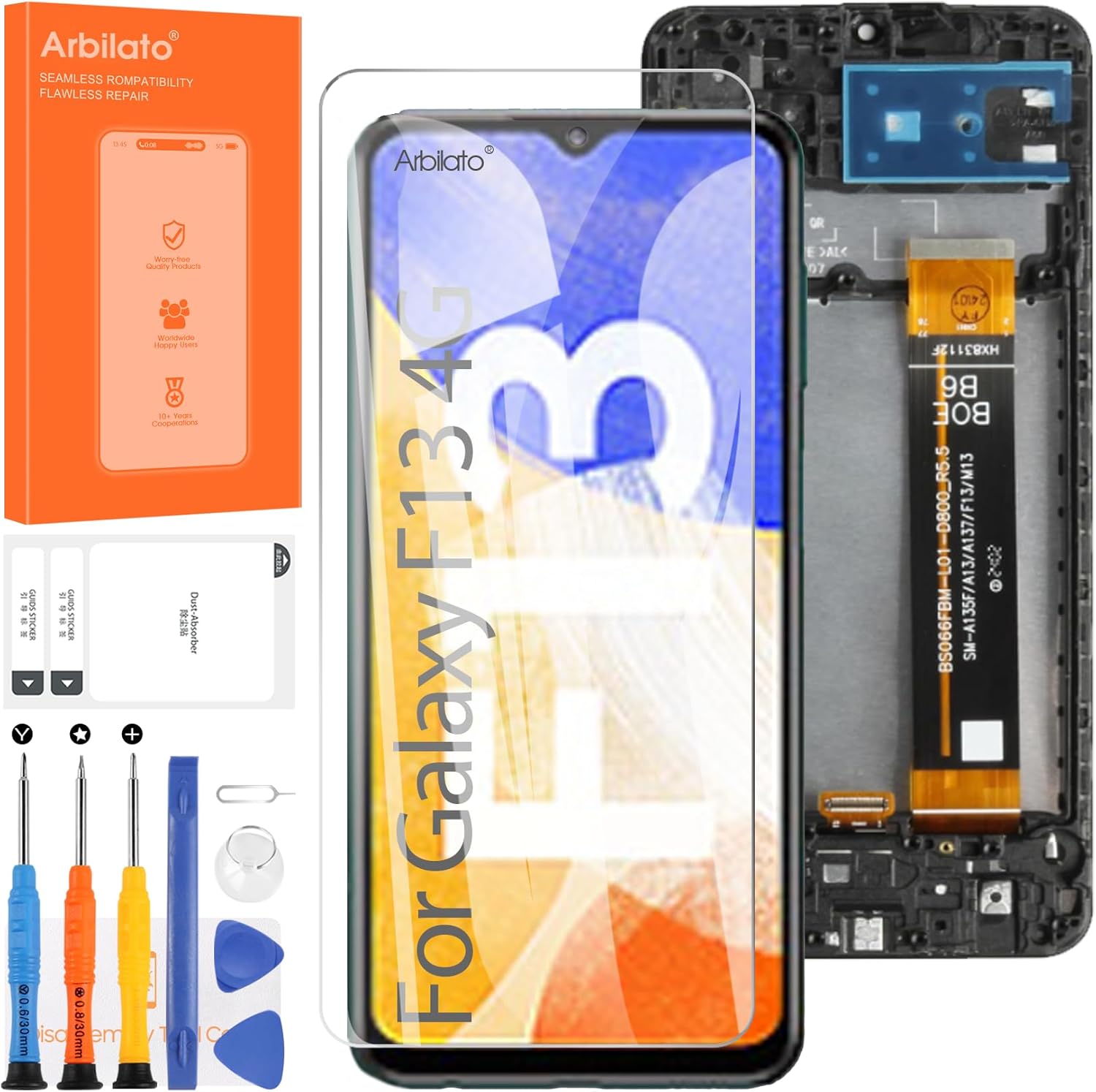
Image 3.1: Overview of the Arbilato screen replacement kit, showing the screen assembly, tempered glass, and a set of basic repair tools.

Image 3.2: Detailed view of the package contents, including the screen replacement, tempered glass, various screwdrivers, pry tools, and a dust removal sticker.
4. Installation Instructions
Due to the complexity of mobile device repairs, detailed step-by-step instructions are best followed through visual guides. We recommend consulting online resources for comprehensive installation procedures.
4.1 Recommended Resources
For visual guidance, search for "Samsung Galaxy F13 4G LCD With Frame replacement" on video-sharing platforms like YouTube. These videos often provide detailed, step-by-step instructions that are easier to follow than written descriptions for complex repairs.
4.2 General Installation Steps (Summary)
- Power Off Device: Ensure your Samsung Galaxy F13 4G is completely powered off.
- Remove Back Cover: Carefully remove the back cover of your device.
- Disconnect Battery: Locate and disconnect the battery flex cable to prevent electrical damage.
- Remove Old Screen Assembly: Disconnect all flex cables connected to the old screen and carefully remove it from the device frame.
- Clean Frame: Thoroughly clean the device frame, removing all old adhesive and debris.
- Test New Screen: Before final installation, connect the new screen's flex cables to the motherboard (without fully adhering it) and reconnect the battery. Power on the device to test display functionality, touch response, and any other relevant features. Power off and disconnect the battery again after testing.
- Install New Screen: Apply the new waterproof sticker/adhesive to the frame and carefully seat the new screen assembly. Connect all flex cables securely.
- Reconnect Battery and Reassemble: Reconnect the battery, reattach the back cover, and secure all screws.
5. Operating and Initial Testing
After installation, perform a thorough test of the new screen's functionality.
- Power On: Turn on your device.
- Display Check: Verify that the display shows images clearly, without any dead pixels, lines, or discoloration.
- Touch Functionality: Test the touch response across the entire screen. Drag an icon around the screen to ensure all areas respond correctly.
- Brightness Adjustment: Check if brightness can be adjusted properly.
- Other Sensors: If applicable, test proximity sensor and ambient light sensor functionality.
6. Maintenance
To ensure the longevity and optimal performance of your new screen, consider the following:
- Screen Protector: Apply the included tempered glass screen protector to guard against scratches and minor impacts.
- Avoid Extreme Conditions: Protect your device from extreme temperatures and direct exposure to water or excessive humidity.
- Gentle Cleaning: Clean the screen with a soft, lint-free cloth, preferably microfiber, and a screen-safe cleaning solution if necessary. Avoid harsh chemicals.
7. Troubleshooting
If you encounter issues after installation, refer to the following common problems and solutions.
- White Screen / No Display:
- Ensure all flex cables are securely connected to the motherboard.
- Check for any damage to the flex cables during installation.
- Verify battery is properly connected and charged.
- Unresponsive Touch:
- Ensure the touch digitizer flex cable is correctly seated.
- Restart the device.
- Check for any debris or foreign objects between the screen and the frame.
- Dead Pixels / Lines on Display:
- This may indicate a defective screen. Recheck connections, and if the issue persists, contact customer support.
- Screen Not Fitting Properly:
- Ensure all old adhesive has been removed from the frame.
- Verify that the device frame is not bent or warped.
If troubleshooting steps do not resolve the issue, please contact Arbilato customer support for further assistance.
8. Product Specifications
| Feature | Specification |
|---|---|
| Compatible Models | Samsung Galaxy F13 4G (SM-E135F, SM-E135F/DS) |
| Screen Size | 6.6 inches |
| Resolution | 1080 x 2408 pixels |
| Color | Black |
| Type | LCD Display with Touch Digitizer Assembly (with Frame) |
9. Warranty and Support
Arbilato is committed to providing quality products and customer satisfaction.
If you encounter any problems after receiving your Arbilato screen replacement, please contact our customer support team immediately. We will work to resolve the issue and provide effective solutions.
For support, please refer to the contact information provided with your purchase or on the official Arbilato website.