
GGTE Nautilus R616
Instruction Manual for GGTE Connector Input Cable
Model: Nautilus R616 | Brand: GGTE
1. Product Overview
The GGTE Connector Input Cable is an essential replacement component designed to restore power connectivity to compatible Nautilus and Schwinn exercise bikes. This cable ensures stable power delivery, allowing for uninterrupted and consistent performance of your fitness equipment. It is crafted from high-quality materials for durability and safety.

This image displays the GGTE Connector Input Cable, a black cable with a three-pin connector on one end and a threaded input jack on the other, designed for exercise bikes.
2. Compatibility
This connector input cable is specifically designed for a range of Nautilus and Schwinn exercise bike models. Please verify your model number against the lists below to ensure compatibility. This part is not universal.
Nautilus Exercise Bikes Models:
- R616 - 100388 - 2014 Rev. B, R616 - 100462
- R618 - 100494, R618 - 100503, R618 - 100650, R618 - 100903
- R626 - 100400, R626 - 100705, R626 - 100740
- R628 - 100604
- R686 - 100435
- U614 - 100389 - 2014 Rev. A, U614 - 100459
- U616 - 100390 - 2014 Rev. A, U616 - 100460
- U618 - 100493, U618 - 100502, U618 - 100603
- U624 - 100395, U624 - 100703
- U626 - 100396, U626 - 100704, U626 - 100739
- U684 - 100432
- U686 - 100433
Schwinn Exercise Bikes Models:
- 130 - 100335 - 2013 Rev. G, 130 - 100512, 130 International - 100723, 130 International - Canada - 100444, 130 Litho - 100352 - 2013 Rev. C
- 170 - 100336 - 2013 Rev. H, 170 - 100371, 170 - 100450, 170 - 100513
- 230 - 100724
- 430 - 100725
- 530 - 100726
- 570U - 100529, 570U - 100698, 570U - 100727
- Journey 1.0 - 100361 - 2013 Rev. C, JOURNEY 1.0 - 100447, Journey 1.0 - 100520
- Journey 1.5 - 100384 - 2013 Rev. D, JOURNEY 1.5 - 100452

This image shows the connector input cable alongside a list of compatible Nautilus exercise bike models, highlighting its specific application.
3. Product Specifications
| Specification | Detail |
|---|---|
| Item Model Number | 8001352 |
| Color | Black |
| Power Cord Type | 3 Prong |
| Material | Plastic |
| Item Weight | 0.01 Pounds |
| Item Dimensions (LxWxH) | 1 x 1 x 2 inches |
| Package Weight | 0.05 Kilograms |
| Size | 18" |

A close-up view of the GGTE Connector Input Cable, emphasizing the quality of its insulation and construction, which ensures durability and safety.
4. Installation Guide
The GGTE Connector Input Cable is designed for quick and easy installation. Follow these general steps to replace or install the cable on your exercise bike:
- Power Off: Ensure your exercise bike is completely powered off and unplugged from the wall outlet before beginning any installation.
- Locate Input Port: Identify the power input port on your exercise bike. This is typically located near the base or console.
- Remove Old Cable (if applicable): If replacing an existing cable, carefully disconnect it from the bike's input port. Note how it was routed.
- Connect New Cable: Insert the threaded input jack end of the GGTE cable into the bike's power input port. Secure it by tightening the nut if present.
- Connect to Power Supply: Connect the three-pin connector end of the GGTE cable to your exercise bike's power supply unit (AC adapter).
- Test: Once connected, plug your exercise bike's power supply into a wall outlet and test the functionality of your bike.

This diagram illustrates the correct connection point for the GGTE Connector Input Cable on an exercise bike, indicating the power input port.
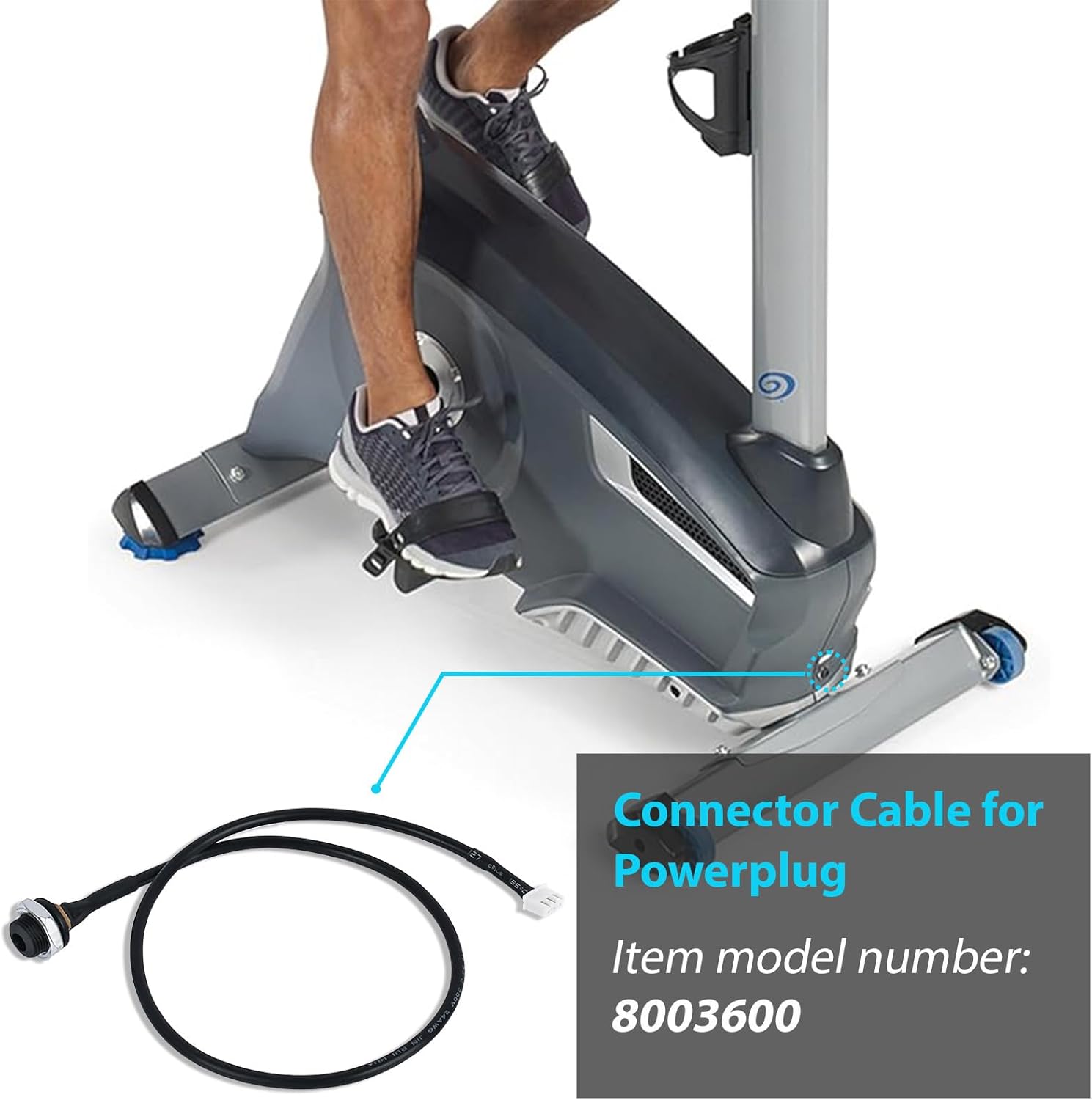
The image shows the GGTE Connector Input Cable positioned near an exercise bike, suggesting a straightforward and quick installation process.
5. Operation
Once properly installed, the GGTE Connector Input Cable facilitates the flow of electrical power from your exercise bike's AC adapter to the bike's internal components. This enables the console, resistance mechanisms, and other electronic features of your bike to function correctly. There are no user-adjustable operational settings for the cable itself; its function is purely to provide a reliable power connection.

This image shows the GGTE Connector Input Cable in context with an exercise bike, illustrating its role in providing power for uninterrupted workouts.
6. Care and Maintenance
To ensure the longevity and optimal performance of your GGTE Connector Input Cable, follow these simple care and maintenance guidelines:
- Keep Dry: Avoid exposing the cable to moisture or liquids, as this can damage the internal wiring and insulation.
- Avoid Kinks and Bends: Do not excessively bend, twist, or kink the cable, especially near the connectors, as this can lead to internal wire breakage.
- Regular Inspection: Periodically inspect the cable for any signs of wear, fraying, cuts, or damage to the insulation. If damage is observed, replace the cable immediately.
- Clean Gently: If necessary, wipe the cable with a dry, soft cloth to remove dust or dirt. Do not use harsh chemicals or abrasive cleaners.
- Proper Storage: When not in use for extended periods, store the cable in a cool, dry place, coiled loosely to prevent damage.
7. Troubleshooting
If you encounter issues with your exercise bike after installing the GGTE Connector Input Cable, consider the following troubleshooting steps:
No Power to Bike / Bike Not Turning On:
- Check Connections: Ensure both ends of the GGTE Connector Input Cable are securely and fully plugged into the exercise bike's input port and the power supply unit.
- Verify Power Outlet: Confirm that the wall outlet is functional by plugging in another device.
- Inspect Power Supply: Ensure your exercise bike's AC adapter (power supply unit) is working correctly. If possible, test it with another compatible device or replace it if suspected faulty.
- Examine Cable for Damage: Visually inspect the entire length of the GGTE cable for any visible damage, such as cuts, kinks, or exposed wires. A damaged cable should be replaced.
- Compatibility Check: Double-check that your exercise bike model is listed in the compatibility section of this manual.
If the issue persists after performing these steps, please contact customer support.
8. Warranty and Support
GGTE stands by the quality of its products. If you encounter any issues or have questions regarding your Connector Input Cable, please reach out to us immediately. Your satisfaction is our top priority, and we are here to assist you every step of the way.
For further assistance or to explore other GGTE products, please visit the official GGTE Store:
Ask a question about this manual
Ask about setup, troubleshooting, compatibility, parts, safety, or missing instructions. Manuals+ will review the question and use this page’s manual context to help answer it.