
SONNLER MIG200A
SONNLER MIG200A Multi-Process Welder Instruction Manual
Model: MIG200A
1. Introduction
This manual provides essential information for the safe and effective operation, maintenance, and troubleshooting of your SONNLER MIG200A Multi-Process Welder. Please read this manual thoroughly before using the equipment.
The SONNLER MIG200A is an 8-in-1 multi-process welding machine designed for various welding applications, including Gas MIG, Gas MAG, Flux Core MIG, MMA/Stick, Lift TIG, Spot Welding, and Aluminum MIG welding. It features a dual voltage input (110V/220V) and an LED digital display for precise control.
2. Safety Instructions
Always prioritize safety when operating welding equipment. Failure to follow safety precautions can result in serious injury or death.
- Wear appropriate personal protective equipment (PPE), including a welding helmet, gloves, and protective clothing.
- Ensure adequate ventilation to avoid inhaling welding fumes.
- Do not operate the welder in damp or wet conditions.
- Keep children and unauthorized personnel away from the welding area.
- Disconnect power before performing any maintenance or adjustments.
- The machine includes safety features such as over-heat, over-load, over-voltage, and over-current protection.

Image Description: An illustration highlighting the safety features of the SONNLER MIG200A welder, including over-heat, over-load, over-voltage, and over-current protection, along with an excellent heat dissipation system.
3. Product Components and Overview
The SONNLER MIG200A Multi-Process Welder comes with various components to facilitate different welding tasks. Familiarize yourself with each part before operation.

Image Description: The SONNLER MIG200A multi-process welder shown with its main unit and essential accessories, including the MIG gun, earth clamp, and electrode holder.

Image Description: A detailed view of the SONNLER MIG200A welder and its accessories, including a 110V-220V adapter cord, 10ft earth clamp, 10ft electrode holder, MIG gun, 2lb flux core welding wire, drive roller, contact tips, gas nozzles, wire feed tube, and gas hose. Dimensions of the welder are also indicated.
3.1 Main Unit Features
- LED Digital Display: Large, easy-to-read screen for adjusting and monitoring welding parameters.
- Synergic Control: Automatically optimizes welding parameters based on wire diameter, material, and gas selection. Manual mode is also available for experienced users.
- Dual Voltage: Operates on both 110V and 220V power supplies.
- Multi-Process Capability: Supports Gas MIG, Gas MAG, Flux Core MIG, MMA/Stick, Lift TIG, Spot Welding, and Aluminum MIG welding.
- Spool Gun Connector: Optional connector for spool gun use (spool gun not included).

Image Description: An overview of the SONNLER MIG200A multi-function welding machine, illustrating its 8-in-1 capabilities: MMA, Lift TIG, Gas MIG, Gas MAG, Flux-Cored, Spool Gun, Spot Welding, and Aluminum MIG Welding. It also shows the ability to weld iron plates from 0.5mm to 8mm thickness.

Image Description: A close-up of the SONNLER MIG200A control panel, emphasizing its built-in synergic control for automatic parameter matching and the large LED display for clear readability and control.
4. Setup and Installation
4.1 Power Connection
The MIG200A supports dual voltage input. Ensure the correct power cord and adapter are used for your power supply (110V or 220V).

Image Description: An illustration demonstrating the dual voltage capability of the SONNLER MIG200A welder, showing connections for both 110V and 220V power sources.
4.2 Wire Installation (MIG/Flux Core)
- Open the side panel of the welder.
- Install the appropriate wire spool (2lb or 10lb) onto the spindle.
- Thread the welding wire through the wire feed mechanism.
- Ensure the correct drive roller is installed for your wire type and diameter.
- Close the side panel.

Image Description: The SONNLER MIG200A welder with an open side panel, showing a welding wire spool installed. The image also indicates compatibility with a spool gun (not included).
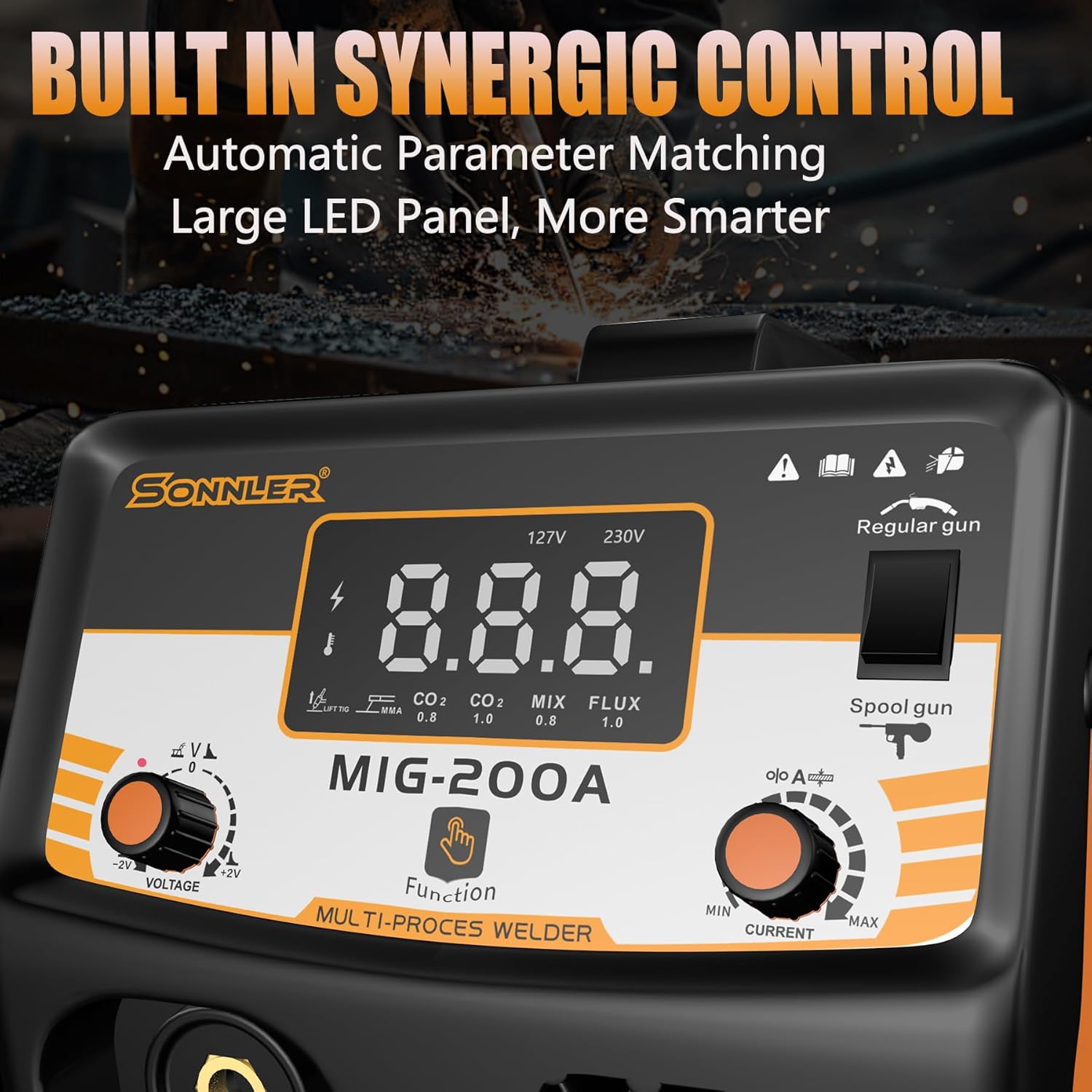
Image Description: A view of the SONNLER MIG200A welder's internal wire feed system, highlighting the aluminum wire feeder and a 10lb/2lb wire spool. This image emphasizes the quality feed system for intelligent automatic adjustment of wire feed speed.
4.3 Gas Connection (for Gas MIG/MAG/Lift TIG)
Connect the gas hose from your shielding gas cylinder to the gas inlet on the rear of the welder. Ensure all connections are secure to prevent leaks.
5. Operation
5.1 Selecting Welding Process
Use the function selector on the control panel to choose your desired welding process:
- Gas MIG/MAG
- Flux Core MIG
- MMA/Stick
- Lift TIG (TIG torch not included)
- Spot Welding
- Aluminum MIG welding (Spool gun optional, not included)

Image Description: A visual guide showing different welding configurations for the SONNLER MIG200A, including MIG Gas, MIG Flux Cored, MMA Stick, Lift TIG, Spool Gun Flux Cored, and Spool Gun Gas setups.
5.2 Parameter Adjustment
The MIG200A features synergic control, which automatically sets optimal parameters. For manual adjustments, use the voltage and current knobs on the control panel. The LED display will show the current settings.
5.3 Welding Different Materials and Wire Sizes
The welder is capable of welding aluminum, stainless steel, iron, steel, and copper. Refer to the table below for recommended wire types and sizes:
| Welding Process | Wire Type | Wire Diameter |
|---|---|---|
| Flux Core MIG | Flux Core Wire | 0.03" (0.8mm), 0.035" (0.9mm) |
| Gas MIG | Solid Wire | 0.024" (0.6mm), 0.03" (0.8mm), 0.035" (0.9mm) |
| MMA/Stick | E7018, E6013 Electrodes | Various sizes |

Image Description: An illustration showing various welding wire types (solid, aluminum, flux, copper) and compatible spool sizes (10lb and 2lb rolls) for the SONNLER MIG200A welder.
5.4 User-Submitted Welding Example
Video Description: A user demonstrating the SONNLER MIG200A welder in operation, performing a weld. The video shows sparks and the welding process, with the user wearing a welding helmet and gloves. This video is provided by a user and demonstrates the machine's functionality.
6. Maintenance
Regular maintenance ensures the longevity and optimal performance of your welder.
- Cleaning: Periodically clean the internal components and air vents to prevent dust buildup.
- Wire Feed System: Inspect and clean the wire feed rollers and liner regularly to ensure smooth wire feeding.
- Consumables: Replace contact tips, nozzles, and electrodes as they wear out.
- Connections: Check all electrical and gas connections for tightness and damage.
7. Troubleshooting
This section addresses common issues you might encounter with your welder.
| Problem | Possible Cause | Solution |
|---|---|---|
| No Arc/Poor Arc Start | Improper ground connection, incorrect settings, worn contact tip, wire feed issue. | Check ground clamp, verify settings, replace contact tip, inspect wire feed system. |
| Wire Feed Issues | Incorrect drive roller tension, clogged liner, wrong drive roller size, tangled wire. | Adjust tension, clean liner, ensure correct roller, untangle wire spool. |
| Overheat Protection Activated | Exceeded duty cycle, insufficient ventilation. | Allow welder to cool down, ensure proper airflow around the machine. |
8. Specifications
- Model: MIG200A
- Input Voltage: 110V/220V Dual Voltage
- Max Current: 200A
- Welding Processes: Gas MIG, Gas MAG, Flux Core MIG, MMA/Stick, Lift TIG, Spot Welding, Aluminum MIG welding
- Material: Iron
- Item Weight: Approximately 1 pounds (Note: This value appears to be a data entry error. Please refer to the product packaging for accurate weight.)
- Product Dimensions: Approximately 1 x 1 x 1 inches (Note: This value appears to be a data entry error. Please refer to the product packaging for accurate dimensions.)
9. Warranty and Support
The SONNLER MIG200A Multi-Process Welder comes with a 2-YEAR Warranty. For any questions or support regarding your welder, please contact SONNLER customer service.
Every SONNLER welding tool undergoes strict inspection and quality control processes to ensure product reliability.
Ask a question about this manual
Ask about setup, troubleshooting, compatibility, parts, safety, or missing instructions. Manuals+ will review the question and use this page’s manual context to help answer it.