
Introduction
Thank you for choosing the Duiliuu Mobile TV Cart. This manual provides essential information for the safe and efficient assembly, operation, and maintenance of your new TV cart. Please read these instructions carefully before beginning assembly and retain them for future reference.
This mobile TV cart is designed to accommodate televisions ranging from 32 to 75 inches, offering height adjustment, tilt functionality, and integrated power outlets for enhanced convenience.
Safety Information
Important Safety Instructions:
- Weight Capacity: Do not exceed the maximum weight capacity of 130 lbs (59 kg) for the television. The upper shelf supports up to 66 lbs (30 kg), and the lower shelf supports up to 110 lbs (50 kg). Overloading can result in instability and serious injury.
- Proper Assembly: Ensure all components are securely fastened according to the assembly instructions. Improper assembly can lead to product failure.
- Stability: Always ensure the TV cart is on a stable, level surface. Lock the wheels when the cart is stationary to prevent accidental movement.
- Children and Pets: Keep children and pets away from the TV cart during assembly and operation. Do not allow them to climb on or play with the cart.
- Power Outlet: Use the integrated power outlet only for devices within its specified voltage and current limits (125V/12A). Do not overload the power strip.
- Cable Management: Route all cables neatly to prevent tripping hazards and damage to the cables.
Package Contents
Before assembly, verify that all parts listed below are present and undamaged. If any parts are missing or damaged, please contact customer support.
- Main Support Columns
- Base with Wheels
- TV Mounting Brackets
- Upper Shelf
- Lower Shelf
- Integrated Power Strip with 6.5 ft Power Cord
- Hardware Kit (screws, washers, spacers, Allen wrench, etc.)
- Instruction Manual

Image Description: This image displays all the individual components of the Duiliuu Mobile TV Cart, including the base, vertical support columns, TV mounting brackets, two shelves, the power strip, and various screws and tools, arranged for easy identification during unboxing.
Setup Instructions
Follow these steps carefully to assemble your Duiliuu Mobile TV Cart. It is recommended to have a second person assist with mounting the television.
- Attach Wheels to Base: Secure the four heavy-duty casters to the base of the TV cart using the provided hardware. Ensure all wheels are firmly attached.
- Assemble Support Columns: Connect the vertical support columns to the base. Ensure they are aligned correctly and tightened securely.
- Install Shelves: Attach the upper and lower shelves to the support columns at your desired height. The shelves provide space for media players, laptops, and other accessories.
- Mount TV Brackets: Attach the TV mounting brackets to the back of your television. Ensure the VESA pattern (distance between mounting holes) on your TV is compatible with the cart (Min: 100x100mm, Max: 600x400mm). Select the appropriate screws and spacers from the hardware kit for your TV model.
- Hang Television: With assistance, carefully lift your television and hook the mounted brackets onto the vertical support columns of the cart. Secure the TV in place using the safety screws provided.
- Adjust TV Height: The TV mount offers 3 levels of height adjustment, allowing you to position the center of your TV between approximately 47.24 inches and 54.72 inches from the floor. Adjust to your preferred viewing height before tightening.
- Install Power Outlet: Secure the integrated power strip to the side of one of the support columns. Plug the 6.5 ft power cord into a wall outlet.
- Cable Management: Use the provided cable ties or clips to route and organize all power and AV cables along the support columns, keeping them tidy and out of the way.

Image Description: This image shows the Duiliuu Mobile TV Cart fully assembled with a large TV, a laptop, and a media player, demonstrating its functional setup and integrated power strip.

Image Description: A visual guide detailing the VESA mounting compatibility, showing various patterns from 100x100mm up to 600x400mm, and confirming support for 32-75 inch TVs with a maximum load of 130 lbs.
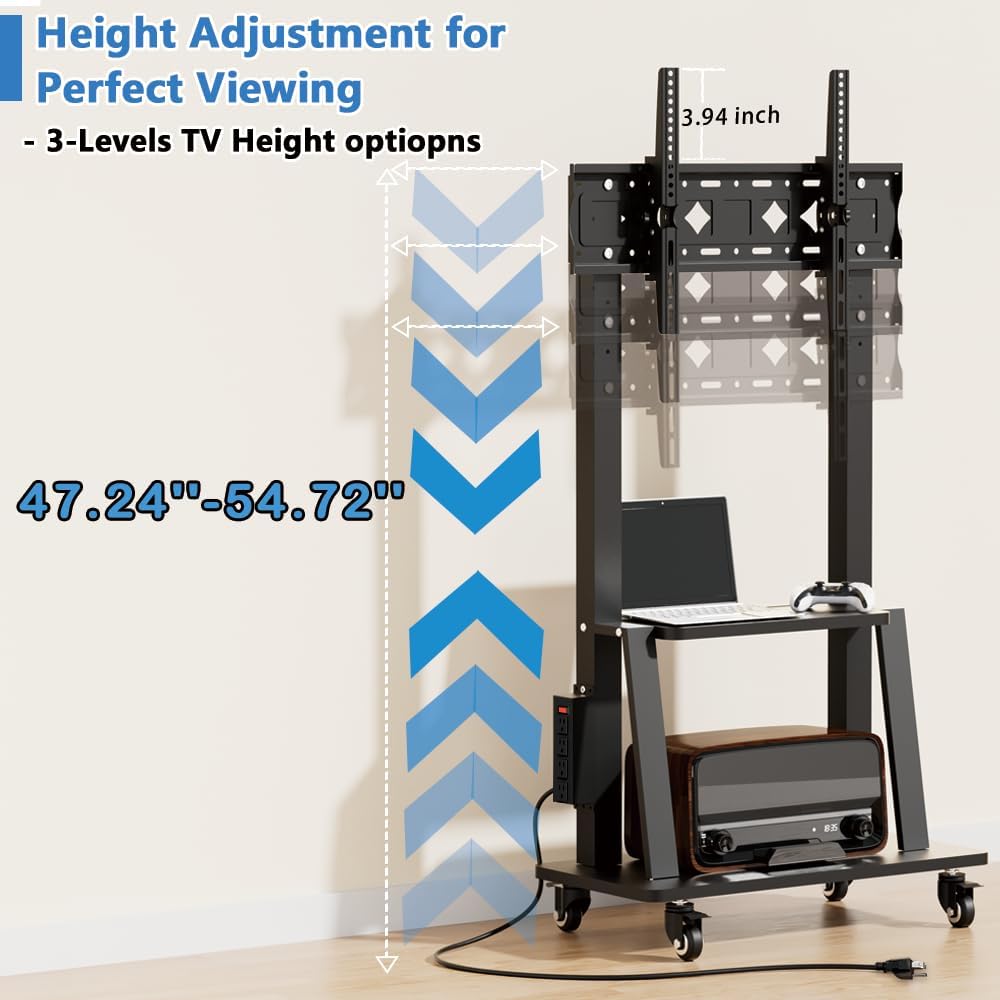
Image Description: This diagram illustrates the three distinct height options for mounting the television, indicating a total adjustable range from 47.24 inches to 54.72 inches for optimal viewing.

Image Description: This image highlights the two robust steel shelves, detailing their dimensions (18.8-inch upper, 27.5-inch lower) and respective maximum load capacities of 66 lbs and 110 lbs, suitable for various entertainment equipment.

Image Description: An illustration demonstrating the integrated cable management feature, designed to keep all wires organized and out of sight for a clean setup.
Operating Instructions
The Duiliuu Mobile TV Cart is designed for ease of use and flexibility.
- Moving the Cart: To move the TV cart, unlock all four wheels by flipping their respective levers. Gently push the cart to your desired location. Once positioned, lock all wheels to ensure stability and prevent accidental movement. The rubber treads on the wheels protect floors from scratches.
- Adjusting TV Tilt: The TV mount allows for a tilt adjustment range of -7° (downward) to +15° (upward). This feature helps reduce glare and optimize viewing angles. Loosen the tilt adjustment knobs on the TV brackets, adjust the screen to the desired angle, and then securely tighten the knobs.
- Using the Power Outlet: The integrated power strip provides four AC outlets (125V/12A) for powering your TV and other media devices. Plug your devices into the outlets. Use the one-button switch on the power strip to turn power on or off. This switch also serves as a safety feature to prevent accidental activation.

Image Description: This image demonstrates the mobility of the TV cart, showing it in motion and highlighting the 360-degree rotating and lockable casters for easy movement and secure positioning on various floor types.

Image Description: A visual comparison showing the TV screen in a neutral position and then tilted both upwards (+15°) and downwards (-7°), demonstrating the adjustable tilt feature for optimal viewing and glare reduction.

Image Description: A detailed view of the integrated power strip, highlighting its four 125V/12A AC outlets, a power switch, and a 6.5 ft thick power cord for convenient device connectivity.
Maintenance
Regular maintenance ensures the longevity and safe operation of your TV cart.
- Cleaning: Wipe down the metal surfaces with a soft, damp cloth. Avoid using abrasive cleaners or solvents that could damage the finish.
- Check Fasteners: Periodically inspect all screws and bolts to ensure they remain tight. Re-tighten any loose fasteners to maintain stability.
- Wheel Inspection: Check the wheels for any debris or hair that might impede smooth movement. Clean as necessary.
- Power Strip: Ensure the power cord is not pinched or damaged. Do not attempt to repair the power strip yourself; contact a qualified electrician if issues arise.
Troubleshooting
If you encounter any issues with your Duiliuu Mobile TV Cart, refer to the following common problems and solutions:
| Problem | Possible Cause | Solution |
|---|---|---|
| Cart is unstable or wobbly. | Loose fasteners; uneven floor; overloaded shelves/TV. | Check and tighten all screws. Ensure cart is on a level surface. Verify weight limits are not exceeded. |
| Wheels do not roll smoothly or lock. | Debris in wheels; lock mechanism engaged/damaged. | Clean wheels of any obstructions. Ensure lock levers are fully disengaged for movement or fully engaged for locking. |
| TV cannot be tilted. | Tilt adjustment knobs are too tight. | Loosen the tilt adjustment knobs, adjust the angle, then re-tighten. |
| Power outlet is not working. | Power switch off; not plugged into wall; circuit breaker tripped. | Ensure the power strip switch is ON. Verify the power cord is securely plugged into a functional wall outlet. Check your home's circuit breaker. |
If the problem persists after attempting these solutions, please contact Duiliuu customer support for further assistance.
Specifications
- Brand: Duiliuu
- Model: B0D2MCVY3W
- Compatible TV Sizes: 32 - 75 inches
- Maximum TV Load Capacity: 130 lbs (59 kg)
- VESA Compatibility: 100x100mm to 600x400mm (Width x Height)
- Upper Shelf Load Capacity: 66 lbs (30 kg)
- Lower Shelf Load Capacity: 110 lbs (50 kg)
- Height Adjustment: 3 levels, TV center height from approx. 47.24 inches to 54.72 inches
- Tilt Angle: -7° (downward) to +15° (upward)
- Power Outlet: Integrated 4 AC outlets (125V/12A) with 6.5 ft power cord and one-button switch
- Material: Metal
- Color: Black
- Item Weight: 29.5 pounds (packaged)
- Product Dimensions (packaged): 56.8 x 20.8 x 2.15 inches
Warranty and Support
Duiliuu is committed to providing quality products. For information regarding warranty coverage, please refer to the product packaging or the official Duiliuu website. If you require assistance with assembly, troubleshooting, or have any questions about your Duiliuu Mobile TV Cart, please contact Duiliuu customer support.
Contact Information: Please visit the official Duiliuu website or refer to your purchase documentation for the most current customer support contact details.