
1. Introduction
This manual provides comprehensive instructions for the Vingtok Smart Bird Feeder with Camera, Model VT02-00027. It covers product features, package contents, setup, operation, maintenance, and troubleshooting to ensure optimal performance and an enjoyable bird-watching experience.
The Vingtok Smart Bird Feeder allows for real-time observation of birds, automatic video capture, and AI-powered bird species identification directly on your smartphone. Featuring a solar-powered design and durable construction, it is designed for outdoor use.

Image 1.1: Overview of the Vingtok Smart Bird Feeder's key features.
2. Safety Information
- Ensure all components are securely fastened during installation to prevent accidental falls.
- Keep the device away from open flames or extreme heat sources.
- Do not attempt to disassemble or repair the device yourself. Contact customer support for assistance.
- Use only the provided charging cable and solar panel.
- Dispose of batteries according to local regulations.
3. Package Contents
Verify that all items listed below are included in your package:
- Bird Feeder with Integrated Camera
- Solar Panel (3W, 360° adjustable)
- Nectar Feeder (x2)
- Water Feeder (x1)
- Fruit Forks (x2)
- Type C Power Cable
- Tripod Adapter
- Perch Screw (x2)
- Ejector Pin
- Solar Panel Set Screws (x3)
- Drilling Template
- Mounting Bracket
- Big Mounting Screws & Anchors (x3)
- Medium Screws (x3)
- Perch
- Small Hose Clip (x2)
- Big Hose Clip (x2)
- Instruction Manual (x2)
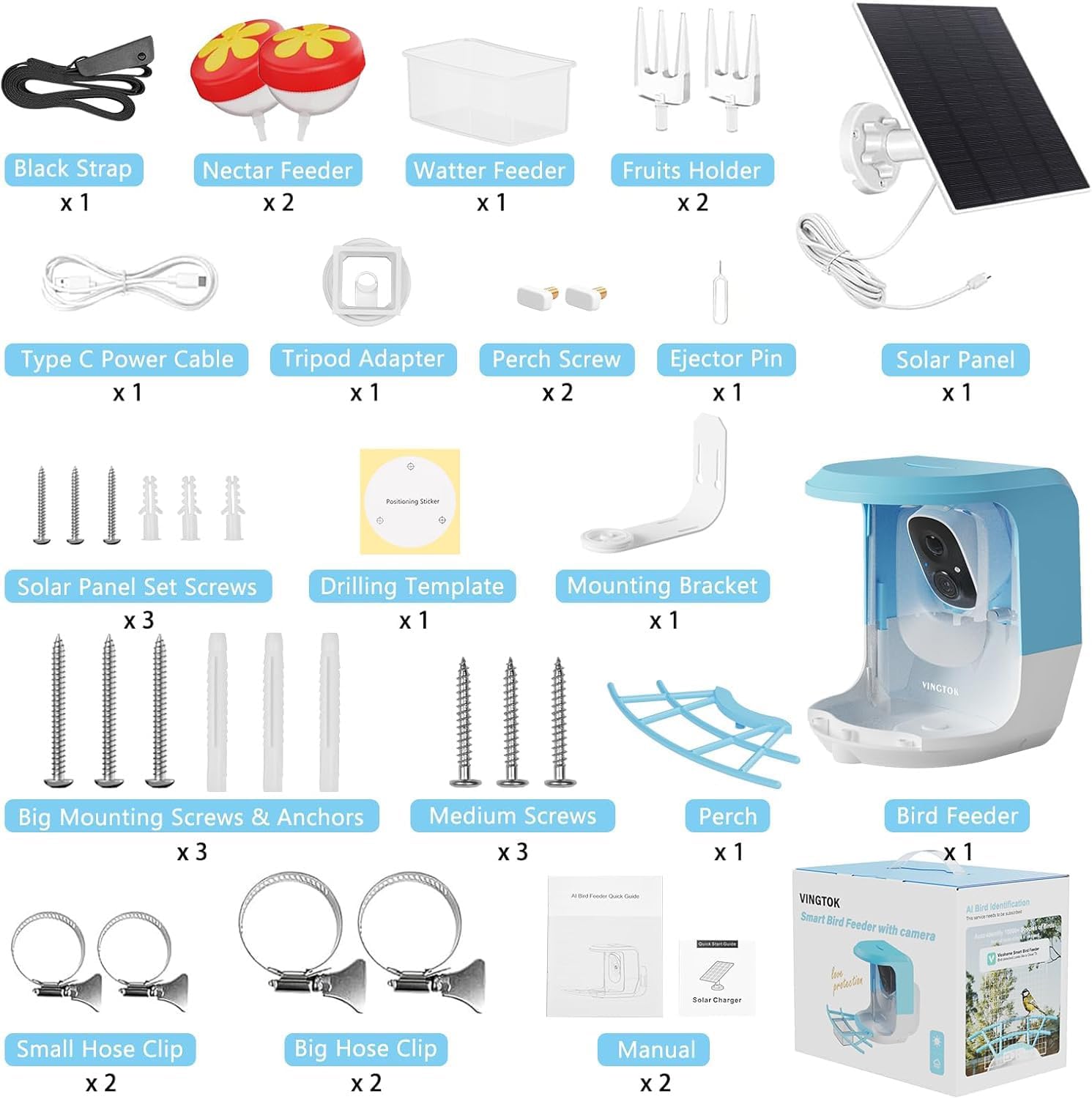
Image 3.1: Contents of the Vingtok Smart Bird Feeder package.
4. Setup Instructions
4.1 Initial Charging
The bird feeder is equipped with a 5200mAh battery and a 3W 360° adjustable solar panel. For initial use, it is recommended to fully charge the device using the provided Type C power cable before relying solely on solar power. Position the solar panel in an area that receives maximum direct sunlight for efficient charging.

Image 4.1: Solar panel charging the bird feeder.
4.2 App Installation and Wi-Fi Connection
- Download the companion app (e.g., VicoHome, as indicated in product images) from your smartphone's app store.
- Follow the in-app instructions to create an account and add your new device.
- Connect the bird feeder camera to a stable 2.4GHz Wi-Fi network. Ensure the feeder is placed within range of your Wi-Fi router for consistent connectivity.
4.3 Mounting Options
The Vingtok Smart Bird Feeder offers multiple installation methods:
- Tree Mount: Use the black strap or hose clips to secure the feeder to a tree trunk.
- Wall Mount: Utilize the mounting bracket, big mounting screws, and anchors to attach the feeder to a wall. A drilling template is provided for convenience.
- Pole Mount: Attach the feeder to a pole using the appropriate hose clips.
- Tripod Mount: Use the tripod adapter to place the feeder on a compatible tripod.

Image 4.2: Various installation methods for the bird feeder.
4.4 Filling the Feeder
The feeder has a 1.2L capacity for bird seeds. The top cover is designed for easy refilling. Additionally, you can attach the provided fruit forks, nectar feeders, and water feeder to offer a variety of food options to attract different bird species.

Image 4.3: Customizable feeding options with fruit forks, jelly, and nectar feeders.
5. Operating Instructions
5.1 Real-time Observation and Notifications
Once connected to Wi-Fi, the camera provides real-time views of visiting birds. The app will send notifications to your phone when motion is detected, ensuring you don't miss any activity.

Image 5.1: Real-time bird arrival notification on your smartphone.
5.2 Recording and Playback
The camera captures and records videos in 1080P Full HD. It supports both day and night vision, with full-color vision available at night under sufficient light. Recorded moments can be accessed and played back through the app.

Image 5.2: App interface for viewing recorded bird videos and images.

Image 5.3: Day and night vision capabilities of the camera.
5.3 AI Bird Identification
The smart camera features AI identification capable of recognizing over 10,000 bird species. This feature provides immediate identification of visiting birds. A 30-day free trial for AI identification is typically included.

Image 5.4: AI-powered bird species recognition feature.
5.4 Squirrel Deterrence
The feeder includes features to deter squirrels, such as two-way audio and an audible alarm, which can be activated via the app to discourage unwanted visitors.

Image 5.5: Squirrel deterrence features.
6. Maintenance
6.1 Cleaning
The Vingtok Smart Bird Feeder is IP65 waterproof and features drainage holes on the top and bottom to prevent seeds from sitting in water. Regularly clean the feeder to ensure hygiene for visiting birds. Use a soft cloth and mild soap solution, then rinse thoroughly and allow to dry completely before refilling.

Image 6.1: IP65 waterproof design and drainage system.
6.2 Battery Care
The integrated 5200mAh battery is recharged by the solar panel. Ensure the solar panel is kept clean and free from obstructions to maximize charging efficiency. In periods of low sunlight, occasional manual charging via the Type C port may be necessary.
7. Troubleshooting
- No Power/Not Charging: Ensure the solar panel is clean and receiving direct sunlight. Check the Type C cable connection if charging manually.
- Wi-Fi Connection Issues: Verify that the feeder is within range of a 2.4GHz Wi-Fi network. Restart your router and the feeder, then attempt to reconnect via the app.
- Poor Image Quality: Clean the camera lens. Ensure there is adequate lighting, especially for full-color night vision.
- No Bird Notifications: Check app settings to ensure notifications are enabled. Adjust motion detection sensitivity if necessary.
- Squirrels Still Present: Utilize the two-way audio and audible alarm features in the app. Consider repositioning the feeder or adding additional squirrel deterrents.
8. Specifications
| Feature | Detail |
|---|---|
| Brand | Vingtok |
| Model Number | VT02-00027 |
| Target Species | Hummingbird and Other Wild Birds |
| Material | ABS, Solar Panel |
| Special Features | DIY Different Feeders, Easy-Refill Top, Squirrel Proof, Two Way Audio, Weatherproof |
| Mounting Type | Wall Mount, Tree Mount, Pole Mount |
| Product Dimensions | 8.43"L x 8.27"W x 7"H |
| Power Source | Solar Powered |
| Battery | 1 Lithium Ion battery (5200mAh, included) |
| Capacity | 1.2 Liters |
| Item Weight | 4.51 pounds |