
1. Introduction
This manual provides detailed instructions for the assembly, operation, and maintenance of your Duiliuu Mobile TV Cart. Please read this manual thoroughly before installation and use to ensure safe and correct operation. Keep this manual for future reference.
The Duiliuu Mobile TV Cart is designed to accommodate flat-panel LCD/LED TVs ranging from 32 to 83 inches, with a maximum weight capacity of 130 lbs. It features a sturdy metal construction, height adjustability, integrated power outlet, and lockable wheels for mobility.
2. Safety Information
WARNING: Failure to read and follow all instructions may result in personal injury or damage to the product. Save these instructions for future reference.
- Do not exceed the maximum weight capacity of 130 lbs (59 kg) for the TV or 66 lbs (30 kg) for the upper shelf and 110 lbs (50 kg) for the lower shelf.
- Ensure the TV's VESA mounting pattern is compatible with the stand (85x32mm to 600x400mm).
- Always use the provided safety straps or anti-tip devices to secure the TV to the stand.
- Do not allow children to climb on the stand or hang from the TV.
- Ensure all screws are tightened securely before moving the stand or placing a TV on it.
- Use caution when moving the stand, especially on uneven surfaces. Lock the wheels when the stand is stationary.
- Do not overload the integrated power outlet. Ensure the total current draw does not exceed 12A.
3. Package Contents
Verify that all components are present and undamaged. If any parts are missing or damaged, contact customer support.
- TV Cart Frame Components
- TV Mounting Brackets
- Shelves (Upper and Lower)
- Casters (Wheels) with Brakes
- Integrated Power Outlet Strip with Power Cord
- Hardware Kit (Screws, Washers, Spacers, Wrenches)
- Instruction Manual
4. Setup and Assembly
Assembly typically requires two people. Lay out all parts on a soft, clean surface to prevent scratches. Follow the step-by-step instructions provided in the included installation guide.
- Attach Casters: Secure the 360° rotating casters to the base of the TV cart. Ensure all four casters are firmly attached.
- Assemble Vertical Columns: Connect the vertical support columns to the base.
- Install Shelves: Attach the upper and lower shelves to the vertical columns using the provided hardware. The upper shelf has a maximum load capacity of 66 lbs, and the lower shelf has a maximum load capacity of 110 lbs.
- Mount TV Brackets: Attach the TV mounting brackets to the back of your television. Ensure the VESA pattern (distance between screw holes) matches the stand's compatibility (85x32mm to 600x400mm).
- Attach TV to Stand: Carefully lift the TV and hook the mounted brackets onto the vertical columns of the stand. Secure the TV using the safety bolts or locking mechanisms.
- Install Power Outlet: Mount the integrated power outlet strip to the designated area on the stand.


5. Operating Instructions
5.1. Height Adjustment
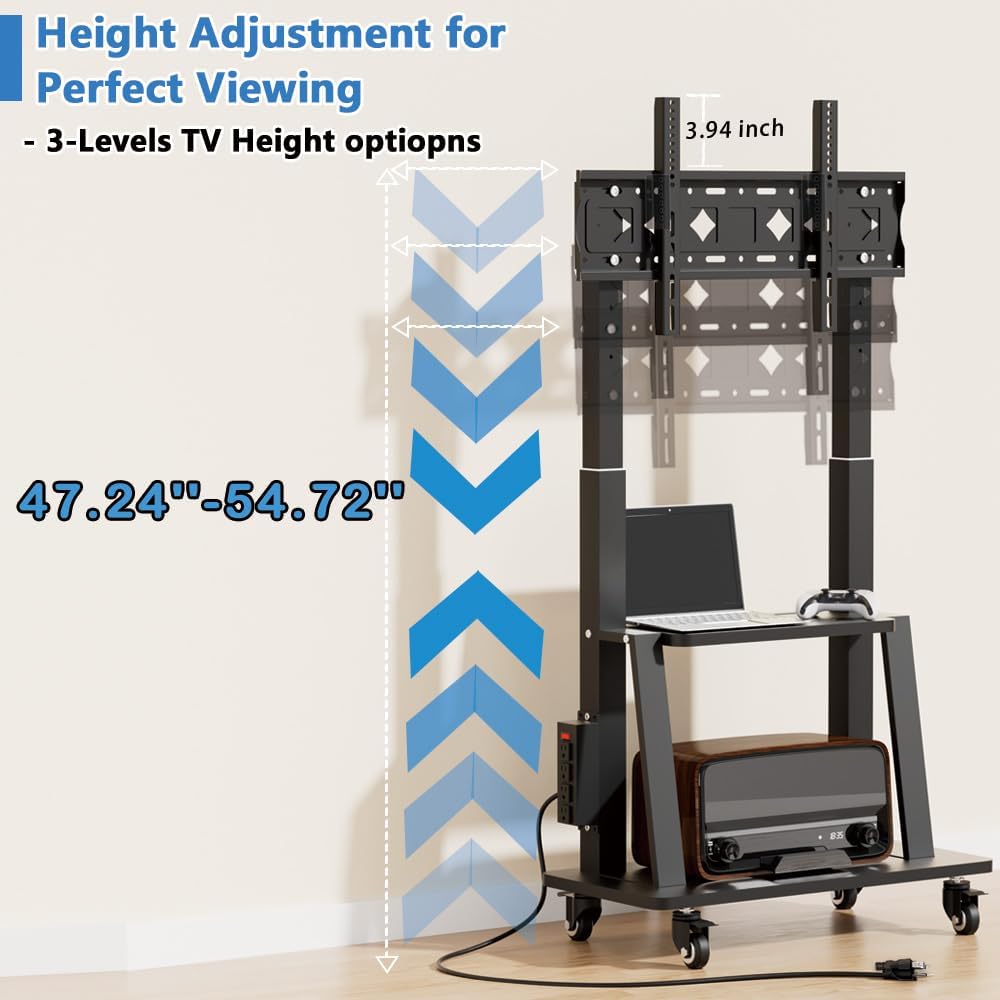
The TV cart allows for height adjustment to achieve optimal viewing. The stand is adjustable with height from 53 inches to 59 inches. To adjust the height, loosen the locking mechanisms on the vertical columns, carefully raise or lower the TV to the desired position, and then securely tighten the locking mechanisms.
5.2. Mobility and Locking
The TV stand is equipped with 2-inch heavy-duty 360° rotating casters, allowing for easy movement across various surfaces such as wood floors, carpets, and grass. To move the stand, ensure the brakes on all four casters are disengaged. To secure the stand in a stationary position, engage the brakes on all four casters.

5.3. Integrated Power Outlet
The TV cart includes a built-in power outlet with 4 AC outlets (125V/12A) and a 6.5 ft power cord. This allows for convenient power access for your TV and other devices, reducing cable clutter. A one-button switch is provided to turn off power to the outlets when not in use, enhancing safety and preventing accidental contact.

5.4. Cable Management
Utilize the integrated cable management features to keep your cables organized and neat, preventing tangles and improving the overall appearance of your setup.

6. Maintenance
- Cleaning: Wipe the stand with a soft, damp cloth. Avoid using abrasive cleaners or solvents that may damage the finish.
- Hardware Check: Periodically check all screws and bolts to ensure they remain tight. Retighten if necessary.
- Caster Inspection: Ensure casters are free of debris and roll smoothly. Clean if needed.
7. Troubleshooting
| Problem | Possible Cause | Solution |
|---|---|---|
| Stand is unstable. | Loose hardware; uneven surface. | Ensure all screws are tightened. Move to a level surface. |
| TV does not fit the stand. | Incorrect TV size or VESA pattern. | Verify TV size (32-83 inches) and VESA pattern (85x32mm - 600x400mm) compatibility. |
| Casters do not roll smoothly. | Brakes engaged; debris in casters. | Disengage caster brakes. Clean any debris from the wheels. |
| Power outlet not working. | Switch off; not plugged into wall. | Ensure the power outlet switch is ON and the main power cord is securely plugged into a wall outlet. |
8. Specifications
- Brand: Duiliuu
- Model: Flat 32-83 inch
- Mounting Type: Freestanding Mount
- Movement Type: Rotate (TV can be rotated on the mount)
- Material: Metal
- Color: Black
- Compatible Devices: Television
- Minimum Supported Screen Size: 32 Inches
- Maximum Supported Screen Size: 83 Inches
- Maximum TV Weight Capacity: 130 lbs (59 kg)
- VESA Compatibility: 85x32mm - 600x400mm
- Upper Shelf Load Capacity: 66 lbs (30 kg)
- Lower Shelf Load Capacity: 110 lbs (50 kg)
- Height Adjustment Range: 53 inches - 59 inches
- Caster Size: 2 inches, 360° rotating with brakes
- Power Outlet: 4 AC outlets (125V/12A), 6.5 ft power cord, one-button switch
9. Warranty and Support
This product comes with a manufacturer's warranty. For specific warranty details, please refer to the documentation included with your purchase or contact Duiliuu customer support. For technical assistance or inquiries regarding parts, please reach out to Duiliuu customer service.
Protection Plans: Extended protection plans may be available for purchase. Please check with your retailer for options such as 2-Year or 3-Year Protection Plans.