
1. Product Overview
The GUOANVISION J1-White-Vine6 is a high-performance wireless outdoor security camera designed to provide comprehensive surveillance for your home or property. It features advanced dual-lens technology for a wide 360° viewing angle, delivering crystal-clear 6MP HD video with both full-color and infrared night vision capabilities. Equipped with AI human tracking and two-way audio, this camera ensures you stay connected and informed. Its IP66 waterproof rating guarantees reliable operation in various weather conditions, making it an ideal solution for outdoor monitoring.

Image 1.1: The GUOANVISION J1-White-Vine6 security camera shown alongside its smartphone application interface, demonstrating its design and remote monitoring capabilities.
2. What's in the Box
Please verify that all components are present before proceeding with installation:
- GUOANVISION Security Camera (J1-White-Vine6)
- 3M Power Cord
- User Manual
3. Specifications
| Feature | Detail |
|---|---|
| Model Name | J1-White-Vine6 |
| Indoor/Outdoor Usage | Outdoor |
| Video Capture Resolution | 6MP |
| Viewing Angle | 360 Degrees (Pan/Tilt) |
| Connectivity Technology | Wireless (2.4GHz Wi-Fi), Wired (Ethernet) |
| Water Resistance Level | IP66 Waterproof |
| Storage Options | Local SD Card (up to 128GB, not included), Cloud Storage |
| Special Features | 2-Way Audio, Local Recording, Motion Sensor, AI Human Tracking, Full Color Night Vision |
| Power Source | Corded Electric |
| Item Dimensions (L x W x H) | 9 x 5 x 7 inches |
| Item Weight | 1.2 pounds |
4. Setup Guide
4.1 App Download and Installation
The GUOANVISION security camera operates via the iCSee mobile application. Follow these steps to get started:
- Ensure your smartphone is connected to a 2.4GHz Wi-Fi network. The camera is only compatible with 2.4GHz Wi-Fi for optimal range and stability.
- Download the iCSee App: Scan the QR code provided in the camera's packaging or visit https://d.xmeye.net/CSee to download the app for your Android or iOS device.
- Register an account within the iCSee app if you are a new user.

Image 4.1: Step-by-step guide for setting up the camera using the iCSee app, from Wi-Fi connection to successful device pairing.
4.2 Camera Connection and Mounting
- Power on the camera by connecting the provided 3M power cord to a suitable power outlet.
- Open the iCSee app and follow the on-screen prompts to add a new device. The app will guide you through pairing the camera via Bluetooth.
- Once connected, choose a suitable outdoor location for mounting. The camera supports both wall mount and ceiling mount installations. Use the included screws for secure attachment.

Image 4.2: Illustration of the camera's versatile mounting options, including wall and ceiling installations.
Note on Wi-Fi Connectivity: This camera is designed to work exclusively with 2.4GHz Wi-Fi networks. This frequency offers wider coverage and better penetration through obstacles compared to 5GHz, which is advantageous for outdoor surveillance.

Image 4.3: Explanation of why 2.4GHz Wi-Fi is preferred for outdoor security cameras due to its superior range and coverage.
5. Operating Instructions
5.1 Dual Lens 360° View and Pan/Tilt/Zoom (PTZ)
The camera features a unique dual-lens system, allowing for simultaneous monitoring. One lens provides a wider panoramic view, while the other offers pan (360°), tilt (90°), and digital zoom capabilities for detailed tracking. This enables you to monitor a crucial fixed point while also tracking motion across the entire area.

Image 5.1: The dual-screen display allows monitoring of a fixed point and a rotating, zoomable area simultaneously.
5.2 6MP HD Night Vision
The camera delivers crystal-clear 6MP HD resolution, ensuring high-quality images day and night. It offers three night vision modes:
- Full Color Night Vision: Utilizes built-in spotlights to illuminate the area, providing vivid color images even in low-light conditions.
- Infrared Night Vision: Uses infrared LEDs for clear black-and-white images in complete darkness.
- Double-Light Alert: Combines infrared with spotlight activation upon motion detection for enhanced visibility and deterrence.

Image 5.2: Visual comparison of the camera's Double-Light (full color) and Infrared Light night vision capabilities.
5.3 AI Detection and Tracking & Instant Alerts
The enhanced AI algorithm provides smart motion detection, humanized recognition, and AI human tracking, minimizing false alarms. When abnormal intrusion is detected, the camera's warning lights flash, and an alarm notification is pushed to your mobile app instantly. You can also customize warning lines to define specific alert areas.
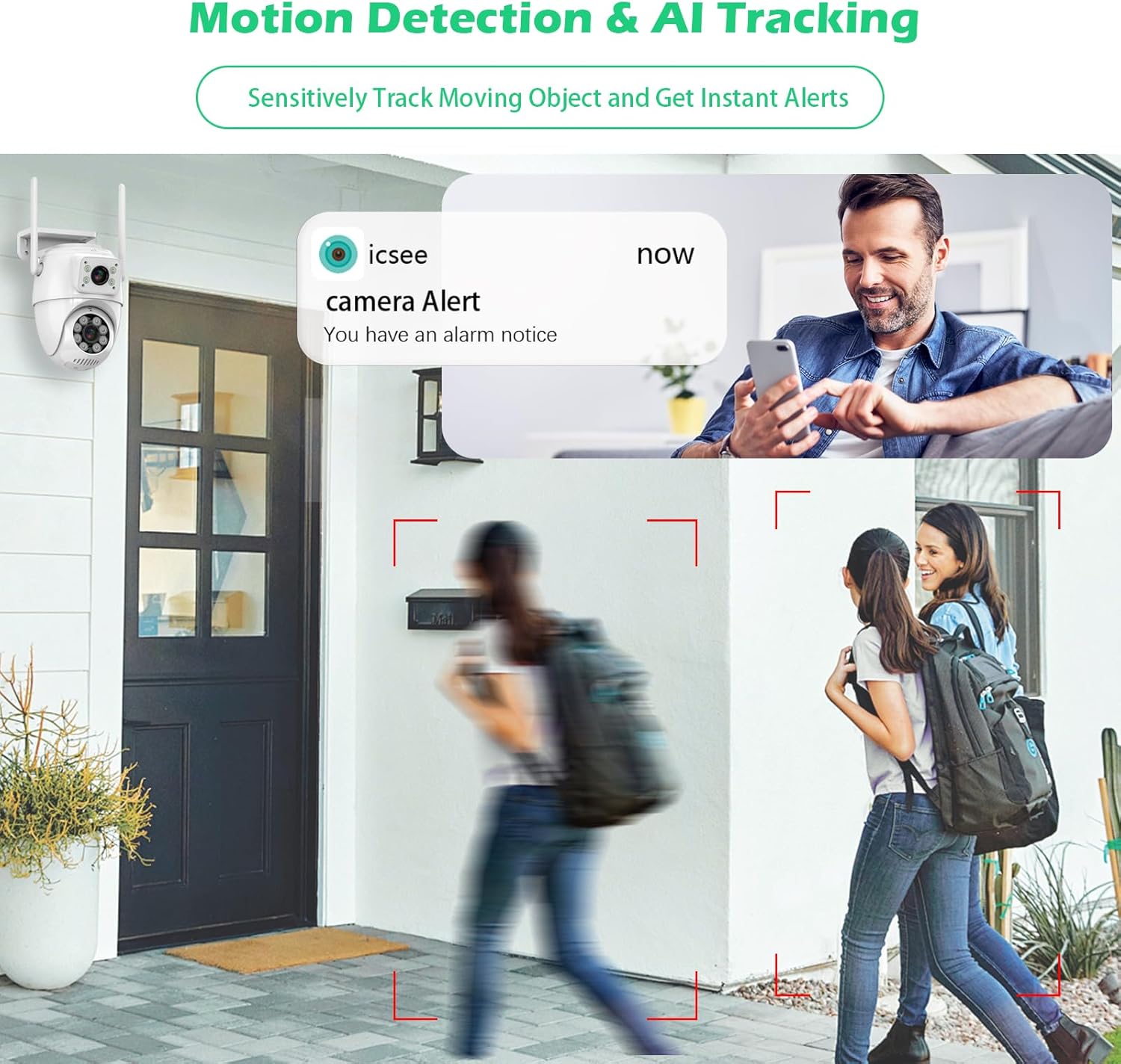
Image 5.3: The camera's AI tracking feature detects and sends instant alerts to your smartphone when motion is detected.
5.4 Real-time Two-Way Talk
The built-in noiseless microphone and two-way voice function enable seamless communication. You can speak to visitors or deter intruders directly through the camera using the iCSee app, no matter where you are.

Image 5.4: The two-way talk feature allows real-time communication and alert pushing for enhanced security.
5.5 Secure Cloud & SD Card Storage
The camera supports flexible storage options for your footage:
- Local SD Card Storage: Insert a microSD card (up to 128GB, not included) for continuous or alarm-triggered recording.
- Cloud Storage: Subscribe to the secure cloud service for off-site storage and easy access to your recordings from anywhere.

Image 5.5: The camera supports both continuous recording to an SD card and cloud storage options.
5.6 NVR Compatibility
The GUOANVISION security camera can integrate with Network Video Recorders (NVRs) for expanded surveillance systems. Please note that it is only compatible with NVRs that support resolutions above 6MP. It occupies one monitoring channel on the NVR.

Image 5.6: The camera's transmission methods and compatibility with NVR systems for integrated surveillance.
5.7 Multi-Device Support
Access your camera's live feed and recordings from multiple devices simultaneously, including smartphones, iPads, and PCs, ensuring you can monitor your property from anywhere.

Image 5.7: The camera supports easy access and monitoring from multiple devices simultaneously.
6. Maintenance
Regular maintenance ensures optimal performance and longevity of your security camera:
- Cleaning: Periodically wipe the camera lens and body with a soft, damp cloth to remove dust, dirt, or water spots. Avoid using harsh chemicals or abrasive materials.
- Weather Protection: While the camera is IP66 waterproof, it is recommended to avoid directing high-pressure water jets directly at the device. Ensure the power connection point is secure and protected from excessive moisture.
- Cable Inspection: Routinely check the 3M power cord for any signs of wear, damage, or fraying. Replace if necessary to prevent electrical hazards.
- Firmware Updates: Check the iCSee app periodically for available firmware updates. Keeping the camera's firmware updated ensures access to the latest features and security enhancements.

Image 6.1: The camera's IP66 waterproof rating ensures durability against outdoor elements.
7. Troubleshooting
If you encounter issues with your GUOANVISION security camera, refer to the following common troubleshooting steps:
- Camera Offline/No Connection:
- Ensure the camera is powered on and the power cord is securely connected.
- Verify your Wi-Fi network is 2.4GHz and has a strong signal at the camera's location.
- Restart the camera by unplugging and re-plugging the power cord.
- Check your router settings to ensure no MAC address filtering is preventing connection.
- Poor Image Quality:
- Clean the camera lens with a soft cloth to remove any dirt or smudges.
- Ensure adequate lighting in the monitored area, especially for full-color night vision.
- Check the video resolution settings in the iCSee app (e.g., ensure it's set to HD/6MP).
- No Motion Detection Alerts:
- Verify that motion detection is enabled in the iCSee app settings.
- Adjust the motion detection sensitivity.
- Check the notification settings on your smartphone to ensure the iCSee app is allowed to send alerts.
- Ensure the camera's field of view covers the desired detection area.
- Two-Way Audio Issues:
- Ensure your smartphone's microphone and speaker are enabled and not muted during communication.
- Check the audio settings within the iCSee app.
- Minimize background noise near both the camera and your smartphone.
8. Warranty and Support
GUOANVISION offers a 1-year warranty for the J1-White-Vine6 security camera. Additionally, 20 hours of online service are available to assist with any product-related inquiries or technical support needs. Please refer to the contact information provided in your product packaging or on the official GUOANVISION website for support.