
1. Introduction
Thank you for choosing the VOJSALDR 26.5V Charger. This adapter is specifically designed to provide efficient and safe charging for 22.2V Lithium-ion battery cordless vacuum cleaners, including compatible models such as Homeika H016, Homeika HA016, and Ealken VG3. Please read this manual thoroughly before use to ensure proper operation and to maximize the lifespan of your charger and vacuum cleaner.
2. Safety Information
- Use this charger only with compatible 22.2V Lithium-ion battery vacuum cleaners as specified in this manual. Using it with incompatible devices may cause damage or safety hazards.
- Do not expose the charger to water, moisture, or extreme temperatures.
- Avoid dropping or subjecting the charger to strong impacts.
- Do not attempt to disassemble, modify, or repair the charger. Refer all servicing to qualified personnel.
- Ensure the power outlet voltage matches the charger's input specifications (100-240V AC).
- Unplug the charger from the power outlet when not in use or during electrical storms.
- Keep out of reach of children.

This image illustrates the multiple safety features integrated into the VOJSALDR charger, including protection against over-temperature, overcurrent, short circuit, overcharge, overpower, and overvoltage.
3. Package Contents
Your package should contain the following item:
- 1 x VOJSALDR 26.5V Charger (Model: DS 265 Power adapter)

This image displays the complete VOJSALDR 26.5V charger unit, featuring the main adapter block, the attached power cord, and the DC barrel connector at the end.
4. Specifications
| Model Number | DS 265 Power adapter |
| Input Voltage | 100-240V AC, 50-60Hz |
| Output Voltage | 26.5V |
| Output Current | 500mA |
| Wattage | 13.25 Watts |
| Power Cord Length | 5.9 ft (1.8 m) |
| Connector Type | 2-Pin DC Barrel Connector |
| Special Feature | Fast Charging, Multiple Safety Protections |

A visual representation highlighting the 5.9-foot (1.8-meter) total length of the charger's power cord, emphasizing its extended reach.
5. Compatibility
This charger is compatible with the following 22.2V Lithium-ion battery cordless vacuum cleaner models:
- Homeika H016 Series Cordless Vacuum Cleaner
- Homeika HA016 Series Cordless Vacuum Cleaner
- Ealken VG3 Cordless Vacuum Cleaner
Please verify your vacuum cleaner's model number and battery voltage (22.2V Lithium-ion) before using this charger.

This image demonstrates the charger's compatibility, featuring the charger unit alongside an inset graphic displaying several compatible 22.2V Lithium-ion battery cordless vacuum cleaner models, including Homeika H016, HA016, and Ealken VG3 in various color options.
6. Setup
- Ensure your vacuum cleaner is turned off before connecting the charger.
- Locate the charging port on your compatible vacuum cleaner.
- Insert the DC barrel connector of the VOJSALDR charger firmly into the vacuum cleaner's charging port.
- Plug the AC adapter end of the charger into a standard 100-240V AC wall outlet.
7. Operating Instructions (Charging)
Once properly connected, the charger will begin charging your vacuum cleaner's battery. Observe the indicator light on the charger for charging status:
- A green light on the charger indicates that the device is actively charging.
- The charging process will automatically stop once the battery is fully charged to prevent overcharging.
Charging times may vary depending on the battery's current charge level and capacity.
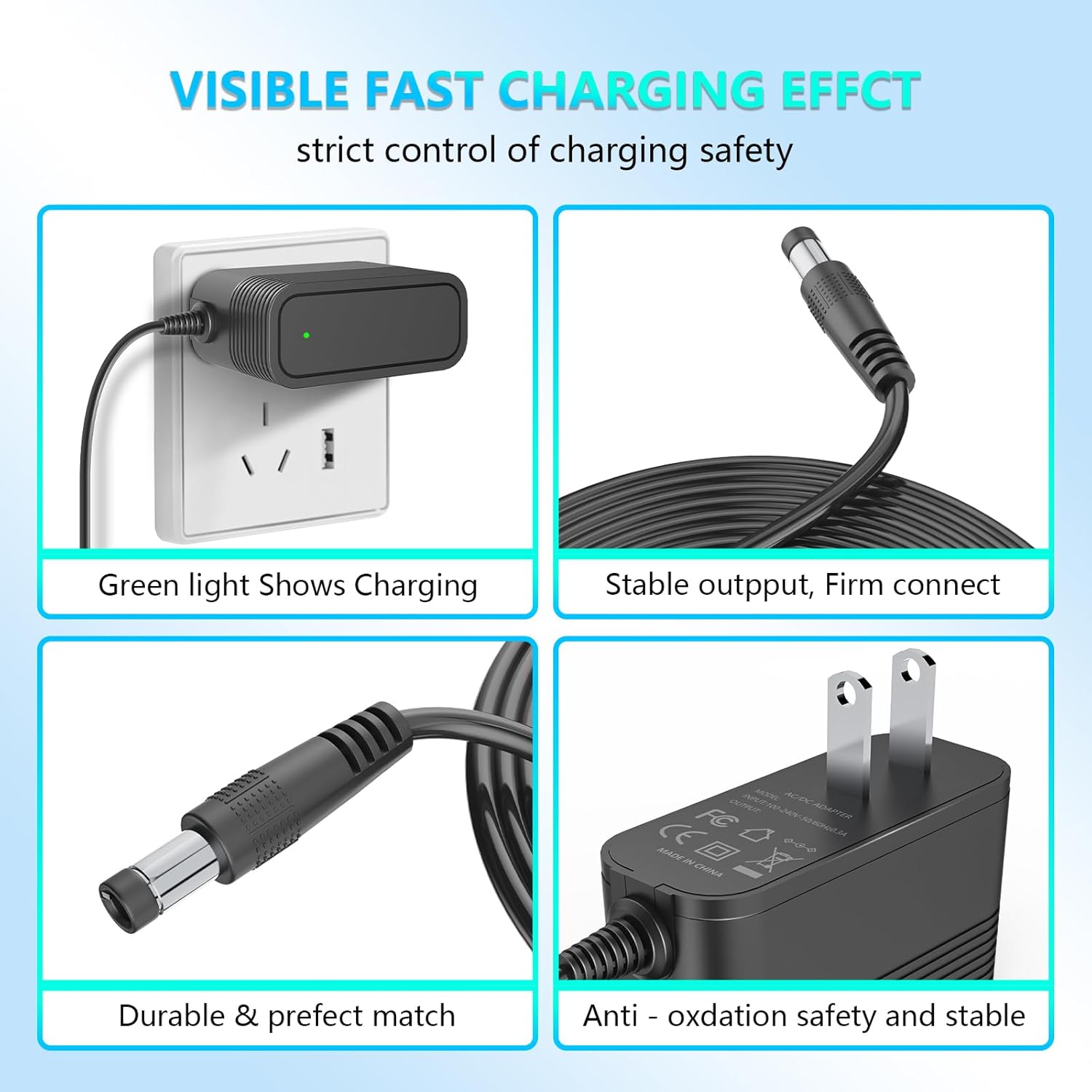
A composite image detailing key aspects of the charger: a green indicator light signaling active charging, the stable output of the connector, the durable and precise fit of the DC plug, and the anti-oxidation design of the AC plug for safety and stability.
8. Maintenance
- Keep the charger clean and free from dust and debris. Use a soft, dry cloth for cleaning.
- Store the charger in a cool, dry place when not in use.
- Avoid wrapping the power cord too tightly around the adapter to prevent damage to the cable.
- Regularly inspect the cable and connectors for any signs of wear or damage. If damage is observed, discontinue use and replace the charger.
9. Troubleshooting
Problem: Charger indicator light does not turn on.
- Solution 1: Ensure the charger is securely plugged into a working wall outlet.
- Solution 2: Verify that the DC connector is fully inserted into the vacuum cleaner's charging port.
- Solution 3: Check if the wall outlet is functional by plugging in another device.
- Solution 4: Confirm that your vacuum cleaner model is listed as compatible.
Problem: Vacuum cleaner is not charging or charges slowly.
- Solution 1: Ensure the charger's specifications (26.5V / 500mA) match the requirements of your vacuum cleaner.
- Solution 2: Check for any visible damage to the charger cable or connectors.
- Solution 3: The battery may be fully charged, or nearing full capacity, which can slow down the charging rate.
- Solution 4: If the battery is severely depleted, it might take longer to initiate charging. Allow some time.
If you continue to experience issues, please contact customer support.
10. Warranty and Support
This VOJSALDR charger comes with a 12-month exchange warranty from the date of purchase. Additionally, a 30-day refund policy is available. This warranty covers manufacturing defects and malfunctions under normal use.
The warranty does not cover damage caused by misuse, accidents, unauthorized modifications, or improper installation. Please retain your proof of purchase for warranty claims.
Customer Support:
For technical assistance, warranty claims, or any questions regarding your VOJSALDR charger, please contact our customer support team through the platform where you purchased the product. Please provide your order number and a detailed description of the issue for prompt assistance.


