
1. Introduction
The Tapo C720 is a state-of-the-art 2K QHD Floodlight Camera designed to enhance your outdoor security. Featuring an ultra-bright 2800 Lumens floodlight and a 270° motion-activated detection zone, it provides expansive vision day and night. With smart AI detection, it accurately distinguishes between people, pets, and vehicles, ensuring you receive only relevant alerts. This wired camera offers reliable 24/7 operation with no subscription required for core features, and it seamlessly integrates with Alexa and Google Home for convenient control.

Figure 1: Tapo C720 2K QHD Floodlight Camera
2. What's in the Box
Your Tapo C720 package includes the following components:
- Tapo C720 Camera x 1; Mounting Plate x 1
- Mouting Screws and Anchors x 2; Bracket Screws x 6
- Floodlight Screws x 2; Floodlight Screws Caps
- Moungting Template x 1; Power Extension Cord x 2
- Wire Nuts x 3; Quick Start Guide
3. Setup
3.1 Safety First
Before beginning installation, ensure the power to the area where you will install the floodlight camera is turned OFF at the circuit breaker. Always prioritize electrical safety.
3.2 Physical Installation
- Attach the mounting plate to your existing junction box using the provided screws. Ensure it is securely fastened.
- Connect the electrical wires from your junction box to the corresponding wires on the Tapo C720. Typically, this involves connecting the live, neutral, and ground wires. Use the included wire nuts to secure connections.
- Mount the Tapo C720 floodlight camera onto the mounting plate. Secure it with the floodlight screws and caps.
- Adjust the angle of the floodlight heads and the camera to cover your desired area. The floodlight heads are adjustable up to 180° and the camera offers a 270° motion-activated zone.

Figure 2: Adjustable Floodlight and Camera Angles
3.3 App Setup
- Download the Tapo app from the App Store (iOS) or Google Play Store (Android).
- Create a TP-Link ID or log in with an existing one.
- Tap the “+” icon in the app to add a new device. Select your Tapo C720 model.
- Follow the in-app instructions to connect your camera to your 2.4GHz Wi-Fi network.
- Once connected, you can name your device and begin customizing settings.
3.4 Product Overview Video
For a general overview of the Tapo C720 Floodlight Camera, please watch the official product video below. This video highlights key features and design aspects of the device.
Video 1: Tapo C720 Product Overview. This video provides a general look at the product's features and design.
4. Operating Instructions
4.1 Live View & Playback
Access crystal-clear 2K QHD live video streams directly from the Tapo app. You can also review recorded footage stored locally on your microSD card (up to 512GB) or via optional cloud storage.
4.2 Two-Way Audio
Communicate directly with visitors or deter unwanted guests using the built-in microphone and speaker for two-way audio functionality.
4.3 Motion Detection & Alerts
The Tapo C720 features advanced Smart AI Detection that differentiates between people, pets, and vehicles. This minimizes false alarms and ensures you receive accurate notifications for critical events. Customize detection zones within the app to focus on specific areas of interest.
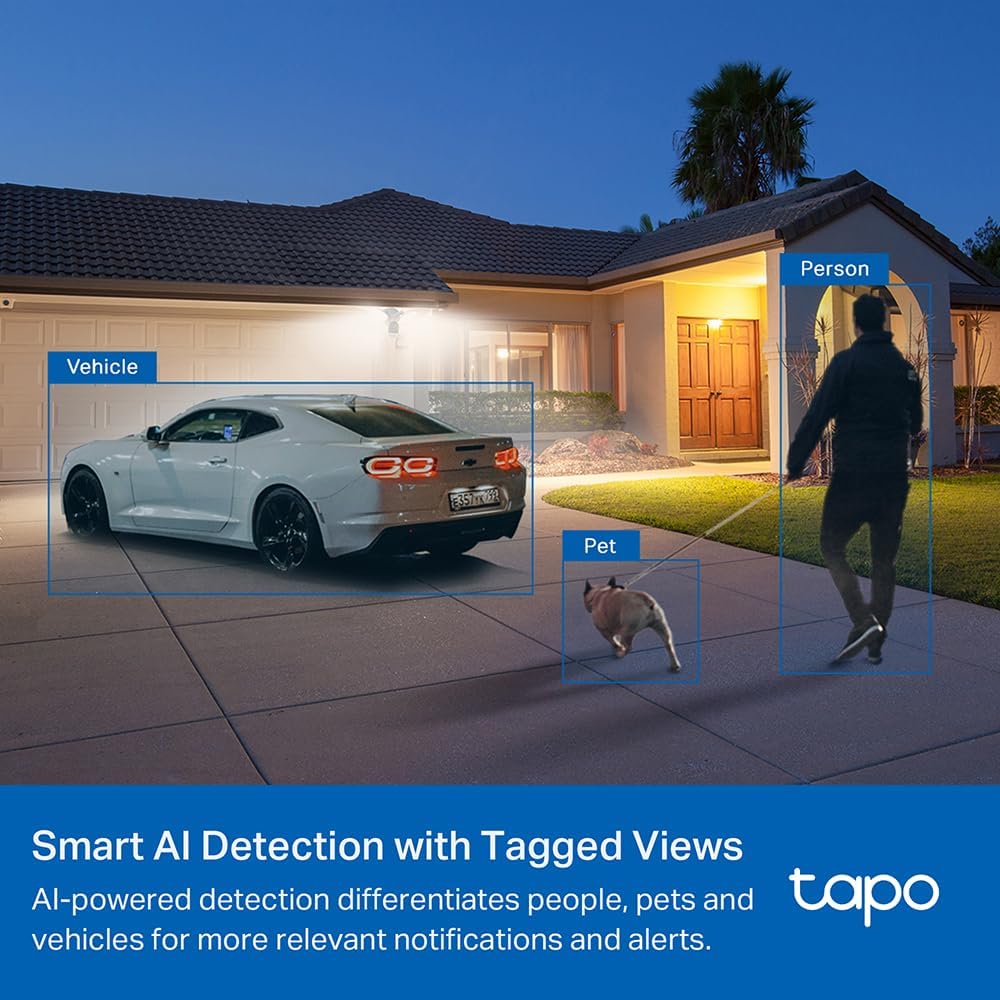
Figure 3: Smart AI Detection with Tagged Views for People, Pets, and Vehicles
4.4 Floodlight Control
Control the powerful 2800 Lumens floodlight directly from the Tapo app. You can:
- Adjust brightness levels.
- Set schedules for automatic on/off times.
- Configure the floodlight to activate automatically upon motion detection within its 270° zone.
- Trigger a customizable sound alarm to deter intruders.
5. Maintenance
5.1 MicroSD Card Management
The Tapo C720 supports local storage on a microSD card up to 512GB. Regularly check the card's status in the Tapo app and format it as needed to ensure continuous recording. New recordings will overwrite older ones when the card is full.
5.2 Cleaning
Periodically clean the camera lens and floodlight surfaces with a soft, damp cloth to ensure optimal video clarity and light output. Avoid using harsh chemicals or abrasive materials.
5.3 Weatherproofing
The camera boasts an IP65 weatherproof rating, protecting it from dust and water. Ensure all connections are secure and sealed during installation to maintain its weather resistance.
6. Troubleshooting
- Connectivity Issues: Ensure your Wi-Fi network is 2.4GHz. If the camera frequently disconnects, check your Wi-Fi signal strength at the installation location.
- False Alarms: Adjust the Smart AI Detection sensitivity and customize detection zones in the Tapo app to reduce irrelevant notifications from pets or vehicles if only person detection is desired.
- Floodlight Not Activating: Verify that the motion detection settings are correctly configured for floodlight activation. Check schedules to ensure the light is not set to remain off during certain periods.
- Video Quality: Ensure your network connection is stable. In the app settings, you can adjust the video quality (2K QHD or 720p) and frame rate (up to 25fps) to optimize performance based on your network conditions.
7. Specifications
| Feature | Detail |
|---|---|
| Indoor/Outdoor Usage | Outdoor |
| Power Source | Corded Electric |
| Connectivity Protocol | Wi-Fi (2.4GHz) |
| Video Capture Resolution | 2K QHD 4MP |
| Viewing Angle | 153 Degrees |
| Night Vision Range | 30 Feet |
| International Protection Rating | IP65 |
| Local Storage | Up to 512GB MicroSD Card |
| Floodlight Brightness | 2800 Lumens |
| Motion Detection | 270° Motion-Activated, Smart AI (Person/Pet/Vehicle) |
| Dimensions (L x W x H) | 11.7 x 11.3 x 5.7 inches |
| Item Weight | 1.52 pounds |
8. Warranty & Support
Tapo products come with a standard manufacturer's warranty. For detailed warranty information, please refer to the Quick Start Guide included in your package or visit the official TP-Link website.
Contact Support:
- Phone: (866) 225-8139
- Web: myproducts.tp-link.com/us
- Email: support.USA@tp-link.com


