
Introduction
The ULANZI CL-003 75mm HD Phone Macro Lens is designed to enhance your smartphone photography by providing 10x optical magnification for capturing intricate details. This lens is compatible with various smartphones when used with a 17mm threaded adapter, such as a lens clip or a dedicated phone case. It features a precision optical design for clear, high-definition imaging with natural background blur.
Package Contents
Please verify that all items listed below are included in your package:
- ULANZI CL-003 75mm Phone Macro Lens x 1
- Rubber Lens Protector x 1
- Lens Clip with Cold Shoe Mount x 1
- Protective Lens Case x 1
- Cleaning Cloth x 1

Figure 1: Contents of the ULANZI CL-003 75mm Macro Lens package, including the lens, clip, case, protector, and cleaning cloth.
Setup Instructions
The ULANZI CL-003 75mm Macro Lens requires a 17mm threaded adapter for attachment to your smartphone. Two common methods are available:
- Using the Included Lens Clip with Cold Shoe Mount:
- Attach the lens clip to your smartphone, ensuring it aligns with your phone's primary camera lens.
- Carefully screw the ULANZI CL-003 75mm Macro Lens into the 17mm thread on the lens clip until secure. Do not overtighten.
- Using a 17mm Threaded Phone Case or Cage:
- If you have a smartphone case or cage with a built-in 17mm screw port, align the macro lens with this port.
- Screw the ULANZI CL-003 75mm Macro Lens directly into the 17mm thread on your phone case or cage until secure.

Figure 2: Illustration of attaching the ULANZI CL-003 75mm Macro Lens using a cold shoe lens clip (top) and a 17mm threaded phone case (bottom).
Operating Instructions
The ULANZI CL-003 75mm Macro Lens provides 10x optical magnification, allowing you to capture extreme close-up details. Follow these steps for optimal use:
- Attach the Lens: Ensure the macro lens is securely attached to your smartphone using either the lens clip or a compatible 17mm threaded phone case, as described in the Setup section.
- Select Camera Mode: Open your smartphone's camera application. For best results, use the primary camera lens. Some phones may require specific settings or third-party camera apps to ensure the correct lens is utilized.
- Position for Macro: Move your smartphone close to the subject you wish to photograph. The optimal focusing range for this lens is approximately 45mm to 90mm from the subject.
- Achieve Focus: Adjust the distance between the lens and your subject until the image appears sharp on your phone screen. The lens is designed for tele-focusing, allowing precise control over the shooting distance.
- Capture Image: Once focused, capture your macro photograph. The lens will produce high-definition images with natural background blur (bokeh), highlighting fine details.

Figure 3: Smartphone with ULANZI CL-003 75mm Macro Lens capturing a close-up of a flower.

Figure 4: Visual comparison demonstrating the 10x magnification and detail capture of the ULANZI 75mm macro lens.
Maintenance
Proper care and maintenance will ensure the longevity and performance of your ULANZI CL-003 75mm Macro Lens:
- Cleaning: Use the provided cleaning cloth to gently wipe the lens surfaces. For stubborn smudges, a small amount of lens cleaning solution applied to the cloth can be used. Avoid harsh chemicals or abrasive materials.
- Storage: When not in use, always place the rubber lens protector on the lens and store it in the protective lens case. This prevents dust accumulation and protects against scratches or impacts.
- Handling: Avoid touching the lens glass directly with your fingers to prevent smudges and oils.
- Environment: Keep the lens away from extreme temperatures, high humidity, and direct sunlight for prolonged periods.
Troubleshooting
If you encounter issues while using your ULANZI CL-003 75mm Macro Lens, refer to the following common problems and solutions:
| Problem | Possible Cause | Solution |
|---|---|---|
| Image is blurry or out of focus. | Incorrect distance to subject; lens not securely attached; phone camera not focusing correctly. | Adjust the distance to the subject (45-90mm range). Ensure the lens is tightly screwed onto the adapter. Tap on the screen to manually focus if your phone camera allows. |
| Dark edges or vignetting in photos. | Lens not perfectly centered over the phone's camera; phone case or clip obstructing the view. | Re-align the lens clip or case to ensure the macro lens is directly over your phone's primary camera. Ensure no part of the clip or case is visible in the frame. |
| Lens does not attach securely. | Incorrect adapter size; threads are misaligned or damaged. | Verify your adapter has a 17mm thread. Carefully align the threads before screwing. Do not force the lens if it resists. |
| Image quality is poor (e.g., low contrast, glare). | Lens surface is dirty; excessive ambient light causing glare. | Clean the lens thoroughly with the provided cloth. Adjust lighting conditions or use a lens hood (if available) to reduce glare. |
Specifications
- Model: CL-003 75mm Macro Lens
- Magnification: 10x Optical
- Focal Length: 75mm
- Mounting Thread: 17mm
- Optimal Focusing Range: 45mm - 90mm
- Lens Type: Macro
- Material: Aluminum Alloy, Premium Optical Glass
- Product Dimensions: Approximately 5 x 5 x 5 inches (packaging)
- Item Weight: Approximately 14.1 ounces
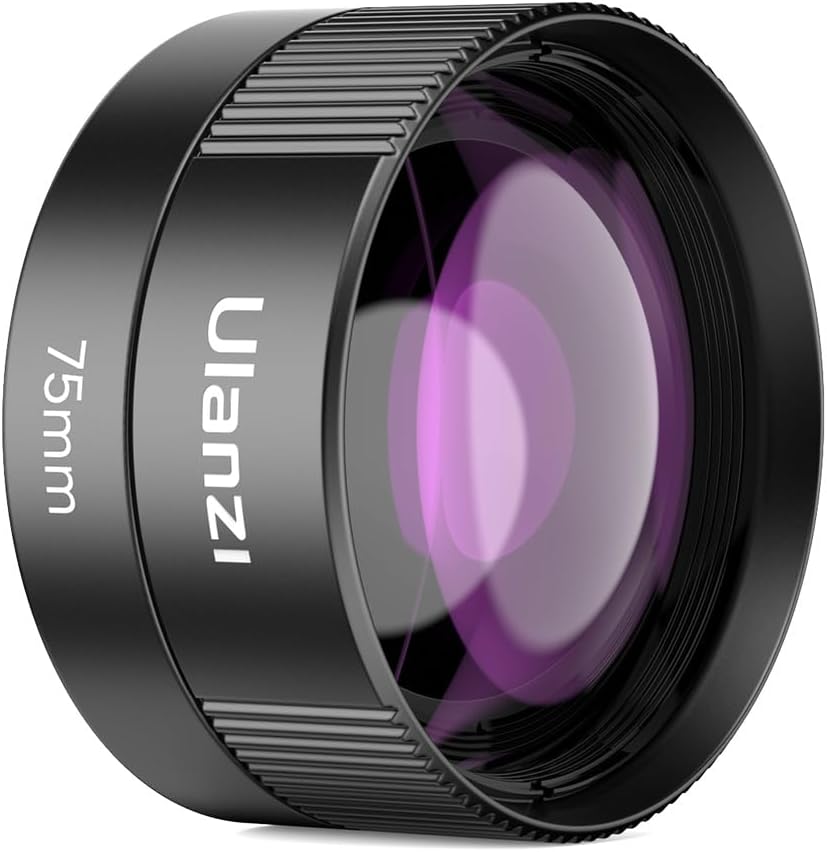
Figure 5: The ULANZI CL-003 75mm Macro Lens.

Figure 6: Diagram illustrating the precision optical design and multi-element glass of the ULANZI CL-003 75mm Macro Lens.
Warranty and Support
ULANZI products are manufactured to high-quality standards. For information regarding warranty coverage, technical support, or service inquiries, please refer to the official ULANZI website or contact their customer service directly. Keep your purchase receipt as proof of purchase.
ULANZI Official Website: www.ulanzi.com


