
1. Introduction
Thank you for choosing the MiJob TTLOCK Smart Lock. This electronic lock provides multiple access methods including fingerprint, passcode, IC card, and remote control (optional), offering enhanced security and convenience for your glass or sliding doors. This manual provides detailed instructions for installation, operation, and maintenance to ensure optimal performance and longevity of your smart lock.
The lock is powered by 4 AAA alkaline batteries and features a USB charging port for emergency power. It is managed via the TTLock mobile application, allowing for remote management of access credentials.
2. Product Overview
2.1 Key Features
- Material: Durable Aluminum alloy + ABS construction.
- Unlock Methods: APP (TTLock), Fingerprint, IC Card, Passcode, Remote Control (optional).
- Door Compatibility: Suitable for Aluminum, Glass, and Wooden doors.
- Door Thickness: 8-13mm for unframed doors, 30-55mm for framed doors.
- Power Supply: 4 AAA Alkaline batteries.
- Emergency Power: USB charge port available.
- App Management: TTLock App for remote passcode/eKey generation and management.
2.2 Components and Dimensions
Familiarize yourself with the main components of your smart lock:
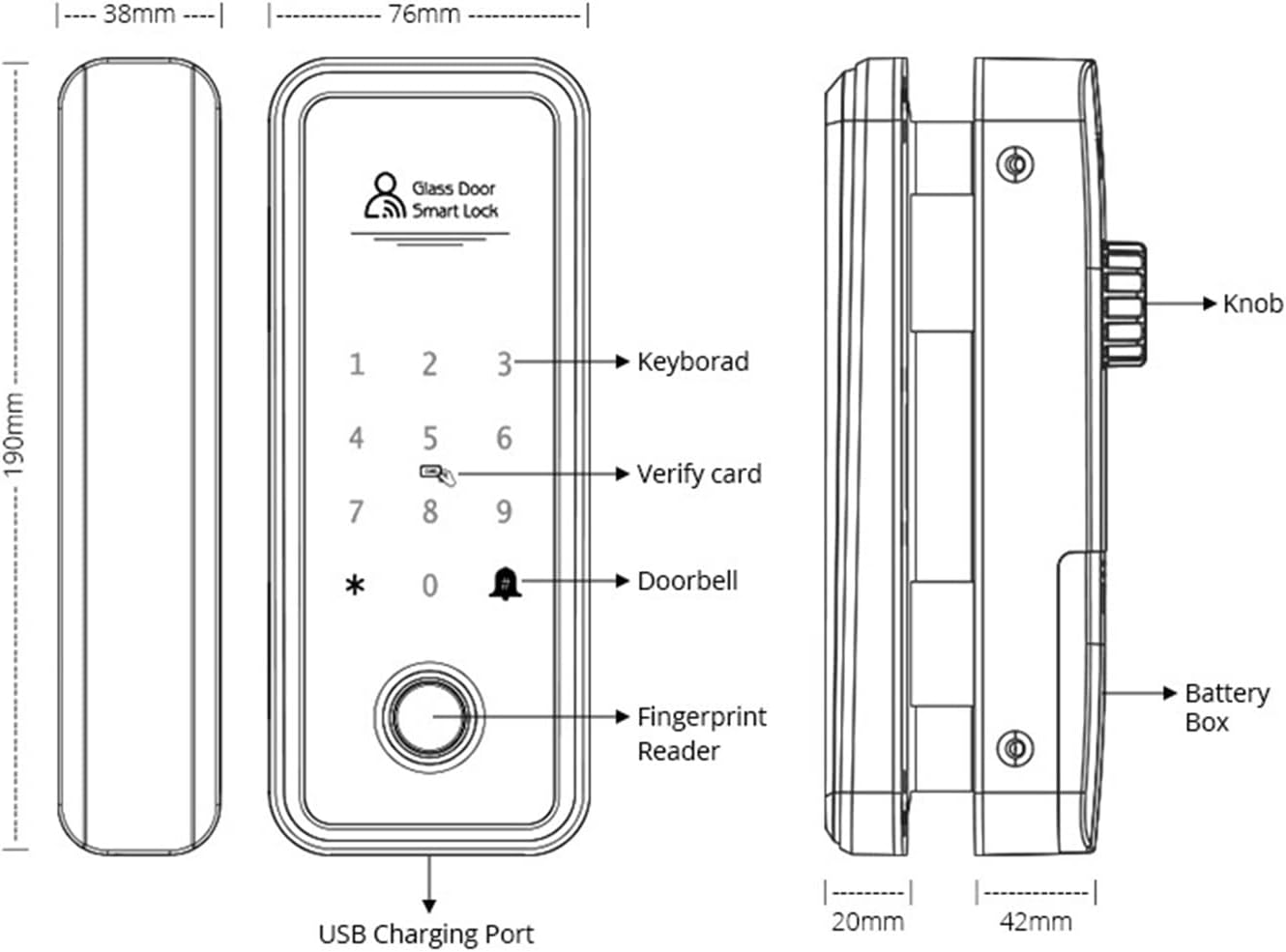
Image 2.2.1: Diagram illustrating the front, side, and back views of the smart lock with key components labeled, including the keypad, fingerprint reader, doorbell button, verify card area, knob, battery box, and USB charging port. Dimensions are also indicated.
- Keypad: For entering passcodes.
- Fingerprint Reader: For fingerprint authentication.
- Verify Card Area: For IC card authentication.
- Doorbell Button: Integrated doorbell function.
- Knob: Manual locking/unlocking from the inside.
- Battery Box: Houses 4 AAA alkaline batteries.
- USB Charging Port: For emergency power supply.

Image 2.2.2: The MiJob TTLOCK Smart Lock, showing the main unit with keypad and fingerprint reader, the interior unit, and an optional remote control.
3. Installation Guide
Proper installation is crucial for the smart lock's functionality and security. Please follow these steps carefully. It is recommended to have professional assistance if you are unsure about any step.
3.1 Pre-Installation Checks
- Verify your door type (glass, aluminum, wood) and thickness. The lock supports 8-13mm for unframed doors and 30-55mm for framed doors.
- Ensure all components listed in the product overview are present.
- Gather necessary tools (e.g., screwdriver, measuring tape).
3.2 Mounting the Lock
- Prepare the Door: If installing on a glass door, ensure the glass is clean and free of obstructions where the lock will be mounted. For framed doors, ensure the frame is suitable for mounting.
- Position the Lock: Place the exterior and interior units on the door, aligning them correctly. The lock mechanism should align with the door frame or strike plate.
- Secure the Units: Use the provided screws and mounting plates to firmly attach both the exterior and interior units to the door. Ensure the lock is level and securely fastened to prevent movement.
- Connect Cables: Carefully connect any internal cables between the exterior and interior units as per the specific model's design. Ensure connections are secure and not pinched.
- Install Batteries: Open the battery compartment on the interior unit and insert 4 new AAA alkaline batteries, observing polarity.

Image 3.2.1: The MiJob TTLOCK Smart Lock installed on a glass door, showing the exterior unit with the keypad and fingerprint reader, and the interior unit on the opposite side.

Image 3.2.2: A close-up view of the MiJob TTLOCK Smart Lock installed on a glass door, highlighting the sleek design and the TTLock Version logo.
3.3 Initial Setup and App Pairing
- Download TTLock App: Search for "TTLock" in your smartphone's app store and download the official application.
- Create Account: Register for a new account or log in if you already have one.
- Add Lock: In the app, follow the instructions to "Add Lock" and select your MiJob Smart Lock from the list of nearby devices.
- Administrator Setup: The first user to pair the lock will be designated as the administrator. Set up your initial fingerprint, passcode, or IC card as prompted by the app.
4. Operating Instructions
The MiJob TTLOCK Smart Lock offers multiple convenient ways to unlock your door.

Image 4.0.1: Visual representation of the four primary unlock methods: APP Remote Control, Fingerprint Unlock, Passcode Unlock, and IC Card Unlock.
4.1 Unlocking with Fingerprint
- Place your registered finger firmly on the fingerprint reader.
- The lock will emit a confirmation sound or light, and the door will unlock.
4.2 Unlocking with Passcode
- Touch the keypad to activate it.
- Enter your registered passcode followed by the '#' key.
- The lock will confirm the entry, and the door will unlock.
4.3 Unlocking with IC Card
- Hold your registered IC card close to the card reader area on the lock.
- The lock will beep, and the door will unlock.
4.4 Unlocking with TTLock App
- Open the TTLock app on your smartphone.
- Ensure Bluetooth is enabled and you are within range of the lock.
- Tap the unlock icon within the app to unlock the door.
- For remote unlocking (when not near the lock), a TTLock Gateway (sold separately) is required.
4.5 Unlocking with Remote Control (Optional)
- If your package includes a remote control and it has been paired, press the unlock button on the remote.
- The lock will respond, and the door will unlock.
4.6 Locking the Door
The lock typically auto-locks after a set period (configurable in the app). To manually lock:
- From the outside, simply close the door. The lock will engage automatically.
- From the inside, turn the knob to the locked position or use the app to lock.
5. Maintenance
Regular maintenance ensures the longevity and reliable operation of your smart lock.
5.1 Battery Replacement
- The lock will provide a low battery warning through the app and/or an audible alert.
- Replace all 4 AAA alkaline batteries simultaneously. Do not mix old and new batteries or different battery types.
- To replace, open the battery compartment on the interior unit (refer to Image 2.2.1 for location).
5.2 Cleaning
- Wipe the lock's surface with a soft, dry cloth.
- Avoid using abrasive cleaners, solvents, or harsh chemicals, as these can damage the finish and electronic components.
- Keep the fingerprint sensor and keypad clean for optimal performance.
5.3 Environmental Considerations
- Avoid exposing the lock to extreme temperatures or direct water spray.
- Ensure the lock is installed in a location protected from severe weather conditions.
6. Troubleshooting
If you encounter issues with your MiJob TTLOCK Smart Lock, refer to the following common problems and solutions:
| Problem | Possible Cause | Solution |
|---|---|---|
| Lock does not respond. | Dead batteries. | Replace all 4 AAA batteries. If completely dead, use the USB emergency power port. |
| Fingerprint not recognized. | Finger is dirty/wet, sensor is dirty, or fingerprint not properly registered. | Clean finger and sensor. Re-register fingerprint in the TTLock app if necessary. |
| Passcode not working. | Incorrect passcode entered, or passcode expired (for temporary codes). | Verify the passcode. Check the passcode validity in the TTLock app. |
| IC Card not working. | Card not registered or damaged. | Register the IC card via the TTLock app. Try another registered card. |
| Cannot connect to TTLock App. | Bluetooth off, out of range, or app issue. | Ensure Bluetooth is on. Move closer to the lock. Restart the app or phone. |
| Lock mechanism is stiff. | Friction or misalignment. | Check for any obstructions. Ensure the lock is properly aligned and installed. Do not force the mechanism. |
If the problem persists after trying these solutions, please contact customer support.
7. Specifications
- Model: xiaojinxiu
- Material: Aluminum alloy + ABS
- Unlock Methods: APP, Fingerprint, Card, Code, Remote control (optional)
- Suitable Door Type: Aluminum, Glass, Wooden doors
- Door Thickness (Unframed): 8-13mm
- Door Thickness (Framed): 30-55mm
- Power Supply: 4 x AAA Alkaline batteries
- Emergency Power: USB charge port
- Item Weight: 1.76 ounces (approximately 50 grams)
- Package Dimensions: 1.18 x 0.79 x 0.39 inches (approximately 3 x 2 x 1 cm)
- Manufacturer: xiaojinxiu
8. Warranty and Support
For warranty information and technical support, please refer to the documentation provided with your purchase or contact the manufacturer directly. Keep your purchase receipt as proof of purchase.
For app-related queries, visit the official TTLock website or support channels.