
Polaroid 009075
Polaroid Now+ Gen 2 Instant Camera User Manual
Model: 009075
Product Overview
The Polaroid Now+ Gen 2 is an advanced instant camera designed for creative photography. It features a dual-lens autofocus system, Bluetooth connectivity for app control, and compatibility with both i-Type and 600 film. This camera is constructed with 40% recycled materials, reflecting a commitment to sustainable design.

Image: The Polaroid Now+ Gen 2 camera in Forest Green, accompanied by its packaging, lens filter kit, and film.
Key Features:
- Gen 2 Now+ Instant Camera: Made from 40% recycled materials, rechargeable, easy to operate, compatible with i-Type and 600 film.
- Dual Lens Autofocus: Ensures clear pictures even without flash.
- Creative Double Exposure: Allows for two frames in one photo for enhanced creativity.
- Built-in Timer: A 9-second self-timer with accurate flash for well-exposed photos.
- Included Accessories: 5 Piece Lens Filter Kit & Pouch, USB Cable, Neck Strap, Color i-Type Film Pack (8 Instant Photos), and a Lumintrail Cleaning Cloth.

Image: A detailed view of the Polaroid Now+ camera along with its included accessories: film, cleaning cloth, neck strap, and USB cable.

Image: Multiple Polaroid Now+ Gen 2 cameras in various colors, emphasizing their construction from 40% recycled materials and iconic design.
Getting Started: Setup
1. Charging the Camera
Before first use, fully charge your Polaroid Now+ Gen 2 camera using the provided USB cable. Connect the USB cable to the camera's charging port and a compatible USB power source. The charging indicator light will show the charging status.
2. Loading Film
The camera is compatible with Polaroid i-Type and 600 film. To load film:
- Press the Film Door Button to open the film compartment.
- Insert a new film pack into the camera with the darkslide facing up. Ensure the film pack is fully seated.
- Close the film door. The darkslide will automatically eject. Do not pull the darkslide.

Image: Various Polaroid i-Type and 600 film packs, illustrating compatibility.
3. Attaching the Neck Strap
Attach the included neck strap to the camera's strap loops for secure carrying.
4. Connecting to the Polaroid App
The Polaroid Now+ Gen 2 can connect to the Polaroid app via Bluetooth for extended creative control. Download the official Polaroid app from your device's app store. Follow the in-app instructions to pair your camera.
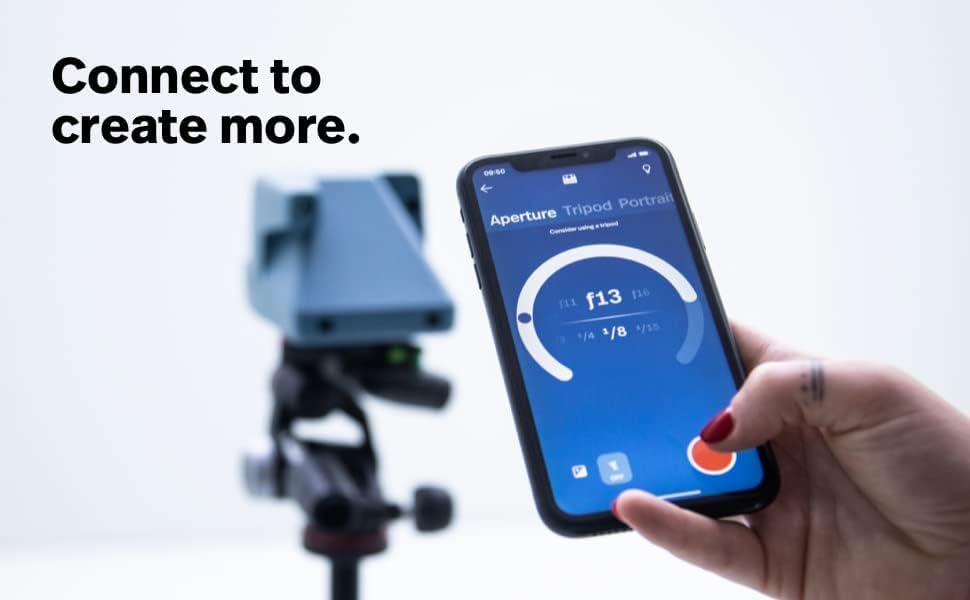
Image: A smartphone displaying the Polaroid app interface, demonstrating connectivity with the camera.
Operating the Camera
Camera Controls:

Image: Diagram showing key components of the Polaroid Now+ Gen 2 camera, including the Shutter Button, Flash, Light Meter, Viewfinder, +Button, +Button Mode Indicator, and Film Door Button.
- Shutter Button: Press to take a photo.
- Flash: The built-in flash provides illumination for low-light conditions.
- Self-Timer: Activate the 9-second self-timer by tapping the +Button. The +Button Mode Indicator will show the timer status.
- Double Exposure: Use the double exposure feature to combine two images onto a single film frame. This mode is accessible via the +Button or the Polaroid app.
Using Lens Filters:
The included 5-piece lens filter kit allows for creative effects. Simply attach the desired filter to the front of the camera lens before shooting.

Image: A collection of five distinct lens filters, showcasing their varied colors and textures, ready for creative use with the camera.
Advanced Features via Polaroid App:
Connect your camera to the Polaroid app to unlock additional features, including:
- Manual Controls: Adjust aperture, shutter speed, and exposure compensation.
- Aperture Priority: Control depth of field.
- Light Painting: Create unique light trail effects.
- Portrait Mode: Optimize settings for portrait photography.
- Self-Timer: More precise control over the timer function.

Image: Multiple smartphone screens displaying various advanced features within the Polaroid app, such as manual controls, portrait mode, and light painting.

Image: Examples of creative photography effects achievable with the Polaroid Now+ Gen 2, including light painting, portrait mode, and double exposure.
Film Development Tips:
- Store film chilled: Temperature affects Polaroid Film. For best results, store film in the fridge unless you intend to use it within 6 months. Do not freeze film.
- Shoot with light: Polaroid instant film loves light. Always shoot in bright light or use the flash for good exposure.
- Develop in the dark: Photos develop in 15 minutes. Place them face down and shield away from the light immediately after ejection.

Image: Visual guide illustrating four essential tips for Polaroid film care and development: storing chilled, caring for the camera, shooting with light, and developing in the dark.
Maintenance
Cleaning Your Camera:
Regular cleaning helps maintain optimal performance. Use the provided Lumintrail Cleaning Cloth to gently wipe the camera body and lens. For the film rollers, refer to the "Care for your camera" tip in the film development section, ensuring they are cleaned periodically for best results.
Battery Care:
The camera has a built-in USB-C rechargeable battery. To prolong battery life, avoid extreme temperatures and store the camera with a partial charge if not used for extended periods.
Troubleshooting
If you encounter issues with your Polaroid Now+ Gen 2 camera, consider the following common solutions:
- Photos are too dark or blurry: Ensure adequate lighting. Use the flash in low-light conditions. Hold the camera steady during exposure. Check that the lens is clean.
- Film not ejecting: Verify that film is loaded correctly and that the film door is fully closed. Ensure the battery is sufficiently charged.
- Camera not turning on: Charge the camera fully. If the issue persists, try a different USB charging port or cable.
- App connectivity issues: Ensure Bluetooth is enabled on your device and the camera. Try restarting both the camera and your device.
For further assistance, please refer to the official Polaroid support resources or contact customer service.
Specifications
| Feature | Detail |
|---|---|
| Brand | Polaroid |
| Model Name | Polaroid Now+ Generation 2 |
| Item Model Number | 009075 |
| Film Format Type | Instant (i-Type and 600 Film) |
| Special Feature | Timer, Built-In Flash, Bluetooth Connectivity |
| Exposure Control Type | Manual (via app) |
| Shutter Type | Electronic |
| Item Weight | 1.94 pounds |
| Package Dimensions | 8 x 5 x 4 inches |
| Batteries | 1 Lithium Ion battery (included) |
Warranty and Support
For information regarding product warranty, please refer to the documentation included with your purchase or visit the official Polaroid website. For technical support or service inquiries, please contact Polaroid customer service directly.
Optional Protection Plans:
- 2-Year Protection Plan: Available for extended coverage.
- 3-Year Protection Plan: Available for extended coverage.
- Complete Protect: A monthly plan covering eligible past and future purchases.
These protection plans are offered separately and provide additional coverage beyond the standard manufacturer's warranty.
Official Product Videos
Video: "Meet Polaroid Now+ --- Our Most Creative Camera Yet" - An official video from the seller showcasing the features and creative possibilities of the Polaroid Now+ camera.