
Introduction
Welcome to your JYTIGV RH902 3-in-1 Wireless Portable Charger. This device is designed to provide convenient and efficient charging for your compatible devices, including iPhone 12-15 series, Apple Watch, and AirPods. It features both wireless and wired charging capabilities, a compact design, and an integrated stand for versatile use.

Front view of the JYTIGV RH902 3-in-1 Wireless Portable Charger, showcasing its compact size and magnetic charging pad.
Key Features:
- 3-in-1 10000mAh Magnetic Power Bank with integrated stand
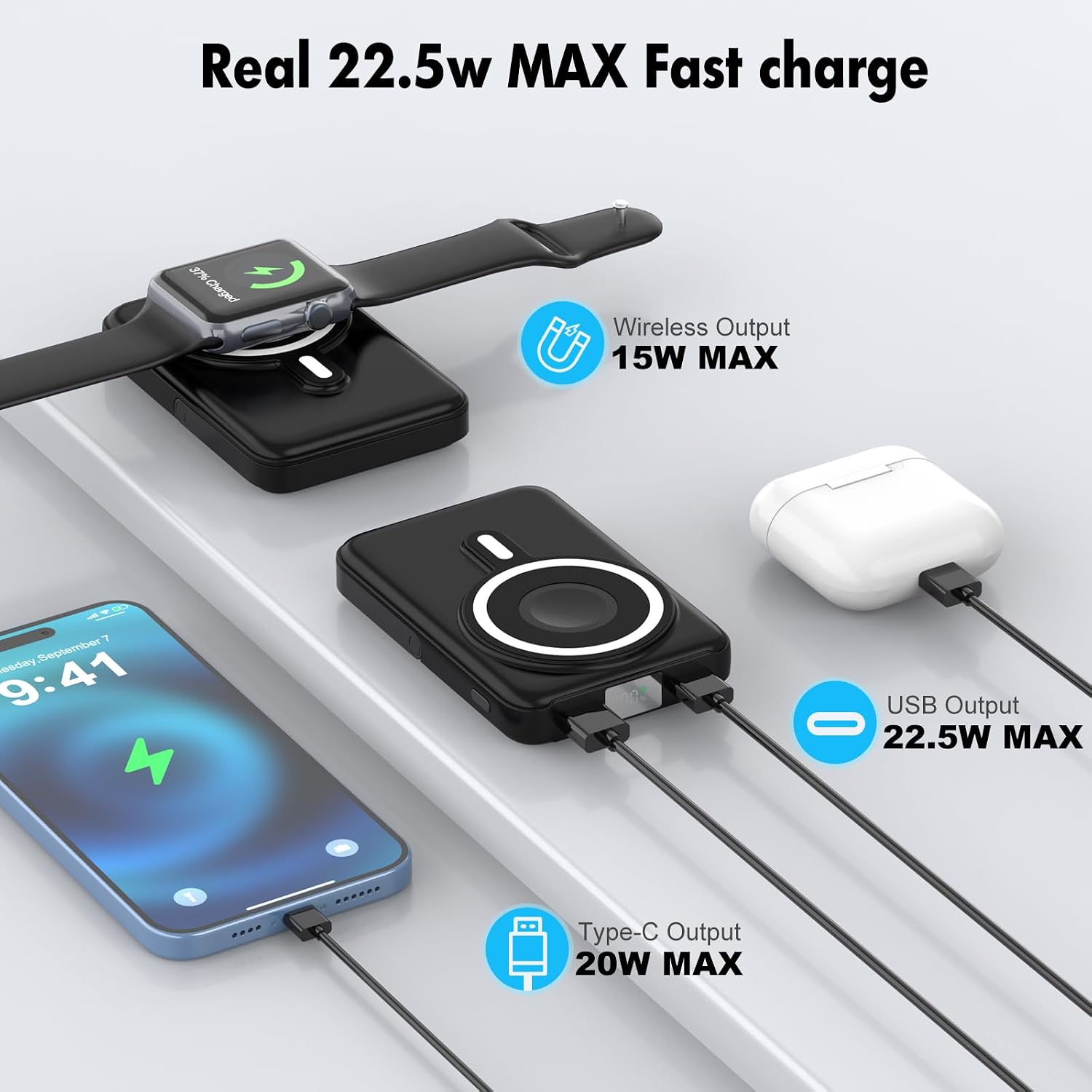
- 15W Max Wireless Charging for smartphones (7.5W for iPhone 12-15 series)
- 5W Max Wireless Charging for AirPods
- 3W Max Wireless Charging for Apple Watch
- PD 20W & QC 22.5W Wired Charging via USB-C and USB-A ports
- Digital LED Display for battery percentage
- Compact and Portable Design (4.21*2.81*0.77 inches, 7.05 Oz)
- Pass-Through Charging capability
- Superior Safety features with innovative temperature control technology
Setup
Charging the Power Bank
Before initial use, ensure your JYTIGV RH902 power bank is fully charged.
- Connect the provided USB-A to USB-C charging cable to the "IN/OUT" Type-C port on the power bank.
- Connect the other end of the cable to a compatible USB power adapter (not included).
- The LED display will show the charging progress, indicating 100% when fully charged.
The bottom of the power bank features USB-C (IN/OUT) and USB-A (OUT) ports for charging the power bank and other devices.
Operating Instructions
Powering On/Off
- To activate the wireless charging function, press the power switch button once. The LED display will illuminate.
- To turn off the power bank, double-click the power button.
Wireless Charging (Magnetic)
Ensure the power bank is turned on.
- For iPhones (12-15 series), align the back of your phone with the magnetic charging area on the power bank. The magnets will snap into place.
- For Apple Watch, place the watch on the designated charging area.
- For AirPods (2nd Gen, 3rd Gen, Pro, Pro 2nd Gen), place the charging case on the magnetic charging area.
Note:
Please do not use thick phone cases, as this may cause insufficient magnetic force and lead to the mobile phone falling off. For optimal magnetic connection, use a Mag-Safe compatible case or no case.

The JYTIGV power bank wirelessly charges an iPhone, Apple Watch, and AirPods simultaneously, demonstrating its 3-in-1 capability.

An iPhone magnetically attached to the power bank, illustrating the secure connection for on-the-go charging.
Wired Charging
The power bank supports PD 20W and QC 22.5W wired charging for most Android devices and other USB-powered devices.
- Connect your device's charging cable to the appropriate output port (USB-A or USB-C) on the power bank.
- The power bank will automatically begin charging your device.
The power bank's ports, including USB-A (OUT) and USB-C (IN/OUT), are used for wired charging of various devices.
Pass-Through Charging
You can charge your phone and the magnetic power bank simultaneously.
- Connect the power bank to a wall adapter using its Type-C input port.
- Place your compatible device on the wireless charging pad or connect it via a cable to an output port.

The power bank is shown connected to a wall outlet while simultaneously wirelessly charging AirPods and an iPhone, demonstrating pass-through charging.
Using the Integrated Stand
The power bank features a foldable stand for convenient viewing while charging.
- Gently pull out the stand from the back of the power bank.
- Position the power bank on a flat surface with the stand extended to support your device.

A hand demonstrating the foldable stand on the back of the power bank, allowing it to prop up a device.
Maintenance
Care and Storage
- Keep the power bank away from extreme temperatures, direct sunlight, and liquids.
- Clean the device with a soft, dry cloth. Do not use harsh chemicals or abrasive materials.
- If not used for a long time, charge the power bank every 3 months to maintain battery health.
- Avoid dropping or subjecting the power bank to strong impacts.
Troubleshooting
Common Issues and Solutions
Device not charging wirelessly:
- Ensure the power bank is turned on (press the power button once).
- Check if your device is wirelessly charging compatible (Mag-Safe for iPhone, Qi for AirPods/Apple Watch).
- Remove any thick phone cases that might interfere with the magnetic connection or wireless charging.
- Ensure proper alignment of your device on the magnetic charging area.
- If switching between charging a phone and a watch/AirPods, double-click the power button to turn off the wireless function, then single-click to reactivate it for the new device.
Slow charging:
- Verify that your device and cable support fast charging protocols (PD 20W, QC 22.5W).
- Ensure the power bank itself is sufficiently charged.
- Avoid using the device heavily while charging, as this can slow down the process.
Power bank not charging:
- Check the charging cable and adapter for damage.
- Ensure the cable is securely connected to the "IN/OUT" Type-C port and the power source.
- Try a different cable or power adapter.
Overheating:
- The power bank features innovative temperature control technology. If it feels excessively hot, discontinue use and allow it to cool down.
- Ensure adequate ventilation around the device during charging.
Specifications
Technical Details
| Feature | Detail |
|---|---|
| Model Number | RH902 |
| Capacity | 10000mAh |
| Product Dimensions | 4.21 x 2.81 x 0.77 inches |
| Item Weight | 8.1 ounces |
| Wireless Output (Phone) | 15W Max (7.5W for iPhone 12-15 series) |
| Wireless Output (AirPods) | 5W Max |
| Wireless Output (Apple Watch) | 3W Max |
| Wired Output (USB-A) | 22.5W Max (QC) |
| Wired Output (USB-C IN/OUT) | 20W Max (PD) |
| Material | Silicone |
| Compatible Devices | iPhone 12/13/14/15 series, Apple Watch (Ultra/8/7/6/SE/5/4/3/2/1), AirPods (2/3rd Gen/Pro/Pro 2nd Gen) |
What's in the Box
Package Contents
- 10000mAh Wireless Power Bank
- USB-A to USB-C Charging Cable (x1)
- User Manual (x1)
Warranty and Support
Customer Support
JYTIGV provides professional technical support and friendly customer service. For any inquiries or assistance, please refer to the contact information provided with your purchase or visit the official JYTIGV website.