
1. Introduction
This manual provides instructions for the VINABTY RC45157 TV Remote Control. This infrared remote is designed as a direct replacement for various JVC and Toshiba TV models, as well as other compatible televisions. It requires no complex programming or setup, offering immediate functionality upon battery installation. Its ergonomic design and durable construction ensure comfortable and long-lasting use.
2. Setup and Battery Installation
The VINABTY RC45157 remote control is ready for use without any additional programming. Simply install the batteries to begin operation.
2.1. Installing Batteries
- Locate the battery compartment cover on the back of the remote control.
- Slide the cover downwards or press the latch to open the compartment.
- Insert two AAA alkaline batteries (not included), ensuring the positive (+) and negative (-) terminals match the diagrams inside the compartment.
- Close the battery compartment cover by sliding it back into place until it clicks securely.
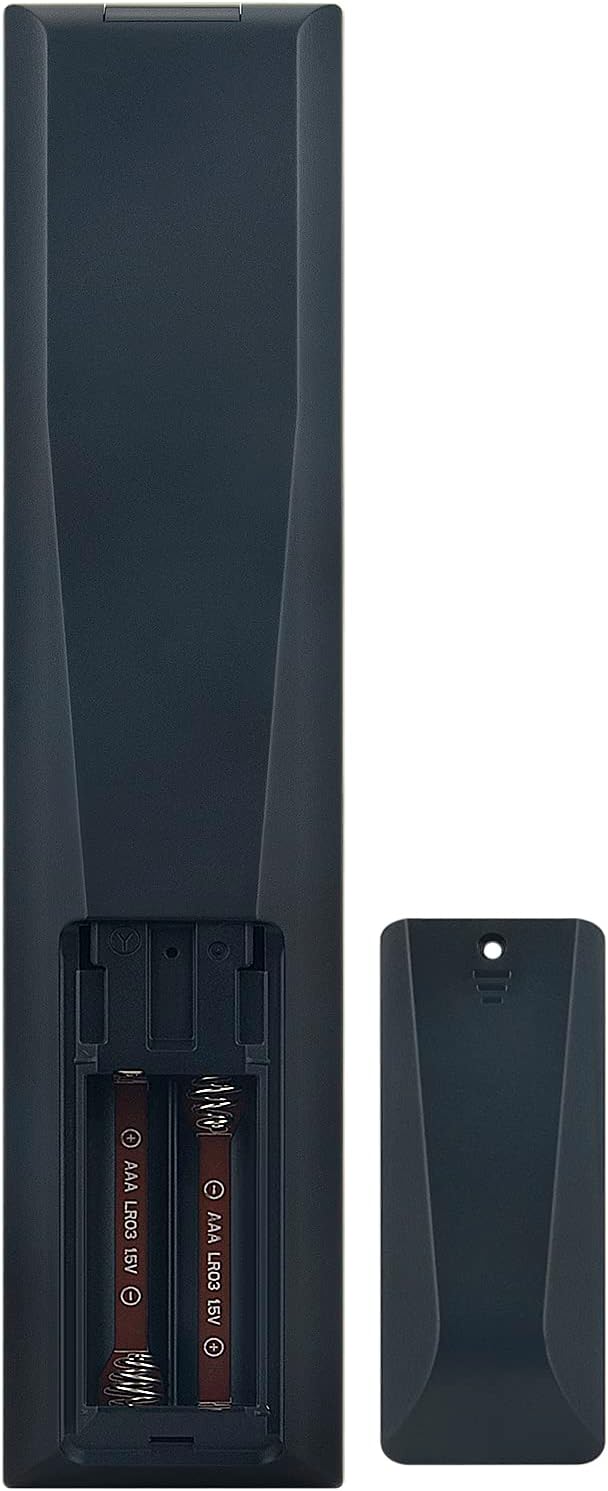
Figure 1: Battery compartment with batteries inserted.
Note: Always use new alkaline batteries for optimal performance. Do not mix old and new batteries, or different types of batteries. Remove batteries if the remote control will not be used for an extended period.
3. Operating the Remote Control
The VINABTY RC45157 remote control uses infrared technology to communicate with your television. Ensure there is a clear line of sight between the remote and the TV's infrared receiver.

Figure 2: Front view of the remote control with button layout.
3.1. Button Functions
- Power Button (●): Turns the TV on or off.
- Number Pad (0-9): Directly select channels or input numbers.
- Volume Up/Down (+/-): Adjusts the TV volume.
- Channel Up/Down (P+/P-): Changes TV channels.
- Mute Button: Mutes or unmutes the TV sound.
- Navigation Buttons (Up, Down, Left, Right, OK): Used to navigate menus and confirm selections.
- Back/Exit Button: Returns to the previous menu or exits the current menu.
- Home Button: Accesses the TV's main home screen or smart TV interface.
- Netflix Button: Direct access to the Netflix application.
- YouTube Button: Direct access to the YouTube application.
- Google Play Button: Direct access to the Google Play Store.
- MENU Button: Opens the TV's main menu.
- TEXT Button: Accesses teletext services (if supported by TV).
- Colored Buttons (Red, Green, Yellow, Blue): Functionality varies depending on the TV model and current menu/application.
The remote control has an effective operating range of approximately 8 to 10 meters (26 to 33 feet).
4. Maintenance and Care
To ensure the longevity and optimal performance of your VINABTY RC45157 remote control, follow these maintenance guidelines:
- Cleaning: Wipe the remote control with a soft, dry cloth. For stubborn dirt, lightly dampen the cloth with water or a mild, non-abrasive cleaner. Avoid using harsh chemicals or solvents, as these can damage the plastic and button markings.
- Battery Replacement: Replace batteries promptly when the remote's performance degrades. Always use new alkaline batteries.
- Storage: Store the remote in a cool, dry place away from direct sunlight and extreme temperatures. If storing for an extended period, remove the batteries to prevent leakage.
- Protection: Avoid dropping the remote control or subjecting it to strong impacts. While made from durable ABS material, excessive force can cause damage.
- Liquid Exposure: Keep the remote control away from liquids. Liquid damage can cause internal circuit failure.
5. Troubleshooting
If you experience issues with your remote control, refer to the following troubleshooting steps:
- Remote Not Responding:
- Check if the batteries are correctly inserted with the correct polarity (+/-).
- Replace the batteries with new ones. Weak batteries are a common cause of remote control issues.
- Ensure there is a clear line of sight between the remote control and the TV's infrared sensor. Obstructions can block the signal.
- Make sure you are within the effective operating range (up to 10 meters).
- Buttons Not Working:
- If only specific buttons are not working, try cleaning around the buttons with a soft cloth.
- Ensure the remote is pointed directly at the TV.
- Interference:
- Bright light sources, especially fluorescent lights or direct sunlight, can sometimes interfere with infrared signals. Try operating the remote in different lighting conditions.
If the issue persists after trying these steps, please contact customer support for further assistance.
6. Specifications
| Feature | Detail |
|---|---|
| Brand | VINABTY |
| Model Name | RC45157 |
| Connectivity Technology | Infrared |
| Number of Buttons | 25 |
| Maximum Range | 10 Meters (approximately 33 feet) |
| Battery Type | Alkaline (AAA x 2, not included) |
| Item Weight | 60 Grams |
| Dimensions (L x W x H) | 18L x 4l x 1.5H centimeters |
| Material | ABS (body), Rubber (buttons) |
| Compatible TV Models | JVC RM-C3602, Toshiba CT-8564, 23799044, 23799041, 30109080, 55QUA9040, 75UA9001, 32LA2063DAL, 32LA2063DG, 32WA2063DG, 42LA2063DG, 24-FAWF-8051-12, 55G9ECMI, 65G10EGMB, 65G9ESMB, FL4335UHD, 24HAE2350, 32HAE2250, 32HAE4351, 43F501HAK5360, 43HAE4251, LT-24VAH3000, LT-24VAH300S, LT-24VAH3035, LT-24VAH3055, LT-24VAH325I, MD31555BE, MD31555DE, MD31939DEN, MD31939DES, MD31965BE, TKA32HD22B, 24DTAH524, 43FAE5510, 50UA9001, Hitachi 43HAE4251, and many others. |

Figure 3: Back view of the remote control.
7. Warranty Information
The VINABTY RC45157 TV Remote Control comes with a 2 Year Limited Warranty. This warranty covers manufacturing defects under normal use. Please retain your proof of purchase for warranty claims. For specific terms and conditions, refer to the warranty documentation provided at the time of purchase or contact customer support.
8. Customer Support
If you have any questions, require assistance, or encounter issues not covered in this manual, please do not hesitate to contact our customer support team. We are committed to providing a satisfactory solution within 24 hours.
Before purchasing, if you are unsure about the compatibility of this remote control with your device, please contact us for verification.
Contact Information: Please refer to your purchase documentation or the seller's contact details on the platform where you purchased the product.