
OBABO K10 Max
OBABO K10 Max Drone User Manual
Model: K10 Max | Professional Aerial Photography Foldable Quadcopter
Introduction
The OBABO K10 Max Drone is a high-definition 4K quadcopter designed for professional aerial photography. Featuring a three-camera system, optical flow positioning, and a foldable design, it offers stable flight and ease of use for both beginners and experienced pilots. This manual provides essential information for safe operation, setup, maintenance, and troubleshooting of your K10 Max drone.

Image: The OBABO K10 Max Drone in its compact, folded state, showcasing its portability.
Safety Information
Always prioritize safety when operating the drone. Failure to follow these guidelines may result in injury, damage to property, or legal consequences.
- Read the Manual: Thoroughly read and understand this entire manual before operating the drone.
- Local Regulations: Be aware of and comply with all local aviation laws and regulations regarding drone operation.
- Environmental Conditions: Do not fly in strong winds (max wind speed resistance <10km/h), rain, snow, or other adverse weather conditions.
- Line of Sight: Always maintain visual line of sight with your drone during flight.
- Obstacle Avoidance: While the drone features 360 intelligent obstacle avoidance, it is not foolproof. Always be vigilant and avoid flying near obstacles.
- Battery Safety: Use only the provided battery and charging cable. Do not overcharge or puncture the battery. Discontinue use if the battery is damaged or swollen.
- Propeller Safety: Keep hands, face, and loose clothing away from rotating propellers. Ensure propellers are securely attached before flight.
- Public Safety: Do not fly over crowds, private property, or restricted airspace. Respect privacy.
- Age Restriction: This product is intended for adult use.
What's in the Box
Verify that all components are present upon unboxing:
- OBABO K10 Max Drone (1)
- Remote Control (1)
- Flight Battery (1)
- Charging Cable (1)
- Spare Wind Blades (Propellers) (4)
- Protective Frames (Propeller Guards) (4)
- Screwdriver (1)
- User Instructions (2)
- Storage Bag (1)

Image: A visual representation of all items included in the OBABO K10 Max Drone package, including the drone, remote, battery, and accessories.
Product Overview
Drone Components
The K10 Max drone features a foldable design for easy transport. Key components include:
- Foldable Arms: Allow for compact storage and portability.
- Three Camera System: Includes a main 4K camera and an optical flow positioning camera for enhanced stability and image capture.
- Propellers: Four propellers for lift and movement.
- Battery Compartment: Located on the drone for the modular flight battery.
- Obstacle Avoidance Sensors: Integrated for 360-degree intelligent obstacle avoidance.
Remote Control Layout
Familiarize yourself with the remote control buttons and functions:

Image: Detailed view of the remote control for the OBABO K10 Max Drone, showing the joysticks, buttons, and a mounted smartphone displaying the drone's view.
- Left Joystick (Throttle): Controls ascent/descent and yaw (rotation).
- Right Joystick (Direction Lever): Controls forward/backward and left/right flight.
- One-Click Takeoff/Landing/Return Button: Initiates automated takeoff, landing, or return-to-home.
- Obstacle Avoidance Switch: Toggles the obstacle avoidance feature.
- High/Low Speed Switching: Adjusts flight speed modes.
- Headless Mode/One Click Backward: Activates headless mode or performs a backward maneuver.
- Right Trim: Fine-tunes rightward drift.
- Front Fine Tuning: Fine-tunes forward drift.
- Rear Fine Tuning: Fine-tunes backward drift.
- Left Trim: Fine-tunes leftward drift.
- 360° Roll Button: Executes a 360-degree stunt roll.
- Power Switch: Turns the remote control on/off.
- Phone Holder: For mounting your smartphone to view the live camera feed via the app.
Setup
1. Charging the Battery
Before first use, fully charge the drone's flight battery and the remote control's battery (if applicable).
- Connect the charging cable to the drone battery and a suitable USB power source.
- The charging indicator will show the charging status (refer to battery specific indicators).
- Always disconnect the charger once charging is complete.
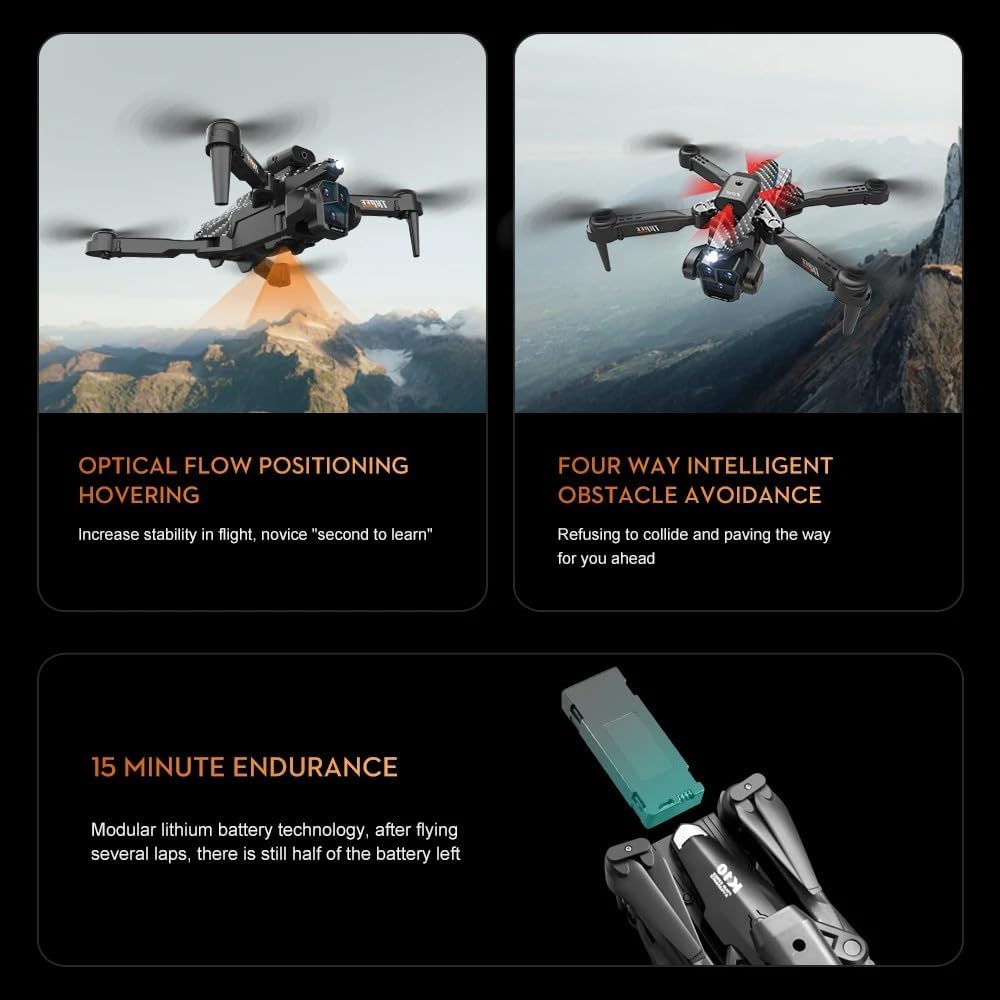
Image: Illustration showing the modular lithium battery being inserted into the OBABO K10 Max Drone, highlighting its easy installation and removal.
2. Installing Propellers and Protective Frames
- Unfold the drone arms.
- Attach the protective frames to each motor arm. Ensure they click securely into place.
- If propellers need replacement, ensure you match the correct propeller type (A or B) to the corresponding motor. Use the provided screwdriver for installation/removal.
3. Remote Control Setup
- Install batteries into the remote control (refer to the remote's battery compartment for type and orientation).
- Extend the phone holder and securely place your smartphone.
4. App Installation and Connection
The K10 Max drone connects via Wi-Fi to a dedicated mobile application for live video feed and advanced controls.
- Scan the QR code in the instruction manual or search for the "OBABO Drone" app (or similar, as specified in the included manual) on your smartphone's app store.
- Install the application.
- Turn on the drone and the remote control.
- On your smartphone, go to Wi-Fi settings and connect to the drone's Wi-Fi network (usually named something like "WIFI_DRONE_XXXXXX").
- Open the drone application. The app should automatically connect to the drone, displaying the live camera feed.
Operating the Drone
1. Pre-Flight Checks
- Ensure drone and remote batteries are fully charged.
- Check that propellers are securely attached and undamaged.
- Verify protective frames are installed.
- Ensure you are in an open area, free from obstacles, people, and animals.
- Confirm Wi-Fi connection between drone and smartphone app.
2. Takeoff and Landing
- Manual Takeoff: Place the drone on a flat, level surface. Push both joysticks down and outwards simultaneously to arm the motors. Slowly push the left joystick (throttle) up to ascend.
- One-Key Takeoff: Press the "One-Click Takeoff/Landing/Return" button on the remote. The drone will automatically ascend to a safe hovering height.
- Landing: Slowly pull the left joystick (throttle) down to descend. For one-key landing, press the "One-Click Takeoff/Landing/Return" button again. The drone will automatically land.

Image: Demonstrates the ease of one-click takeoff and landing, with a hand launching the drone, and an illustration of the headless mode for simplified control.
3. Flight Controls and Features
- Basic Flight: Use the left joystick for altitude and rotation, and the right joystick for forward, backward, left, and right movement.
- Optical Flow Positioning: This feature allows for stable hovering indoors and outdoors by using a downward-facing camera to detect ground patterns. This provides precise positioning without GPS.

Image: Illustrates the optical flow hovering capability of the OBABO K10 Max Drone, showing stable flight both outdoors over sand dunes and indoors.
- 360 Intelligent Obstacle Avoidance: The drone is equipped with sensors to detect obstacles in 360 degrees, helping to prevent collisions. Always exercise caution.
- Headless Mode: When activated, the drone's orientation becomes irrelevant. Pushing the right joystick forward will always make the drone fly away from the pilot, regardless of which way the drone's "head" is facing.
- 360° Roll (Stunt): Press the dedicated 360° roll button on the remote control to perform an aerial flip. Ensure sufficient altitude and clear surroundings before attempting.

Image: The OBABO K10 Max Drone executing a 360-degree roll, demonstrating its stunt capability.
- Altitude Hold Mode: The drone will automatically maintain its current altitude, allowing you to focus on directional control and camera operation.
- Track Flight (Waypoint Flight): Draw a flight path on the smartphone app screen, and the drone will autonomously follow the specified route.
- Orbital Motion (Circle Fly): The drone can fly in a circle around a designated point, ideal for capturing cinematic shots.
- Electronic Fence Protection: Helps prevent the drone from flying beyond a set distance, automatically returning if it goes out of range.
- GPS Tracking Function: Intelligently recognizes the best tracking distance for follow-me modes (requires GPS signal).
- Speed Switching: Toggle between 3 levels of flight speeds (low, medium, high) to suit your flying environment and skill level.
4. Camera Operation (4K HD)
The K10 Max drone is equipped with a 4K HD camera for high-quality photo and video capture.
- Live View: The smartphone app provides a real-time view from the drone's camera.
- Photo Capture: Tap the camera icon in the app to take still photos.
- Video Recording: Tap the video icon in the app to start/stop recording. Videos are saved to your smartphone or the drone's memory card (if installed).
- Resolution: Supports 4K (4096*2160) video recording and high-resolution photos.
Maintenance
Regular maintenance ensures the longevity and optimal performance of your drone.
- Cleaning: Use a soft, dry cloth to clean the drone body and camera lenses. Do not use harsh chemicals or solvents.
- Propeller Inspection: Regularly check propellers for cracks, bends, or damage. Replace any damaged propellers immediately using the provided screwdriver.
- Battery Care:
- Store batteries in a cool, dry place away from direct sunlight.
- Do not fully discharge batteries. Charge them to about 50-60% for long-term storage.
- If a battery appears swollen, punctured, or damaged, discontinue use and dispose of it properly.
- Motor Inspection: Ensure motors are free from debris and can spin freely.
- Storage: Fold the drone arms and store it in its original storage bag or a protective case when not in use. Keep it away from extreme temperatures and humidity.
Troubleshooting
| Problem | Possible Cause | Solution |
|---|---|---|
| Drone does not power on. | Battery not charged or not inserted correctly. | Ensure battery is fully charged and securely inserted. |
| Remote control does not connect to drone. | Remote control batteries low or not paired. | Replace remote batteries. Follow pairing instructions in the full manual (usually power on drone, then remote, then perform a joystick calibration/pairing sequence). |
| No live video feed in app. | Not connected to drone's Wi-Fi or app not launched correctly. | Go to phone Wi-Fi settings, connect to drone's Wi-Fi. Restart the app. |
| Drone drifts during flight. | Not calibrated or trim settings incorrect. | Perform gyroscope calibration (refer to full manual for specific steps). Use the trim buttons on the remote to correct drift. |
| Drone crashes despite obstacle avoidance. | Obstacle avoidance has limitations (e.g., very thin objects, reflective surfaces, high speed). | Always fly with caution and maintain visual line of sight. Do not rely solely on obstacle avoidance. |
| Short flight time. | Battery not fully charged or aging battery. | Ensure battery is fully charged. Consider replacing old batteries. |
Specifications
| Feature | Detail |
|---|---|
| Model Name | K10 Max |
| Brand | OBABO |
| Color | Silver |
| Max Wind Speed Resistance | <10km/h |
| Max Takeoff Weight | <1kg |
| Video Maximum Resolution | 4K (4096*2160) |
| Aircraft Operating Frequency | 2.4GHz |
| Drone Weight | 0.81 Pounds (approx. 367g) |
| Pixels | Above 6 million |
| Connectivity | APP Controller, Remote Control, Wi-Fi Connection |
| Control Channels | 4 channels |
| Flight Time | 12 minutes (approx.) |
| Camera Features | 1080p HD Video Recording, 720p HD Video Recording, 4K HD Video Recording |
| Special Features | 360 Degree Flip, Auto Follow, One key return, Circle Fly, Optical Flow Positioning Hover, 360 Intelligent Obstacle Avoidance, Headless Mode, Track Flight, Electronic Fence Protection, GPS Tracking Function |
| Material | High-strength, corrosion-resistant engineering plastic |
| Product Dimensions | 9.4"L x 9.4"W x 2.8"H |
Warranty and Support
For warranty information, technical support, or service inquiries, please refer to the contact details provided on the product packaging or the official OBABO website. Keep your purchase receipt as proof of purchase.
Online Resources: Visit the official OBABO website for updated FAQs, software downloads, and additional support materials.