Introduction
Thank you for choosing the KT76 Outdoor Sport Smart Watch. This manual provides essential information for setting up, operating, and maintaining your device. The KT76 is designed for active lifestyles, featuring robust construction, advanced health monitoring, comprehensive fitness tracking, and versatile utility tools.

Figure 1: KT76 Outdoor Sport Smart Watch (Red variant)
What's in the Box
Please verify that all items are present in your package:
- Smartwatch (KT76)
- Wrist Band
- Magnetic USB Charging Cable
- User Manual (this document)
Key Features
- Durable and Stylish Design: Crafted from robust zinc alloy with a dual-color injection molded bottom shell and a comfortable silicone wrist strap.
- Advanced Health Monitoring: Real-time tracking of heart rate, blood oxygen (SpO2), and blood pressure. Includes stress monitoring and sleep analysis.
- High-Performance Fitness Tracker: Records daily activities (steps, distance, calories) and features over 100 sport modes for diverse workouts.
- Enhanced Connectivity: Message push for SMS and apps, information storage, voice assistant, smart notifications for weather, and remote music/camera control.
- Waterproof and Long-Lasting: Designed to withstand up to 3 ATM water pressure, suitable for indoor swimming. Up to 4 days active use or 25 days standby on a single charge.
- Comprehensive Utility Tools: 1.53-inch full-screen touch display (360x360 pixels), built-in compass, timers, stopwatch, calculator, world clock, and "find phone" feature.
- Ultra Powerful Flashlight: Equipped with bright light mode, flash mode, and SOS mode for various outdoor scenarios.

Figure 2: Multisport mode interface on the KT76 Smart Watch.
Setup Guide
1. Charging the Smart Watch
Before first use, fully charge your KT76 Smart Watch.
- Connect the magnetic USB charging cable to a USB power adapter (not included) or a computer USB port.
- Attach the magnetic end of the cable to the charging contacts on the back of the smartwatch. Ensure proper alignment.
- The watch display will indicate charging status. A full charge typically takes about 2.5 hours.
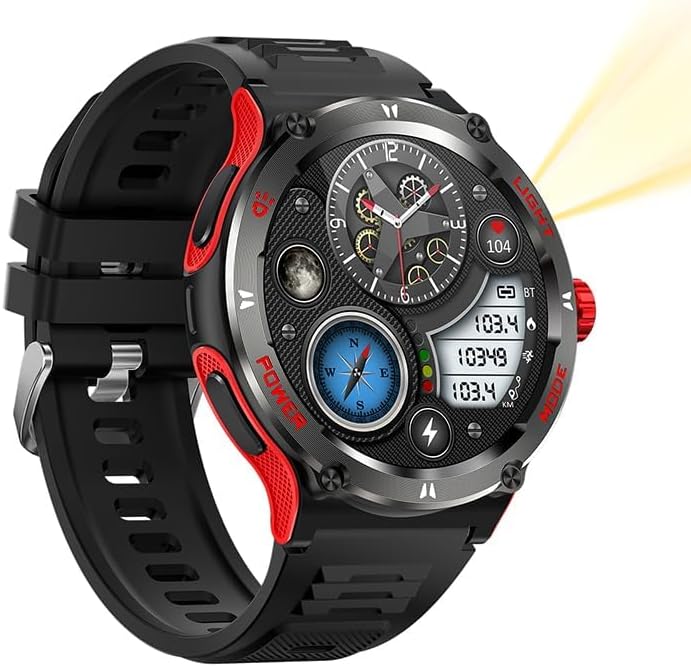
Figure 3: Rear view of the KT76, highlighting the charging contacts and health sensors.
2. Downloading and Pairing with DaFit App
The KT76 Smart Watch uses the DaFit app for full functionality and data synchronization.
- Scan the QR code in the included quick start guide or search for "DaFit" in your smartphone's app store (App Store for iOS, Google Play Store for Android).
- Install and open the DaFit app.
- Ensure Bluetooth is enabled on your smartphone.
- In the DaFit app, navigate to the "Device" or "Add Device" section.
- Select "KT76" or the corresponding device name from the list of available devices to pair.
- Follow the on-screen prompts to complete the pairing process.
Important: For accurate data and notifications, grant all necessary permissions to the DaFit app when prompted.
Operating Instructions
Basic Navigation
- Touch Screen: Swipe left/right, up/down to navigate through menus and features. Tap to select.
- Side Buttons: The KT76 features a crown and three additional buttons.
- Crown: Rotate to scroll, press to return to home screen or confirm selection.
- "LIGHT" Button: Activates the flashlight.
- "POWER" Button: Power on/off, short press to wake/sleep screen.
- "MODE" Button: Cycles through different modes or functions.
Health Monitoring
Access health metrics directly from the watch or through the DaFit app.
- Heart Rate: Swipe to the heart rate interface and wait for the measurement.
- Blood Oxygen (SpO2): Swipe to the SpO2 interface and initiate measurement.
- Blood Pressure: Swipe to the BP interface and initiate measurement.
- Sleep Tracking: Wear the watch during sleep for automatic monitoring. Data is viewable in the DaFit app.
Note: Health monitoring data is for reference only and should not be used for medical diagnosis.
Fitness Tracking
- Daily Activity: Steps, distance, and calories burned are automatically tracked.
- Sport Modes: Select from over 100 sport modes (e.g., running, cycling, swimming) to track specific workouts.
- Swipe to the "Sport" or "Workout" menu.
- Select your desired activity.
- The watch will begin tracking your performance.
Flashlight Function
The KT76 features a powerful built-in flashlight with multiple modes.
- Press the "LIGHT" button to activate the flashlight.
- Cycle through modes (Bright, Flash, SOS) by pressing the "LIGHT" button repeatedly.

Figure 4: The KT76 Smart Watch's integrated flashlight in action.
Video 1: Demonstration of the KT76 Smart Watch's features, including durability, waterproofing, sport modes, and flashlight functionality.
Other Functions
- Compass: Access the built-in compass for navigation assistance.
- Notifications: Ensure Bluetooth is connected and app permissions are granted to receive call, SMS, and app notifications.
- Voice Assistant: Activate the voice assistant through the watch interface for hands-free control.
- Music Control: Control music playback on your paired smartphone directly from the watch.
- Remote Camera: Use the watch as a remote shutter for your smartphone's camera.
Care and Maintenance
- Cleaning: Wipe the watch and strap regularly with a soft, damp cloth. Avoid harsh chemicals or abrasive materials.
- Water Resistance: The watch is 3ATM waterproof. It is suitable for indoor swimming and rain.Caution: Do not expose the watch to hot water, steam (e.g., sauna), seawater, or corrosive liquids, as this may compromise the waterproof seal. Do not press buttons underwater.
- Storage: Store the watch in a cool, dry place when not in use. Avoid extreme temperatures.
- Charging: Use only the provided magnetic USB charging cable.
Troubleshooting
| Problem | Possible Solution |
|---|---|
| Watch does not turn on. | Ensure the watch is fully charged. Press and hold the "POWER" button for several seconds. |
| Cannot pair with smartphone. |
|
| Notifications not received. |
|
| Inaccurate step/sleep tracking. |
|
| Screen is unresponsive. | Restart the watch by holding the "POWER" button. If unresponsive, allow the battery to fully drain and then recharge. |
Specifications
| Feature | Detail |
|---|---|
| Model Number | KT76 |
| Display Size | 1.53 Inches |
| Display Resolution | 360x360 pixels |
| Water Resistance | 3 ATM |
| Battery Capacity | 500 mAh Lithium Polymer |
| Connectivity | Bluetooth |
| Operating System | Wear OS by Google |
| Item Weight | 2.8 ounces |
| Manufacturer | connected wrist |
Warranty and Support
For warranty information and customer support, please refer to the warranty card included in your product packaging or visit the official "connected wrist" website. You may also contact your retailer for assistance.
For common questions and troubleshooting tips, please visit the product support page on the retailer's website or consult the DaFit app's help section.


