
Fablestoryem WVC-1600W
Fablestoryem WVC-1600W MPPT Solar Grid Tie Micro Inverter User Manual
Model: WVC-1600W | Brand: Fablestoryem
1. Introduction
This manual provides essential instructions for the safe installation, operation, and maintenance of your Fablestoryem WVC-1600W MPPT Solar Grid Tie Micro Inverter. This device efficiently converts DC power from solar panels (22-60V) into AC power (120-230V) for grid connection, featuring WiFi connectivity for monitoring and an IP65 waterproof design for outdoor use.
Key features include:
- Efficient Power Conversion: Utilizes a powerful MPPT algorithm to maximize solar energy harvesting.
- Smart Monitoring: Integrated WiFi for mobile app monitoring of your solar power system.
- Weatherproof Design: IP65 waterproof rating and aluminum alloy casing ensure durability in outdoor environments.
- Automatic Voltage Identification: Supports automatic identification of 120V/230V AC output voltage.
- Pure Sine Wave Output: Provides high-quality power compatible with grid standards.
2. Important Safety Information
WARNING: To reduce the risk of electric shock, always follow these instructions to ensure safe installation and operation. Improper installation or use can result in serious injury or death.
- Read all instructions before installing or using the inverter.
- Installation must be performed by qualified personnel in accordance with local electrical codes and regulations.
- Ensure the DC input voltage from solar panels is within the specified range (22-60V).
- Verify AC output voltage (120V/230V) matches your grid requirements.
- Always disconnect power from both the DC input and AC output before performing any maintenance or service.
- Do not attempt to open or repair the inverter yourself. Contact qualified service personnel.
- Ensure proper grounding of the inverter.
- Avoid miswiring the live, neutral, and ground wires during AC connection.
3. Package Contents and Product Overview
3.1 Package Contents
Verify that all items are present in the package:
- WVC-1600W Micro Inverter (1 unit)
- AC Cable (1 unit)
- Fixing Screw Kit (1 set)
- User Manual (1 unit)

Figure 3.1: Included accessories with the micro inverter, showing the screw kit, instructions, and AC plug.
3.2 Product Appearance and Connections
The WVC-1600W micro inverter features a streamlined design with an aluminum alloy casing, ensuring durability and efficient heat dissipation. The IP65 rating protects against dust and water ingress.
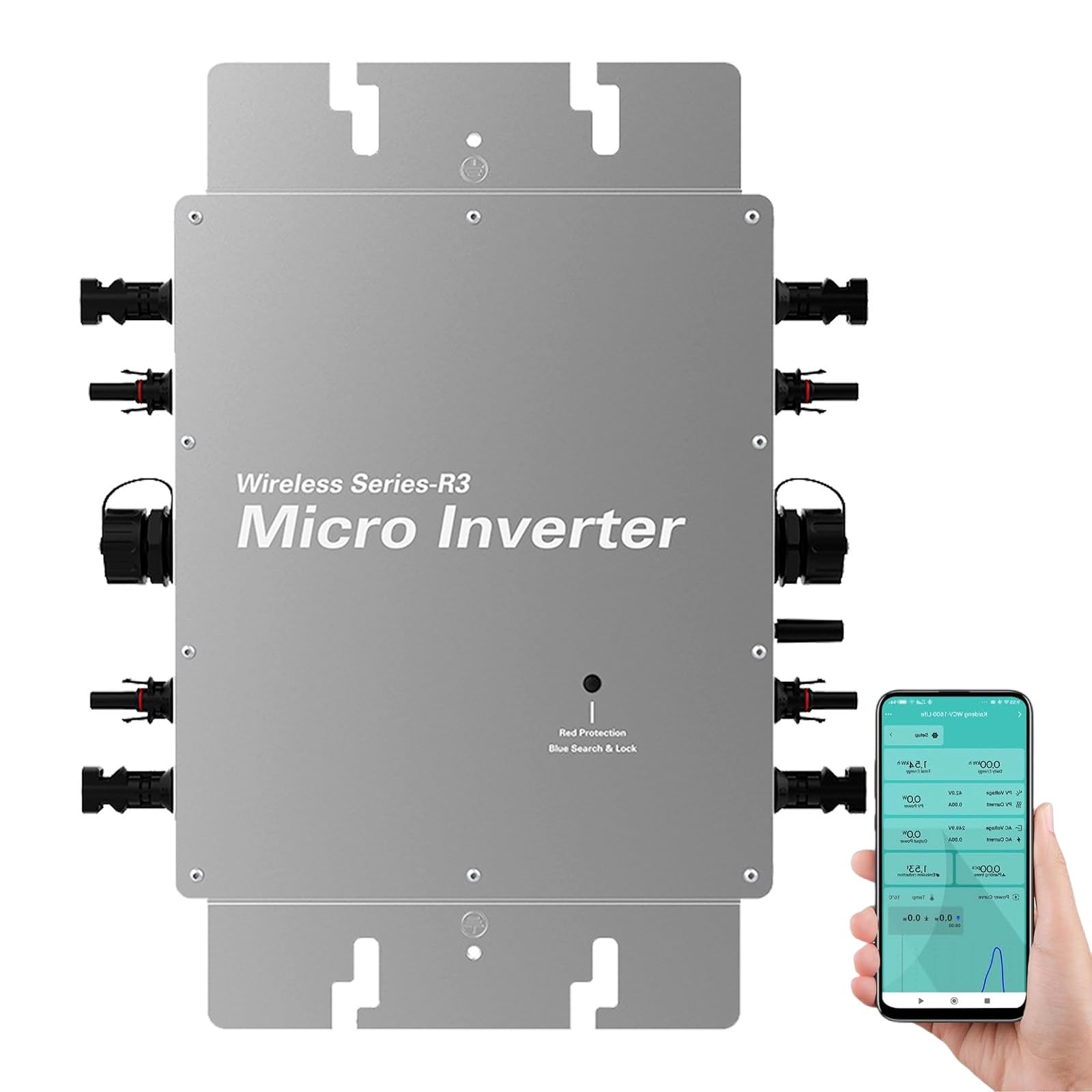
Figure 3.2: The WVC-1600W Micro Inverter showcasing its streamlined, waterproof (IP65) design and aluminum alloy construction.
Figure 3.3: Detailed view of the micro inverter's appearance, indicating DC input terminals (22-60V), AC output terminal, independent ground connections, and antenna.
The inverter includes multiple DC input ports for connecting photovoltaic modules and an AC output terminal for grid connection. An antenna is provided for WiFi communication.
4. Installation Guide
Follow these steps carefully for safe and correct installation of the micro inverter. Ensure all safety precautions are observed.
4.1 System Composition Diagram

Figure 4.1: Diagram illustrating the overall system composition, including solar panels, micro inverters, connection to the power grid, and remote monitoring via WiFi and a mobile application.
4.2 Step-by-Step Installation
- Mount the Inverter: Use the provided fixing screws to securely attach the inverter to the photovoltaic panel bracket. Ensure the mounting location allows for adequate ventilation and is protected from direct sunlight if possible, despite its waterproof rating.
- Connect DC Input: Connect the positive and negative poles of the DC connection plug from the photovoltaic panel(s) to the corresponding DC input terminals on the inverter. Ensure correct polarity. The DC input is designed with MC4 connectors to prevent reverse polarity.
- Connect AC Output: Open the waterproof cover of the AC output connector on the inverter. Connect the AC cable to the waterproof AC socket. Ensure a secure and watertight connection.
- Connect to Main AC Line: Connect the AC output line from the inverter to the main AC line of your electrical system. This connection should be performed by a qualified electrician.
- Repeat for Multiple Inverters (if applicable): If installing multiple inverters, repeat steps 1-3 for each unit. Multiple inverters can be stacked arbitrarily to form a single-phase parallel stacking system.
- Connect to Grid: Connect the main AC cable from your inverter system to the utility grid. This final connection initiates your green energy generation.
4.3 Multiple Inverter Installation and Wiring
Multiple inverters can be connected in a stacked configuration. There is no model limit, allowing for mixing and matching as needed. Each inverter operates independently without interference.

Figure 4.2: Illustration of multiple micro inverters installed in a stacked arrangement, along with a diagram detailing the grid-connected cable components and terminal wire hole schematic (L-brown, N-blue, G-yellow & green).
The current of each group connected in series to the AC box can reach 50 Amps.

Figure 4.3: Wiring diagrams for both single-phase and three-phase connections of multiple micro inverters to the power grid. Includes notes on WiFi signal strength and cable requirements for longer distances.
For single-phase connections, up to 6 inverters can be connected at 110V, and up to 12 inverters at 230V. For three-phase connections, similar limits apply per phase. Ensure proper cable sizing; for distances over 10m from the network point, use 3*4mm² cable, and for distances over 20m, use 3*6mm² cable.
5. Operation and Monitoring
The WVC-1600W inverter features WiFi connectivity and a mobile application for smart monitoring of your solar power system. This allows for real-time data analysis and control.
5.1 Mobile App Monitoring Setup (Wi-Fi Mode)
The Cloud Intelligence APP provides real-time data and graphical displays. It allows users to understand the working status and adjust the output power function of the system.

Figure 5.1: Step-by-step guide for setting up the mobile application in Wi-Fi mode, including scanning a QR code, selecting the Wi-Fi signal, entering the password, and monitoring the network configuration status.
- Download App: Scan the QR code provided in the manual or on the inverter to download the Cloud Intelligence APP (available for Android/iOS).
- Activate Network: If Bluetooth distribution network fails, you can scan the QR code to operate.
- Connect to Wi-Fi: Select your Wi-Fi signal and enter the password.
- Monitor: The system will enter the network configuration state, allowing you to monitor various parameters such as PV input, AC output, temperature, and power generation.
The app provides detailed environmental analysis, actual DC input voltage, current, power, inverter temperature, and historical power curve data.
6. Maintenance
The WVC-1600W micro inverter is designed for minimal maintenance due to its robust IP65 waterproof and self-cooling design. However, periodic checks are recommended to ensure optimal performance and longevity.
- Visual Inspection: Periodically inspect the inverter and all connections for any signs of damage, corrosion, or loose wiring.
- Cleaning: If necessary, gently clean the exterior of the inverter with a soft, damp cloth. Do not use harsh chemicals or abrasive materials. Ensure the inverter is powered off before cleaning.
- Connection Checks: Ensure all DC and AC connections remain tight and secure.
- Performance Monitoring: Regularly check the inverter's performance via the mobile app to identify any anomalies.
7. Troubleshooting
This section provides general guidance for common issues. For complex problems, contact customer support.
| Problem | Possible Cause | Solution |
|---|---|---|
| No power output / Inverter not operating |
|
|
| Low power output |
|
|
| WiFi connection issues |
|
|
8. Technical Specifications
Detailed technical specifications for the WVC-1600W Micro Inverter.

Figure 8.1: Comprehensive product information and technical parameters table for the WVC-1600W Micro Inverter, including electrical characteristics, dimensions, and certifications.
| Parameter | Value |
|---|---|
| Model | WVC-1600W |
| Recommended Use Panels | 4*500Watt |
| Output Voltage Mode | 120/230V Auto Switch |
| PV Open Circuit Voltage | 33-60VDC |
| Operating Voltage Range | 22-60V |
| Starting Voltage | 22-60V |
| Short-Circuit Current | 2*16A |
| Maximum Working Current | 2*14A |
| Rated Output Power | 1600Watt |
| Output Current (@120V) | 13.3A (Calculated from 1600W/120V) |
| Output Current (@230V) | 6.95A (Calculated from 1600W/230V) |
| AC Voltage Range | 85-160VAC (for 120V) / 180-265VAC (for 230V) |
| AC Frequency Range | 48-51Hz/58-61Hz |
| Power Factor | >95% |
| Number of Branch Connections | 6 units (Single) / 12 units (Single) |
| Output Efficiency (Static MPPT) | 99.5% |
| Max Output Efficiency | 95% |
| Loss of Power at Night | <0.5W |
| Total Current Harmonics | <5% |
| Temperature Range | -20°C to +50°C |
| Size (L*W*H) | 370mm × 230mm × 41.6mm |
| Net Amount | 3kg (approx. 6.6 lbs) |
| Waterproof Grade | IP65 NEMA3R |
| Heat Dissipation Mode | Self-cooling |
| Communication Mode | Wi-Fi |
| Power Transmission Mode | Reverse transmission, Load priority |
| Monitoring System | Mobile APP |
| Electromagnetic Detection | EN50081 part1, EN50082 part1, CSASTD.C22.2 No.107.1 |
| Power Grid Standard | EN61000-3-2 EN62109.UL STD.1741 |
| Power Grid Detection | DIN VDE0126 IEEE STD.1547.1 1547.A |
| Certificate | CEC, CE, INMETRO, VDE, EMC |
| Item Weight | 8.8 pounds (approx. 4 kg) |
| Package Dimensions | 16.73 x 14.96 x 4.92 inches |
9. Warranty and Support
Fablestoryem is committed to providing high-quality products. While specific warranty details are not provided in this manual, please retain your proof of purchase for any warranty claims.
For any questions, technical assistance, or if you encounter any issues after receiving your package, please contact the seller or Fablestoryem customer support as soon as possible. We are dedicated to providing a satisfactory resolution.
10. Application Scenarios
The WVC-1600W Micro Inverter is versatile and suitable for various solar power generation applications, including:
- Rooftop solar installations for residential and commercial buildings.
- Balcony solar systems.
- Off-grid or grid-tied systems for RVs, boats, and remote cabins.
- Portable solar setups for camping and outdoor activities.

Figure 10.1: Examples of diverse application scenarios for the micro inverter, demonstrating its use in residential rooftops, RVs, marine vessels, and portable outdoor power solutions.
Ask a question about this manual
Ask about setup, troubleshooting, compatibility, parts, safety, or missing instructions. Manuals+ will review the question and use this page’s manual context to help answer it.